9 Best Portable Scanners for Photos (November 2026)
The best portable scanners for photos include the Epson FastFoto FF-680W High-Speed Duplex Photo for batch photo scanning, the Canon Canoscan Lide 300 Scanner for light flatbed scanning, and the KODAK Slide N Scan Film & Slide for slides and negatives.
On this page (9 sections)
- The best portable scanner for photos, by type
- Best portable scanner for photos: comparison
- How we compared these photo scanners
- Is a handheld photo scanner better than a sheetfed photo scanner?
- How do you scan photos without a desk?
- What should you check before scanning old photos?
- How many photos will you batch scan?
- How do you care for a portable photo scanner?
- Verdict: pick the best portable scanner for photos by your job
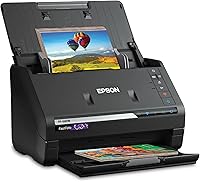
The best portable scanner for photos is the Epson FastFoto FF-680W, because it combines batch photo feeding with duplex document scanning in one unit. You can scan up to 36 photos at a time, and it handles prints up to 8 x 10 in.
Our score weighs specs, features and buyer feedback against what you're shopping for. Speed, batch capacity, portability and photo care matter most here.
If you want a broader buying guide first, start with our digital scanner for documents. For film collections, our best scanner for photos slides and negatives covers a different job.
Our picks at a glance
-
1
 Best for batch photo scanning
Epson FastFoto FF-680W High-Speed Duplex Photo
9.7/10 our score
See it on Amazon -
2

-
3
- 4
 Check it
Epson Workforce ES-50 Compact & Lightweight Mobile
Best for travel documents - 5
 Check it
Canon CanoScan LiDE 400 Slim Scanner
Best for detailed flatbed scans - 6
 Best for duplex documents on the moveCheck it
- 7
 Check it
HP Small USB Document & Photo Scanner
Best for light one-sided scanning - 8
 Check it
ScanSnap iX2500 Photo Edition Wireless or USB
Best for large photo batches - 9
 Check it
ScanSnap iX100 Wireless Mobile Portable Scanner
Best for cordless mobile scanning
The best portable scanner for photos, by type
The best portable scanner for photos depends on what you scan most. Batch sheetfed models win for collections.
Flatbeds win for fragile prints. Mini sheetfed models win for travel.
Epson FastFoto FF-680W High-Speed Duplex Photo: Best for batch photo scanning
- Batch-scans up to 36 photos at a time
- 1 photo per second at 300 dpi
- Duplex photo and document scanning
- USB and Wi-Fi connectivity
- Carrier sheet and cleaning cloth included
A high-speed sheetfed scanner for large photo collections, with batch feeding, duplex capture and app sharing.
Pros
- Fast batch photo scanning
- Captures backs of photos in one pass
- Handles photos up to 8 x 10 in
Cons
- Largest and heaviest in this group
- Sheetfed feeding needs care with delicate prints
Epson FastFoto FF-680W suits a home archive of hundreds or thousands of prints. It scans as fast as 1 photo per second at 300 dpi, and it batch-scans up to 36 photos at a time.
At 8.2 lb and 11.7 x 11.7 x 6.9 in, it is portable in the sense that you can move it between rooms. It is not a pocket scanner, so plan a flat surface for it.
Duplex capture is a real advantage for photos. You can capture the image and handwritten notes on the back in a single scan, which saves a second pass for family collections.
Epson includes a carrier sheet and a microfiber cloth for delicate photos. That helps with prints you do not want to run through rollers unprotected.
Its trade-off is size and care. A flatbed is gentler for one fragile print, and this sheetfed path needs clean, flat prints.
For large batches, the speed more than makes up for it.
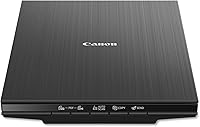
Canon Canoscan Lide 300 Scanner: Best for light flatbed scanning
- 2400 x 2400 dpi resolution
- Auto Scan Mode
- USB connectivity
- 4 EZ buttons
- 10 second fast scanning
A slim flatbed for careful one-at-a-time photo scanning, with auto detection and fade correction.
Pros
- Flatbed protects photos on the glass
- High resolution for enlargements
- Slim and light for a desk or bag
Cons
- One sheet at a time
- USB only, no Wi-Fi
Canon CanoScan LiDE 300 suits careful scanning of a few photos at a time. Its flatbed glass holds each print still while the scan head moves below it, so there is no pulling or bending as the sheet passes through.
Resolution is 2400 x 2400 dpi, which gives room to enlarge a small print or crop a damaged edge. At 3.6 lb, it is light enough to carry between rooms or in a larger bag, though it still needs a flat, level surface.
Auto Scan Mode detects what you placed on the glass and adjusts settings for you. That helps when you scan mixed documents and photos in one session.
Fade correction and dust reduction help older prints look cleaner in the file. You still need to clean the glass before a session, because dust or a small mark can show up in a scan.
Its trade-off is speed. One sheet at a time is slow for a shoebox of prints, so choose it for quality and care rather than volume.
Lift prints by the edges to avoid marks.
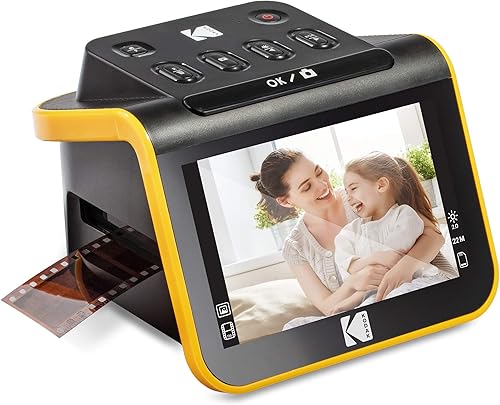
KODAK Slide N Scan Film & Slide: Best for slides and negatives
- 22MP film scanner
- 5 in LCD screen
- 135, 110, 126 mm film support
- 50 mm slide holder included
- SD card saving
A compact film scanner for slides and negatives, with a preview screen and easy-load inserts.
Pros
- Smallest footprint here
- Preview on screen before saving
- Continuous loading inserts
Cons
- SD card not included
- Made for film, not loose prints
KODAK Slide N Scan suits film collections and anyone with boxes of negatives or slides stored away. It scans 135, 110 and 126 mm negatives and slides, plus 50 mm slides with the included holder, so check your film format before you start.
At 16 ounces and 5.27 x 5.35 x 3.74 in, it is the smallest unit here. You can keep it on a shelf and bring it out when you want to view film, which makes it easy to use now and then rather than leaving it set up.
A 5 in LCD screen lets you preview and edit before saving. Gallery mode also lets you use it as a small digital frame, which helps when you share scans with family in the same room.
Easy-load inserts feed film continuously, so you do not need to reset the tray after each frame. That speeds up a long strip of negatives and makes the process easier to follow from start to finish.
Its trade-off is narrow use. You need an SD card, which is not included, and it will not scan loose photo prints.
For film only, it fits well, and keeping spare cards ready will avoid a pause mid session.
Epson Workforce ES-50 Compact & Lightweight Mobile: Best for travel documents
- 9.44 ounces
- Single page in 5.5 seconds
- Scans up to 8.5 x 72 in
- USB powered
- Nuance OCR included
An ultra-light single-sheet scanner built for receipts, ID cards and long documents on the go.
Pros
- Lightest sheetfed option here
- No batteries or power supply needed
- Handles extra-long pages
Cons
- Single sheet at a time
- Document-first, not a photo archive scanner
Epson WorkForce ES-50 suits travel and occasional documents, and it will suit anyone who needs to scan a form, receipt or card while away from a desk. At 9.44 ounces, it is the lightest sheetfed scanner here and slips easily into a bag.
It scans a single page in as fast as 5.5 seconds, and it handles documents up to 8.5 x 72 in. That extra length helps with long receipts or records that would not fit a standard sheetfed path.
USB power means no batteries and no separate power supply. You plug it into a laptop and scan, which keeps your bag lighter and makes setup simple at a hotel desk or meeting table.
Automatic feeding mode combines multi-page scans into one file. You feed pages one after another and save one document, which keeps names and order tidy for later use.
Its trade-off is photo care. This is a document-first scanner for receipts and ID cards, and it feeds sheets one at a time.
For a large photo archive, a batch photo scanner will be faster and gentler, so use this model for paper jobs on the move.
Canon CanoScan LiDE 400 Slim Scanner: Best for detailed flatbed scans
- 4800 x 4800 dpi resolution
- 8 second high-speed scanning
- USB Type-C cable
- Color restore and dust removal
- Vertical stand included
A higher-resolution flatbed for detailed photos, with fast scanning and slim storage.
Pros
- Highest flatbed resolution here
- Single cable for data and power
- Can store upright
Cons
- One sheet at a time
- USB only
Canon CanoScan LiDE 400 suits detailed flatbed scanning and will suit anyone who wants a few important prints captured with care. Its 4800 x 4800 dpi resolution is the highest here, which helps with small prints and fine detail when you plan to crop or enlarge.
It scans in as fast as 8 seconds, with one USB Type-C cable for data and power. A single cable makes setup and storage simpler, since there is no separate power lead to carry or lose.
At 3.6 lb and 7.7 x 14.5 x 0.4 in, it stores flat or upright. The included vertical stand lets you keep it in a smaller footprint on a shelf or beside a desk when it is not in use.
Color restore and dust removal help faded prints. Auto Scan Mode detects the item type and adjusts settings without manual changes, which is handy when you switch between photos and documents.
Its trade-off is one sheet at a time. For a large collection, batch feeding will save hours, so this pace can feel slow.
For a few important prints, the detail is worth the slower pace, and cleaning the glass first will help the result.
Canon imageFORMULA R10: Best for duplex documents on the move
- Duplex scanning up to 12 pages per minute
- 20 sheet automatic feeder
- USB powered
- 600 dpi resolution
- Built-in software
A portable duplex document scanner with a 20-sheet feeder for receipts, cards and paper records.
Pros
- Two-sided scanning in one pass
- 20-sheet feeder for batches
- Small on a desk or in a bag
Cons
- Canon says not for photographs on photo paper
- Document-first design
Canon imageFORMULA R10 suits portable document work and will suit anyone who needs to digitize two-sided paper while moving between home, office and travel stops. It scans both sides at once at up to 12 pages per minute, with a 20 sheet automatic feeder for small batches.
At 998 g and 3.74 x 11.22 x 1.57 in, it fits on a small desk or in a bag. USB power keeps the setup simple, so you can run it from a laptop without hunting for a wall socket.
It handles receipts, business cards, plastic cards, reports and legal documents. That range suits home offices, classrooms and remote work where paper arrives in mixed sizes and formats.
Built-in software requires no installation and updates automatically. You can preview scans and adjust files before saving them, which helps if you need to straighten or trim a page.
Its trade-off is photos. Canon says this product is not intended for scanning photographs on photo paper, so treat it as a document tool.
Choose it for paper records and keep a photo scanner or flatbed for prints you value.
HP Small USB Document & Photo Scanner: Best for light one-sided scanning
- 15 ppm simplex scanning
- 1200 dpi resolution
- 3 ounces
- USB 2.0 powered
- HP WorkScan software included
The lightest scanner here for occasional documents, photos, receipts and cards.
Pros
- Very light for travel
- Simple one-sided workflow
- Wide paper size range
Cons
- One-sided only
- Best for small batches, not archives
HP HPPS100 suits light, occasional scanning and will suit anyone who wants a very light scanner for a handful of pages at a time. At 3 ounces, it is by far the lightest scanner here and is easy to carry in a briefcase.
It scans at 15 pages per minute in simplex mode, which means one side at a time. For a handful of pages, that pace is fine, and you can turn a sheet over if you need the back.
Paper size ranges from 2 x 2.9 in to 8.5 x 14 in, so it handles business cards, photos, receipts, bills and brochures. Resolution is 1200 dpi, which is enough for everyday sharing and record keeping.
USB 2.0 power and a compact 2 x 11.6 x 1.4 in body make it easy to slip into a bag. HP WorkScan software helps you preview, crop and save files, so you can check a scan before you move on.
Its trade-off is batch size. It is built for small jobs, not thousands of photos, and the one-sided path adds steps for two-sided pages.
If you scan often, a feeder or batch model will fit better for your routine.
ScanSnap iX2500 Photo Edition Wireless or USB: Best for large photo batches
- Up to 100 photos per minute
- Feeder holds 100 documents or 36 photos
- 3 photo carrier sheets included
- Wi-Fi 6 and USB-C
- Large touchscreen
A high-speed photo edition scanner for large collections, with carrier sheets for delicate prints.
Pros
- Very fast batch scanning
- Carrier sheets protect prints
- Touchscreen profiles
Cons
- Desktop footprint, not handheld
- Photo carrier sheets are a separate handling step
ScanSnap iX2500 Photo Edition suits large photo collections and will suit anyone with case after case of prints to work through. It scans up to 100 photos per minute, and its feeder holds up to 100 documents or 36 photos, which changes how long a big archive takes.
It includes 3 photo carrier sheets for delicate prints. Carrier sheets add a handling step, but they protect prints from rollers and dust, so keep them flat and clean between uses.
A large touchscreen lets you pick profiles and send files to a PC, Mac, mobile device or cloud service. Wi-Fi 6 and USB-C give you flexible placement, so you can set it up near your main computer or share it with a phone.
Automatic rotation, cropping, color restoration and red-eye reduction help clean up old prints. That cuts manual editing time for big batches and keeps files more consistent from one set to the next.
Its trade-off is footprint. At 7.7 lb and 6.26 x 11.5 x 6.34 in, it is a desktop unit that needs a stable surface.
It is portable between rooms, not a handheld scanner, so plan where it will live and store the carrier sheets nearby.
ScanSnap iX100 Wireless Mobile Portable Scanner: Best for cordless mobile scanning
- Battery scans up to 260 documents
- Wi-Fi and USB connectivity
- 14.08 ounces
- Auto de-skew and color optimization
- ScanSnap Cloud support
A battery-powered wireless scanner for photos, receipts and documents away from a desk.
Pros
- Truly cordless scanning
- Long battery life per charge
- Direct cloud sending
Cons
- Simplex scanning only
- Sheetfed feeding, not flatbed
ScanSnap iX100 suits cordless scanning away from a desk and will suit anyone who needs to capture a receipt, photo or document while out. Its battery scans up to 260 documents on a single charge, which covers a full day of occasional use for most people.
At 14.08 ounces and 1.87 x 10.74 x 1.42 in, it is a true mini scanner for photos and documents. You can carry it in a briefcase or larger bag, and it sets up quickly at a table or counter.
Wi-Fi connects directly to your device or wireless network. ScanSnap Cloud can name files and send them to different cloud services by document type, which helps if you keep receipts and photos in separate folders.
Dual Scan lets you scan two small items at once, such as two receipts or business cards. Automatic de-skew, color optimization and blank page removal help each file look tidy without extra steps.
Its trade-off is simplex feeding. It scans one side at a time and feeds sheets, so it is not a flatbed for fragile prints.
For travel, the cordless design is the main win, and keeping the battery charged before a trip will avoid delays.
Best portable scanner for photos: comparison
The table below compares size, weight of the headline spec, resolution and the best use for each model. It is there to help you narrow your shortlist before you read the buying advice in the sections that follow.
Use the size and weight figures to judge where a scanner will live and how you will carry it. A flatbed, a mini sheetfed model and a batch photo scanner all travel in different ways.
Resolution helps you judge detail for crops and enlargements, while the best use column links each model to the job it fits most. Start there, then return to the detail for the models you plan to shortlist.
| Product | Best for | Weight | Size | Resolution | Our score |
|---|---|---|---|---|---|
| Epson FastFoto FF-680W High-Speed Duplex Photo | batch photo scanning | 8.2 pounds | 11.7 x 11.7 x 6.9 in | 600 dpi | 9.7 |
| Canon Canoscan Lide 300 Scanner | light flatbed scanning | 3.6 pounds | 14.5 x 9.9 x 1.7 in | 2400 x 2400 dpi | 9.7 |
| KODAK Slide N Scan Film & Slide | slides and negatives | 16 ounces | 5.27 x 5.35 x 3.74 in | 22 Megapixels | 9.6 |
| Epson Workforce ES-50 Compact & Lightweight Mobile | travel documents | 9.44 ounces | 10.7 x 10.7 x 1.3 in | 1200 dpi | 9.6 |
| Canon CanoScan LiDE 400 Slim Scanner | detailed flatbed scans | 3.6 pounds | 7.7 x 14.5 x 0.4 in | 4800 x 4800 dpi | 9.4 |
| Canon imageFORMULA R10 | duplex documents on the move | 998 g | 3.74 x 11.22 x 1.57 in | 600 dpi | 9.2 |
| HP Small USB Document & Photo Scanner | light one-sided scanning | 3 ounces | 2 x 11.6 x 1.4 in | 1200 dpi | 8.7 |
| ScanSnap iX2500 Photo Edition Wireless or USB | large photo batches | 7.7 pounds | 6.26 x 11.5 x 6.34 in | 600 dpi | 8.5 |
| ScanSnap iX100 Wireless Mobile Portable Scanner | cordless mobile scanning | 14.08 ounces | 1.87 x 10.74 x 1.42 in | 600 dpi | 8.2 |
How we compared these photo scanners
We compared specs, features and buyer feedback for each model. We checked size, weight, resolution, feeder capacity, connectivity and the media types each brand lists, since those details decide what you can scan and how often.
We gave more weight to photo batch capacity and photo care. A scanner that is fast for documents but not intended for photo paper scored lower for this search, because print safety matters more than paper speed here.
We also checked portability in practical terms. A 3 ounce sheetfed scanner and an 8.2 lb batch scanner both travel, but they travel in very different ways, from a bag pocket to a trip between rooms.
Set-up and care played a part in our reading. We looked at whether a scanner needs a power brick, a battery, a carrier sheet or a flat surface, and how that affects daily use at home or on a trip.
We weighed the trade-offs for each type. Flatbeds protect a single print and give control over placement, while sheetfed models save time on stacks and mixed sizes, which matters more as a collection grows.
Scores spread from 9.7 to 8.2 because these models solve different problems. The lower scores are not poor scanners, and they can be the right pick for travel, film or light document work.
We kept the focus on the job in hand. If you scan a few prints now and then, a flatbed or mini model may fit better than a batch unit, even if the batch unit is faster.
If you scan thousands of prints, feeder capacity and print protection move to the top of the list.
In the end, the score is a guide, not a rule. Match your batch size, print condition and where you will scan, and the right portable scanner for photos should become clear.
Is a handheld photo scanner better than a sheetfed photo scanner?
A handheld photo scanner is better for a single large item that cannot pass through a sheetfed path. A sheetfed scanner is better for stacks of prints.
When handheld wins
A handheld design suits oversized prints, posters or items with edges that would catch in rollers. You move the scanner across the item by hand.
That manual movement can cause uneven speed. A sheetfed path feeds at a steady pace, which helps with even scans.
When sheetfed wins
Sheetfed models batch-scan many prints. The Epson FastFoto FF-680W handles up to 36 photos at a time, which changes the time for a large archive.
If you scan mostly documents, a sheetfed model also handles receipts and cards. Learn the workflow in our guide to photo adf scanner how to use.
How do you scan photos without a desk?
You scan photos without a desk by choosing a scanner that fits your space and power. A battery model needs no outlet.
A USB model needs a laptop.
Battery and wireless options
The ScanSnap iX100 runs on battery and Wi-Fi, so you can scan at a table, in a car or in another room. That is the most flexible setup here.
USB powered options
The HP HPPS100 and Epson ES-50 draw power from USB. You need a laptop or PC nearby, but you avoid a power brick.
Flatbed options
Flatbeds need a stable, flat surface. At 3.6 lb, the Canon models are easy to move, but they still need a level table to scan well.
For a wider look at small units, see our best compact photo scanner guide.
What should you check before scanning old photos?
Check print condition, size and backing before you scan. Old prints may be curled, torn, dusty or stuck to album pages.
Size and condition
Most sheetfed models here handle standard prints. The Epson FastFoto FF-680W handles photos up to 8 x 10 in, plus panoramas and postcards.
Fragile or curled prints may need a carrier sheet. The ScanSnap iX2500 includes 3 photo carrier sheets for that reason.
Backs and notes
Family photos often have names and dates on the back. A duplex model can capture both sides in one pass, which preserves that context.
For older and faded collections, our best scanner for old photos guide covers restoration features in more detail.
Resolution for enlargements
Use 300 dpi for sharing and 600 dpi for archiving or enlarging. The Epson FastFoto FF-680W supports both paths, with TIFF for archiving.
Flatbeds here go higher. The Canon LiDE 400 reaches 4800 x 4800 dpi for detailed crops.
How many photos will you batch scan?
Your batch size decides the scanner type. A few prints a month fit a flatbed or mini scanner.
Thousands of prints need batch feeding.
Small batches
For 1 to 10 prints at a time, a flatbed gives you control over placement and care. You can adjust settings for each photo.
Large batches
For 36 photos at a time, choose a batch photo scanner. Our best photo scanner for multiple photos guide compares feeder capacity in depth.
Batch feeding also helps with mixed sizes. The Epson FastFoto FF-680W handles multiple sizes in one batch.
That mix matters in real family collections, where small prints sit beside postcards and larger prints. A batch path lets you load a set once and check the files after, rather than stopping for each size change.
Plan your set-up before you load the feeder. Sort prints roughly by size, dust them lightly, and keep fragile items for a carrier sheet or a flatbed pass.
Check the first few scans at full size before you run the rest. If edges look cropped or skewed, adjust the batch and rerun a small test set first.
How do you care for a portable photo scanner?
Clean the scan path and glass before you scan valuable prints. Dust on the glass or rollers can appear in digital files.
Wipe the glass with a soft cloth and let it dry. Use the cleaning cloth included with your scanner where one is provided.
Store sheetfed scanners with the path clear. Do not leave curled prints in the feeder, and keep carrier sheets flat.
After scanning, check a few files at full size. Look for dust spots, skewed edges and cropped borders before you store the originals away.
If you plan to print your scans, read Which Printer Is Better for Printing Photos? and Why Is Inkjet Better for Photo Printing? before you buy a printer.
Verdict: pick the best portable scanner for photos by your job
Pick the Epson FastFoto FF-680W for large photo collections and mixed photo and document batches. It batch-scans up to 36 photos, captures the backs of prints in one pass, and handles prints up to 8 x 10 in.
Pick the Canon CanoScan LiDE 300 for careful flatbed scans of a few prints. Its glass protects each item, its 2400 x 2400 dpi resolution helps with crops, and Auto Scan Mode keeps settings simple.
Pick the ScanSnap iX100 for cordless travel scanning. Its battery, Wi-Fi and small size make it easy to use away from a desk, while ScanSnap Cloud helps keep receipts and photos sorted.
Pick the KODAK Slide N Scan for slides and negatives only. It previews on a 5 in screen, feeds film continuously, and fits film formats that loose-print scanners cannot handle.
Pick the Canon imageFORMULA R10 for duplex documents, not photo paper. Its 20 sheet feeder, two-sided scanning and portable size suit receipts, cards and paper records on the move.
Pick the HP HPPS100 for the lightest occasional scanning. At 3 ounces it is easy to carry, and its simple one-sided path suits a handful of pages, cards and small photos.
Start with the job, not the spec sheet. Your batch size and print condition will point to the right portable scanner for photos, whether that is a batch photo scanner, a flatbed, a film scanner or a mini travel unit.
Our top 3 picks at a glance
-
1
Best for batch photo scanning
Epson FastFoto FF-680W High-Speed Duplex Photo
9.7/10 our score
See it on Amazon -
2
-
3
Frequently asked questions
What is the best portable scanner for photos?
The Epson FastFoto FF-680W is the best portable scanner for photos for most people because it batch-scans up to 36 photos and handles duplex documents. Choose a Canon flatbed for delicate prints, and the ScanSnap iX100 for cordless travel scanning.
Is a handheld photo scanner better than a sheetfed scanner?
A handheld scanner suits a single large item you cannot feed through a sheetfed path. A sheetfed photo scanner is faster for stacks of prints and can batch-scan many photos at once.
A flatbed is gentler for fragile prints.
What is a mini photo scanner good for?
A mini photo scanner is good for small batches of prints, receipts and cards away from a desk. Its small size suits travel and storage, but it will not match a batch photo scanner for thousands of prints.
Check paper size limits before you buy.
Can a portable document scanner scan photos?
Some portable document scanners scan photos, but many are made for paper documents and cards. Canon says the imageFORMULA R10 is not intended for photographs on photo paper.
Check the media types for each model before using it for prints.