How to Choose a 36-Inch Large Format Scanner
A 36-inch large format scanner is the right choice when your largest originals are wider than A3 or letter size and you need one pass capture for drawings, posters or plans: you give up desk space and portability for width, and you should confirm media thickness, roll or sheet handling and software before you buy.
On this page (11 sections)
- What size originals justify a 36-inch large format scanner?
- How does a large format scanner 36 inch handle media?
- What resolution and color depth do you need?
- How wide is wide enough for your desk and room?
- When does a sheet-fed document scanner beat a wide flatbed?
- When is a portable scanner the smarter choice?
- When does a slim flatbed scanner still make sense?
- What software and workflow features should you check?
- How do you set up and care for a large format scanner?
- What are the honest trade-offs between wide, sheet-fed and flatbed scanners?
- How should you decide between a 36-inch scanner and other options?
A large format scanner 36 inch is the right choice when your largest originals are wider than A3 or letter size and you need one pass capture for drawings, posters or plans. You give up desk space and portability for width, and you should confirm media thickness, roll or sheet handling and software before you buy.
This guide explains width, media handling and workflow for oversized originals. We compared product specs to show where a wide scanner helps and where a smaller scanner is enough.
If your work is mostly photos, start with our large format photo scanner guide. If your work mixes printing and scanning, compare options in best large format printer scanner combos.
If most pages fit A3, check the best A3 flatbed scanner picks first.
What size originals justify a 36-inch large format scanner?
Buy a 36-inch width when your largest originals regularly exceed A3 width. Common examples are architectural drawings, engineering plans, posters, banners, patterns and maps.
A smaller scanner would force you to scan in sections and stitch files, which adds time and alignment risk.
Measure your largest original before you shop. Add a margin for borders and for the scanner grip on each edge.
Some sheet-fed machines lose millimeters at the lead and trail edges, so usable width can be less than headline width.
Think about length as well as width. A 36-inch scanner often handles long rolls, but the limit depends on whether the model feeds from a roll, uses single sheets, or needs you to guide a long original by hand.
Long pages can curl, catch or skew without a straight feed path.
Rule: choose 36 inches for regular wide originals, not for a single poster you could send out for scanning. If wide work is rare, a service bureau or tiled scans may save space.
How does a large format scanner 36 inch handle media?
Media handling decides whether a wide scanner works for your originals or damages them. Roll-fed and sheet-fed scanners pull media through rollers.
Flatbed scanners lay media flat under a lid.
Each type suits a different mix of paper, thickness and fragility.
Sheet-fed designs are good for documents, drawings and posters that are flat and sturdy enough for rollers. They can scan long pages and duplex in some models.
They need a clear path in front and behind the machine, plus room to catch a large sheet as it exits.
Flatbed designs support fragile photos, books and uneven items. The trade-off is a fixed bed size and more desk space.
A flatbed that fits A3 will not capture a 36-inch drawing in one pass.
Carrier sheets help with delicate photos and wrinkled paper. They protect the original but add a step and can limit resolution or size.
Ask whether carriers are included before you rely on them.
Rule: match the feed type to your most fragile and thickest media, not to your average page. Rollers for sturdy sheets, a flatbed for fragile items, and carriers when you need both width and protection.
Sheet-fed, roll-fed and flatbed: which feed fits your workflow?
Sheet-fed models suit offices that scan mixed documents and occasional wide sheets. Roll-fed models suit print shops that scan from rolls.
Flatbed models suit photo and book work where support matters most.
For oversized originals, check maximum scan length and minimum and maximum media thickness. A model may accept wide paper but refuse thick board.
It may also need a rigid backing sheet for thin or curled media.
Feed speed matters for long originals. A slow feed gives you time to guide a large sheet, but it stretches a batch job.
Check speed at the resolution you will actually use.
What resolution and color depth do you need?
Choose resolution by the smallest detail you must keep, not by the highest number on the box. For line work and text, 300 dpi often keeps lines readable for viewing and printing at size.
For photo archiving, 600 dpi gives more room to enlarge and crop.
Optical resolution is the true sampling rate. Interpolated resolution is created by software and adds no real detail.
Compare optical figures when you compare models.
Color depth affects file size and editing range. A 24-bit or 48-bit scanner can hold more tonal range, but saving at high depth creates larger files.
For office drawings, 24-bit color or grayscale may be enough. For fine art and photo work, higher depth can help when you edit.
File format matters too. TIFF suits archiving.
JPEG suits sharing. PDF suits documents that need search.
Check whether the software saves searchable PDFs with OCR.
Rule: buy 300 dpi for most drawings and documents, and 600 dpi or higher when you archive photos or enlarge fine detail. Extra resolution you never use only slows scans and fills storage.
How wide is wide enough for your desk and room?
A 36-inch scanner needs a footprint and feed path that match its width. The machine itself is wide, and the original needs a straight path through it.
Measure the desk, wall clearance and space where a long sheet will land.
Place the scanner where you can see the lead edge enter and the trail edge exit. Large sheets can fold, curl or fall if the outfeed area is crowded.
A rear exit tray helps, but it does not replace a clear landing zone.
Consider weight and placement. Large scanners are heavy and awkward to move.
A fixed desk or stand is better than a shelf you will carry the machine across the room to use.
Also check power and connection. USB models draw power while connected.
Wireless models add placement freedom but need a stable network. Confirm cable length or network location before you commit to a spot.
Rule: do not buy width you cannot feed. Sketch the full path of your largest original on paper, then tape that outline on your desk and floor.
When does a sheet-fed document scanner beat a wide flatbed?
A sheet-fed document scanner beats a wide flatbed when speed, duplex and batch feeding matter more than flat support. Sheet-fed models feed page after page, capture both sides in one pass in duplex models, and use less desk space than a large flatbed.
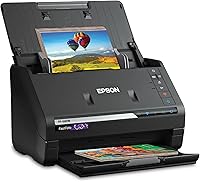
The Epson FastFoto FF-680W shows how a sheet-fed photo and document scanner handles mixed batches. It scans up to 36 photos at a time and documents up to 240 inches long, with duplex capture for notes on the back of a photo.
Epson says it scans photos at about 1 photo per second at 300 dpi and documents at up to 45 ppm or 90 ipm. It includes a carrier sheet and microfiber cloth for delicate photos, plus Safetouch technology for worry-free feeding.
The trade-off is width. This model handles photos up to 8 x 10 inches and documents up to 240 inches long, but it is not a 36-inch wide scanner.
It suits photo and document batches, not wide drawings.
Rule: choose sheet-fed speed for batches and duplex, and choose wide flatbed or roll-fed capture for originals wider than your sheet-fed limit.
When is a portable scanner the smarter choice?
A portable scanner is smarter when you scan single pages away from a desk and need USB power and low weight. It will not capture 36-inch originals, but it covers receipts, ID cards and letter pages that a wide scanner handles poorly on the road.
The Epson Workforce ES-50 is a single-sheet mobile scanner that weighs 9.44 ounces and draws power over USB. It scans a single page in as fast as 5.5 seconds and handles documents up to 8.5 x 72 inches.
Epson includes Nuance OCR for searchable PDFs and editable Word and Excel files. Automatic feeding mode combines multi-page scans into one file, one sheet at a time.
The trade-off is one sheet at a time and a narrow width. It suits field work, travel and small offices.
It does not suit posters, drawings or photo batches.
Our broader digital scanner for documents guide covers portable and desktop models in more detail. For photo-specific field work, see best portable scanner for photos.
Rule: buy portable for single pages on the go, and buy wide for originals that never leave your desk.
When does a slim flatbed scanner still make sense?
A slim flatbed scanner makes sense when most work fits letter or photo sizes and you want flat support for fragile items. It will not capture wide drawings, but it handles photos and documents without roller risk.
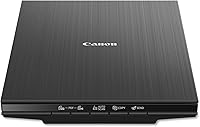
The Canon CanoScan LiDE 400 is a slim flatbed that measures 7.7 x 14.5 x 0.4 inches and weighs 3.6 pounds. It scans at 4800 x 4800 dpi and handles paper sizes up to 8.27 x 11.69 inches and 8.50 x 11.69 inches.
Canon includes a USB Type-C cable for data and power, EZ buttons for common tasks, and a vertical stand. It supports color restore and dust removal for photo work.
The trade-off is a one-page flatbed with no duplex and no wide feed. It suits home photo archiving and occasional documents.
It does not suit batches, wide drawings or long rolls.
Rule: choose a slim flatbed for fragile letter-size work, and choose wide feed when originals exceed the flatbed.
What software and workflow features should you check?
Software decides whether wide scans become usable files or a pile of image files you cannot search. Check OCR, save formats, batch naming, scan to cloud or email, and whether the software works with programs you already use.
OCR turns scanned text into searchable or editable text. That matters for documents, receipts and office files.
For drawings, OCR matters less than clean lines, accurate scale and file naming that matches your project system.
Look for automatic file naming by date, page count or text. Look for presets for documents, photos and drawings so you do not reset settings for every job.
Look for scan to PDF, TIFF and JPEG, and for direct save to cloud storage if that fits your workflow.
The FastFoto FF-680W includes Epson ScanSmart with OCR, plus the FastFoto app for adding voice and text to photos. The ES-50 includes Epson ScanSmart and a TWAIN driver for use with other imaging software.
The LiDE 400 includes EZ buttons and PDF buttons for multi-page PDFs.
A best large format scanner roundup helps you compare software across wide models. For document-heavy offices, our best A3 scanner for documents guide compares narrower desktop options.
Rule: choose the scanner whose save formats and OCR match your filing system, not the one with the longest feature list.
OCR, file formats and naming: what to confirm before you buy
Confirm OCR type, output formats and naming rules before you order. Some OCR creates searchable PDFs.
Some creates editable Word or Excel files. Check whether OCR is included or needs a separate license.
Check scan destinations. Direct save to a folder, email, cloud storage or a TWAIN-compatible program can save minutes per batch.
Check whether multi-page scans save as one file or separate files.
Check naming. A scanner that names files by date and page is fine for personal photos.
A scanner that uses text or a barcode from the page suits office filing better. Large drawings need names that match project numbers.
How do you set up and care for a large format scanner?
Set up a large format scanner with a straight feed path, clean rollers and a test scan at your normal resolution. Most problems with wide scanners come from skewed feeding, dusty rollers or a blocked exit path, not from the sensor.
Place the scanner on a level, stable surface. Connect power and the data cable or network before you install software.
Run a test scan with a sheet you can spare and check edges, focus and color before you scan originals.
Clean rollers and the scan area with a soft, dry cloth or maker-approved cleaner. Dust on rollers causes skew and marks.
Dust on glass or the sensor causes spots that repeat on every scan.
For sheet-fed models, use the carrier sheet for delicate or wrinkled media. For flatbed models, clean glass gently and avoid harsh chemicals.
For roll-fed models, keep the media path clear of tape, staples and curled edges.
Store large originals flat after scanning. Rolling a freshly scanned drawing can crease it, and folding it can crack ink or toner.
Scan, check the file, then store the original as your office already stores oversized work.
Rule: run one test scan and one cleaning check before every batch of originals you cannot rescan.
What are the honest trade-offs between wide, sheet-fed and flatbed scanners?
No single scanner covers wide drawings, photo batches, portable pages and fragile books well. Wide scanners give up portability.
Sheet-fed scanners give up flat support for some fragile items.
Flatbed scanners give up width and batch speed.
The FastFoto FF-680W gives speed and duplex for photos and documents, with wireless connection and batch feeding up to 36 photos. It gives up 36-inch width and flat support for books.
The ES-50 gives portability and USB power at 9.44 ounces, with OCR for searchable PDFs. It gives up width, batch feeding and photo archiving depth.
The LiDE 400 gives flat support and 4800 x 4800 dpi for photos and letter documents in a slim body. It gives up duplex, batch feeding and wide capture.
A wide scanner gives up desk space and needs more room to feed and catch large sheets. A narrower scanner gives up one-pass capture and may force tiled scans.
An automatic book scanner suits bound books that none of these three handles well. That is a different feed type with its own cost and space needs.
Rule: rank width, fragility, batch speed and portability in that order for your work, then buy the scanner that wins on your top two.
How should you decide between a 36-inch scanner and other options?
Decide by your largest regular original, your most fragile media and your desk space, in that order. If wide originals are regular, a 36-inch scanner earns its space.
If wide originals are rare, a smaller scanner plus a scanning service may cost less in space and setup time.
Start with a list of your last 20 scanning jobs. Mark the widest original, the thinnest or most fragile item, and the largest batch.
That list tells you more than a spec sheet.
If wide drawings dominate, compare wide models in our best large format scanner guide and check feed type, length limit and media thickness for each one. If photo batches dominate, the FastFoto FF-680W pattern suits you.
If field pages dominate, the ES-50 pattern suits you. If fragile letter-size photos dominate, the LiDE 400 pattern suits you.
Measure your desk and feed path before you order. Confirm return terms for a large scanner, since a wide machine that does not fit your room is hard to resell or return.
Keep the box until you have scanned your largest original.
Final rule for a large format scanner 36 inch: buy width for regular oversized originals, buy speed for batches, and buy flat support for fragile media. Your largest regular original should make the choice for you.
Frequently asked questions
What does a 36 inch large format scanner actually scan?
It scans originals up to about 36 inches wide in one pass, such as drawings, posters, patterns and oversized documents. You still need to check length, thickness and whether the model uses rollers, a flatbed or a carrier sheet for fragile media.
Is a 36 inch scanner better than an A3 flatbed scanner?
A 36 inch scanner is better for wide or long originals that an A3 flatbed cannot capture in one pass. An A3 flatbed is better for books, fragile photos and 3D objects that need a flat, supported surface.
What should I check before buying a large format scanner?
Check maximum width, maximum length, media thickness, whether it feeds single sheets or rolls, resolution for your use, and how files are saved. Measure the desk space and the path the original will travel through the machine.