How to Choose a Book Scanner with a Cradle
The best book scanner with a cradle supports the book without forcing the binding flat. Compare the cradle angle, page support, scan method, resolution and how much handling fragile pages require.
On this page (10 sections)
- What should you look for in a book scanner with a cradle?
- Which cradle angle is best for fragile bindings?
- How does a cradle protect book pages?
- Should you choose a camera scanner or flatbed?
- How much resolution do book scans need?
- Which products can help with book scanning tasks?
- How should you scan a fragile book?
- Is OCR useful for scanned books?
- How do you care for a book scanner cradle?
- What is the best way to choose?
A book scanner with a cradle should support the open book at a safe angle while keeping pages steady for clear scans. That priority helps you check basic handling before you pay for speed or resolution.
Choose the cradle first, then compare the scan method, page support, image quality and software. File quality will not help if the book cannot stay open safely during the session.
A bound book cannot always lie flat without pressure on its spine. A good setup reduces the need to press pages down, so fragile bindings are easier to handle.
This setup suits readers, researchers and small teams who scan bound volumes slowly. It also suits careful home users with old family books, manuals or reference volumes.
For loose sheets, photos or short office papers, another scanner type may be simpler and faster. Decide which work you will do most before you choose.
A cradle changes the pace of work in a practical way. You can place the book once, turn pages in sequence and check each spread before moving on.
That steadier rhythm can reduce handling fatigue over a long session. It can also make naming and checking files easier because the book stays in one position.
Set up the cradle on a firm, level surface before you open the book. A wobbling table can shift the angle and make pages move at the worst moment.
Open the book gently to its natural resting point and let both sides settle into the support. Do not force the spine wider than it wants to go to make the page look flatter.
If the cradle is adjustable, make small changes and check the result after each one. A slight angle change can affect focus near the binding more than you might expect.
Consider the trade off between control and convenience. A deeper cradle gives more support for thick books, while a shallow design may be easier to store and move.
Also think about cleaning and care from the start. Dust on the support can reduce grip, and stray paper can change the page angle during a long scan.
Keep the workflow simple enough to repeat for an entire book. A setup you can maintain for an hour is more useful than a complex arrangement that frustrates you after ten pages.
If you are comparing the wider category, start with our guide to a digital scanner for documents. For broader product types, see our best book and document scanner guide.
Use those broader guides to understand when a flat sheet workflow is enough. Then return to the cradle question and judge the book support on its own terms.
A clear decision at this stage saves time later. You will know whether you need open book support, a flat surface for loose pages, or both for different projects.
Spend a few minutes testing the setup with a sturdy book first. That practice run will show whether the angle, page support and file naming all work together before you open a fragile volume.
What should you look for in a book scanner with a cradle?
Look for adjustable support, a stable page surface and enough clearance for the book's binding. The cradle should help you hold pages open without forcing the spine into a flat position.
A useful cradle has two supported sides rather than one narrow ledge. This lets the left and right pages rest at an angle while you work through the book.
Check whether the cradle angle is fixed or adjustable. A fixed cradle can work for a regular workflow, but adjustable support gives you more control when books have different sizes or bindings.
Also check how pages stay in position. A scanner may use glass, a camera system, a page holder or simple surface support.
Each method changes how much you need to touch the book.
Which cradle angle is best for fragile bindings?
A V-shaped cradle is generally the better design for a fragile binding because it supports both sides without demanding a fully flat opening. An adjustable cradle is more flexible when books vary in thickness or opening angle.
A book that opens naturally at 120 degrees needs different support from one that opens close to 180 degrees. Do not assume that every cradle suits every binding.
Look for a cradle that keeps the spine above the lowest point instead of bending it sharply over a flat surface. The support should also prevent the book from sliding as you turn pages.
For delicate material, plan a slower workflow. Turn pages from the edge, avoid pulling on the spine, and keep the book supported between scans.
An automatic setup may reduce page-by-page work, but it does not remove the need to check whether the page-turning method is gentle enough. Our guide to an automatic book scanner explains the trade-offs between speed and handling.
How does a cradle protect book pages?
A cradle protects pages by reducing the pressure needed to hold the book open. It can also keep the spine from being pushed against a flat scanning surface.
That protection is about force as much as comfort. When a book rests at an angle, the weight is shared by both sides instead of being concentrated along the hinge.
The support helps most when the book is thick, tightly bound or old. A flat surface may require you to press one side down to keep text near the binding in focus.
Thick volumes often resist opening evenly because pages near the spine do not fall into place as freely as outer pages. A cradle can ease that uneven pull by letting each side rest at its own angle.
This matters for art books, manuals and hardback reference works. Their size and weight can make page turning awkward when the book is pressed flat on a desk or glass.
It also matters for paperbacks and notebooks with glued or sewn bindings. These can look flexible at first, yet repeated forcing may loosen the spine over time.
A cradle does not guarantee safe handling. You still need to match the angle to the book, avoid forcing pages open and pause if the binding resists.
Resistance is useful information, not a problem to push through. If a page feels tight, stop and let the book settle before trying a gentle turn from the outer edge.
Page support should also stop the book from sliding forward during the session. Movement can cause blur, cropped margins and uneven lighting across the spread.
Check the position after the first few pages rather than assuming it will stay fixed. Small shifts are easier to correct early than after a full chapter is scanned.
For fragile books, plan the session around short rests and careful checks. Frequent pauses let you notice creaking, lifting adhesive or pages that no longer turn smoothly.
Practice the page movement with a less delicate volume before using a valuable book. This helps you learn how much support and page tension the setup requires.
During practice, notice where your fingers naturally grip the page. A safe habit is to lift from a clean outer edge and avoid pulling from the inner corner near the spine.
Cleaning the support surface before the session can improve grip and image quality. A light dusting with a soft dry cloth is usually enough when you follow the scanner instructions.
Avoid adding weights, clips or tape unless the maker specifically allows them. Extra pressure can damage the binding and may leave marks on older paper.
A cradle works best as part of a calm routine. Support the book gently, turn pages slowly and check the image before continuing to the next spread.
Should you choose a camera scanner or flatbed?
Choose a camera-style book scanner when you want to scan an open book with less contact against the pages. Choose a flatbed when you need a familiar glass surface and the book opens safely enough.
A camera system can capture pages from above while the book rests in a cradle. This design can reduce the need to press the binding against glass, but you must keep pages positioned consistently.
A flatbed scanner can produce detailed images when the page lies evenly on the glass. It is less convenient when the book cannot open wide without stressing the spine.
For a flatbed option, compare our best book scanner flatbed guide. The right choice depends on the condition of the book, the scan volume and how much page handling you accept.
How much resolution do book scans need?
Use 300 dpi for ordinary reading copies and searchable documents, while higher resolution can help preserve fine print, illustrations or small text. More resolution also creates larger files and may slow the workflow.
The right setting depends first on how the scans will be used. A reading copy needs to be clear on screen, while an archival copy may need more detail for future printing or enlargement.
For books with small type, diagrams or detailed images, compare the scanner's optical resolution rather than relying only on an interpolated number. Optical resolution describes the detail captured by the sensor.
That distinction matters because an interpolated figure is created by software after capture. It can smooth or enlarge the image, but it cannot invent fine detail that the sensor never recorded.
Color depth matters when the book contains illustrations, faded ink or photographs. For plain black text, careful page positioning and even lighting may matter more than choosing the highest available number.
A higher color depth can preserve subtle tone in plates and pencil notes. It also increases file size, so it is worth using mainly for pages where tone and detail are part of the content.
Resolution also affects focus near the binding. Curved pages may look softer because they sit farther from the scanning surface or camera focal plane, even at a strong sensor specification.
Lighting can create a similar problem across a spread. Shadows near the spine may hide faint print, while bright edges can wash out margins and make cropping harder later.
Before a long session, test one page with dense text and one with an image or diagram. Compare the files on screen at normal reading size rather than judging only from a close up view.
Check file size as well as appearance. A setting that looks good but creates very large files may make storage, sharing and backup slower than you want.
For OCR, clarity of the text edge matters more than extra detail in the background. Sharp, evenly lit characters give the software a cleaner starting point.
For archival work, keep the original settings consistent across the book. Changing resolution midway can make later pages harder to compare with earlier ones.
Consider keeping two versions when a book has both text and artwork. A moderate file for reading and a higher detail file for plates can suit different uses without rescanning the whole volume.
Remember that resolution is only one part of image quality. Stable page support, clean surfaces and gentle handling often make a visible difference in the finished scan.
Which products can help with book scanning tasks?
The 3 products below do not include a dedicated book cradle in the supplied product information. They can still help with related scanning jobs, such as photographs, loose documents and flat pages, but they are not substitutes for a cradle designed to support a bound book.
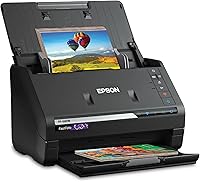
Epson FastFoto FF-680W High-Speed Duplex Photo
The Epson FastFoto FF-680W scans photos as quickly as 1 photo per second at 300 dpi and can batch-scan up to 36 photos. It handles photos up to 8 x 10 in, postcards, panoramas and Polaroid photos.
It also scans documents up to 240 in and includes OCR through Epson ScanSmart software. Wi-Fi and USB connectivity give you flexible placement, while the Epson FastFoto app can add voice and text to photos.
This model suits a reader who needs a high-volume photo and document workflow alongside book scanning. It does not replace a cradle because its listed uses focus on photos and documents rather than supporting an open bound book.
Epson Workforce ES-50 Compact & Lightweight Mobile
The Epson WorkForce ES-50 scans a single page in as quickly as 5.5 seconds and connects through USB. It scans documents up to 8.5 x 72 in, supports receipts and ID cards, and includes Epson ScanSmart software with OCR.
Its automatic feeding mode can combine multiple sheets into one file. Because it is a single-sheet-fed document scanner, it is suited to loose pages rather than an open book resting in a cradle.
Choose it when you need a lightweight document workflow beside your book project. For a device that combines printing and scanning in a portable setup, see our guide to a portable document scanner and printer.
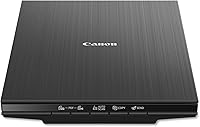
Canon CanoScan LiDE 400 Slim Scanner
The Canon CanoScan LiDE 400 scans in as fast as 8 seconds and uses one USB Type-C cable for data and power. Its flatbed design supports documents and photos, with paper sizes up to 8.27 x 11.69 in and 8.50 x 11.69 in.
It includes auto scan mode, color restoration and dust removal. Built-in PDF buttons can save multi-page PDFs that are editable and searchable.
This model suits flat pages, photos and documents that can rest on the glass. It may help with an open book only when the binding opens safely and the pages can lie flat without force.
For large photographs or artwork, compare our guide to a large format photo scanner.
How should you scan a fragile book?
Scan a fragile book by supporting both sides, using the least force needed and checking the page image before moving on. A slower process is usually safer than repeated repositioning.
Start by cleaning the scanning surface according to the scanner's care instructions. Keep dust, loose paper and debris away from the page support.
Place the book in the center of the cradle, with the spine aligned to the support. Adjust the angle so the pages stay open without pulling against the binding.
Turn one page at a time from the outer edge. Keep your fingers away from printed areas when possible, and avoid using clips or weights unless the scanner instructions specifically allow them.
Check the first few scans for curved text near the binding, shadows, cropped edges and page movement. Correct the setup before scanning the rest of the book.
Save files with clear names and make a backup after the session. OCR can make text searchable, but always inspect the result because curved pages, unusual fonts and damaged print can reduce accuracy.
Is OCR useful for scanned books?
OCR is useful when you need to search, copy or edit the words in a scanned book. It is less important when your goal is to preserve page images exactly as they appear.
OCR software reads the image and creates a text layer. Searchable PDFs can make research easier because you can find a word without opening every page.
The quality depends on focus, lighting, page curvature, type size and the condition of the print. A clear image gives OCR a better starting point, but it does not guarantee perfect text.
If searchable text is your main goal, compare our best book scanner with ocr guide. Choose a workflow that lets you review important passages against the original scan.
How do you care for a book scanner cradle?
Care for the cradle by keeping its support surfaces clean, checking moving parts gently and avoiding pressure beyond its intended range. Dust and loose material can affect page stability and image quality.
Use a soft, dry cloth unless the scanner instructions allow another cleaning method. Do not spray liquid directly onto the cradle, glass or camera area.
Check the support before each long scanning session. A loose hinge, worn pad or shifted guide can change the page angle and cause uneven scans.
Store the cradle in a dry area and protect it from objects that could bend the support. If the design is adjustable, return it to a neutral position after use rather than forcing it closed.
What is the best way to choose?
Choose a book scanner with a cradle that matches the book's opening angle and condition, not just the highest resolution. Fragile bindings need gentle support, while routine office books may allow a faster workflow.
Pick an adjustable V-shaped cradle when you scan books with different bindings. Choose a flatbed only when the book can open safely on the glass.
Choose a camera-style system when reduced page contact matters most.
The Epson FastFoto FF-680W suits high-volume loose photos and documents. The Epson WorkForce ES-50 suits portable single-sheet scanning, while the Canon CanoScan LiDE 400 suits flat documents and photos.
If your main goal is bound-book scanning, confirm that the complete system includes the cradle, page support and software features you need before ordering.
Frequently asked questions
What is a book scanner with a cradle?
A book scanner with a cradle supports an open book while you capture its pages. The cradle can reduce pressure on the spine, especially when it holds each side at an angle instead of requiring the book to lie completely flat.
What cradle angle is best for fragile books?
A V-shaped or adjustable cradle is usually the safer starting point for fragile bindings because it supports both halves of the book without forcing the spine flat. Check the scanner's actual cradle range and use gentle page handling for older books.
Can a flatbed scanner scan books?
A flatbed scanner can scan books when the binding opens far enough for the pages to rest against the glass. It may be less suitable for fragile bindings because pressing the book flat can strain the spine.
Do book scanners create searchable PDFs?
Some scanners include optical character recognition, or OCR, which can turn scanned pages into searchable PDFs or editable files. Confirm that the scanner and included software support OCR before choosing one for research or office documents.