How to Choose a Flatbed Scanner for Negatives and Slides
The best flatbed scanner for negatives and slides must support transparent film directly, include a suitable film holder, and offer enough optical resolution for enlargement. Confirm those details before choosing a general photo scanner.
On this page (10 sections)
- What should you check in a flatbed scanner for negatives and slides?
- What is the difference between a photo scanner and a film digitizer?
- Which scanner type fits your workflow?
- Which listed products help with scanning photos and documents?
- How should you scan negatives and slides?
- Should you choose a flatbed scanner with a film adapter?
- What other features matter after film support?
- What should you avoid when digitizing film?
- Flatbed scanner for negatives and slides: final choice
- Frequently asked questions
The best flatbed scanner for negatives and slides must have a transparency unit, a film holder that matches your originals, and enough optical resolution for the final image size. A scanner made only for paper and printed photos may produce a sharp scan of a photograph but cannot properly capture film.
Before comparing models, decide whether you need a dedicated film digitizer or a general photo and document scanner. Our document scanners complete buying guide explains the broader features that matter for paper workflows.
What should you check in a flatbed scanner for negatives and slides?
Check transparency support first, then film-holder fit, optical resolution, color depth, dust handling and software. These features determine whether the scanner can capture the film itself rather than only the printed photos made from it.
A flatbed scanner for film negatives needs a light source above and below the original, or another design made for transparent media. A normal flatbed light source is intended to reflect off paper.
Does the scanner support transparent film?
The product description should clearly identify support for negatives, slides, transparencies or film. If it only says document and photo scanning, treat that as support for opaque originals unless the manufacturer confirms otherwise.
Look for terms such as:
- Transparency unit
- Film adapter
- Negative holder
- Slide holder
- 35mm film support
- Medium-format film support
- Backlight for transparent originals
A removable film adapter can be useful when you also scan printed photos and documents. A built-in transparency area may be quicker for regular film work, but the exact film formats still matter.
Does it include the right film holder?
A film holder keeps each negative or slide in a fixed position. It can reduce crooked frames, uneven spacing and contact with the glass.
Check the holder's frame count and film size. A holder for 35mm strips may not fit mounted slides, 120 film or larger formats.
If the holder is optional, include its cost and availability in your decision.
Dust is another concern. Clean the glass and film carefully, hold originals by their edges and use a holder when possible.
Avoid pressing film against the glass because scratches and dust marks become more visible after enlargement.
Is the resolution optical?
Optical resolution is the useful number for comparing film scanners. Software-enhanced resolution can create a larger file, but it cannot recover detail that the sensor did not capture.
A 35mm negative is small, so scanning it for a large print requires more resolution than scanning a printed 8 x 10 photo for a small web image. Choose the setting based on your final use:
| Your goal | Sensible priority |
|---|---|
| Quick digital reference copies | Easy workflow and moderate optical resolution |
| Family archive | Optical resolution, color depth and reliable file storage |
| Large prints or heavy cropping | Higher optical resolution and careful dust control |
| Sharing online | Simple software and manageable file sizes |
Higher resolution also creates larger files and longer processing times. Keep a master scan at the setting that preserves the detail you need, then create smaller copies for sharing.
How much color depth do you need?
Color depth affects how many shades the scanner can represent. It matters most when you plan to correct faded color, recover shadow detail or adjust exposure after scanning.
For family snapshots and simple sharing, workflow speed may matter more than maximum color depth. For old negatives and slides, preserve the highest useful master file before making edited copies.
A scanner's software may offer automatic color correction, dust removal or crop tools. These can save time, but review the result before deleting the original scan.
What is the difference between a photo scanner and a film digitizer?
A photo scanner captures reflective originals, while a film digitizer captures light passing through negatives or slides. Some flatbed scanners handle both, but the product must name transparent-film support.
A photo scanner is useful for prints, postcards and documents. A film digitizer is built around smaller transparent originals and usually includes holders or guides that position them over a dedicated backlight.
The phrase “photo scanner” alone does not prove that a device scans film. The same is true of a high resolution number.
Confirm the complete film workflow before you buy.
For printed photos, compare our guide to the best scanners for photos, slides and negatives. It helps separate photo-focused models from scanners that are actually prepared for film.
Which scanner type fits your workflow?
Choose a dedicated film-capable flatbed if negatives and slides are the main job. Choose a photo and document scanner if printed photos are the priority, and choose a mobile document scanner only when portability matters more than film support.
Dedicated flatbed with transparency support
This is the most flexible option for film digitization when it supports your film size. The glass surface can also handle printed photos and documents, but each scan may require more manual placement than a sheet-fed model.
A dedicated flatbed suits archives that need careful framing, repeated editing and high-resolution master files. It may take longer per original because you must load holders, preview frames and inspect the results.
Sheet-fed photo scanner
A sheet-fed photo scanner can be fast for stacks of printed photographs. It is less suitable for loose negatives and mounted slides unless it specifically includes a film path and the required holders.
Use this type when your collection is mainly printed photos and documents. For automatic feeding, see how to use an ADF photo scanner.
Mobile document scanner
A mobile scanner is designed for single sheets, receipts, cards or long documents. Its small footprint helps when desk space and portability are the main concerns.
It is generally the wrong starting point for a flatbed scanner for film negatives because a sheet-fed document path does not provide the glass bed and transparency lighting that film requires.
Which listed products help with scanning photos and documents?
The 3 products below serve different workflows. None of their supplied descriptions confirms a film adapter or transparency unit, so verify film support before choosing any of them for negatives or slides.
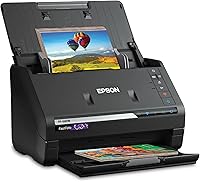
Epson FastFoto FF-680W High-Speed Duplex Photo
The Epson FastFoto FF-680W can batch-scan up to 36 photos at a time and scan photos as quickly as 1 photo per second at 300 dpi. It handles photos up to 8 x 10 in and can capture both sides of a photo in one scan, which helps preserve handwritten notes on the back.
Its listed resolution is 600 dpi, with options for 300 dpi sharing, 600 dpi TIFF archiving and 1200 dpi enlargements. Epson includes auto enhancement, color restoration, red-eye reduction, de-skew, crop and rotate tools, plus Epson ScanSmart software with OCR for documents.
The unit measures 11.7 x 11.7 x 6.9 in and weighs 8.2 lb. It includes a carrier sheet and cleaning cloth, along with an AC adapter, power cable and USB 3.0 cable.
It connects through Wi-Fi and is designed for Windows 7 or later system requirements.
This model fits a printed-photo archive far better than a film collection based on the information. Confirm transparency support and film holders before treating it as a photo scanner and film digitizer.
Epson Workforce ES-50 Compact & Lightweight Mobile
The Epson WorkForce ES-50 is a single-sheet-fed mobile document scanner. It scans one page in as quickly as 5.5 seconds at 300 dpi, accepts documents up to 8.5 x 72 in, and includes automatic feeding mode for combining multiple sheets into one file.
It measures 10.7 x 10.7 x 1.3 in and weighs 9.44 oz. USB power means it needs no batteries or separate power supply while connected to a computer.
The package includes a USB cable, maintenance sheets and a Start Here poster.
Epson ScanSmart software and Nuance OCR can create searchable PDFs and editable Word and Excel files. The ES-50 works with Windows and Mac systems and includes a TWAIN driver for imaging software.
This model is useful for paper records and travel workflows, not as a flatbed scanner for film negatives. Its single-sheet path does not replace a transparency unit or film holder.
Canon CanoScan LiDE 400 Slim Scanner
The Canon CanoScan LiDE 400 is a flatbed-style document and photo scanner with a listed resolution of 4800 x 4800 dpi. It can scan in as fast as 8 seconds and uses one USB Type-C cable for data and power.
Its built-in EZ buttons include auto scan and PDF functions. The scanner supports paper and photo media, and the package includes the scanner, setup CD, USB 2.0 Type-C cable and clip-on vertical stand.
The unit measures 7.7 x 0.4 x 14.5 in and weighs 3.6 lb. Its listed color depth is 48-bit, and its optical sensor uses CIS technology.
The Canon is the closest match here for a flatbed workflow, but its supplied description does not confirm a transparency unit, film adapter or slide holder. Its high resolution does not by itself make it a flatbed scanner for negatives and slides, so confirm those features before ordering.
How should you scan negatives and slides?
Scan film in a clean, controlled workflow: prepare the originals, position them in the correct holder, preview the frames, choose optical resolution, save a master file and create edited copies afterward.
1. Prepare the workspace
Use a clean, dry surface with enough room for the scanner, holders and file notes. Keep drinks, loose paper and strong dust sources away from the film.
Clean the scanner glass according to the manufacturer's instructions. Remove visible dust from the film with a suitable blower or soft cleaning method, and hold the edges rather than touching the image area.
2. Identify the film format
Separate 35mm negatives, mounted slides and other film sizes before scanning. The holder must match the frame dimensions and spacing.
Do not force film into a holder. A poor fit can crop the frame, bend the strip or place the image outside the scanner's transparency area.
3. Preview before the final scan
Previewing lets you check orientation, cropping and frame placement. It also shows whether the scanner detects the entire image area.
Rotate and crop a working copy if your software allows it. Keep the original master scan unchanged so you can correct the edit later.
4. Choose a master resolution
Use a resolution that matches the film size and final output. Small negatives usually need more resolution than large printed photos because the original image area is much smaller.
Avoid choosing the highest setting without a storage plan. Larger files take more space and may slow previews, transfers and backups.
5. Save an unedited master
Save the first useful scan as a master file before applying color, dust or exposure corrections. Use a clear filename with the collection, date or frame number.
Create separate copies for sharing and printing. This keeps your edited version from replacing the original capture.
6. Review the result at full size
Check focus, dust, scratches, clipped highlights and dark shadow areas before scanning the whole collection. A short test run can reveal a holder or lighting problem early.
If every frame has the same crop or color issue, adjust the holder or software settings before continuing. Repeating a bad setup wastes more time than fixing it first.
Should you choose a flatbed scanner with a film adapter?
Choose a flatbed scanner with a film adapter when you want one device for transparent film and printed originals, but confirm the adapter's format and lighting design before buying.
A film adapter can make a flatbed more versatile, yet not every adapter supports every type of film. Check whether it handles strips, mounted slides, frame counts and the film sizes in your collection.
Also check how the adapter is installed. A removable accessory may suit occasional film work, while a built-in transparency system may be easier for frequent scanning.
If your main need is compact printed-photo scanning, compare our best compact photo scanner guide. If you want files without a computer, read how to choose a photo scanner that saves to USB.
What other features matter after film support?
After confirming film support, compare file control, cleaning, software and storage needs. These details shape the time and quality of a large digitization project.
- Preview controls help you check alignment before a full scan.
- Crop and rotate tools reduce repeated manual editing.
- Dust and color correction can speed up work on older originals.
- OCR matters for documents, but it does not improve film detail.
- USB or Wi-Fi affects where you can place the scanner.
- A carrier sheet can help protect delicate printed photos, but it is not a film holder.
- A clear naming system makes a large archive easier to search.
For printed images that need a new printer, see which printer is better for printing photos. For unusual paper sizes, our large format photo scanner guide covers the space and handling questions that standard models may not answer.
What should you avoid when digitizing film?
Avoid buying based on resolution alone. A high dpi number cannot replace transparency lighting, a correctly sized holder and a film workflow.
Do not assume that a scanner labeled “photo” handles negatives. Do not place film directly on the glass unless the manufacturer specifically describes that method, and do not use a document feeder for loose film.
Avoid editing the only copy of a scan. Keep a clean master, then make corrected files for printing or sharing.
Do not ignore storage. Film scans can become large, especially when you use high optical resolution and retain multiple versions.
Flatbed scanner for negatives and slides: final choice
Choose a dedicated flatbed scanner for negatives and slides when film is the main job and you need careful previews, holders and high-resolution master files. Choose the Epson FastFoto FF-680W for large batches of printed photos and documents, the Epson ES-50 for portable paper scanning, or the Canon LiDE 400 for a slim flatbed photo and document workflow.
For the 3 listed products, confirm transparency support, film-holder compatibility and film size before ordering. If those details are absent, treat the scanner as a photo or document model rather than a confirmed film digitizer.
For books and bound originals, compare how to choose a book scanner with a cradle. It uses a different setup because the original cannot lie flat like a loose negative or photo.
Frequently asked questions
Can a flatbed scanner scan negatives and slides?
A flatbed scanner can scan negatives and slides only when it has transparency support, a film holder or another dedicated light path for transparent originals. A flatbed designed for paper and printed photos may not capture film correctly, even if its resolution is high.
What resolution is best for scanning film negatives?
Choose optical resolution based on how much you plan to enlarge the film. A higher optical resolution captures more detail for prints and cropping, while a lower setting can work for small digital copies.
Check that the quoted resolution is optical rather than only software-enhanced.
Do I need a film holder for slides?
Yes, a film holder helps keep slides or negatives flat, aligned and positioned over the scanner's transparency area. It also keeps fingers away from the film surface.
Confirm that the holder supports your film size before buying.
Is a photo scanner the same as a film digitizer?
No. A photo scanner captures printed photographs, while a film digitizer needs to pass light through negatives or slides.
Some devices do both, but you must confirm transparency support, film formats and the included holders.
Frequently asked questions
Can a flatbed scanner scan negatives and slides?
A flatbed scanner can scan negatives and slides only when it has transparency support, a film holder or another dedicated light path for transparent originals. A flatbed designed for paper and printed photos may not capture film correctly, even if its resolution is high.
What resolution is best for scanning film negatives?
Choose optical resolution based on how much you plan to enlarge the film. A higher optical resolution captures more detail for prints and cropping, while a lower setting can work for small digital copies.
Check that the quoted resolution is optical rather than only software-enhanced.
Do I need a film holder for slides?
Yes, a film holder helps keep slides or negatives flat, aligned and positioned over the scanner's transparency area. It also keeps fingers away from the film surface.
Confirm that the holder supports your film size before buying.
Is a photo scanner the same as a film digitizer?
No. A photo scanner captures printed photographs, while a film digitizer needs to pass light through negatives or slides.
Some devices do both, but you must confirm transparency support, film formats and the included holders.