9 Best Scanners for Photos, Slides, and Negatives (November 2026)
The best scanners for photos, slides, and negatives include the Epson FastFoto FF-680W High-Speed Duplex Photo for mixed photo collections, the KODAK Slide N Scan Film & Slide for easy film previews, and the Magnasonic All-in-One 24MP Film Scanner with Large for high-resolution film files.
On this page (7 sections)
- The best scanner for photos, slides, and negatives
- How to choose a scanner for photos, slides, and negatives
- How to organize and use scanned photo files
- Are these scanners also useful for printing photos?
- How to care for old prints, slides, and negatives
- More guides on this topic
- Which is the best scanner for photos, slides, and negatives for you?
The best scanner for photos, slides, and negatives is the Epson FastFoto FF-680W if your collection includes many loose prints. Pick a dedicated film scanner from KODAK or Magnasonic when negatives and mounted slides make up most of the work.
A mixed archive needs more than a high resolution number. You also need to check print size, film format, feeding method, storage, computer needs and how much editing you want to do on the scanner.
For document-heavy work, our guide to a digital scanner for documents explains feeder capacity, duplex scanning and OCR. If your collection is mostly prints, compare these picks with our best photo scanner machine guide.
Our picks at a glance
-
1
 Best for mixed photo collections
Epson FastFoto FF-680W High-Speed Duplex Photo
9.7/10 our score
See it on Amazon -
2
-
3
 Best for high-resolution film files
Magnasonic All-in-One 24MP Film Scanner with Large
9.5/10 our score
See it on Amazon
- 4
 Check it
ClearClick QuickConvert 2.0 Photo
Best for simple 4 x 6 scanning - 5
 Check it
KODAK SCANZA Film & Slide Scanner
Best for broad film format support - 6
 Check it
Plustek ePhoto Z300 Photo Scanner
Best for frequent photo prints - 7
 Check it
TCNEWCL 35mm Negative Slide Scanner
Best for phone-based 35mm scanning - 8
 Check it
DigitPro Mobile 35mm Film and Slide Scanner
Best for portable beginner scanning - 9
 Check it
HP Film & Slide Scanner HPFS500
Best for standalone touchscreen control
The best scanner for photos, slides, and negatives
The Epson is the most versatile pick for mixed collections, while the film scanners are better matched to negatives and slides. The right choice depends first on the media you need to digitize most often.
Epson FastFoto FF-680W High-Speed Duplex Photo: Best for mixed photo collections
- Scans up to 36 photos at a time
- Up to 1 photo per second at 300 dpi
- Scans photos up to 8 x 10 in
- Duplex scanning captures handwritten backs
The Epson combines fast photo feeding with document scanning and wireless connectivity. It is the most flexible choice here for collections that contain many prints plus paperwork.
Pros
- Batch scans up to 36 photos
- Auto enhancement and color restoration
- Includes carrier sheet and cleaning cloth
Cons
- Does not list direct slide or negative scanning
- Requires a Windows 7 or later system for the stated minimum
Epson FastFoto FF-680W High-Speed Duplex Photo is the best match for a large collection of loose prints. It can batch-scan up to 36 photos at a time, and Epson states a speed of up to 1 photo per second at 300 dpi under its stated conditions.
It handles photos up to 8 x 10 in, including Polaroid photos, panoramas and postcards. The carrier sheet and cleaning cloth are useful when you are preparing delicate photos for a feeder-based workflow.
The scanner also captures both sides in one pass. That matters when handwritten notes on the back are part of the memory you want to preserve.
Choose 300 dpi for quick sharing, 600 dpi TIFF for archiving, or 1200 dpi for enlargements. Epson includes FastFoto and ScanSmart software, with OCR for converting scanned documents into readable text.
Read our guide on how to use a photo ADF scanner before feeding fragile or mixed-size prints. The FF-680W is less suitable when your main job is scanning mounted slides or negatives because those formats are not listed among its supported media.
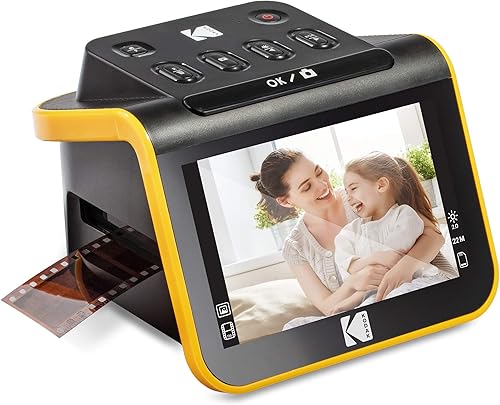
KODAK Slide N Scan Film & Slide: Best for easy film previews
- 22MP resolution
- 5 in LCD screen
- Supports 135, 110 and 126 film
- Saves to SD or SDHC cards up to 32GB
The KODAK Slide N Scan gives film collections a large screen for previewing and editing. Its inserts cover several common film formats, but an SD card is not included.
Pros
- Large 5 in viewing screen
- Continuous-loading film inserts
- No complex computer workflow required for basic scanning
Cons
- SD card is not included
- Designed for film and slides rather than loose photo prints
KODAK Slide N Scan Film & Slide is the best fit when you want to preview film on a built-in screen. Its 5 in LCD gives you a direct view while you scan, edit and browse saved images.
It supports 135, 110 and 126 film, plus 50mm slides. The quick-feeding inserts allow continuous loading, which can reduce repeated tray changes during a film session.
The scanner saves directly to SD or SDHC cards up to 32GB. An SD card is not included, so plan your storage before beginning a large archive.
HDMI and USB connections give you options for viewing or transferring images. Choose it for developed film and slides, not for a collection made mostly of loose photo prints.
Magnasonic All-in-One 24MP Film Scanner with Large: Best for high-resolution film files
- 24MP JPEG files
- 5 in LCD display
- Supports 35mm, 126, 110 and Super 8 film
- SD slot supports cards up to 128GB
Magnasonic is a strong film-first choice when you want 24MP JPEG files and direct adjustments on the scanner. It also works without a computer for scanning and basic image changes.
Pros
- Supports several film and slide formats
- Brightness and RGB adjustments on the device
- Fast-loading trays
Cons
- SD card is not included
- HDMI cable is not included
Magnasonic All-in-One 24MP Film Scanner with Large is the strongest choice here for a film-first workflow that prioritizes 24MP JPEG files. It supports 35mm, 126, 110 and Super 8 film, along with 135, 126 and 110 slides.
A 5 in LCD lets you view the media and scanned images on the device. You can adjust brightness, RGB color, flip and mirror directly on the scanner, so a computer is not required for those basic changes.
The SD card slot supports cards up to 128GB, but the card is not included. Magnasonic states that its fast-loading trays can scan photos in less than 5 seconds each.
Choose this model when your archive includes several supported film formats and you want more output resolution than the 13MP sensor used by the HPFS500. Its HDMI cable is not included, so plan for that connection separately if you need it.
ClearClick QuickConvert 2.0 Photo: Best for simple 4 x 6 scanning
- Scans 4 x 6 photos or smaller
- Scans 35mm, 110 and 126 film
- 22MP interpolated resolution
- Built-in rechargeable battery
ClearClick fits a simple workflow for small prints, slides and negatives. Its rechargeable battery supports cord-free scanning, but it scans one item at a time and does not support 5 x 7 photos.
Pros
- No computer or drivers required
- 2 to 3 second scan time stated for an item
- 5 in preview LCD
Cons
- No automatic feeder
- Does not support 5 x 7 photos
ClearClick QuickConvert 2.0 Photo is a practical choice for 4 x 6 photos or smaller, 35mm slides, and 35mm, 110 and 126 negatives. It does not support 5 x 7 photos, so check your print sizes before choosing it.
The scanner works without a computer or drivers and saves JPEG files to an SD memory card. Its stated resolution is 14MP, or 22MP interpolated, with an approximate image size of 3824 x 2512 pixels.
A built-in rechargeable battery allows cord-free scanning after charging. The 5 in LCD provides an instant preview, and the stated scan time is 2 to 3 seconds for one photo, slide or negative.
The main trade-off is the lack of an autofeeder. You place each item yourself, which works well for a small archive but takes more attention than the Epson batch workflow.
KODAK SCANZA Film & Slide Scanner: Best for broad film format support
- Supports 35mm, 126, 110, Super 8 and 8mm
- 3.5 in LCD
- Includes multiple film inserts and adapters
- Saves to SD cards up to 128GB
The KODAK SCANZA covers more film formats than most picks here, including Super 8 and 8mm still images. It is for developed film and slides, not loose photo prints or raw film.
Pros
- Multiple inserts and adapters
- Adjustable LCD brightness
- Includes USB, HDMI, video and AC cables
Cons
- Does not scan loose photos
- Super 8 converts to still images, not video
KODAK SCANZA Film & Slide Scanner is the best fit for a collection with several older film formats. It supports 35mm, 126, 110, Super 8 and 8mm negatives and slides, then saves them as JPEG files.
Its 3.5 in LCD has adjustable brightness and a tilt design. Multiple inserts and adapters help you switch between supported formats without needing a separate scanner for each one.
The scanner includes USB, HDMI, video and AC cables, along with a film cleaning brush. It supports SD cards up to 128GB, but the card is not included.
This is a film-only choice. It does not scan loose photo prints, and Super 8 converts to still images rather than video.
Use the brush to remove dust from the light box before scanning to reduce visible specks.
Plustek ePhoto Z300 Photo Scanner: Best for frequent photo prints
- Scans 4 x 6 photos in 2 seconds
- Supports 3 x 5, 4 x 6, 5 x 7 and 8 x 10 photos
- 600 dpi optical resolution
- CCD sensor
The Plustek is designed around loose photo prints rather than film. Its feed-through design and 600 dpi setting suit buyers digitizing many prints in several sizes.
Pros
- Supports photos up to 8 x 10 in
- CCD sensor
- Photo enhancement tools
Cons
- Does not list slide or negative scanning
- Scans one photo at a time
Plustek ePhoto Z300 Photo Scanner is the best option here for a large stack of loose prints in different sizes. It supports 3 x 5, 4 x 6, 5 x 7 and 8 x 10 photos, plus letter and A4 paper.
The feed-through design scans one photo at a time. Plustek states a 2-second scan for a 4 x 6 photo and 5 seconds for an 8 x 10 photo at 300 dpi.
Its CCD sensor and optical resolution up to 600 dpi suit buyers who want more detail for archiving or cropping. The software includes tools for auto-cropping, rotating and restoring faded colors.
This model does not list slide or negative scanning, so it is not a complete mixed-media solution by itself. Choose it when prints are the main part of the archive and film can be handled separately.
For more print-focused options, compare our guide to the best photo scanner for multiple photos.
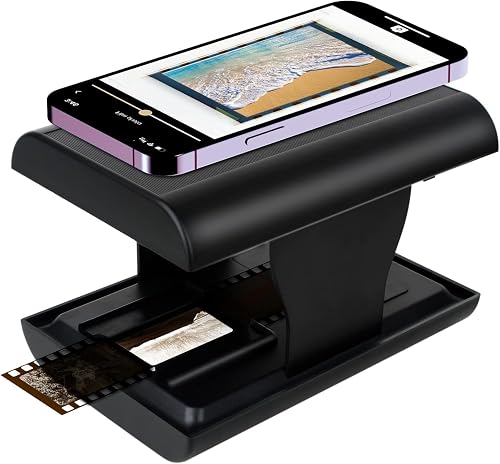
TCNEWCL 35mm Negative Slide Scanner: Best for phone-based 35mm scanning
- Works with 35mm slides and negatives
- Foldable design
- Built-in LED backlight
- 300–400 dpi resolution
TCNEWCL uses a smartphone camera over an LED backlight to digitize 35mm slides and negatives. It takes little storage space, but final image quality depends on the phone camera.
Pros
- Foldable for storage
- Works with a smartphone
- Free app supports editing and sharing
Cons
- Limited to 35mm media
- Image quality depends on the smartphone camera
TCNEWCL 35mm Negative Slide Scanner is the most portable choice for basic 35mm digitizing. It uses a smartphone camera over a built-in LED backlight, so the phone does the image capture.
The foldable body stores in a small box-sized shape. Its stated resolution is 300–400 dpi, and the free app supports capture, rotation, filters, color, contrast and sharing.
The main trade-off is image quality. TCNEWCL states that the result is limited by the resolution of your phone camera, so this is better for casual sharing and quick family archives than for demanding enlargements.
Choose it when storage space, portability and a low-complexity setup matter more than dedicated scanner controls. It supports 35mm slides and film negatives, not the wider range of formats handled by the KODAK SCANZA.
DigitPro Mobile 35mm Film and Slide Scanner: Best for portable beginner scanning
- Supports 35mm black-and-white and color film
- Foldable design
- Built-in battery
- Includes phone clip and cleaning cloth
DigitPro is a compact smartphone digitizer for people beginning with 35mm film. Its foldable body and built-in battery suit occasional scanning away from a desk.
Pros
- Supports black-and-white and color film
- Phone holder included
- Companion app includes color and contrast tools
Cons
- Limited to 35mm media
- Uses the smartphone camera for capture
DigitPro Mobile 35mm Film and Slide Scanner is a beginner-friendly smartphone option for black-and-white film, color film, negatives and slides. Its foldable design includes a built-in battery and a phone holder.
The companion app provides color and contrast tools without a subscription. The package includes a cleaning cloth, phone clip, battery and illustrated user manual.
Because the smartphone camera captures the image, your phone affects the final result. Keep the film flat, align the phone carefully and use even lighting from the built-in backlight for consistent frames.
Choose DigitPro when you want a portable 35mm workflow that is easy to share. For more control over output and film formats, a standalone model such as the Magnasonic or KODAK Slide N Scan is a better fit.
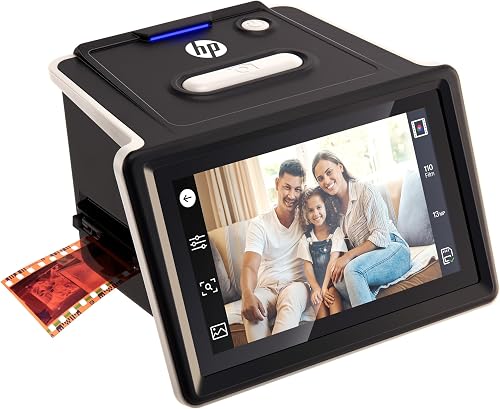
HP Film & Slide Scanner HPFS500: Best for standalone touchscreen control
- 5 in all-angle LCD touchscreen
- Supports 135, 126 and 110 film
- 13MP CMOS sensor with 22MP interpolation
- Quick-load tray
The HPFS500 gives film scanning a standalone workflow with a touchscreen for previewing and editing. It suits mixed 135, 126 and 110 film collections that do not need loose-print scanning.
Pros
- No computer required for standalone scanning
- Large touchscreen
- Quick-load tray
Cons
- Does not list loose photo scanning
- Uses a 13MP sensor before interpolation
HP Film & Slide Scanner HPFS500 suits buyers who want a standalone film workflow with touchscreen controls. Its 5 in all-angle LCD touchscreen lets you preview and edit without adding a computer to the scanning step.
The HPFS500 supports 135, 126 and 110 negatives and positive slides. Its 13MP CMOS sensor provides 22MP interpolation, so compare the native sensor figure with the interpolated output when judging detail.
A quick-load tray helps move between film frames. The scanner uses USB, and its stated system requirements include Windows 10 or later and macOS 10.15 or later.
Choose it for straightforward film digitizing with a large touchscreen. It does not list loose photo scanning, so it is not the first choice for albums full of prints.
How to choose a scanner for photos, slides, and negatives
Choose the scanner by the media that fills most of your boxes. A feeder model saves time on loose prints, while a film scanner gives you the holders and format support needed for negatives and slides.
Do you need a photo scanner with an ADF?
A photo scanner with an ADF is useful when you have hundreds or thousands of loose prints. The Epson can batch-scan up to 36 photos, while the Plustek is a one-photo-at-a-time design made for several print sizes.
Feeders save time, but inspect and dust each photo first. For a deeper workflow guide, see how to use a photo scanner with an ADF.
Which film formats do you need?
Write down every format in your boxes before buying. KODAK SCANZA supports 35mm, 126, 110, Super 8 and 8mm, while the KODAK Slide N Scan supports 135, 110, 126 and 50mm slides.
A 35mm-only mobile scanner can be a good compact choice, but it will not replace a multi-format model. Our guide to flatbed scanners for negatives and slides covers another way to approach difficult or mixed media.
Should you scan to a computer, SD card or phone?
Choose computer connectivity if you plan to sort, back up and edit a large archive. SD-card models such as the KODAK and Magnasonic can work without a computer, while mobile scanners use your phone for capture and sharing.
For phone workflows, read how to scan photos to an iPhone. If you want removable storage from a dedicated scanner, compare how to choose a photo scanner that saves to USB.
What resolution should you use?
Use 300 dpi for quick sharing, 600 dpi when you want more room to crop, and a higher setting when you plan to enlarge a print. Film scanners often describe output in megapixels, so compare native sensor resolution with interpolated figures.
A larger number does not remove dust, scratches or soft focus from the original. Clean the scanner surface, use the included brush or cloth where appropriate, and save an untouched archive file before making edits.
How to organize and use scanned photo files
Create folders by person, event or decade before scanning. Use a consistent file name such as 1987-family-reunion-001 so you can find images later without opening every file.
Save an archival copy first, then make smaller versions for messages and social media. Keep at least one backup in a separate location from the computer or memory card.
Software can reduce common problems such as faded color, red eyes, skew and dust. Epson includes enhancement tools in FastFoto, while Plustek includes auto-crop, rotate and faded-color restoration tools.
If organization matters as much as scanning, see our guide to the best photo scanner and organizer. Mac users can also compare the best photo scanner for Mac before choosing a software workflow.
Are these scanners also useful for printing photos?
A scanner preserves the image file, but you still need a printer if you want physical copies. An inkjet printer is often the better match for photo output, depending on your paper and color needs.
Read which printer is better for printing photos before building a scan-and-print setup. Our explanation of why inkjet is better for photo printing covers the print side of the decision.
A combined device can save desk space if you need both functions. Compare photo scanner and printer combinations if you want one machine for scanning and printing.
How to care for old prints, slides, and negatives
Handle photos by the edges and keep dust away from the scanning surface. Use a soft cleaning cloth or the brush included with a compatible scanner, and avoid pressing fragile prints through a feeder if they are curled, sticky or cracked.
Scan a small test group before processing the full archive. Check cropping, color, orientation and file storage first, then use the same settings for similar media.
A portable model can help when you scan in more than one room. See our guide to the best portable scanner for photos if storage and transport are important.
More guides on this topic
- Best High Resolution Photo Scanners
Which is the best scanner for photos, slides, and negatives for you?
The Epson FastFoto FF-680W is the best scanner for photos, slides, and negatives when loose prints and documents make up most of the collection. Choose the KODAK Slide N Scan or Magnasonic for a film-first archive, and choose the KODAK SCANZA when you need broad film-format support.
Pick the Plustek ePhoto Z300 for frequent loose-photo scanning, or choose TCNEWCL and DigitPro when a compact smartphone workflow matters most. If your collection includes older prints, our guide to the best scanner for old photos is a useful next step.
Our score weighs specs, features and buyer feedback against the needs of mixed photo collections. Check the supported media and storage method before choosing the scanner that will handle your archive most often.
Our top 3 picks at a glance
-
1
Best for mixed photo collections
Epson FastFoto FF-680W High-Speed Duplex Photo
9.7/10 our score
See it on Amazon -
2
-
3
Best for high-resolution film files
Magnasonic All-in-One 24MP Film Scanner with Large
9.5/10 our score
See it on Amazon
Frequently asked questions
What is the best scanner for photos, slides, and negatives?
The Epson FastFoto FF-680W is the best scanner for photos, slides, and negatives when your collection has many loose prints and documents. For film-heavy collections, choose the KODAK Slide N Scan or Magnasonic because their stated formats focus on negatives and slides.
Check format support before buying.
Can one scanner handle photos, slides, and negatives?
Some models handle both loose photos and film, but not every product in this guide does. Epson and ClearClick cover photo prints plus selected film formats, while KODAK SCANZA and HPFS500 focus on film.
Confirm the exact print size and film type your collection contains.
Is a flatbed scanner better for negatives and slides?
A flatbed scanner can be useful when you want careful placement or need to scan media that a feeder does not support. Film scanners are often simpler for developed negatives and slides.
Our guide to a flatbed scanner for negatives and slides explains the trade-offs.
What resolution should a photo and negative scanner have?
For prints, 300 dpi is useful for sharing and 600 dpi gives more room for cropping or enlarging. Film products often state megapixel output instead.
Compare the stated optical resolution or sensor resolution, then choose the setting that fits your final use rather than selecting the largest number automatically.