9 Best Document Scanner Deals (November 2026)
The best document scanners on sale include the Epson Workforce ES-50 Compact & Lightweight Mobile for light mobile scanning, the Brother DS-640 Compact Mobile Document Scanner for compact travel use, and the ScanSnap iX2500 Wireless or USB High-Speed Document for large batch scanning.
On this page (9 sections)
- The best document scanners on sale for home and office use
- How do these document scanner deals compare side by side?
- How we compared these scanners
- What should you look for in a document scanner on sale?
- Portable or desktop: which scanner fits your space?
- How do you set up and care for a document scanner?
- Is a document scanner better than a printer scanner for paper records?
- What about photos, books and oversized pages?
- Verdict: which document scanner deal should you buy?
The best document scanner on sale for most buyers is the Epson Workforce ES-50, because it pairs light weight with quick single page scanning and OCR. If you scan stacks, the ScanSnap iX2500 is the stronger pick with a 100 sheet feeder and 45 ppm duplex speed.
Our score weighs specs, features and buyer feedback against what you are shopping for. A deal only helps if the scanner fits the pages you actually scan.
Start with a digital scanner for documents if you are new to this category. That guide explains feeder size, duplex scanning and resolution before you compare models.
Our picks at a glance
-
1
 Best for light mobile scanning
Epson Workforce ES-50 Compact & Lightweight Mobile
9.6/10 our score
See it on Amazon -
2
 Best for compact travel use
Brother DS-640 Compact Mobile Document Scanner
9.5/10 our score
See it on Amazon -
3
 Best for large batch scanning
ScanSnap iX2500 Wireless or USB High-Speed Document
9.4/10 our score
See it on Amazon
- 4
 Best for portable duplex scanningCheck it
- 5
 Check it
Epson Workforce ES-400 II High-Speed Color Duplex
Best for office stacks - 6
 Check it
ScanSnap iX1300 Wireless or USB Double-Sided Color
Best for small desk spaces - 7
 Best for simple home scanningCheck it
- 8
 Check it
Canon imageFORMULA DR-C225 II Office Document Scanner
Best for upright office use - 9
 Check it
ScanSnap iX2400 High-Speed One-Touch Button Color Document
Best for one touch batch scanning
The best document scanners on sale for home and office use
Portable models win for travel and short tasks. Feeder models win for stacks.
The picks below split cleanly by that choice.
Epson Workforce ES-50 Compact & Lightweight Mobile: Best for light mobile scanning
- Single page in 5.5 seconds at 300 dpi
- Scans documents up to 8.5 x 72 in
- USB 2.0, no battery needed
- Nuance OCR for searchable PDFs
A very light single sheet scanner for receipts, IDs and on the go documents.
Pros
- Very light at 9.44 ounces
- USB powered
- Handles pages up to 72 in long
Cons
- Single sheet feeding only
- No automatic feeder for stacks
The Epson Workforce ES-50 suits people who scan a few pages at a time, often away from a desk. It weighs 9.44 ounces and runs from USB power, so no battery or outlet is needed.
It scans a single page in as fast as 5.5 seconds at 300 dpi. That speed matters for receipts, ID cards and one off forms, where setup time matters more than batch speed.
Paper handling reaches 8.5 x 72 inches, which covers extra long pages that desktop feeders may struggle with. Automatic feeding mode can combine multi page scans into one file when you feed sheets one by one.
Epson ScanSmart software handles review and saving. Nuance OCR creates searchable PDFs and editable Word and Excel files, which helps when you need to find text later.
Scan to cloud functions work through the included software on a connected Windows PC or Mac. A TWAIN driver also lets the scanner work with other imaging programs you may already use.
The trade off is clear. This is a single sheet scanner with a capacity of 1, so a 30 page stack means 30 feeds.
Pick it for mobile and light use, not for daily piles.
Brother DS-640 Compact Mobile Document Scanner: Best for compact travel use
- Up to 16 ppm color and black and white
- Less than 1 foot long, about 1.5 lb
- Micro USB 3.0 powered
- Scans cards and documents
A pocket size mobile scanner with the same color and black and white speed.
Pros
- Fast at 16 ppm
- Under 1.5 lb
- Visits Windows, Mac and Linux
Cons
- Single sheet feeding only
- No feeder for large stacks
The Brother DS-640 suits mobile workers who want a scanner that fits in a bag or purse. It is less than 1 foot long and about 1.5 pounds, so it travels well between home, office and client sites.
It scans color and black and white at up to 16 ppm, and Brother says color speed matches black and white speed. You do not lose speed when you choose color for charts or forms.
Power comes through the included micro USB 3.0 cable, so a laptop or PC supplies power. That removes the need to plan around an outlet while traveling.
The scanner handles documents up to 72 inches long and media such as business cards, plastic ID cards, embossed cards and receipts. For a wider look at card scanning, see best scanner for documents and cards.
Software includes document management and OCR. Image options include color detection, text enhancement, background removal and bleed through prevention, which helps with thin paper.
Support for Windows, Mac and Linux plus TWAIN, WIA, ICA and SANE drivers widens software choice. The iPrint and Scan app adds scan to destinations for PC, network, cloud, email and OCR.
The trade off is the single sheet capacity of 1. It is fast for its size, but it is not built for large stacks.
Choose it for portability first.
ScanSnap iX2500 Wireless or USB High-Speed Document: Best for large batch scanning
- 45 ppm duplex scanning
- 100 sheet document feeder
- Wi-Fi 6 and USB-C
- Large touchscreen
A fast desktop scanner with a 100 sheet feeder and wireless options.
Pros
- 100 sheet feeder
- 45 ppm duplex speed
- Wi-Fi and USB-C
Cons
- Heavier at 7.7 pounds
- Not a travel scanner
The ScanSnap iX2500 suits offices and home offices that scan large batches every day. Its 100 sheet feeder and 45 ppm duplex speed clear tall stacks without constant reloading.
A large touchscreen lets you pick personalized profiles and send scans to a PC, Mac, mobile device or cloud service. That control helps shared desks where more than one person scans.
Connectivity includes Wi-Fi 6 and USB-C. You can scan without a computer in some setups, or use a wired connection for a stable link at a fixed desk.
The scanner detects pages stuck together, checks skew and uses a brake roller system to feed paper smoothly. Those features reduce the risk of torn pages or missed sheets in mixed batches.
It also sorts and names files automatically and makes text searchable. That saves time after scanning, when files still need filing.
At 600 dpi resolution, fine text and small print stay readable in saved files. 7.7 pounds of desktop weight also signals a machine built for daily office volume rather than occasional use.
The trade off is size and weight. It is a desktop unit, not a travel scanner.
Pick it for volume and speed.
Canon imageFORMULA R10: Best for portable duplex scanning
- Up to 12 ppm duplex
- 20 sheet automatic feeder
- USB powered
- Searchable PDF and JPEG output
A portable duplex scanner with a 20 sheet feeder for mobile users.
Pros
- Duplex scanning
- 20 sheet feeder
- Light and portable
Cons
- Slower than desktop models
- Not for photo paper scanning
The Canon imageFORMULA R10 suits mobile users who still need duplex scanning and a feeder. It scans both sides at up to 12 ppm and holds 20 sheets in its automatic feeder.
At 998 g, it stays light for a feeder model. You can move it between a home office, classroom or remote office without much effort.
It handles receipts, business cards, plastic or embossed cards, reports and legal documents. That range suits small businesses that mix paper types in one batch.
Canon says the software is built in and updates automatically, so there is no separate install step for core scanning. You can preview, edit, straighten and trim files before saving.
Output includes searchable PDF, JPEG and more, in color, black and white or grayscale, at 600 dpi. Canon notes the model is not intended for scanning photographs on photo paper, so treat it as a document scanner first.
Its suggested daily volume of 500 scans and ENERGY STAR certification point to steady light office use. Power use of 2.5W or less also suits USB powered setups.
The trade off is speed. At 12 ppm, it is slower than desktop models here.
Pick it when portability and duplex matter more than raw speed.
Epson Workforce ES-400 II High-Speed Color Duplex: Best for office stacks
- Up to 35 ppm duplex
- 50 sheet Auto Document Feeder
- OCR searchable PDFs
- Ultrasonic double feed detection
A desktop duplex scanner built for steady office document stacks.
Pros
- 50 sheet feeder
- 35 ppm speed
- Double feed detection
Cons
- Desktop size at 3.7 kg
- No wireless connection
The Epson Workforce ES-400 II suits busy desks where stacks arrive daily. Its 50 sheet Auto Document Feeder and 35 ppm duplex speed keep long batches moving.
It captures both sides at once as a duplex scanner. That halves handling time for two sided contracts, invoices and reports.
Epson ScanSmart lets you preview scans, email files and upload to cloud services such as Dropbox, Evernote, Google Drive and OneDrive. Automatic file naming also reduces manual filing.
OCR creates searchable PDFs and editable Word or Excel files. Image processing includes auto crop, blank page removal and background removal, which cleans up mixed office paper.
A reliable feed system includes ultrasonic double feed detection and dynamic skew correction. Those checks help when two pages stick together or feed at an angle.
The scanner uses CCD sensor technology at 300 dpi for letter sized scans in black and white, grayscale or color. 3.7 kg of desktop weight means it is meant to stay in one place.
The trade off is footprint and USB only connection. Pick it for office volume, not for travel.
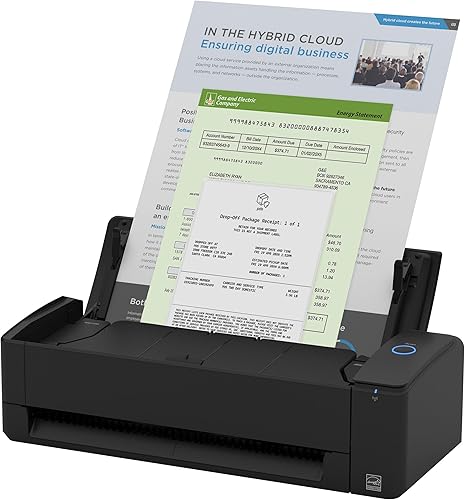
ScanSnap iX1300 Wireless or USB Double-Sided Color: Best for small desk spaces
- Up to 30 ppm duplex
- 20 sheet feeder
- USB and Wi-Fi
- Space saving design
A compact wireless duplex scanner that stays out of the way on a desk.
Pros
- Compact footprint
- 30 ppm duplex
- USB and Wi-Fi
Cons
- 20 sheet feeder only
- Heavier than mobile models
The ScanSnap iX1300 suits small desks where space is tight. Its design stays compact even while in use, which helps when a scanner shares a desk with a laptop and monitor.
It scans duplex at up to 30 ppm with a 20 sheet feeder. That pace suits daily small batches of mail, receipts and forms.
You can connect by USB or Wi-Fi and send scans to Mac, PC, mobile devices and cloud services. It can also scan without a computer and to Chromebook through the mobile app.
One touch operation starts scanning with automatic de skew, color optimization and blank page removal. You do not need driver setup for basic scans.
ScanSnap Home software manages documents, receipts, business cards and photos in one place. The Quick Menu lets you drag and drop a scan to a favorite app.
At 600 dpi and 48 bit color depth, receipts and cards capture in detail for later reference. Thick items and plastic cards are also listed as supported types.
The trade off is feeder size. A 20 sheet feeder means more reloads than 50 or 100 sheet models.
Pick it for space saving duplex scanning.
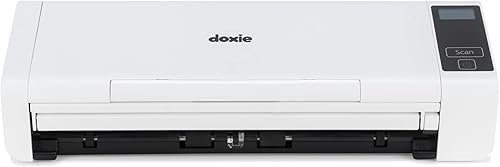
Doxie Pro: Best for simple home scanning
- Up to 22 ppm duplex
- 20 page collapsible feeder
- 600 dpi up to 11 x 17 in
- Direct feed for thick paper
A simple duplex scanner with smart software for Mac and PC.
Pros
- Collapsible feeder
- 11 x 17 in maximum size
- Direct feed slot
Cons
- Wired footprint only
- Feeder holds 20 pages
Doxie Pro suits home users who want simple software and two sided scanning without a complex setup. It scans duplex at up to 22 ppm with a 20 page collapsible feeder.
The feeder folds away when not in use, which helps in small home offices. A direct feed slot handles thick or delicate paper that should not go through the feeder.
It scans up to 11 x 17 inches at up to 600 dpi. That larger page size and resolution suit drawings, classwork and oversized documents.
Software imports, organizes and sends scans to apps such as Dropbox, Evernote, OneNote and iCloud. Doxie says no complicated drivers are needed, which suits non technical users.
OCR converts text into searchable PDFs with copyable text. Automatic cropping, rotation and contrast boost clean up each scan.
At just over 3 pounds and 11.75 by 4 by 3 inches, it fits a shelf or cabinet between jobs. 1 year warranty from Doxie also covers the main unit for home use.
The trade off is a wired footprint and a 20 page feeder limit. Pick it for simple home use, not for high volume office batches.
Canon imageFORMULA DR-C225 II Office Document Scanner: Best for upright office use
- Up to 25 ppm duplex
- 30 sheet automatic feeder
- Upright top feed design
- Three year warranty included
An upright office scanner with a 30 sheet feeder and cloud scanning.
Pros
- Upright space saving design
- 30 sheet feeder
- 25 ppm duplex
Cons
- At 6 pounds, not for travel
- Larger desk footprint
The Canon imageFORMULA DR-C225 II suits offices that want an upright scanner to save desk space. Its top feed and top eject design keeps the footprint narrow while you scan.
It scans both sides at up to 25 ppm in color, with a 30 sheet automatic feeder. One touch operation keeps the workflow simple for repeat jobs.
The scanner handles receipts, photos, business cards, plastic or embossed cards, reports, contracts and long documents. Thick and thin documents are both listed as supported types.
You can scan to the cloud through services such as Dropbox, Google Drive, OneDrive, Box, QuickBooks Online, Evernote and SharePoint. Output includes searchable PDF and JPG files.
Bundled software includes a business card organizer and tools to create, view, edit and convert PDF files. A TWAIN driver is also included for other imaging software.
A built in cable organization system helps keep a small desk tidy. Three year warranty with advanced exchange service also reduces downtime risk.
The trade off is weight at 6 pounds and a larger upright height. Pick it for a fixed office desk, not for travel.
ScanSnap iX2400 High-Speed One-Touch Button Color Document: Best for one touch batch scanning
- Up to 45 ppm duplex
- 100 sheet feeder
- One touch button
- USB connection
A high speed one touch scanner with a 100 sheet feeder for large batches.
Pros
- 100 sheet feeder
- 45 ppm speed
- One touch operation
Cons
- USB only, no Wi-Fi
- At 7.1 pounds, desktop only
The ScanSnap iX2400 suits buyers who want one touch scanning for large batches. Press one button and it scans, cleans up and organizes at up to 45 ppm, with a 100 sheet feeder.
That feeder size matches the fastest model in this group, so large piles of contracts and invoices need fewer reloads.
A stable USB connection suits a fixed desk where wireless is not needed. The one touch interface keeps daily scanning simple for shared workspaces.
It handles business cards, receipts, photos and envelopes. Automatic detection of document size and color depth, plus streak removal, blank page removal, de skew and rotation, improves consistency.
ScanSnap Home software brings documents, receipts, business cards and photos into one management system. The Quick Menu sends a scan to a favorite app with drag and drop.
At 600 dpi, saved pages keep fine print legible for archiving and search. 7.1 pounds of weight reflects a desktop build for repeated batch work.
The trade off is no Wi-Fi. Pick it for wired batch scanning at one desk.
How do these document scanner deals compare side by side?
The fastest batch models reach 45 ppm with 100 sheet feeders, while portable models trade feeder size for weight under 2 pounds. Compare sheet capacity and speed first, then decide if you need Wi-Fi.
| Product | Best for | Sheet capacity | Connection | Weight | Our score |
|---|---|---|---|---|---|
| Epson Workforce ES-50 Compact & Lightweight Mobile | light mobile scanning | 1 | USB | 9.44 ounces | 9.6 |
| Brother DS-640 Compact Mobile Document Scanner | compact travel use | 1 | USB | 9.5 | |
| ScanSnap iX2500 Wireless or USB High-Speed Document | large batch scanning | 100 | USB, Wi-Fi | 9.4 | |
| Canon imageFORMULA R10 | portable duplex scanning | 20 | USB | 9.2 | |
| Epson Workforce ES-400 II High-Speed Color Duplex | office stacks | 50 | USB | 9.2 | |
| ScanSnap iX1300 Wireless or USB Double-Sided Color | small desk spaces | 20 | USB, Wi-Fi | 9.2 | |
| Doxie Pro | simple home scanning | 20 | USB | 8.7 | |
| Canon imageFORMULA DR-C225 II Office Document Scanner | upright office use | 30 | USB | 8.2 | |
| ScanSnap iX2400 High-Speed One-Touch Button Color Document | one touch batch scanning | 100 | USB | 8.1 |
How we compared these scanners
We compared specs, features and buyer feedback against what a deal hunter wants. That means speed, feeder size, duplex scanning, connection options and OCR came first.
We checked each model's sheet capacity, pages per minute, media types and software. Portable models were judged on weight and USB power.
Desktop models were judged on feeder size and batch speed.
We also matched each scanner to a clear job. A 1 sheet scanner can be excellent for receipts and poor for a 50 page stack.
A 100 sheet feeder can be excellent for daily volume and poor for a suitcase.
Resolution mattered where listed, because 600 dpi models preserve small text better for archives. Color depth and sensor type were noted, but feeder reliability and duplex speed shaped most scores.
No model here is best at everything. The right deal depends on whether you scan one page or one hundred pages at a time.
What should you look for in a document scanner on sale?
A good deal starts with the job, not the discount. List your typical batch size before you compare prices.
How many pages do you scan at once?
If you scan 1 to 5 pages, a portable single sheet model saves money and space. The Epson ES-50 and Brother DS-640 fit this pattern.
If you scan 20 to 50 pages, choose a feeder model between 20 and 50 sheets. The Canon R10, Epson ES-400 II and ScanSnap iX1300 cover this range.
If you scan 100 pages or more, the ScanSnap iX2500 and iX2400 reduce reloads. For automatic feeders in more depth, see best document scanner with automatic feeder.
Do you need two sided scanning?
Duplex scanning captures both sides in one pass. It saves time on contracts, invoices and forms.
Buy duplex if most documents are two sided. Buy single sided only if your pages are mostly one sided and you want the lightest model.
Do you need wireless or USB?
USB power suits travel because the scanner runs from a laptop. USB data also suits a fixed desk with a stable connection.
Wi-Fi suits shared desks and scanning to a phone or cloud without a computer nearby. The ScanSnap iX2500 and iX1300 offer Wi-Fi here.
For cable options in more depth, see best document scanner with usb c.
Do you need searchable PDFs and OCR?
OCR turns scanned text into searchable and editable text. It helps with receipts, contracts and long documents you may need to search later.
Look for OCR in the software list, not just scanning resolution. The Epson ES-50 and ES-400 II list Nuance OCR or OCR searchable PDFs.
What resolution and daily volume should you plan for?
Higher resolution helps with small print, stamps and signatures that need closer inspection. Models here range from 300 dpi to 600 dpi, so match resolution to how closely you will check saved files.
Daily volume matters as much as peak speed. A feeder rated for steady daily use will handle repeat batches more reliably than a travel model pushed beyond its design.
Check maximum paper length and supported media before you buy. Cards, receipts and long forms each place different demands on the feed path.
Portable or desktop: which scanner fits your space?
Portable scanners weigh under 2 pounds and run from USB. Desktop scanners hold larger feeders and scan faster.
Choose portable if you scan at different locations or have little desk space. The Epson ES-50 at 9.44 ounces and Brother DS-640 at about 1.5 pounds are the lightest picks here.
Choose desktop if you scan daily batches at one desk. The ScanSnap iX2500 at 7.7 pounds and Epson ES-400 II at 3.7 kg are built for that pattern.
A digital scanner for documents guide helps you weigh size against speed before you choose.
How do you set up and care for a document scanner?
Setup usually means connecting USB or Wi-Fi, installing the scanning software and choosing a save folder. Canon R10 users can also read how to use canon document scanner for step by step guidance.
Run a test scan with a mixed batch. Check that both sides capture, text stays readable and files save to the right folder or cloud service.
Clean the paper path with the method in your manual. Dust and paper residue can cause streaks and misfeeds over time.
Store feeder models with the feeder closed or open as the maker directs. Keep portable models in a case or bag where the feed slot stays clean.
Replace or clean rollers only as directed for your model. Do not force thick cards through a feeder when a direct feed slot is available.
Is a document scanner better than a printer scanner for paper records?
A dedicated scanner is faster for batches and better at mixed paper types. Printer scanners often suit occasional single pages.
If you print a lot and scan rarely, a printer with a scanner may save space. If you scan often, a dedicated model will save time.
For printed documents, also consider Is Toner Better Than Ink for Text Documents? when you plan a full paper workflow.
What about photos, books and oversized pages?
Document scanners handle photos in some cases, but photo paper needs care. The Doxie Pro lists photos and the Canon DR-C225 II lists photos and thick paper.
For photo focused scanning, compare best portable scanner for photos before you buy a document model for that job.
For bound books, a document scanner may not be the right tool. See automatic book scanner for that specific use.
For long pages, check the maximum document length. The Epson ES-50 and Brother DS-640 list up to 72 inches, which covers unusually long forms.
Verdict: which document scanner deal should you buy?
Buy the Epson Workforce ES-50 for light mobile scanning, the ScanSnap iX2500 for large batches and the Brother DS-640 for compact travel. Those three cover most buyers in this group.
Pick the Canon R10 if you want portable duplex scanning. Pick the Epson ES-400 II if you want a 50 sheet office feeder.
Pick the ScanSnap iX1300 if desk space is tight.
Revisit your batch size one last time. The best document scanner on sale is the one whose feeder, speed and connections match the pages you scan every week.
Our top 3 picks at a glance
-
1
Best for light mobile scanning
Epson Workforce ES-50 Compact & Lightweight Mobile
9.6/10 our score
See it on Amazon -
2
Best for compact travel use
Brother DS-640 Compact Mobile Document Scanner
9.5/10 our score
See it on Amazon -
3
Best for large batch scanning
ScanSnap iX2500 Wireless or USB High-Speed Document
9.4/10 our score
See it on Amazon
Frequently asked questions
What is the best document scanner on sale for most people?
The Epson Workforce ES-50 suits most light users because it is USB powered, weighs 9.44 ounces and scans a single page in 5.5 seconds. Choose a feeder model such as the ScanSnap iX2500 if you scan stacks often.
Should I buy a portable scanner or a feeder scanner?
Buy a portable single sheet scanner if you mostly scan receipts, IDs and a few pages away from your desk. Buy a feeder scanner if you scan piles of two sided documents at home or in the office.
What speed matters for a document scanner?
Pages per minute matters most for batches. A 20 sheet feeder at 25 ppm clears a small stack in about a minute, while 45 ppm models suit larger daily loads.
Do these scanners make searchable PDFs?
Several models here include OCR for searchable PDFs and editable files. The Epson ES-50 and ES-400 II list OCR, and Canon models list searchable PDF output.
Can I scan cards and receipts with these models?
Yes. The Brother DS-640, Epson ES-50 and Canon R10 list receipts, business cards and plastic or ID cards as supported media types.