7 Best Printers for Duplex Printing (November 2026)
The best printers for duplex printing include the Brother DCP-L2640DW Wireless Compact Monochrome Multi-Function Printer for fast small-office documents, the HP LaserJet Pro 3101sdw for high-volume black-and-white work, and the Canon PIXMA TS6520 Wireless Color Inkjet Printer for compact color printing.
On this page (3 sections)
The best printer for duplex printing for most small offices is the Brother DCP-L2640DW. It combines automatic 2-sided printing with fast monochrome laser output, scanning and copying.
That mix matters because duplex printing is rarely the only job in an office. A printer that can also scan a stack, copy a form and connect from several devices handles a normal workday with fewer bottlenecks.
It connects through dual-band wireless, Ethernet and USB. Those options suit a single desk with one computer and a small team sharing a network connection.
Color inkjet models make more sense for homes, schoolwork and photos. They can print color documents and images on both sides, which a monochrome laser printer cannot do.
The Epson EcoTank ET-2803 is the exception because it uses simplex printing. It can still make 2-sided documents, but you handle the second side yourself.
If you mainly print text, reports and forms, speed and paper capacity often matter more than color. If you print photos or school projects in color, an inkjet is usually the better fit.
Some models print both sides automatically but still scan one side at a time. Check the feeder details if scanning is part of your routine.
If you are comparing multifunction features beyond duplexing, use this all in one printer comparison to check scanning, copying, connection options and paper handling.
Compare feeder size, tray capacity and media size before you decide. Those details shape how a printer feels for daily batches.
Our picks at a glance
-
1
 Best for fast small-office documents
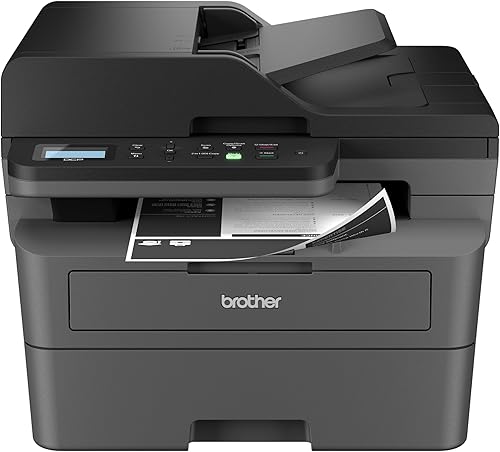
Brother DCP-L2640DW Wireless Compact Monochrome Multi-Function Printer
9.6/10 our score
See it on Amazon -
2

-
3
 Best for compact color printing
Canon PIXMA TS6520 Wireless Color Inkjet Printer
9.5/10 our score
See it on Amazon
- 4
 Check it
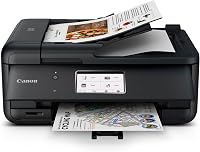
Canon PIXMA TR7120 Wireless Color Inkjet Printer
Best for color documents with an ADF - 5
 Check it
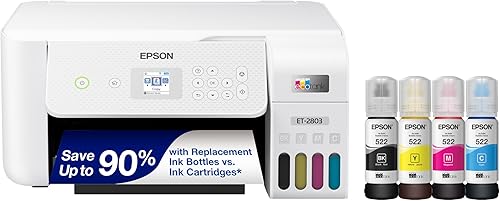
Epson EcoTank ET-2803 Wireless Color All-in-One Supertank
Best for frequent color printing - 6
 Check it
HP Envy 6155 Wireless All-in-One Color Inkjet Printer
Best for everyday home color work - 7
 Check it
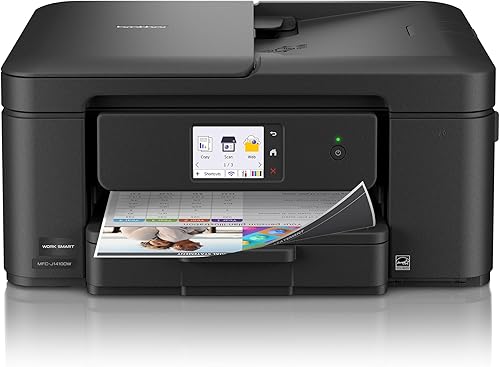
Brother Work Smart 1410 Wireless Color Inkjet
Best for a small office with an ADF
The best printers for duplex printing
The Brother DCP-L2640DW is the strongest overall choice for fast 2-sided documents, while the HP LaserJet Pro 3101sdw is close behind. Both suit regular office work rather than occasional home use.
Color buyers should compare the Canon PIXMA TS6520, Canon PIXMA TR7120, HP Envy 6155 and Brother Work Smart 1410 by feeder needs, media size and speed. The TS6520 focuses on a compact home setup, while the TR7120 adds an automatic document feeder for multi-page scanning and copying.
The HP Envy 6155 keeps everyday home color work simple with a touchscreen and a 100-sheet tray. The Brother Work Smart 1410 adds a 150-sheet tray and a 20-sheet feeder for a small office desk.
Our score weighs specs, features and buyer feedback against what you are shopping for. It is not a lab test and does not replace checking exact limits for your own documents.
Start with print type, as monochrome laser models target fast text output and color inkjet models target documents, schoolwork and photos. Then check paper handling, since automatic duplex printing turns the second side while an ADF feeds a stack for scanning or copying.
Also check maximum page size, as some models stop at letter size while others accept legal-size media up to 8.5 x 14 in. Check physical size too, because a taller printer with a feeder needs more desk room than a low-profile home model.
The right pick is the one whose limits you will not hit in a normal week. Speed matters for long batches, but feeder size, tray capacity and media size matter just as much day to day.
| Product | Best for | Print type | Speed | Connections | Our score |
|---|---|---|---|---|---|
| Brother DCP-L2640DW Wireless Compact Monochrome Multi-Function Printer | fast small-office documents | Monochrome laser | Up to 36 black-and-white pages per minute | Dual-band wireless, Ethernet and USB | 9.6 |
| HP LaserJet Pro 3101sdw | high-volume black-and-white work | Monochrome laser all-in-one | Up to 35 black-and-white pages per minute | 9.6 | |
| Canon PIXMA TS6520 Wireless Color Inkjet Printer | compact color printing | Color inkjet all-in-one | 14 black-and-white, 9 color pages per minute | 9.5 | |
| Canon PIXMA TR7120 Wireless Color Inkjet Printer | color documents with an ADF | Color inkjet all-in-one | 14 black-and-white, 9 color pages per minute | 9.2 | |
| Epson EcoTank ET-2803 Wireless Color All-in-One Supertank | frequent color printing | Color inkjet all-in-one | 9.2 | ||
| HP Envy 6155 Wireless All-in-One Color Inkjet Printer | everyday home color work | Color inkjet all-in-one | 10 black-and-white, 7 color pages per minute | 8.8 | |
| Brother Work Smart 1410 Wireless Color Inkjet | a small office with an ADF | Color inkjet all-in-one | 16 black-and-white, 9 color pages per minute | 8.7 |
Brother DCP-L2640DW Wireless Compact Monochrome Multi-Function Printer: Best for fast small-office documents
- Automatic duplex printing
- Up to 36 black-and-white pages per minute
- 50-page automatic document feeder
- 250-sheet paper tray
Fast black-and-white printing, automatic duplexing and a 50-page feeder make this a strong fit for small offices handling regular document batches.
Pros
- Fastest stated print speed here
- Automatic duplex printing
- Scanning and copying
Cons
- Black-and-white printing only
- Uses toner rather than refillable ink tanks
The Brother DCP-L2640DW is the best printer for duplex printing when your main work is black-and-white documents. Its automatic duplex function handles both sides of a page, while the stated speed reaches 36 pages per minute.
That speed suits reports, invoices, forms and other text-heavy work where pages stack up. For a small office, it means a long document is less likely to keep you waiting beside the printer.
A 50-page automatic document feeder helps with multi-page scanning and copying. You can load a stack and let the machine feed it instead of lifting a scanner lid for every page.
The 250-sheet paper tray also means fewer refills during regular office work. That helps when you print several batches in a row or share the printer with other people.
The compact multifunction design combines printing, scanning and copying in one footprint. It suits a desk that needs to do more than one job without taking up the whole work area.
You can connect through dual-band wireless, Ethernet or USB. That gives you a wired option for a fixed computer, a network option for a shared office and a wireless option for laptops and phones.
The Brother Mobile Connect app supports printing, scanning and printer management from a mobile device. It can also help you order supplies and track toner use before you run out.
This is a monochrome printer, so choose it for text work rather than color photos. It uses Brother TN830 or TN830XL toner, and Toner Save Mode can help extend cartridge life.
Automatic duplex printing also reduces paper waste compared with single-sided printing. For a busy office, that saving adds up across contracts, statements and internal reports.
HP LaserJet Pro 3101sdw: Best for high-volume black-and-white work
- Automatic 2-sided printing
- Up to 35 black-and-white pages per minute
- 250-sheet input tray
- 50-sheet automatic document feeder
The HP LaserJet Pro 3101sdw is built around fast black-and-white office work, with automatic duplexing, scanning, copying and a large input tray.
Pros
- Fast laser output
- 250-sheet input tray
- Automatic duplex printing
Cons
- Black-and-white printing only
- Cartridge use is limited to HP chips or circuitry
The HP LaserJet Pro 3101sdw is another strong choice for fast 2-sided office documents. It prints black and white pages at up to 35 pages per minute, just behind the Brother DCP-L2640DW.
That pace suits a small team printing reports and forms through the day. It helps keep a shared printer from becoming a bottleneck when several people send jobs at once.
Automatic duplex printing, a 250-sheet input tray and a 50-sheet automatic document feeder support larger jobs. Together they reduce stops to refill paper or feed pages by hand.
The all-in-one design also scans and copies, which fits an office that needs to file signed pages and copy forms from one machine. Its maximum media size is 8.5 x 14 in, so it also handles legal-size documents.
Ethernet and USB sit alongside wireless printing from laptops, PCs and smartphones. A wired network connection suits a shared office, while USB gives a direct option for a single computer.
This model is monochrome, so it targets text and documents rather than color images. Its cartridges must have HP chips or circuitry, so keep that supply limit in mind before choosing it.
Canon PIXMA TS6520 Wireless Color Inkjet Printer: Best for compact color printing
- Automatic duplex printing
- Color printing and photo support
- 1.42 in OLED display
- Dual-band Wi-Fi
A compact color all-in-one with automatic 2-sided printing, scanning, copying and mobile printing for home users and hybrid workers.
Pros
- Small 6.7 in height
- Automatic duplex printing
- Prints documents and photos
Cons
- No automatic document feeder
- Slower than the laser models
The Canon PIXMA TS6520 is the best printer for duplex printing when you want a compact color all-in-one for everyday home use. Automatic 2-sided printing works alongside color printing, scanning and copying.
Its stated speed is 14 black-and-white pages per minute and 9 color pages per minute. That is slower than the laser models, but it is aimed at home documents, schoolwork and photos rather than office batches.
A 1.42 in OLED display shows printer status and settings without taking much space. You can check ink levels and job status at a glance, which helps when you print from another room.
The TS6520 measures 14.8 in deep, 14 in wide and 6.7 in high. That low height makes it easier to fit under a shelf or on a desk where vertical space is limited.
It supports documents and photos up to 8.5 x 11 in, with or without borders. That covers standard homework, recipes, letters and common photo prints for home use.
It offers dual-band Wi-Fi for mobile printing. You can print from a phone or tablet with the Canon PRINT app, Apple AirPrint or Mopria Print Service.
There is no automatic document feeder, so it suits occasional scanning and copying better than large multi-page batches. If you scan contracts or copy stacks often, that missing feeder will be felt quickly.
Choose the Canon PIXMA TR7120 if an ADF matters more than the smaller height. Otherwise, the TS6520 is the cleaner pick for a compact home setup.
For care, keep the printer on a stable surface and print regularly enough to keep the ink flowing. Use the duplex setting in the print dialog, and check the preview so pages come out in the right order.
Canon PIXMA TR7120 Wireless Color Inkjet Printer: Best for color documents with an ADF
- Automatic duplex printing
- Automatic document feeder
- Legal-size media support
- 1.42 in OLED display
The TR7120 adds an automatic document feeder to automatic 2-sided color printing, making it useful for multi-page scanning and copying.
Pros
- ADF for multi-page work
- Automatic duplex printing
- Supports legal-size media
Cons
- Slower than the laser picks
- Larger than the TS6520
The Canon PIXMA TR7120 is the better color choice when you need automatic duplex printing and an automatic document feeder. The feeder helps with multi-page scanning and copying, while the printer handles color documents and photos.
Its speed reaches 14 black-and-white pages per minute and 9 color pages per minute. The 100-sheet capacity is suited to home and light hybrid-office work.
The TR7120 supports media up to legal size, or 8.5 x 14 in. Its 1.42 in OLED display and dual-band Wi-Fi keep common print, scan and copy controls close at hand.
At 14.8 in deep, 14 in wide and 8.2 in high, it is taller than the TS6520. Pick it when the ADF will save more time than the extra cabinet height costs.
For duplex scanning rather than only duplex printing, compare these best printers with duplex scanning.
Epson EcoTank ET-2803 Wireless Color All-in-One Supertank: Best for frequent color printing
- Refillable ink tanks
- Up to 4,500 black pages per replacement set
- Up to 7,500 color pages per replacement set
- Wireless and mobile printing
The ET-2803 is a color tank printer for regular printing, but it does not provide automatic duplex printing, so 2-sided pages require manual handling.
Pros
- Refillable tank design
- Color scanning and copying
- Large stated color yield
Cons
- No automatic duplex printing
- Slowest stated color speed here
The Epson EcoTank ET-2803 suits regular color printing when refillable tanks matter more than automatic duplexing. It uses a cartridge-free tank design and supports scanning, copying, wireless printing and mobile printing.
Epson states up to 4,500 black pages and 7,500 color pages per replacement ink set. That large yield is the main reason to choose it for frequent home printing.
The included ink is described as enough for up to 2 years based on roughly 125 pages per month. For a student or home office that prints weekly, that reduces how often you need to buy ink.
This model uses simplex printing, so it does not automatically print both sides. You can still make 2-sided documents by printing one side, reloading the pages and starting the second side in the correct orientation.
That manual step is the key trade-off. Reloading long reports slows you down and makes mistakes more likely.
For a few pages at a time, the manual method may be easy enough. It works best for short documents where you can track the stack and check orientation.
The ET-2803 measures 22.8 in deep, 14.8 in wide and 10 in high. Check your desk depth before you buy, as it needs room for the paper path as well as the body.
It is a practical color tank option for regular home printing, but automatic duplex buyers should choose another model here. The tank system saves on ink over time, while duplex models save time on every 2-sided job.
For daily use, keep the ink levels visible and refill with the EcoFit bottles when needed. Use the Epson Smart Panel app or AirPrint for mobile printing, and set paper guides to the size you use most.
HP Envy 6155 Wireless All-in-One Color Inkjet Printer: Best for everyday home color work
- Automatic 2-sided printing
- 2.4 in color touchscreen
- 100-sheet input tray
- Color printing, scanning and copying
The HP Envy 6155 keeps duplex color printing simple for home documents, homework and borderless photos, with a touchscreen and 100-sheet tray.
Pros
- Automatic duplex printing
- Color touchscreen
- Print, scan and copy functions
Cons
- Slower than the other duplex color picks
- Limited to letter-size media
The HP Envy 6155 is a home-focused color printer with automatic 2-sided printing, scanning and copying. It suits homework, everyday color documents and borderless photos more than large office batches.
Its stated speed is 10 black-and-white pages per minute and 7 color pages per minute. A 100-sheet tray handles common home jobs, while the 2.4 in color touchscreen provides direct control.
The printer supports letter-size media up to 8.5 x 11 in. Wireless and mobile printing work with the HP app, and the printer uses a dual-band Wi-Fi connection.
It is slower than the Canon color models and the Brother Work Smart 1410 on stated black-and-white speed. Choose it if the touchscreen and simple home color workflow matter more than a higher page rate.
For a closer look at color photo choices, see Which Printer Is Better for Printing Photos? and Why Is Inkjet Better for Photo Printing?.
Brother Work Smart 1410 Wireless Color Inkjet: Best for a small office with an ADF
- Automatic duplex printing
- 20-sheet single-sided automatic document feeder
- 150-sheet paper tray
- 2.7 in color touchscreen
The Work Smart 1410 combines automatic duplex printing with a feeder, touchscreen and 150-sheet tray for home offices and small offices.
Pros
- Automatic duplex printing
- ADF and 150-sheet tray
- Fastest stated inkjet black-and-white speed
Cons
- ADF is single-sided
- Color speed is slower than laser printing
The Brother Work Smart 1410 is a useful duplex choice for a home office or small office that needs an ADF and a larger paper tray. It prints, copies and scans, with automatic 2-sided printing for documents.
Its stated speed reaches 16 black-and-white pages per minute and 9 color pages per minute. That makes it the fastest stated inkjet here for black-and-white output, though still behind the laser models.
The 20-sheet ADF is single-sided, so it feeds a stack but does not scan both sides of each sheet. You must turn over double-sided originals yourself.
A 150-sheet paper tray reduces refill work compared with smaller home trays. That helps when you print several documents in a day or share the printer with family.
The 2.7 in color touchscreen connects with cloud apps. You can print from and scan to Google Drive, Dropbox, Box and OneDrive without using a computer first.
The Brother Mobile Connect app supports mobile printing, copying and scanning. It also helps you monitor ink usage before supplies run low.
The printer accepts media up to 8.5 x 14 in. That extra length helps with larger forms, tables and legal-size pages that letter-only models cannot handle.
Choose this model when you need color, a feeder and a larger tray in one compact machine. The laser picks remain better for frequent text-heavy batches.
How to choose the best printer for duplex printing
The best printer for duplex printing depends first on whether you need black-and-white documents or color output. Monochrome laser models are the strongest fit for fast office pages, while inkjets cover color documents and photos.
What does automatic duplex printing mean?
Automatic duplex printing means the printer handles both sides without requiring you to remove and reload each page. Read our guide to what auto duplex means on a printer before comparing manual and automatic workflows.
With manual duplex printing, you print the first side, remove the pages, turn the stack and reload them. That is slower and easier to get wrong, especially with a long document.
Automatic duplexing avoids that reload step. The printer feeds the sheet through again or holds it while the second side is printed, so the job finishes without your hands on the stack.
Automatic duplexing does not always mean automatic duplex scanning. A printer can print on both sides while its scanner still needs one side at a time, as with the Brother Work Smart 1410.
That matters if you scan as much as you print. A larger ADF can feed many pages, but a single-sided feeder still means turning over double-sided originals yourself.
Before you buy, check whether you need duplex printing, duplex scanning or both. Many buyers only need 2-sided printing, while others scan signed forms printed on both sides.
Also check tray and feeder sizes, maximum media size and physical footprint. A printer with automatic duplexing and a small tray may still need frequent refills during a busy day.
Used well, automatic duplex printing saves paper and keeps long jobs moving. It works best when settings match the paper size and the preview shows the expected page order.
Should you choose laser or inkjet for duplex printing?
Choose a monochrome laser if you print many reports, forms or other text documents. The Brother DCP-L2640DW and HP LaserJet Pro 3101sdw have the highest stated speeds here, at 36 and 35 black-and-white pages per minute.
Choose an inkjet if color documents and photos are part of the job. The Canon PIXMA TS6520 and TR7120 offer automatic duplex printing with color output, while the HP Envy 6155 focuses on everyday home color work.
How much paper capacity do you need?
A larger tray helps when you print often because you reload less frequently. The Brother DCP-L2640DW and HP LaserJet Pro 3101sdw each hold 250 sheets, while the Brother Work Smart 1410 holds 150 sheets and the Canon PIXMA TR7120 holds 100.
Match the tray to your normal print batches rather than choosing by capacity alone. A smaller tray can be enough for occasional home work if you don't print long documents every day.
What should you check before setting up a duplex printer?
Confirm the printer's dimensions, connection method and paper type before placing it. Leave room to open trays, load paper and reach the control panel.
Use the correct paper orientation for automatic 2-sided printing, then check the preview for page order and blank pages. Print a short sample first when the document is important.
A printer stand can also help place a compact model at a comfortable height. See these best desktop printer stands if your desk has limited space.
Best printer for duplex printing: final decision
The Brother DCP-L2640DW is the best printer for duplex printing when you need fast black-and-white pages, scanning, copying and a 50-page feeder. It is the simplest choice for a small office that prints text all day.
Pick the HP LaserJet Pro 3101sdw for a similar laser workflow with legal-size media support. It also has automatic duplex printing, a 250-sheet tray and a 50-sheet feeder.
For color, choose the Canon PIXMA TS6520 for a compact setup. Its low height and color printing suit a home desk, schoolwork and photos.
Choose the Canon PIXMA TR7120 when an automatic document feeder matters. It adds multi-page scanning and copying to automatic 2-sided color printing.
Choose the Epson EcoTank ET-2803 only if refillable tanks are more important than automatic 2-sided printing. It is built for regular color printing, but you will handle the second side yourself.
For everyday home color work, the HP Envy 6155 keeps things simple with a touchscreen and a 100-sheet tray. The Brother Work Smart 1410 suits buyers who want a feeder, a 150-sheet tray and legal-size media in a color model.
Before you decide, match the printer to your normal workload. Long office batches point to laser, while color documents and photos point to inkjet.
Check the feeder if you scan often, and check the tray if you print often. Also confirm size and connections before you order, so the printer fits your desk and connects the way you work.
Our top 3 picks at a glance
-
1
Best for fast small-office documents
Brother DCP-L2640DW Wireless Compact Monochrome Multi-Function Printer
9.6/10 our score
See it on Amazon -
2
-
3
Best for compact color printing
Canon PIXMA TS6520 Wireless Color Inkjet Printer
9.5/10 our score
See it on Amazon
Frequently asked questions
What is the best printer for duplex printing?
The Brother DCP-L2640DW is the best printer for duplex printing for many small offices because it has automatic 2-sided printing, a 36-page-per-minute black-and-white speed, a 50-page feeder and a 250-sheet tray.
Choose a color inkjet instead if photos or color documents matter more than speed.
Is automatic duplex printing better than manual duplex printing?
Automatic duplex printing is easier because the printer turns or feeds the paper for the second side. Manual duplex printing requires you to reload pages and select the correct settings.
The Epson EcoTank ET-2803 uses simplex printing, so it needs manual handling for 2-sided documents.
Do duplex printers print color on both sides?
Yes, a color printer with automatic duplex printing can print color on both sides when the print settings and paper support that job. The Canon PIXMA TS6520, Canon PIXMA TR7120, HP Envy 6155 and Brother Work Smart 1410 are color duplex options in this group.
Laser models here print black and white.
Does duplex printing save paper?
Yes. Printing on both sides can reduce the number of sheets used for multi-page documents, though the exact saving depends on your document layout and whether pages contain blank or intentionally single-sided sections.
Check the print preview before starting a large job.