5 Best Copier Fax Scan Printer for Business (November 2026)
The best copier fax scan printers for business include the Brother MFC-L2820DW Wireless Compact Monochrome All-in-One Laser for compact fax offices, the Brother DCP-L2640DW Wireless Compact Monochrome Multi-Function Printer for fast monochrome documents, and the Canon PIXMA TR8620a for home office color and fax.
On this page (10 sections)
- The best copier fax scan printer for business needs
- How we chose these business all-in-one printers
- 1. Brother MFC-L2820DW: Best for compact fax offices
- 2. Brother DCP-L2640DW: Best for fast monochrome documents
- 3. Canon PIXMA TR8620a: Best for home office color and fax
- 4. HP OfficeJet Pro 8135: Best for color home-office workflows
- 5. Brother MFC-L8930CDW: Best for high-volume color teams
- Which business printer is best for fax, scanning and copying?
- How to choose a copier fax scan printer for business
- Verdict: which all-in-one business printer should you choose?
The best copier fax scan printer for business is the Brother MFC-L2820DW when you need compact monochrome printing, copying, scanning and faxing in one machine. The Canon PIXMA TR8620a and HP OfficeJet Pro 8135 add color, while the Brother MFC-L8930CDW targets faster color work without fax.
A business all-in-one printer should match your document flow, not just its function list. Fax matters for some offices, while others need fast duplex pages, color reports, a large paper tray or a bigger auto document feeder.
If you are comparing several types of multifunction machines, start with our all in one printer comparison. For a narrower fax-focused shortlist, see our guide to the best printer with fax.
Our picks at a glance
-
1
 Best for compact fax offices
Brother MFC-L2820DW Wireless Compact Monochrome All-in-One Laser
9.6/10 our score
See it on Amazon -
2
 Best for fast monochrome documents
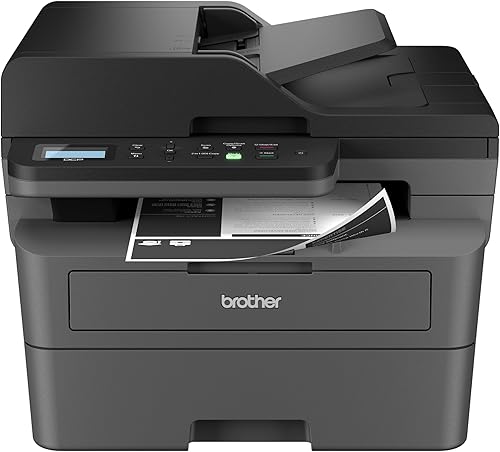
Brother DCP-L2640DW Wireless Compact Monochrome Multi-Function Printer
9.6/10 our score
See it on Amazon -
3

- 4
 Check it
HP OfficeJet Pro 8135 Wireless All-in-One Color
Best for color home-office workflows - 5
 Check it
Brother MFC-L8930CDW Business Color Laser All-in-One Printer
Best for high-volume color teams
The best copier fax scan printer for business needs
The Brother MFC-L2820DW is the best overall fit because it combines all 4 core functions, fast black-and-white printing and a compact footprint.
It prints, copies, scans and faxes, which suits a small office that wants one machine for routine document work.
The 50-page auto document feeder helps when a packet needs copying, scanning or faxing without loading each sheet by hand.
Automatic duplex printing supports two-sided documents and reduces manual page turning for reports and forms.
Dual-band wireless, Ethernet and USB give the office several ways to connect laptops, PCs, smartphones and tablets.
The 2.7 inch touchscreen and Brother Mobile Connect app add day to day convenience for cloud apps and mobile printing.
The other picks are better when you need color, do not need fax or expect heavier scanning.
The Canon PIXMA TR8620a and HP OfficeJet Pro 8135 add color with fax, while matching different home office workflows.
The Brother DCP-L2640DW suits fast monochrome work without fax, and the Brother MFC-L8930CDW suits larger color teams.
Our score weighs specs, features and buyer feedback against what you are shopping for.
The products below are arranged by score, with each badge tied to a distinct office use.
That order helps you compare a compact fax office against color or high volume scanning needs before you narrow the choice.
How we chose these business all-in-one printers
We compared the stated print functions, speed, paper handling, automatic document feeder size, connections and duplex support.
Print speed matters in daily use when several people queue documents, while feeder size matters when packets are scanned or copied.
Paper capacity and duplex support affect how often staff stop to refill paper or turn pages by hand.
We also looked at the trade-off between monochrome laser, color inkjet and color laser designs.
Monochrome laser suits text heavy offices that print mainly in black and white, while color inkjet suits smaller home offices.
A color laser suits teams that need faster color output and heavier scanning, but it asks for more space.
Fax is a key filter for this topic.
A printer can copy, scan and print well but still be the wrong choice if your office sends documents by fax.
That is why the fax models sit apart from the print, copy and scan only options in this list.
Color is another major decision.
Read [Do All Laser Printers Print in Color?
What to Know](/do-all-laser-printers-print-in-color/) before choosing between a monochrome laser, color inkjet or color laser.
Checking color needs early saves time, because toner models and ink models also differ in speed, size and care.
| Product | Best for | Functions | Print speed | Connections | Our score |
|---|---|---|---|---|---|
| Brother MFC-L2820DW Wireless Compact Monochrome All-in-One Laser | compact fax offices | Print, copy, scan and fax | Up to 36 ppm | Dual-band wireless, Ethernet and USB | 9.6 |
| Brother DCP-L2640DW Wireless Compact Monochrome Multi-Function Printer | fast monochrome documents | Print, copy and scan | Up to 36 ppm | Dual-band wireless, Ethernet and USB | 9.6 |
| Canon PIXMA TR8620a | home office color and fax | Print, copy, scan and fax | 15 ipm black, 10 ipm color | 9.5 | |
| HP OfficeJet Pro 8135 Wireless All-in-One Color | color home-office workflows | Print, scan, copy and fax | Up to 20 ppm black, 10 ppm color | 9.0 | |
| Brother MFC-L8930CDW Business Color Laser All-in-One Printer | high-volume color teams | Print, scan and copy | Up to 33 ppm black and color | Dual-band wireless and Gigabit Ethernet | 8.7 |
1. Brother MFC-L2820DW: Best for compact fax offices
Brother MFC-L2820DW Wireless Compact Monochrome All-in-One Laser: Best for compact fax offices
- Print, copy, scan and fax
- Up to 36 ppm
- 50-page auto document feeder
- Automatic duplex printing
This compact monochrome laser combines the 4 core office functions with automatic duplex printing, a 50-page auto document feeder and flexible connections.
Pros
- Includes fax
- 50-page auto document feeder
- Automatic duplex printing
Cons
- Black-and-white printing only
- Larger than the 3-in-1 DCP-L2640DW in weight
The Brother MFC-L2820DW is the strongest match for a small office that needs a 4-in-1 monochrome laser. It prints, copies, scans and faxes, so you do not need a separate fax machine for routine document work.
Its stated print speed reaches up to 36 ppm, while the automatic document feeder holds 50 pages for multi-page copy, scan and fax jobs. That feeder matters when you are processing a packet instead of placing each sheet on the glass.
Automatic duplex printing helps reduce manual page turning for two-sided documents. The printer also supports dual-band wireless at 2.4GHz and 5GHz, Ethernet and USB, giving you several ways to connect laptops, PCs, smartphones and tablets.
The 2.7-inch touchscreen supports print-from and scan-to workflows with cloud apps such as Google Drive, Dropbox, Evernote and OneNote. The Brother Mobile Connect app can also help manage printing, scanning and toner usage from a mobile device.
This model uses black toner and supports TN830, TN830V and TN830XL cartridges. Its compact dimensions are 15.7 in deep, 16.1 in wide and 12.5 in high, with a listed weight of 22.5 lb.
Choose it for a compact office where fax is required and most documents are black and white. It is less suitable when color pages, photos or color marketing material are central to the work.
2. Brother DCP-L2640DW: Best for fast monochrome documents
Brother DCP-L2640DW Wireless Compact Monochrome Multi-Function Printer: Best for fast monochrome documents
- Print, copy and scan
- Up to 36 ppm
- 50-page auto document feeder
- Automatic duplex printing
The DCP-L2640DW is a compact 3-in-1 for businesses that need fast black-and-white output and do not need fax transmission.
Pros
- Fast monochrome printing
- 50-page auto document feeder
- 250-sheet paper tray
Cons
- Does not include fax
- Black-and-white printing only
The Brother DCP-L2640DW is the better choice when your business needs a fast 3-in-1 printer, copier and scanner but does not need fax. It keeps the compact monochrome laser format while reaching up to 36 ppm.
A 50-page automatic document feeder speeds up multi-page copying and scanning. Its 250-sheet paper tray also means fewer refill stops during regular document work, especially when several people share the machine.
The DCP-L2640DW supports automatic duplex printing, which helps with two-sided reports and internal documents. It connects through dual-band wireless, Ethernet or USB, and the Brother Mobile Connect app supports printing, scanning and printer management from mobile devices.
The printer uses black toner and supports TN830 and TN830XL cartridges. It measures 15.7 in deep, 16.1 in wide and 12.5 in high, so its footprint matches the MFC-L2820DW, although the listed weight is 25 lb.
The main trade-off is simple: it does not include fax. That makes it a practical office printer for teams that have moved fax work online or rarely transmit documents that way.
Pick it when fast black-and-white output and scanning matter more than fax. If fax is a firm requirement, the MFC-L2820DW is the closer fit.
3. Canon PIXMA TR8620a: Best for home office color and fax
Canon PIXMA TR8620a: Best for home office color and fax
- Wireless print, copy, scan and fax
- 15 ipm black and 10 ipm color
- 200-sheet capacity
- Automatic 2-sided printing
The Canon PIXMA TR8620a combines fax with color inkjet printing, automatic 2-sided printing and separate 100-sheet cassette and rear-feed capacity.
Pros
- Color printing and fax
- 200-sheet capacity
- Automatic 2-sided printing
Cons
- Slower than the monochrome laser picks
- USB is the listed hardware interface
The Canon PIXMA TR8620a is a color inkjet option for a home office or small business that needs print, copy, scan and fax functions. It prints at up to 15 ipm in black and 10 ipm in color.
Its 200-sheet capacity is split between a 100-sheet cassette and a 100-sheet rear feed. That layout gives you a way to keep one paper type in the cassette and load another through the rear feed when your work changes.
Automatic 2-sided printing supports duplex documents. The printer also includes an auto document feeder, a touchscreen, a Micro SD slot and wireless printing support for AirPrint and Android devices.
The Canon has a smaller listed height than the laser picks at 7.5 in, with dimensions of 13.8 in deep by 17.3 in wide. Its listed weight is 17.4 lb, making it one of the lighter options in this group.
Choose it when color output and fax are both important, but your office does not need the fastest monochrome speed. For heavy black-and-white document batches, the Brother laser models are better matched to the stated speeds.
For more color options, compare it with the best all in one color printer.
4. HP OfficeJet Pro 8135: Best for color home-office workflows
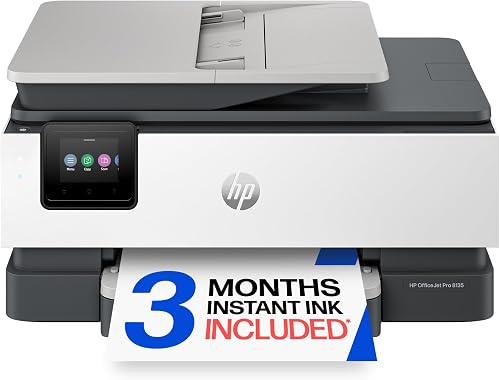
HP OfficeJet Pro 8135 Wireless All-in-One Color: Best for color home-office workflows
- Print, scan, copy and fax
- Up to 20 ppm black and 10 ppm color
- 225-sheet input tray
- Automatic 2-sided printing
The HP OfficeJet Pro 8135 brings fax, color output, an auto document feeder and a 225-sheet input tray to a home office or small business.
Pros
- Color printing and fax
- 225-sheet input tray
- 2.7-inch color touchscreen
Cons
- Ink cartridge policy limits compatibility
- Slower color speed than the Brother color laser
The HP OfficeJet Pro 8135 combines color inkjet printing with scanning, copying and faxing. It reaches up to 20 ppm in black and 10 ppm in color, which places it between the Canon and Brother color laser for the stated color speed.
A 225-sheet input tray supports regular office work, while the auto document feeder handles multi-page jobs. Automatic 2-sided printing is standard, and the 2.7-inch color touchscreen provides a larger control surface for routine tasks.
The HP app lets you print, scan, copy and fax from a smartphone. Dual-band Wi-Fi is designed to detect and resolve connection issues, and Ethernet and USB provide wired connection choices.
HP says the printer is made with more than 45% recycled plastic content. It also includes HP Wolf Essential Security features and HP AI formatting tools for removing unwanted content from emails and web pages before printing.
The cartridge policy is a buying factor. This printer is intended to work with cartridges using original HP chips or circuitry, and firmware updates maintain those measures.
Its listed dimensions are 13.29 in deep, 18.12 in wide and 9.17 in high, with a listed weight of 17.6 lb. Choose it when color documents, fax and a phone-based workflow matter more than laser toner.
See the other HP options in our guide to the best hp printer with fax.
5. Brother MFC-L8930CDW: Best for high-volume color teams
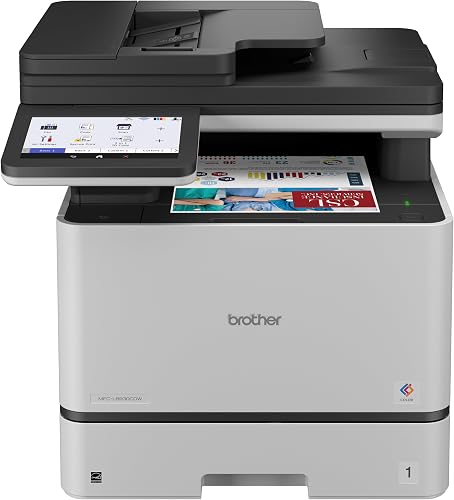
Brother MFC-L8930CDW Business Color Laser All-in-One Printer: Best for high-volume color teams
- Color laser printing, scanning and copying
- Up to 33 ppm
- 80-page auto document feeder
- Automatic duplex printing
This business color laser is built around fast color output, high-speed scanning, an 80-page auto document feeder and network security features.
Pros
- Fast color laser output
- 80-page auto document feeder
- Legal-size glass
Cons
- Does not include fax
- Heaviest and largest model here
The Brother MFC-L8930CDW is the most work-team-focused model here. It is a color laser all-in-one with automatic duplex printing, scanning and copying, but it does not include fax.
Its black and color print speeds reach up to 33 ppm. That makes it a stronger match than the inkjet options for teams that produce frequent color documents, reports and presentations.
The 80-page automatic document feeder supports larger multi-page scanning jobs than the 50-page feeders on the compact Brother models. The printer also has legal-size glass and supports two-sided scanning at up to 104 ipm.
Network options include dual-band wireless and Gigabit Ethernet. A 7-inch color touchscreen provides access to scan previews and up to 64 customized shortcuts, while the machine includes security features for devices, documents and networks.
The printer supports TN635 standard-yield, TN635XL high-yield and TN635XXL super-high-yield toner. It includes Brother Genuine standard-yield toner cartridges with stated yields of 3,000 black pages and 1,800 color pages.
This is the largest and heaviest pick, measuring 20.7 in deep, 16.1 in wide and 21.6 in high, with a listed weight of 71.2 lb. Plan a stable location before choosing it.
Pick it for a team that needs fast color laser printing and advanced scanning. Skip it if fax is essential or if your office has limited floor space.
Which business printer is best for fax, scanning and copying?
The Brother MFC-L2820DW is the best fit for a compact business that needs fax, scanning, copying and black-and-white laser printing. Its 50-page feeder, automatic duplex support and wireless, Ethernet and USB connections cover the main needs of a small office.
The Canon PIXMA TR8620a and HP OfficeJet Pro 8135 are better when color and fax belong in the same workflow. The Canon has a 200-sheet capacity, while the HP offers a 225-sheet input tray and a larger color touchscreen.
The DCP-L2640DW is the practical choice when fax is not needed. It keeps the compact Brother design and up to 36 ppm monochrome speed while focusing on printing, copying and scanning.
The Brother MFC-L8930CDW makes more sense for a larger team that needs fast color laser output and an 80-page feeder. Its size, weight and lack of fax make it a specialized office choice rather than the default pick.
How to choose a copier fax scan printer for business
Choose a copier fax scan printer for business by checking the functions you will use every week. Fax, automatic document feeding, duplex printing and color can each change which model is the right fit.
Do you need fax transmission?
Choose the Brother MFC-L2820DW, Canon PIXMA TR8620a or HP OfficeJet Pro 8135 if fax is a required function. The Brother DCP-L2640DW and Brother MFC-L8930CDW do not include fax, so they are better for offices with other document-sharing methods.
Is monochrome or color better for your office?
Choose monochrome laser when most of your pages are text, forms and internal documents. Choose color inkjet for color documents in a smaller home-office setup, or choose the Brother color laser when faster color output and team scanning matter.
How much does the auto document feeder matter?
A 50-page feeder is enough for many small office packets, while the Brother MFC-L8930CDW has an 80-page feeder for larger scanning jobs. An auto document feeder saves time because you can load multiple sheets instead of handling each page separately.
Which connection should you use?
Wireless helps place the printer where your office needs it, while Ethernet can suit a shared wired network. USB is useful for a direct connection to one computer, and the available connection choices differ by model.
How should you plan the printer's location?
Measure the available depth, width and height before ordering, then leave room for paper loading, cable access and document handling. The Brother MFC-L8930CDW needs much more space than the compact Brother monochrome models.
How do you control toner or ink use?
Use automatic duplex printing for documents that do not need one-sided pages. For the Brother monochrome printers, choose the listed TN830 family cartridges, while the HP OfficeJet Pro 8135 supports the listed HP 923 and HP 923e cartridge options.
For a separate business printing task, our guide to the best label printer for business can help when you need labels rather than standard office pages.
Verdict: which all-in-one business printer should you choose?
Choose the Brother MFC-L2820DW if you need the best balance of fax, scanning, copying, monochrome laser speed and compact size.
It is the closest match for a small office that needs all 4 functions and mostly black and white pages.
Choose the DCP-L2640DW if fax is not needed and fast monochrome printing, copying and scanning come first.
Its 50-page auto document feeder and 250-sheet paper tray suit regular office packets without the fax function.
Choose the Canon or HP if color faxing matters for a home office or small business.
The Canon PIXMA TR8620a offers color inkjet output with fax and a 200-sheet capacity split across two feeds.
The HP OfficeJet Pro 8135 offers color output with fax, a 225-sheet input tray and a 2.7 inch color touchscreen.
Choose the Brother MFC-L8930CDW for high-volume color laser work without fax.
Its 80-page auto document feeder, legal size glass and faster team scanning suit larger document batches.
Plan its location with care, because it is larger and heavier than the compact Brother monochrome models.
The best copier fax scan printer for business is the one that matches your document mix and available space.
Confirm the required functions first, then compare feeder capacity, speed, color needs, connections and toner or ink choices.
Also check cabinet size, paper loading room and whether wireless, Ethernet or USB fits your office layout.
A shortlist based on those points will make set-up simpler and reduce changes after the printer arrives.
Our top 3 picks at a glance
-
1
Best for compact fax offices
Brother MFC-L2820DW Wireless Compact Monochrome All-in-One Laser
9.6/10 our score
See it on Amazon -
2
Best for fast monochrome documents
Brother DCP-L2640DW Wireless Compact Monochrome Multi-Function Printer
9.6/10 our score
See it on Amazon -
3
Frequently asked questions
What is the best copier fax scan printer for business?
The Brother MFC-L2820DW is the strongest fit for a compact business that needs all 4 functions in one machine. It combines monochrome laser printing, copying, scanning and faxing with automatic duplex printing, a 50-page auto document feeder and wireless, Ethernet and USB connections.
Do all business all-in-one printers include fax?
No. The Brother MFC-L2820DW, Canon PIXMA TR8620a and HP OfficeJet Pro 8135 include fax.
The Brother DCP-L2640DW and Brother MFC-L8930CDW focus on printing, copying and scanning, so choose one of the fax models when fax transmission is part of your workflow.
Is laser or inkjet better for a business copier scanner fax printer?
Laser models suit businesses that mainly print black-and-white documents or need faster output. Inkjet models can add color at a smaller size, while a color laser such as the Brother MFC-L8930CDW suits teams that print color documents at higher speed.
What should a small business check before buying an all-in-one printer?
Check whether you need fax, color, automatic duplex printing, an auto document feeder and the right connection type. Then compare print speed, paper capacity, cabinet size and cartridge or toner options with the documents your business handles each week.