9 Best Printers for Mobile Notaries (November 2026)
The best printers for mobile notaries include the HP OfficeJet 250 Inkjet Mobile Printer for mobile notary paperwork, the KODAK Dock Plus 4x6 Photo Printer for 4x6 photo keepsakes, and the Brother DCP-L2640DW Wireless Compact Monochrome Multi-Function Printer for high-volume black-and-white work.
On this page (4 sections)
The best printer for mobile notary work is the HP OfficeJet 250, because it prints, scans and copies without a network and supports letter, legal and several smaller paper sizes.
Choose Brother for faster black-and-white office work, or Canon for portable color printing.
Mobile notaries need more than a small printer. The right choice must match the documents you handle, the paper sizes required for each assignment and the places where you work.
A signing can happen at a client home, an office, a library or a vehicle. That change of place affects power, connection and carrying weight as much as print speed.
We compared portable inkjet, laser, photo and thermal models. Our score weighs specs and features against mobile notary needs, including document size, scanning, copying, power, connection and carrying convenience.
Portability was not the only goal. A heavy printer can still suit a notary who returns to a home office or vehicle base each day.
A light printer can fail the job if it cannot use standard copy paper or cannot scan a signed page. Paper size therefore sits near the top of the list.
Letter is the starting point for most forms and contracts. Legal support adds flexibility when an assignment uses longer pages.
Smaller sizes can help with cards, photos and envelopes tied to related office tasks. Scanning and copying also matter because mobile work often needs a clean copy before or after signing.
A print-only model leaves that step to a phone or another device. Power matters too, since battery printing helps at a location with no free outlet.
Fast charging matters when the day is short. Connection also needs planning, as wireless printing without a router still requires the printer, phone and app to be set up and tested before the appointment.
Use this all in one printer comparison if scanning and copying are central to your work.
The models below split into clear groups. HP offers the most complete portable all-in-one package for mixed tasks.
Brother suits high-volume black-and-white work from a fixed base. Canon and Epson suit portable color output.
Gloryang, Rongta and Phomemo suit inkless thermal printing when thermal paper is acceptable. KODAK and KNAON fill narrow roles and should not be read as general contract printers.
Match the printer to the job first, then to the size of the bag or desk you can offer it.
Our picks at a glance
-
1
 Best for mobile notary paperwork
HP OfficeJet 250 Inkjet Mobile Printer
9.7/10 our score
See it on Amazon -
2

-
3
 Best for high-volume black-and-white work
Brother DCP-L2640DW Wireless Compact Monochrome Multi-Function Printer
9.6/10 our score
See it on Amazon
- 4
 Check it
Gloryang Inkless Portable Printer for Travel
Best for ink-free letter documents - 5
 Check it
Canon PIXMA TR160 Color Wireless Portable Printer
Best for portable color forms - 6
 Check it
Rongta Thermal Portable Printers Wireless for Travel
Best for simple thermal forms - 7
 Check it
KNAON Bluetooth Thermal Shipping Label Printer
Best for labels and small office tasks - 8
 Check it
Epson WorkForce WF-110 Wireless Color Mobile Portable
Best for rechargeable color printing - 9
 Check it
Phomemo M832D Touchscreen Portable Inkless Printer
Best for multi-size thermal paper
The best printer for mobile notary assignments
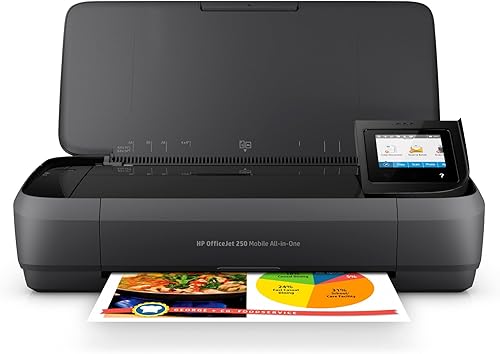
The HP OfficeJet 250 is the best overall printer for mobile notaries because it combines portable printing, scanning and copying with support for letter and legal paper.
The Brother DCP-L2640DW is better for a fixed office where speed and automatic duplexing matter more.
That contrast runs through the whole list.
One model is built for moving between locations with different documents.
The other is built for steady work where page count and handling time carry more weight.
Paper size helps show the difference.
HP covers letter and legal plus several smaller formats.
Brother covers steady office loads with a larger tray and a 50-page feeder.
Carrying weight also separates the two choices.
At 6.5 lb, the HP is easier to move between a car, backpack and briefcase.
At 25 lb, the Brother needs a planned desk or vehicle base.
Neither fact makes one model wrong for every notary.
The right pick depends on where most printing and scanning will happen.
If locations change all day, portability and all-in-one functions should lead.
If work returns to one desk, speed, duplexing and fewer refills should lead.
HP OfficeJet 250 Inkjet Mobile Printer: Best for mobile notary paperwork
- Print, scan and copy
- Wireless use without a router
- Letter and legal paper support
- 10-page automatic document feeder
The HP OfficeJet 250 combines printing, scanning and copying in a portable body. Its wireless setup and broad paper-size support fit mobile notaries who handle different documents at changing locations.
Pros
- Prints, scans and copies
- Supports legal paper
- Battery included
- 10-page automatic document feeder
Cons
- Manual duplex printing
- Uses ink cartridges
The HP OfficeJet 250 is the strongest all-around match for a mobile notary who may need to print, scan or copy at a signing location. Its wireless connection can work without a router, so you can connect a laptop, tablet or smartphone directly.
The letter and legal paper support matters because notary assignments may use more than one document format. It also supports statement, executive, card, photo and envelope sizes, giving you more flexibility for related office tasks.
The 10-page automatic document feeder helps with multipage scanning and copying. Its compact body fits in a car, backpack or briefcase, and the included battery supports work away from a wall outlet.
HP Fast Charge can recharge the printer within 90 minutes while it is turned off. You can also charge it from an AC power source at home, in a car or in an office.
The trade-off is manual duplex printing and ink cartridge supply management. Pick this model when portability and all-in-one functions are more important than high-volume speed.
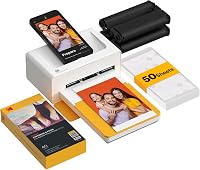
KODAK Dock Plus 4x6 Photo Printer: Best for 4x6 photo keepsakes
- 4x6-inch photo printing
- Bluetooth smartphone connection
- 4PASS dye sublimation printing
- 50 sheets
The KODAK Dock Plus is a specialized 4x6 photo printer for a notary who also needs photo keepsakes or event prints. It is not a general document printer for contracts or legal-size forms.
Pros
- Simple smartphone printing
- 4x6 photo output
- Protective lamination layer
Cons
- Prints only 4x6-inch media
- No document scanning or copying
The KODAK Dock Plus is a specialized option, not a general contract printer.
It prints 4x6-inch photos from compatible smartphones through Bluetooth and the KODAK Photo Printer app.
Its 4PASS process creates three color layers and a clear protective lamination layer.
KODAK describes the output as resistant to fingerprints, water and fading.
That lamination matters for keepsakes that will be handled or framed.
It also explains why this model sits apart from document printers.
The print takes about 55 seconds per photo.
That pace suits occasional photo printing rather than a stack of busy office pages.
The integrated dock holds a compatible phone during printing.
It can also charge the device while the photo prints.
For a notary who prints family photos at home, that dock makes setup feel simple.
Bluetooth setup goes through the KODAK Photo Printer app on iOS or Android.
You can edit, crop and customize photos before printing.
That control helps with framing and layout, but it does not turn the printer into a document tool.
It uses a power outlet for desktop operation.
It has a 50-sheet capacity for home printing, photo albums and family events.
The maximum media size is 4 x 6 inches.
It cannot print letter or legal contracts, forms or signed pages.
It also cannot scan or copy.
Touchscreen or document feeder features are not part of this model.
Choose it only when photo printing is a separate need.
For contracts, forms and signed pages, select a document printer below.
Brother DCP-L2640DW Wireless Compact Monochrome Multi-Function Printer: Best for high-volume black-and-white work
- Print, scan and copy
- Up to 36 pages per minute
- Automatic duplex printing
- 50-page automatic document feeder
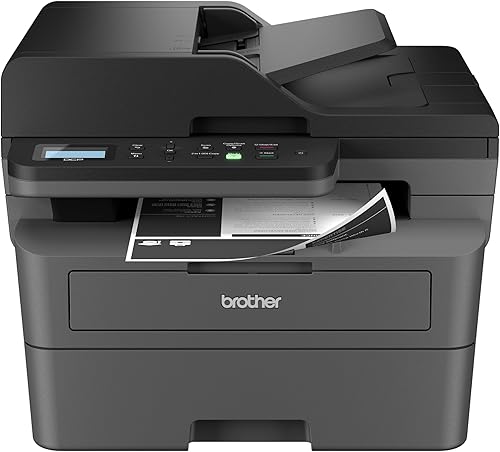
The Brother DCP-L2640DW is the strongest choice when speed, automatic two-sided printing and multi-page scanning matter more than carrying weight. Its 25 lb body suits a home office or vehicle base rather than constant hand carrying.
Pros
- Fast black-and-white printing
- Automatic duplexing
- 50-page document feeder
- 250-sheet paper tray
Cons
- Heavier than mobile models
- Monochrome output
The Brother DCP-L2640DW is the best fit for a mobile notary who works from a home office or vehicle base and needs fast black-and-white output. It prints up to 36 pages per minute, scans up to 23.6/7.9 images per minute and includes a 50-page automatic document feeder.
Automatic duplex printing helps reduce manual page turning on two-sided documents. Its 250-sheet paper tray also means fewer refills during a busy workday.
The printer connects through dual-band wireless, Ethernet or USB. Brother Mobile Connect supports printing, scanning and printer management from a mobile device.
At 25 lb, this is much heavier than the portable models. Its 15.7 x 16.1 x 12.5 in dimensions also need a planned workspace.
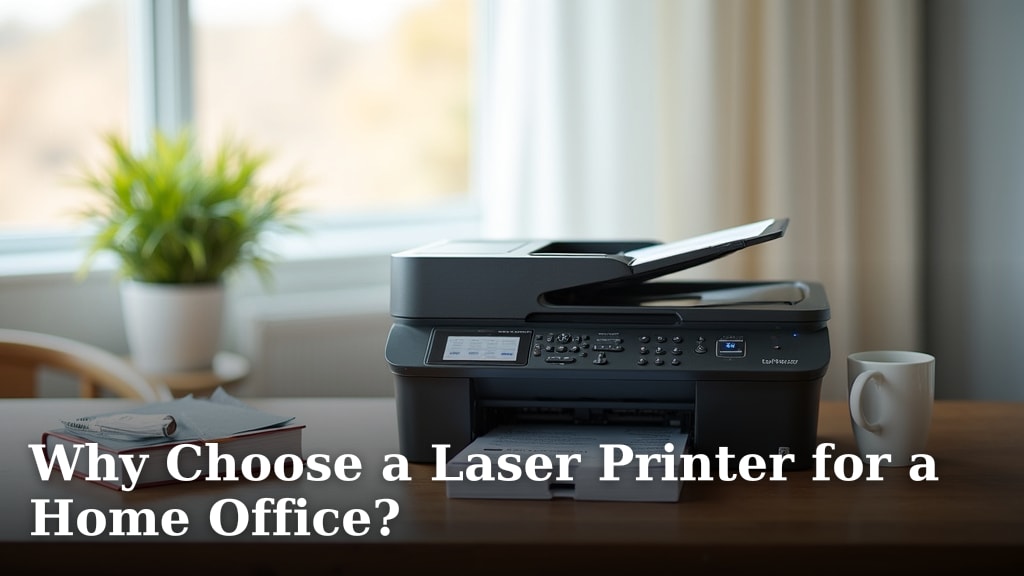
Choose Brother when your work involves many pages and frequent scans. Read our guide to Why Choose a Laser Printer for a Home Office? for more on the laser trade-off.
Gloryang Inkless Portable Printer for Travel: Best for ink-free letter documents
- Inkless thermal printing
- Bluetooth connection
- Letter-size thermal paper support
- Carry case and 3 paper rolls
The Gloryang is a compact inkless option for black-and-white documents when you can use thermal paper. It supports letter-size thermal paper and includes a carry case, but it cannot use regular copy paper.
Pros
- No ink, toner or ribbons
- Letter-size thermal paper
- Carry case included
- Bluetooth app connection
Cons
- Thermal paper only
- Simplex printing
The Gloryang is the best inkless option for mobile notaries who can use thermal paper. It supports thermal paper from 2 to 8.5 inches, including 8.5 x 11 in paper for larger documents.
It needs no ink, toner or ribbons. Bluetooth connects it to iOS and Android devices through the Jadens Printer app, and it can also work with laptops and computers after driver setup.
The package includes a carry case, charging cable, manual, guide card and 3 rolls of letter-size thermal paper. The compact design suits a backpack or briefcase, and the built-in paper bin helps keep the setup tidy.
The key limitation is paper compatibility. It works with Gloryang or JADENS thermal paper and does not support regular, inkjet or plain paper.
Pick it when ink-free operation and letter-size thermal printing fit your assignments. Confirm thermal-paper acceptance before using it for official documents.
Canon PIXMA TR160 Color Wireless Portable Printer: Best for portable color forms
- Wireless color printing
- Prints up to 8.5 x 11 inches
- Canon PRINT, AirPrint and Mopria support
- 1.44-inch OLED display
The Canon PIXMA TR160 fits notaries who need portable color output for documents, flyers or one-sheets. It prints up to 8.5 x 11 inches, but it does not scan or copy.
Pros
- Portable color printing
- Wireless direct mode
- Supports borderless photos
- Compact 4.5 lb body
Cons
- Prints only
- Does not support legal-size paper
The Canon PIXMA TR160 is the best portable color printer for notaries who print documents, flyers, one-sheets or photos up to 8.5 x 11 inches. Its 5-color hybrid ink system supports sharp black text and color output.
You can print through the Canon PRINT app, Apple AirPrint, Mopria Print Service or a wireless direct connection. The 1.44 in OLED display shows ink levels, printer status and settings.
The body weighs 4.5 lb and fits in a bag or backpack. Canon also describes an optional battery for printing away from a fixed location.
This is a print-only model, so it cannot scan or copy signed pages. It also does not support legal-size paper.
Choose Canon if color and portability matter more than all-in-one functions. For a broader color comparison, see our guide to the best all in one color printer.
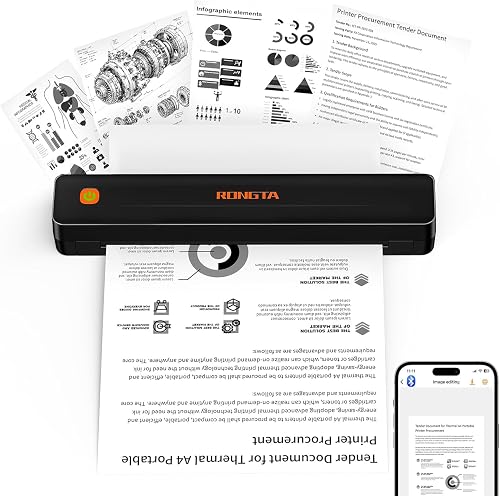
Rongta Thermal Portable Printers Wireless for Travel: Best for simple thermal forms
- Inkless thermal printing
- US Letter, legal and A4 thermal paper
- Bluetooth app connection
- USB connection for computers
The Rongta F11A suits mobile notaries who want a light thermal printer for forms and travel documents. It connects through the RONGTA app on phones and tablets, and it does not support normal paper.
Pros
- Lightweight design
- No ink or ribbons
- Supports letter, legal and A4 thermal paper
Cons
- Thermal paper only
- Phone and tablet Bluetooth pairing uses the app
The Rongta F11A is a lightweight thermal printer for notaries who need simple forms, letters or travel documents without ink cartridges.
It supports US Letter, legal and A4 thermal paper.
Phones and tablets connect through the RONGTA app.
A USB connection supports laptops and computers, including Windows 7 to 11 and macOS.
The printer uses 203 dpi thermal output in black and white.
That resolution is suited to text, forms and simple layouts.
It is not a color printer and it is not built for photos.
The body measures 2.28 x 10.55 x 1.18 inches.
Its weight is 0.43 kg, which makes it easier to carry than larger office models.
That small size helps in a backpack or tote bag for travel days.
It also helps when desk space is already used for files and a laptop.
The main setup detail is easy to miss.
Phone and tablet Bluetooth pairing must happen through the RONGTA app.
You cannot pair it directly through phone Bluetooth settings alone.
Download the app, turn it on and make the connection inside the app.
For computers, the USB route avoids that phone pairing step.
The product details state that Chrome is not supported.
That limit should be checked before relying on browser printing.
The printer does not support normal paper.
Only thermal paper will work for the intended output.
Choose Rongta when you want a light thermal printer for larger paper formats and can plan around the app and paper limits.
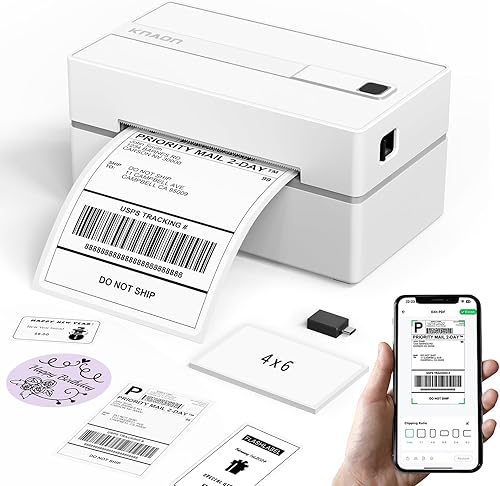
KNAON Bluetooth Thermal Shipping Label Printer: Best for labels and small office tasks
- Bluetooth and USB connectivity
- 1.5 to 4.2-inch paper widths
- Up to 180 mm/s printing
- 10 test papers included
The KNAON is useful for shipping labels, mailing labels and small tags around a notary business. Its narrow media range makes it a support printer, not a contract printer.
Pros
- Fast label printing
- Bluetooth and USB
- Works with several shipping platforms
- Compact design
Cons
- Maximum media width is 4.2 inches
- Not suitable for letter-size contracts
The KNAON is a support printer for shipping labels, mailing labels, name tags and other narrow media. It supports paper widths from 1.5 to 4.2 inches and prints at up to 180 mm per second.
Its FlashLabel Pro app connects mobile devices through Bluetooth. USB connectivity supports macOS, Windows 7 and later, ChromeOS and Linux, with setup details varying by operating system.
The app includes more than 3,000 templates, 5,000 icons and 100 fonts. The printer works with platforms including Etsy, Shopify, USPS, UPS, Amazon and eBay when logistics labels are saved and imported into the app.
The compact white printer measures 5.46 x 3.03 x 2.61 in and weighs 2.8 lb. It includes 10 test printing papers, a USB cable, power adapter, power cord, USB-C adapter and setup materials.
Do not choose it for contracts or legal forms. Pick KNAON when a notary business also needs labels and small-format office printing.
Epson WorkForce WF-110 Wireless Color Mobile Portable: Best for rechargeable color printing
- Wireless color printing
- Built-in rechargeable battery
- Wi-Fi Direct
- USB and AC charging
The Epson WorkForce WF-110 gives traveling notaries a rechargeable color printer with Wi-Fi Direct. It is a print-only option for business documents, invoices and contracts.
Pros
- Rechargeable battery
- Color output
- Wi-Fi Direct
- Wireless phone and laptop printing
Cons
- Slower than the Brother
- Uses genuine Epson cartridges
The Epson WorkForce WF-110 suits a mobile notary who wants rechargeable wireless color printing.
Its built-in lithium-ion battery supports printing away from an outlet. USB and AC charging options help you refill power at home or on the road.
An optional external accessory battery can extend print volume for longer business trips. Wi-Fi 5 and Wi-Fi Direct connect the printer to laptops, tablets and smartphones.
Wi-Fi Direct can work without requiring a network connection. That matters where office Wi-Fi is unavailable or restricted.
Epson positions it for presentations, invoices, contracts and reports. Those short business documents can benefit from color for clearer layout.
The package includes the printer, instruction booklets and a CD-ROM with drivers. It also includes a power cord, 4 Epson ink cartridges and a replacement maintenance box.
The four cartridges cover black plus cyan, magenta and yellow. That supports color printing from the start, but it also means ink supply planning.
The body measures 12.2 x 8.5 x 9.1 inches and weighs 4.6 lb. It is compact for travel and small office spaces.
Its color printing is slower than the Brother black-and-white output. Battery operation gives 3.5 ISO ppm for black and 2.0 ISO ppm for color.
It uses genuine Epson cartridges for the intended performance. It is also print-only, so scanning and copying require another device.
Choose Epson when rechargeable color printing is the priority and you already have a separate scanner or copier.
Phomemo M832D Touchscreen Portable Inkless Printer: Best for multi-size thermal paper
- 300 dpi thermal printing
- Touchscreen
- Up to 200 pages per charge
- Letter, A4 and smaller thermal paper
The Phomemo M832D gives mobile users several thermal paper sizes and a touchscreen for checking settings. It prints black and white only and requires thermal paper.
Pros
- Lightweight design
- 300 dpi output
- Multiple thermal paper sizes
- Touchscreen
Cons
- Thermal paper only
- Black-and-white output
The Phomemo M832D is a light inkless printer for mobile notaries who need several thermal paper sizes.
It supports US Letter, A4, 2.08 in, 3.15 in and 4.33 in thermal paper.
Paper can be roll, folded or single-sheet thermal paper.
That range helps a student with class notes or a traveler with a contract.
It also helps when one job needs a short note and the next needs a full page.
Its touchscreen shows battery and connection status.
It also helps identify paper placement for more precise printing.
That display reduces guesswork for first-time users.
The built-in 2600mAh battery can print up to 200 pages on one charge.
Phomemo lists the weight at 1.5 lb.
That light body fits easily into a backpack, briefcase or car.
Bluetooth works with iPhone, Android phones and iPad.
A USB-C cable connects it to a laptop or computer.
The Bluetooth connection is limited to phones and tablets.
It does not connect to a laptop by Bluetooth.
The printer produces black-and-white output at 300 dpi.
That resolution suits clear text and simple documents.
It requires thermal paper, not standard office paper.
Paper can curl, and edges may appear jagged.
Scratching the paper with a nail can leave a black line.
Some app templates and features are premium-only.
Free users still have access to basic printing functions.
Choose Phomemo when paper-size flexibility and a small 1.5 lb body matter more than standard office-paper compatibility.
How should a mobile notary choose a printer?
Choose an all-in-one inkjet when you need to print, scan and copy at assignment locations. Choose a laser printer when most work happens in one place and speed, duplexing and a larger paper tray matter more.
What paper sizes does a mobile notary printer need?
Letter support should be the starting point, while legal support adds useful flexibility. The HP OfficeJet 250 supports both, and the Rongta and Gloryang support larger thermal formats.
Check the exact paper type as well as the size. Thermal printers may support letter or legal dimensions but still require thermal paper instead of standard copy paper.
Is battery power useful for mobile printing?
Battery power helps when an assignment location lacks a convenient outlet. The HP OfficeJet 250 includes a battery, while Canon describes an optional battery and Epson includes a built-in rechargeable battery.
Battery capacity does not remove the need for planning. Charge the printer before leaving, carry the correct cable and keep extra paper or cartridges available for the day's work.
Should a mobile notary choose inkjet or thermal printing?
Inkjet gives you familiar office-paper use and portable color output. Thermal printing avoids ink, toner and ribbons, but paper compatibility becomes the central trade-off.
Gloryang, Rongta and Phomemo are the stronger thermal choices for larger documents. Canon and Epson are better when color or standard document printing matters.
Does automatic duplexing matter?
Automatic duplexing matters when you print many two-sided pages because the printer turns the sheets for you.
The Brother DCP-L2640DW has automatic duplex printing.
The HP OfficeJet 250 uses manual duplexing.
That difference changes the routine for document packets.
With automatic duplexing, a long two-sided set can print with less handling.
With manual duplexing, you reload or turn pages as part of the job.
For a smaller assignment, manual page turning may be acceptable.
For repeated document packets, compare the time and handling involved before choosing a portable model.
The Brother also adds a 250-sheet paper tray.
That larger tray reduces refills during a busy workday.
Its 50-page automatic document feeder helps with multi-page scanning and copying.
Those features suit a home office or vehicle base more than constant hand carrying.
The HP takes the opposite route.
Its portable body and battery suit work that moves between locations.
Manual duplexing is the trade-off for that portability.
Touchscreen use, wireless setup and mixed paper sizes can matter more on a short job.
See our guide to the best printer for duplex printing if two-sided documents are common in your work.
Count two-sided pages over a normal week before you decide.
If they are frequent, automatic duplexing saves repeated handling.
If they are occasional, a portable model may still be the better fit.
What should you carry with a mobile notary printer?
Carry the printer correct power cable, a charged battery when supported, enough paper for the assignment and the connection app or driver required by the model.
Keep documents protected from moisture and avoid placing the printer where paper can bend.
That basic kit prevents most small problems on the road.
A charged battery should be checked before you leave home.
The HP includes a battery and supports fast charging when turned off.
Canon describes an optional battery for the PIXMA TR160.
Epson includes a built-in rechargeable battery in the WF-110.
Thermal models vary, so the charging cable matters as much as the paper.
Carry enough paper for the exact assignment, not just a general supply.
Letter and legal jobs need the right stock loaded or packed by size.
Inkjet models need the correct cartridges.
HP uses Original HP 62 series cartridges.
Epson is designed for genuine Epson cartridges.
Thermal models need compatible thermal paper.
Gloryang requires Gloryang or JADENS thermal paper.
Rongta and Phomemo also require thermal paper rather than normal paper.
Before leaving, print a short sample.
Confirm that the phone, tablet or laptop connects through the required app or wireless mode.
That test can reveal a missing app, a wrong paper size or a low battery.
It is easier to fix those issues at home than at a signing.
Keep the printer clean and dry in transit.
Avoid pressure on the paper path and keep loose sheets flat.
A short packing check each morning can keep the day on schedule.
Best printer for mobile notary work: final picks
The HP OfficeJet 250 is the best printer for mobile notary work when you need portable printing, scanning, copying and mixed paper sizes.
It is the most complete fit for assignments that change from one location to the next. Pick the Brother DCP-L2640DW for a home office or vehicle base where fast monochrome printing, automatic duplexing and a 50-page feeder matter more than low weight.
Pick Gloryang or Rongta if you want inkless printing and can use thermal paper. Pick Canon or Epson for portable color output.
Choose KNAON only for labels and narrow-format tasks. Start with the paper the job requires, since letter and legal support cover most notary documents.
Thermal paper changes that rule because the format can be right while the paper type is wrong. Then match the printer to the place of work.
A 6.5 lb all-in-one suits a car, backpack or briefcase. A 25 lb laser suits a desk that stays in place.
Then check the functions you truly need each day. Scanning and copying point to an all-in-one, color points to Canon or Epson, and inkless thermal printing points to Gloryang, Rongta or Phomemo.
For most mobile notaries, the HP OfficeJet 250 remains the best overall answer. It keeps printing, scanning and copying in one portable unit, supports letter and legal paper, works wirelessly without a network and includes a 10-page automatic document feeder.
Brother remains the better pick when speed and automatic duplexing outweigh carrying weight.
Our top 3 picks at a glance
-
1
Best for mobile notary paperwork
HP OfficeJet 250 Inkjet Mobile Printer
9.7/10 our score
See it on Amazon -
2
-
3
Best for high-volume black-and-white work
Brother DCP-L2640DW Wireless Compact Monochrome Multi-Function Printer
9.6/10 our score
See it on Amazon
Frequently asked questions
What is the best printer for mobile notary work?
The HP OfficeJet 250 is the best printer for mobile notary work when you need printing, scanning and copying in one portable unit. It supports letter and legal paper, works wirelessly without a router and includes a 10-page automatic document feeder.
Choose Brother when speed and automatic duplexing matter more than portability.
Do mobile notaries need a color printer?
Not always. Black-and-white output is enough for many contracts and forms, while color helps when a document includes color instructions, diagrams or business materials.
The Canon PIXMA TR160 and Epson WorkForce WF-110 are portable color options.
The Brother DCP-L2640DW is a faster monochrome choice.
Can a thermal printer print notary documents?
Yes, if the printer supports the paper size and the document can be printed on thermal paper. Gloryang, Rongta and Phomemo support larger thermal paper formats, while the KNAON is designed for narrow labels.
Check whether the receiving office accepts thermal paper before relying on one for an assignment.
What paper sizes should a mobile notary printer support?
Letter and legal support cover many mobile notary jobs. The HP OfficeJet 250 supports both, while the Canon PIXMA TR160 supports documents up to 8.5 x 11 inches.
Thermal models can support different sizes, but they require compatible thermal paper rather than standard copy paper.
Is an all-in-one printer useful for a mobile notary?
An all-in-one printer can be useful because it combines printing, scanning and copying. The HP OfficeJet 250 is the most portable all-in-one here, while the Brother DCP-L2640DW adds a 50-page feeder and automatic duplexing for larger office workloads.
Choose a print-only model if you already have another way to scan and copy.