7 Best Printers with Fax (November 2026)
The best printers with fax include the Brother MFC-L2820DW Wireless Compact Monochrome All-in-One Laser for fax-heavy small offices, the Brother DCP-L2640DW Wireless Compact Monochrome Multi-Function Printer for fast scanning without fax, and the Canon PIXMA TR8620a for home office color and fax.
On this page (4 sections)
The best printer with fax for most small offices is the Brother MFC-L2820DW, because it combines fast monochrome laser printing with fax, scanning, copying, a 50-page feeder and automatic duplexing.
Color-focused home offices should consider the Canon PIXMA TR8620a or HP OfficeJet Pro 8139. Those models add color output that a black and white laser printer cannot handle.
Fax still helps when a client, clinic, government office or supplier requires traditional document transmission. Some organizations keep a fax number for forms, signed pages and records in a familiar format.
The right choice depends on how often you fax, whether you need color, and how many pages you scan at once. A printer that suits a home office may not suit a shared small team.
Laser models here reach higher black and white speeds, while inkjet models trade some speed for color documents and photos. Paper handling also matters, as a larger tray means fewer refills and a larger feeder means less babysitting on multi-page jobs.
Automatic two-sided printing saves time on longer reports, but matters less for short one-page forms. Where the printer will live matters too, since a compact design still needs room to open trays and load paper.
Connections shape daily use, with wireless for several devices, Ethernet for a fixed office network, and USB for one computer. For regular faxing of text documents, the Brother model leads this group.
If you are comparing several multifunction formats, start with this all in one printer comparison. That guide can help you separate a true office workhorse from a lighter home model.
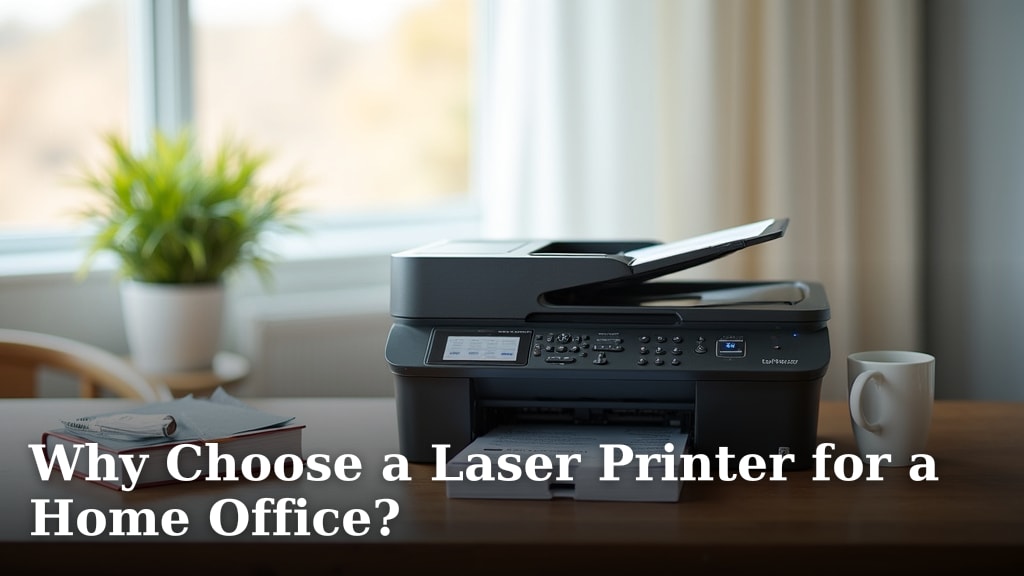
For a home office that mostly prints text, our guide to Why Choose a Laser Printer for a Home Office? explains why monochrome laser output can fit that workflow.
Use the sections below to check each model against your workflow. Pay attention to feeder size, paper capacity, connection options and whether fax is included as a stated function.
Our picks at a glance
-
1
 Best for fax-heavy small offices
Brother MFC-L2820DW Wireless Compact Monochrome All-in-One Laser
9.6/10 our score
See it on Amazon -
2
 Best for fast scanning without fax
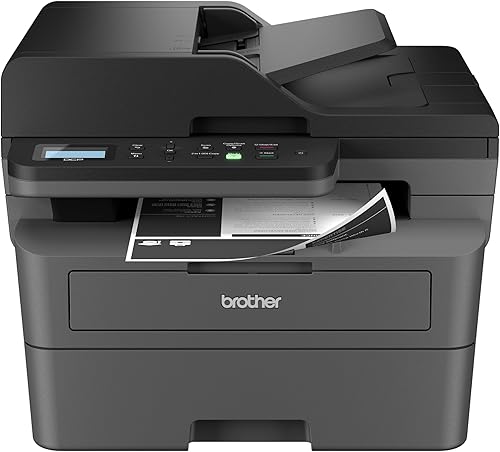
Brother DCP-L2640DW Wireless Compact Monochrome Multi-Function Printer
9.6/10 our score
See it on Amazon -
3

- 4
 Best for secure small-team printingCheck it
- 5
 Check it
HP OfficeJet Pro 8139 Wireless All-in-One Color
Best for color home-office documents - 6
 Check it
Canon MegaTank MAXIFY GX2020 All-in-One Wireless Color
Best for high-volume color inkjet work - 7
 Check it
Epson Workforce Pro WF-3823 Wireless Color All-in-One
Best for fast color workflow
The best printer with fax for each office workflow
The Brother MFC-L2820DW is the best overall match for regular fax and black-and-white work. The Canon PIXMA TR8620a and HP OfficeJet Pro 8139 are better choices when color documents matter, while the HP LaserJet Pro 3101fdw suits a small team that needs security features.
Our score weighs specs, features and buyer feedback against what you're shopping for. We compared fax capability, print type, speed, document feeders, duplexing, paper handling and connection options.
| Product | Best for | Type | Fax | Paper size | Our score |
|---|---|---|---|---|---|
| Brother MFC-L2820DW Wireless Compact Monochrome All-in-One Laser | fax-heavy small offices | Monochrome laser multifunction printer | Yes | Up to 8.5 x 14 in | 9.6 |
| Brother DCP-L2640DW Wireless Compact Monochrome Multi-Function Printer | fast scanning without fax | Monochrome laser multifunction printer | No | 9.6 | |
| Canon PIXMA TR8620a | home office color and fax | Color inkjet multifunction printer | Yes | 9.5 | |
| HP LaserJet Pro 3101fdw | secure small-team printing | Monochrome laser multifunction printer | Yes | 9.4 | |
| HP OfficeJet Pro 8139 Wireless All-in-One Color | color home-office documents | Color inkjet multifunction printer | Yes | 9.3 | |
| Canon MegaTank MAXIFY GX2020 All-in-One Wireless Color | high-volume color inkjet work | Color inkjet multifunction printer | Yes | 9.0 | |
| Epson Workforce Pro WF-3823 Wireless Color All-in-One | fast color workflow | Color inkjet multifunction printer | Not included in the stated functions | 8.4 |
The Brother MFC-L2820DW is the most complete fit for a small office that still sends and receives faxes. It combines print, copy, scan and fax functions in a compact monochrome laser design.
Its stated black-and-white speed reaches 34 pages per minute. A 50-page auto document feeder supports multi-page copy, scan and fax jobs, so you can load a stack and return to other tasks instead of feeding pages one by one.
Automatic duplex printing reduces manual page turning for reports, contracts and forms that run on both sides. It also helps reduce paper waste compared with printing single-sided and flipping pages by hand.
A 250-sheet paper tray helps reduce refill interruptions during a busy week of invoices, letters and forms. You can connect through dual-band wireless, Ethernet or USB for a single dedicated computer.
The 2.7-in touchscreen supports direct control and makes common tasks easier to start without walking back to a computer. That matters for a quick copy or scan from the desk.
This model accepts Brother TN830, TN830V and TN830XL toner. It also includes an AC power cord, drum unit, telephone line cord and toner cartridges.
Setup should include the fax connection as well as printing. Confirm the telephone line cord is connected and test a send or receive before you rely on it.
Keep paper dry and keep the machine on a stable surface. Replace toner with the stated Brother types.
The trade-off is clear. You get a fast, compact fax-capable laser printer, but no color output for presentations, flyers or photos.
Choose it when fax is a core office task and color printing is not required. If your work includes presentations or photos, one of the color inkjet models will be a better match.
Brother DCP-L2640DW Wireless Compact Monochrome Multi-Function Printer: Best for fast scanning without fax
- Up to 36 black-and-white pages per minute
- 50-page auto document feeder
- Automatic duplex printing
- Dual-band wireless, Ethernet and USB
This compact laser model is a strong choice when you need fast printing, scanning and copying but do not need fax hardware.
Pros
- Fastest print speed in this group
- 50-page feeder
- Automatic duplex printing
Cons
- No fax function
- Black-and-white printing only
The Brother DCP-L2640DW is a strong laser alternative when you need fast printing, scanning and copying but do not need fax. Its 36-page-per-minute black-and-white speed is the highest in this group.
The 50-page auto document feeder supports multi-page scanning and copying. Automatic duplex printing helps with two-sided documents, while the 250-sheet paper tray suits a steady small-business workflow.
Dual-band wireless, Ethernet and USB provide flexible connections for laptops, PCs, smartphones and tablets. The compact body has the same stated 15.7-in depth and 16.1-in width as the MFC-L2820DW.
This printer uses Brother TN830 or TN830XL toner. It includes an AC power cord, drum unit and toner cartridges.
Pick it only when fax is not part of the plan. If fax may become necessary later, the MFC-L2820DW is the safer choice because it adds that function while keeping a similar compact footprint.
Canon PIXMA TR8620a: Best for home office color and fax
- Wireless print, copy, scan and fax
- 15 black-and-white and 10 color pages per minute
- 200-sheet capacity
- Automatic two-sided printing
- Auto document feeder
The PIXMA TR8620a combines fax with color document and photo printing. Its 200-sheet capacity and automatic two-sided printing fit a home office with mixed workloads.
Pros
- Color printing and fax in one unit
- 200-sheet paper capacity
- Automatic two-sided printing
Cons
- Slower than the laser picks
- Inkjet rather than monochrome laser
The Canon PIXMA TR8620a is the best fit here for a home office that needs fax plus color printing. It is a wireless 4-in-1 printer with print, copy, scan and fax functions.
Its stated speed is 15 black-and-white pages per minute and 10 color pages per minute. A 200-sheet capacity is split between a 100-sheet cassette and a 100-sheet rear feed, and automatic two-sided printing helps with routine documents.
The auto document feeder supports multi-page work. A touch-controlled LCD, USB connection, AirPrint support and Android compatibility make it practical for a mixed home-office setup.
The box includes the PIXMA TR8620, documentation, a set of standard ink tanks, RJ-11 telephone and modem cords, and a power cord.
Choose this Canon when photos and color documents sit beside fax work. It is slower than the laser picks, so high-volume black-and-white document production may feel less efficient.
HP LaserJet Pro 3101fdw: Best for secure small-team printing
- Print, scan, copy and fax
- Up to 35 black-and-white pages per minute
- Automatic two-sided printing
- Auto document feeder
- HP Wolf Pro Security
The HP LaserJet Pro 3101fdw targets small teams of up to 7 people with fast monochrome output, fax, automatic duplexing and security controls.
Pros
- Fast black-and-white printing
- Security features
- Wireless, Ethernet, USB and Bluetooth
Cons
- Black-and-white printing only
- Designed around original HP chip or circuitry
The HP LaserJet Pro 3101fdw suits a small team that needs fax, quick monochrome printing and security controls. HP describes it for teams of up to 7 people.
It prints up to 35 black-and-white pages per minute and includes automatic two-sided printing and an auto document feeder for scan and copy workflows. The printer supports wireless printing from mobile devices, PCs and tablets.
Wi-Fi, Ethernet, USB and Bluetooth give the team several connection choices. HP Wolf Pro Security provides customizable security settings, which may matter when office documents move across a shared network.
The printer is designed for cartridges with original HP chips or circuitry. Its stated maximum media size is letter, so check your paper needs if your workflow includes legal-size documents.
Choose it over the Brother models when HP's security and small-team management features fit your office. Choose a color inkjet instead if color output is part of the daily job.
HP OfficeJet Pro 8139 Wireless All-in-One Color: Best for color home-office documents
- Print, scan, copy and fax
- Up to 20 black-and-white and 10 color pages per minute
- 225-sheet input tray
- Automatic two-sided printing
- Auto document feeder
The OfficeJet Pro 8139 fits a home office that needs fax and regular color documents. It adds a 225-sheet tray, a feeder and phone-based printing.
Pros
- Color printing, scanning, copying and fax
- 225-sheet input tray
- Automatic duplex printing
Cons
- Slower than the laser models
- Designed around original HP chip or circuitry
The HP OfficeJet Pro 8139 is a practical color fax printer for a home office. It prints, scans, copies and faxes, with automatic two-sided printing and an auto document feeder.
Its stated speeds reach 20 black-and-white pages per minute and 10 color pages per minute. A 225-sheet input tray supports regular work, while the 2.7-in color touchscreen keeps common controls close at hand.
Dual-band Wi-Fi, Ethernet and USB support connections from laptops, PCs and smartphones. The HP app adds phone-based print, scan, copy and fax control, and HP AI can remove unwanted content from web pages and emails before printing.
The printer uses HP 923 or HP 923e EvoMore original ink cartridges. It includes setup cartridges in black, cyan, magenta and yellow, along with a power cord, setup poster and reference guide.
Pick it for color business documents, reports and presentations with occasional faxing. Its inkjet speed is lower than the laser options, so it is not the best match for a mostly monochrome high-volume office.
Canon MegaTank MAXIFY GX2020 All-in-One Wireless Color: Best for high-volume color inkjet work
- Wireless print, copy, scan and fax
- Refillable tank system
- Up to 3,000 black-and-white and 3,000 color pages per ink set
- 35-sheet auto document feeder
- Automatic duplex printing
The GX2020 pairs fax with a refillable ink tank system and a 35-page feeder. It suits a home or office that prints color pages often.
Pros
- Refillable ink system
- Fax and automatic duplexing
- Up to 3,000 black-and-white and color pages per ink set
Cons
- Slower than the laser picks
- Smaller feeder than several competitors
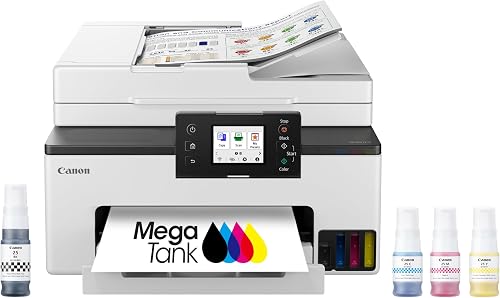
The Canon MegaTank MAXIFY GX2020 fits a color office that wants a refillable tank system and fax. It includes wireless print, copy, scan and fax functions, automatic duplexing and a 35-page auto document feeder.
Canon states that one set of inks can produce up to 3,000 black-and-white and 3,000 color pages. That makes the tank design worth considering when color printing is frequent rather than occasional.
The 2.7-in color touchscreen supports direct control. The printer has a stated 250-sheet paper capacity, and its compact desktop design measures 14.8 in deep, 15 in wide and 8.9 in high.
It uses GI-25 pigment-based cyan, magenta, yellow and black ink bottles. The box includes setup ink bottles, a fax modular cable, documentation and a power cord.
Choose the GX2020 when refillable color printing matters more than maximum page speed. The 35-page feeder is smaller than the 50-page feeders on the Brother models, so compare your usual scan batches.
Epson Workforce Pro WF-3823 Wireless Color All-in-One: Best for fast color workflow
- Up to 21 black-and-white and 11 color ISO pages per minute
- Automatic two-sided printing
- 35-page auto document feeder
- 250-sheet paper capacity
- Wireless, Wi-Fi Direct and Ethernet
The WF-3823 is a productive color inkjet for printing, scanning and copying, with a 250-sheet tray and a 35-page feeder. It is not a fax pick from this group.
Pros
- Fast color inkjet speeds
- 250-sheet paper capacity
- Automatic duplex printing
Cons
- No fax function stated
- Uses Epson Genuine Cartridges
The Epson WorkForce Pro WF-3823 is a fast color inkjet for print, scan and copy work, but fax is not included in its stated functions. It belongs on this list as a useful comparison for buyers who may not need fax after all.
Its PrecisionCore Heat-Free Technology reaches 21 black-and-white and 11 color ISO pages per minute. Automatic two-sided printing, a 35-page feeder and a 250-sheet paper capacity support a busy color workflow.
A 2.7-in color touchscreen provides direct control. Wireless, Wi-Fi Direct, Ethernet and USB support different office setups, while the Epson Smart Panel app adds mobile control.
The printer uses Epson Genuine Cartridges and includes a quick setup guide, CD-ROM with drivers, power cord and 4 DURABrite Ultra ink cartridges. Its stated body size is 19.4 in deep, 16.7 in wide and 9.8 in high.
Choose it only if fax is optional. If you need a fax machine built into the printer, the HP OfficeJet Pro 8139 or Canon MegaTank MAXIFY GX2020 is a closer fit.
How to choose a printer with fax
Start with fax capability, because not every all-in-one printer includes it. The Brother MFC-L2820DW, Canon PIXMA TR8620a, HP LaserJet Pro 3101fdw, HP OfficeJet Pro 8139 and Canon MegaTank MAXIFY GX2020 all state print, scan, copy and fax functions.
Should you choose laser or inkjet for a printer with fax?
Choose a monochrome laser printer when your work is mainly contracts, forms, invoices and other text documents. The fastest fax-equipped options here are the Brother MFC-L2820DW at 34 pages per minute and HP LaserJet Pro 3101fdw at 35 pages per minute.
Choose color inkjet when you need presentations, flyers, photos or color reports. The Canon PIXMA TR8620a, HP OfficeJet Pro 8139 and Canon MegaTank MAXIFY GX2020 trade some speed for color output.
How much does the document feeder matter?
A larger auto document feeder saves more time when you scan, copy or fax several pages. The Brother MFC-L2820DW and DCP-L2640DW have 50-page feeders, while the Canon MegaTank MAXIFY GX2020 and Epson WF-3823 have 35-page feeders.
Automatic duplex printing matters when your source documents or output use both sides. For a closer look at this workflow, see our guide to the best office printer and scanner with duplex.
What connections should a fax printer have?
Choose connections that match your office. Wireless helps multiple devices share the printer, Ethernet can suit a fixed office network, and USB provides a direct connection.
The Brother MFC-L2820DW and DCP-L2640DW support dual-band wireless, Ethernet and USB. The HP LaserJet Pro 3101fdw adds Bluetooth, while the Canon PIXMA TR8620a lists USB, AirPrint and Android support.
How should you plan the printer area?
Measure depth, width and height before ordering, then leave enough room to open trays, load documents and reach cables. The Epson WF-3823 is the deepest model here at 19.4 in, while the Canon PIXMA TR8620a is 13.8 in deep.
That depth difference can decide whether a printer fits a narrow desk or a shared shelf. Check the footprint first, then check space around it for paper loading and document handling.
Height matters too, especially under a cabinet or shelf. A model that fits on the desk may still block a cupboard door or a monitor arm.
Leave clearance at the front for trays and at the back for cords. Fax printers in particular need a telephone line connection reachable without moving the whole unit.
A stable stand can make paper loading easier if your desk is crowded. See these best printer stands with drawers if you need storage for paper and supplies.
A stand is most useful when it raises the printer without blocking output or input paths. Test the layout before you buy, because a raised unit can make top loading awkward.
Think about who uses the printer each day. In a shared office, the machine should be reachable by everyone who needs it, not tucked behind a monitor.
Keep the area clear of drinks, loose cables and stacks that can slide into paper paths. A tidy desk reduces jams and makes routine cleaning easier.
Keep paper dry and store replacement toner or ink as the manufacturer allows. Damp paper can cause feeding problems and poor storage can affect toner.
Store extra paper flat and away from direct heat or moisture. For a busy office, keep a small reserve where the printer user can reach it.
If your office also handles protected documents, a what is paper shredder machine guide can help you plan disposal, while a laminator machine for paper guide covers document protection.
Shredding and lamination are part of office document care, not printing. Planning them at the same time as the printer area helps you avoid clutter later.
Also plan where scanned and faxed pages will go. An inbox tray, folder system or nearby file cabinet keeps incoming documents from piling on the desk.
Check ventilation around the printer as well. Laser and inkjet machines work best with air flow around them, not pressed against a wall or covered by paper stacks.
Finally, measure again after delivery and before you commit to a permanent spot. A short test with trays open and paper loaded will show whether the space really works.
Best HP printers with fax compared
The HP LaserJet Pro 3101fdw is the better HP choice for fast monochrome documents and small-team security. The HP OfficeJet Pro 8139 is the better fit for color home-office work, a larger input tray and phone-based control.
Those two models cover opposite ends of this comparison. One is built around fast black and white laser output, and the other around color inkjet documents for a home office.
For the LaserJet Pro 3101fdw, the stated speed reaches 35 black and white pages per minute. That makes it a strong match for contracts, invoices, reports and other text-led work.
Its automatic two-sided printing and auto document feeder support scan and copy tasks as well as printing. For a small team, that combination reduces manual handling across the whole workflow.
HP positions this model for teams of up to 7 people. That scale matters because connection sharing, security settings and paper supply all become shared concerns.
The OfficeJet Pro 8139 takes a different path with color output. It reaches 20 black and white pages per minute and 10 color pages per minute, which suits business documents, reports and presentations.
Its 225-sheet input tray helps a home office print in larger batches. The 2.7-in color touchscreen and phone-based control also suit a setup where one person handles most jobs.
Both models include fax, scan and copy functions. The choice comes down to whether your daily pages are mainly monochrome text or color documents.
Security is a key reason to pick the LaserJet model. HP Wolf Pro Security with customizable settings may matter when office documents move across a shared network.
The OfficeJet model also lists HP Wolf Essential Security. For a home office, that protection sits alongside convenient app-based printing and scanning.
Connection options differ in emphasis. The LaserJet adds Bluetooth alongside Wi-Fi, Ethernet and USB, while the OfficeJet focuses on dual-band Wi-Fi, Ethernet and USB.
Read our full guide to the best hp printer with fax if you want to compare HP models in more detail. For a business-focused setup, see the best copier fax scan printer for business guide.
If you print mostly black and white and share the printer with a team, the LaserJet is the cleaner fit. If color pages appear every week, the OfficeJet is easier to justify.
Final verdict on the best printer with fax
The Brother MFC-L2820DW is the best printer with fax for most small offices because it balances fax, fast black-and-white printing, a 50-page feeder, duplexing and flexible connections.
Pick the HP LaserJet Pro 3101fdw for a small team that values security controls. Pick the Canon PIXMA TR8620a or HP OfficeJet Pro 8139 for color home-office documents, and choose the Canon MegaTank MAXIFY GX2020 when refillable color ink fits your workload.
The Brother model wins for the most common fax workflow in this group. It prints at up to 34 black and white pages per minute and supports multi-page fax, scan and copy jobs through its feeder.
That combination matters because fax is rarely the only task. The same machine handles the copying and scanning that surround a fax send, so the feeder size affects every part of the job.
If color is non-negotiable, the ranking changes quickly. The Canon PIXMA TR8620a suits a home office that mixes fax with photos and color documents at a moderate pace.
The HP OfficeJet Pro 8139 suits a home office with regular color business documents. Its larger tray and phone-based control make it practical for repeated daily use.
The Canon MegaTank MAXIFY GX2020 is the pick when color volume is high. Its refillable tank system and stated page yield per ink set change the running cost picture for frequent color printing.
The HP LaserJet Pro 3101fdw is the pick when security and team sharing matter. It reaches 35 black and white pages per minute and adds HP Wolf Pro Security for a shared office network.
Before you decide, confirm three things. Make sure fax is a stated function, check that the feeder and tray sizes match your batch sizes, and measure the space where the printer will sit.
If fax is optional rather than essential, the Brother DCP-L2640DW and Epson WF-3823 become useful comparisons. They offer fast printing and scanning without the fax hardware.
For most small offices that still fax, the Brother MFC-L2820DW remains the safest overall choice. It covers the core tasks without asking you to give up speed, duplexing or flexible connections.
Our top 3 picks at a glance
-
1
Best for fax-heavy small offices
Brother MFC-L2820DW Wireless Compact Monochrome All-in-One Laser
9.6/10 our score
See it on Amazon -
2
Best for fast scanning without fax
Brother DCP-L2640DW Wireless Compact Monochrome Multi-Function Printer
9.6/10 our score
See it on Amazon -
3
Frequently asked questions
What is the best printer with fax for a small office?
The Brother MFC-L2820DW is the strongest fit for most small offices because it combines fax, scanning, copying and black-and-white laser printing with a 50-page feeder and automatic duplexing. Choose the HP LaserJet Pro 3101fdw if small-team security tools matter more to your setup.
Do all-in-one printers with fax need a phone line?
A fax-equipped all-in-one printer needs a supported fax connection for traditional fax sending and receiving. Check the setup instructions and your office phone arrangement before buying.
Wireless printing connects devices to the printer, but it does not automatically replace the fax connection.
Is a laser or inkjet printer better for fax and scanning?
Laser models are usually the better match for frequent black-and-white office documents because the fastest picks here reach 34 to 36 pages per minute. Inkjet models make more sense when you also need color documents, photos or refillable color ink.
What should I check before buying a printer with fax?
Check that the printer has fax as a stated function, then compare feeder size, automatic duplexing, print type, connection options and paper capacity. Also measure the printer area.
The models here range from 13.8 to 19.4 inches in depth.