7 Best Printers with Duplex Scanning (November 2026)
The best printers with duplex scanning include the Brother MFC-L2820DW Wireless Compact Monochrome All-in-One Laser for complete small-office workflows, the Brother DCP-L2640DW Wireless Compact Monochrome Multi-Function Printer for fast 3-in-1 document work, and the HP LaserJet Pro 3101sdw for sharp monochrome office documents.
On this page (6 sections)
- The best printers with duplex scanning for different needs
- What should you check in a printer with duplex scanning?
- Should you choose laser or inkjet for two-sided documents?
- Do you need fax as well as duplex scanning?
- How do you set up and use automatic duplex features?
- Which printer with duplex scanning should you choose?
The best printer with duplex scanning for most small offices is the Brother MFC-L2820DW, with automatic duplex printing, a 50-page feeder and print, copy, scan and fax functions.
The Brother DCP-L2640DW is a strong 3-in-1 alternative for teams that do not need fax. The Canon and Epson models add color printing for home and office use.
A key detail matters here: duplex printing and duplex scanning are different features. Duplex printing handles both sides of a new page.
Duplex scanning captures both sides of a two-sided original, so check the scanner description separately before you buy.
That distinction affects daily work in a quiet way. A printer may print two-sided reports all day, yet still need you to flip each original by hand when scanning.
For a broader way to compare features, see our all in one printer comparison.
If your main need is two-sided output rather than scanning, our guide to the best printer for duplex printing narrows the decision.
Use the comparison to weigh feeder size, speed and paper capacity against the work you actually do. A small office with steady forms and contracts will value a different set of specs than a home user printing photos and school pages.
Our picks at a glance
-
1
 Best for complete small-office workflows
Brother MFC-L2820DW Wireless Compact Monochrome All-in-One Laser
9.6/10 our score
See it on Amazon -
2
 Best for fast 3-in-1 document work
Brother DCP-L2640DW Wireless Compact Monochrome Multi-Function Printer
9.6/10 our score
See it on Amazon -
3

- 4
 Check it
Canon PIXMA TR7120 Wireless Color Inkjet Printer
Best for home color documents and photos - 5
 Check it
Canon MegaTank MAXIFY GX2020 All-in-One Wireless Color
Best for refillable color printing - 6
 Check it
HP Envy 6155 Wireless All-in-One Color Inkjet
Best for simple home color printing - 7
 Check it
Epson EcoTank ET-4950 Wireless Duplex All-in-One Cartridge-Free
Best for high-volume color and fax
The best printers with duplex scanning for different needs
The Brother laser models are the best fit for fast black-and-white paperwork, while the color inkjet models suit home printing, photos and color forms. The product details confirm automatic duplex printing across the group, but they do not confirm automatic duplex scanning for every model.
Our score weighs specs, features and buyer feedback against what you're shopping for. We placed products with faster document output, larger feeders or broader office functions higher for this keyword.
The Brother MFC-L2820DW is the most complete choice for a small office that still wants a compact machine. It combines print, copy, scan and fax functions with automatic duplex printing, so one device can handle common document jobs.
Its 50-page auto document feeder helps with multi-page copying, scanning and faxing. The printer also reaches up to 34 pages per minute in black and white, with an 8.5-second initial page print time.
Connection choices include dual-band wireless at 2.4 GHz and 5 GHz, Ethernet and USB. A 2.7-inch touchscreen supports printer controls and access to cloud apps such as Google Drive, Dropbox, Evernote and OneNote.
The 15.7 in deep by 16.1 in wide by 12.5 in high body is compact for a four-function laser printer, but measure your desk before ordering. It weighs 22.5 lb and supports media up to 8.5 x 14 in.
Choose it if you need fax support with scanning and copying. It is less suitable if you need color pages or if automatic two-sided scanning is a must and the exact scanner behavior has not been confirmed.
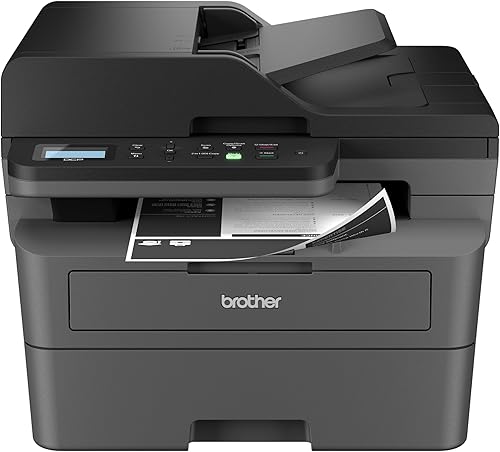
Brother DCP-L2640DW Wireless Compact Monochrome Multi-Function Printer: Best for fast 3-in-1 document work
- Automatic duplex printing
- 50-page auto document feeder
- 36 pages per minute
- Print, copy and scan
This compact Brother handles printing, copying and scanning without fax hardware. Its 36-page-per-minute speed and 50-page feeder fit busy document workflows.
Pros
- Fastest print speed here
- 50-page feeder
- Dual-band wireless, Ethernet and USB
Cons
- No fax function
- Black-and-white printing only
The Brother DCP-L2640DW is the better fit when you need a fast printer, copier and scanner but do not need fax. Its 36-page-per-minute black-and-white speed is the highest among the products here.
A 50-page auto document feeder supports multi-page copying and scanning, while automatic duplex printing reduces manual page turning for two-sided output. The 250-sheet paper tray also helps reduce refill stops during regular office work.
The machine connects through dual-band wireless, Ethernet or USB. Its 15.7 in deep by 16.1 in wide by 12.5 in high footprint matches the MFC-L2820DW, though its listed weight is 25 lb.
Brother includes support for mobile printing and the TN830 or TN830XL toner family. The printer has an LCD display and app-based controls, which keeps the front panel simpler than a touchscreen model.
Pick this one for a busy 3-in-1 workflow with fast black-and-white output. Choose the MFC-L2820DW instead if fax is part of your daily work.
HP LaserJet Pro 3101sdw: Best for sharp monochrome office documents
- Automatic duplex printing
- 35 pages per minute
- 250-sheet input tray
- 50-sheet auto document feeder
The HP combines automatic two-sided printing with a 250-sheet tray and a 50-sheet feeder. It is a practical fit for small teams focused on black-and-white reports and forms.
Pros
- 250-sheet input tray
- 35-page-per-minute speed
- Automatic duplex printing
Cons
- Black-and-white printing only
- Cartridge chip restrictions apply
The HP LaserJet Pro 3101sdw suits a small team that prints sharp black-and-white reports, forms and other office documents. It reaches up to 35 pages per minute and has automatic two-sided printing.
Its 250-sheet input tray supports longer print runs, while the 50-sheet auto document feeder handles multi-page scanning and copying. The first page can print in 7 seconds, according to the listed specifications.
The printer measures 15.7 in deep by 16.5 in wide by 12.3 in high and weighs 23.1 lb. It supports media up to 8.5 x 14 in, Ethernet and USB, along with wireless printing managed through an app.
HP includes an introductory black toner cartridge with an estimated yield of about 1,000 pages. This model is intended to work with cartridges using HP chips or circuitry, and firmware updates maintain that restriction.
Choose it for office teams that value the larger tray and 35-page-per-minute speed. Confirm the exact duplex scanning process before buying if your originals are often printed on both sides.
Canon PIXMA TR7120 Wireless Color Inkjet Printer: Best for home color documents and photos
- Automatic duplex printing
- Auto document feeder
- Color printing and scanning
- 1.42-inch OLED display
The Canon PIXMA TR7120 adds color documents and photos to automatic two-sided printing. Its compact body and feeder suit home users who scan and copy multi-page work.
Pros
- Color printing
- Automatic duplex printing
- Dual-band Wi-Fi
Cons
- Slower than the laser picks
- Duplex scanning is not specified
The Canon PIXMA TR7120 is the best color-focused option for a home or hybrid workspace. It combines automatic duplex printing with color documents, photos, copying and scanning in a compact body.
The auto document feeder helps with multi-page scanning and copying, while dual-band Wi-Fi supports printing from a phone or computer. The printer also works with Canon PRINT, Apple AirPrint and Mopria Print Service.
Black-and-white output reaches 14 pages per minute, while color output reaches 9 pages per minute. Its 100-sheet capacity and maximum legal media size give it flexibility for everyday documents.
The 1.42-inch monochrome OLED display shows printer status and ink levels. The white body measures 14.8 in deep by 14 in wide by 8.2 in high and weighs 18.1 lb.
Choose it if color pages and photos matter more than laser speed. Its automatic duplex printing is confirmed, but the available product details do not confirm automatic duplex scanning.
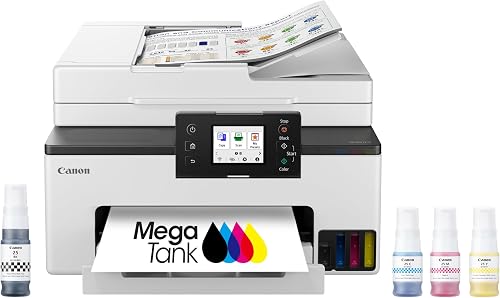
Canon MegaTank MAXIFY GX2020 All-in-One Wireless Color: Best for refillable color printing
- Automatic duplex printing
- 35-sheet auto document feeder
- Refillable tank system
- Print, copy, scan and fax
The GX2020 combines color printing with refillable ink tanks, a 35-sheet feeder and fax support. It fits home and office users who want color output and fewer cartridge changes.
Pros
- Refillable ink system
- Print, copy, scan and fax
- Automatic duplex printing
Cons
- Slower than the laser models
- Feeder holds fewer pages than the top Brother picks
The Canon MegaTank MAXIFY GX2020 is built for users who want color printing, scanning, copying and faxing with a refillable ink system. Its automatic duplex printing helps with two-sided documents, while the 35-sheet feeder handles smaller multi-page jobs.
Canon lists up to 3,000 black-and-white pages and 3,000 color pages from a single set of inks. The system uses GI-25 pigment-based ink bottles in cyan, magenta, yellow and black.
The GX2020 reaches 15 black-and-white pages per minute and 10 color pages per minute. Its 2.7-inch color touchscreen provides direct controls, and the printer connects through wireless printing or USB.
At 14.8 in deep by 15 in wide by 8.9 in high, it is compact for a color all-in-one with fax. The body weighs 17.8 lb, and the box includes the printer, documentation, power cord, fax modular cable and setup ink bottles.
Pick it when refillable tanks and fax matter more than maximum speed. Its 35-sheet feeder is smaller than the Brother feeders, and automatic duplex scanning is not confirmed in the available details.
HP Envy 6155 Wireless All-in-One Color Inkjet: Best for simple home color printing
- Automatic duplex printing
- 100-sheet input tray
- 2.4-inch color touchscreen
- Print, scan and copy
The HP Envy 6155 is a light home all-in-one for color documents, photos, scanning and copying. Automatic two-sided printing helps reduce manual page turning.
Pros
- Color printing
- 100-sheet tray
- Color touchscreen
Cons
- Slower print speed
- Duplex scanning is not specified
The HP Envy 6155 is a simple home color all-in-one for printing, scanning and copying. It adds automatic two-sided printing, a 100-sheet input tray and a 2.4-inch color touchscreen.
Black-and-white speed reaches 10 pages per minute, while color speed reaches 7 pages per minute. That makes it better suited to everyday home work than large batches of office documents.
The printer supports wireless and mobile printing, with a USB hardware interface. It measures 17.05 in deep by 5.35 in wide by 14.21 in high and weighs 11.2 lb.
The Envy 6155 supports letter-size media and color output up to 4,800 x 1,200 dpi. It includes HP 68 setup black and tri-color cartridges, a power cord and setup materials.
Choose it for homework, routine forms and borderless color photos. It is not the right pick for high-volume scanning, and the available details do not confirm automatic duplex scanning.
Epson EcoTank ET-4950 Wireless Duplex All-in-One Cartridge-Free: Best for high-volume color and fax
- Automatic duplex printing
- 250-sheet paper tray
- Auto document feeder and fax
- Cartridge-free ink tanks
The ET-4950 pairs automatic duplex printing with a 250-sheet tray, fax and a cartridge-free ink system. It suits users who print color pages often and want large ink bottles.
Pros
- 250-sheet tray
- Cartridge-free system
- Print, copy, scan and fax
Cons
- Duplex scanning is not specified
- Slower black-and-white speed than the laser picks
The Epson EcoTank ET-4950 is the best match for frequent color printing when a large paper tray and cartridge-free ink system matter. It includes automatic duplex printing, copying, scanning and faxing.
Its 250-sheet paper tray matches the HP laser pick in capacity. The automatic document feeder supports multi-page work, while the 2.4-inch color display provides controls on the printer.
Epson lists speeds of 18 black-and-white pages per minute and 9 color pages per minute. The ink system includes one 127 mL bottle of 502 black ink and one 70 mL bottle each of cyan, magenta and yellow.
The ET-4950 measures 13.7 in deep by 14.8 in wide by 9.4 in high and weighs 16.1 lb. It supports media up to 8.5 x 14 in and connects through Ethernet or USB.
Pick it for color documents and long intervals between cartridge-style replacements. Its listed features confirm duplex printing, not automatic two-sided scanning, so verify that point for your workflow.
What should you check in a printer with duplex scanning?
The most important check is whether the automatic document feeder scans both sides in one pass. A printer may have an automatic duplex printing setting and still require you to turn two-sided originals over by hand.
Look for wording such as automatic duplex scanning, single-pass duplex scanning or a duplex scan unit. If the description only says automatic duplex printing, treat that as a printing feature and ask the manufacturer about scanning.
Feeder size also affects daily work. A 50-page feeder suits longer packets than a 35-sheet or smaller feeder, while a 100-sheet paper tray is enough for many home tasks but may need more frequent refills in an office.
Speed matters most when you scan or print several pages at once. The Brother DCP-L2640DW reaches 36 pages per minute, the Brother MFC-L2820DW reaches 34, and the HP LaserJet Pro 3101sdw reaches 35 in black and white.
For more capacity-focused choices, compare these models with the best office printer for high volume printing.
Should you choose laser or inkjet for two-sided documents?
Choose a monochrome laser if most of your work is black and white forms, reports and contracts. The Brother and HP laser models here run from 34 to 36 pages per minute, which suits repeated office jobs.
That pace matters when a shared printer handles invoices, sign-in sheets and meeting packs through the day. A first page in about seven to eight seconds also helps after the printer has been idle.
Laser output suits text heavy work because pages stay crisp and dry as they leave the tray. It also fits desks where documents are filed, stamped or passed around soon after printing.
The trade off is simple. A monochrome laser will not print in color, so charts, photos and highlighted forms will come out in black and white.
Choose an inkjet if you need color documents, photos or refillable ink tanks. The Canon PIXMA TR7120 and HP Envy 6155 target home color work, while the Canon MAXIFY GX2020 and Epson ET-4950 add office focused tank systems.
Inkjet models here print color at slower speeds than the laser picks print black and white. That slower pace is normal for home use and matters less when jobs are short and occasional.
Refillable tank models change the daily cost pattern in a useful way. Large bottles are topped up over time instead of swapping small cartridges often.
The Canon MAXIFY GX2020 lists up to 3,000 black pages and 3,000 color pages from a single set of inks. The Epson ET-4950 lists enough included ink for up to 6,600 black pages and 5,500 color pages.
Those yields suit users who print color often and want fewer interruptions. A 250-sheet tray also means fewer refills than a 100-sheet tray for light home use.
Photo work can change the decision. Read Which Printer Is Better for Printing Photos? and Why Is Inkjet Better for Photo Printing? before choosing a monochrome laser for a mixed workload.
If photos are a weekly task, color may be worth more than extra speed. If photos are rare, a laser printer keeps the focus on documents and copying.
Setup and care follow the same split. Laser models here often use wireless, Ethernet or USB for shared office access, while inkjet home models lean more on wireless and mobile printing.
Laser printers need toner and drum care over time, while inkjet printers benefit from regular use to keep nozzles clear. The best choice matches the pages you print most, not the pages you print once in a while.
Do you need fax as well as duplex scanning?
Fax support is useful when your workflow still sends documents directly to phone numbers or receives them through the printer. The Brother MFC-L2820DW, Canon MAXIFY GX2020 and Epson ET-4950 include fax functions.
Keeping fax in the same machine can reduce clutter on a small desk. It also means one clear spot for incoming pages, sent confirmations and stored documents.
Ask who still uses fax in your office before you pay for it. Some teams send one fax a month, while others rely on it daily for orders or signed forms.
If fax is rare, a 3-in-1 printer keeps the controls simpler. Fewer menus and fewer cables can make setup faster and daily use calmer.
If fax is part of the routine, check what else the machine must handle. Multi-page scanning, copying and two-sided printing should all fit the same workflow without constant workarounds.
The Brother MFC-L2820DW pairs fax with a 50-page auto document feeder. That feeder helps when a fax packet or scan packet runs past a few pages.
The Canon MAXIFY GX2020 pairs fax with a 35-sheet feeder and refillable tanks. That mix suits color users who also need fax without switching machines.
The Epson ET-4950 pairs fax with a 250-sheet tray and tank ink. That mix suits frequent color printing where fax is a secondary task.
Do not add fax only because it sounds complete. An unused function still takes space in menus, setup steps and support calls.
If you do not need fax, the Brother DCP-L2640DW removes that extra function while keeping printing, copying and scanning. Its 36-page-per-minute speed is the fastest listed here for black and white output.
Its 50-page feeder also suits multi-page copy and scan jobs. Removing fax does not remove the need to check scanning details, so confirm how two-sided originals are handled before you scan long packets.
A focused 3-in-1 often suits teams that email or scan instead of faxing. It can also suit a home office where desk space is tight.
For more fax-focused options, compare our best printer with fax guide and our roundup of the best copier fax scan printer for business.
Use those guides to check feeder size, paper capacity and connection options. List your weekly tasks first, then choose the machine that covers the top three with ease.
If fax ranks near the top, keep it. If it ranks near the bottom, a simpler printer may serve you better every day.
How do you set up and use automatic duplex features?
Start by placing the printer where you can open the feeder and remove printed pages without blocking the paper tray. Leave enough space for the full document path, then connect the printer through the wireless, Ethernet or USB method that fits your devices.
For duplex printing, select two-sided or duplex output in the print settings before sending the job. Print a short document first so you can confirm page order, paper direction and the binding edge.
For duplex scanning, load a short two-sided sample into the feeder and check the saved file. Look for both sides in the correct order before scanning a long packet.
Keep originals straight and remove staples, clips and folded corners before using an automatic feeder. Clean the scanning surface and feeder path according to the printer's instructions when pages begin to show lines or feed unevenly.
Which printer with duplex scanning should you choose?
The Brother MFC-L2820DW is the best overall choice for a small office that needs black and white printing, copying, scanning and faxing in one compact machine.
Choose the Brother DCP-L2640DW for the fastest 3-in-1 document workflow. Choose the HP LaserJet Pro 3101sdw for a 250-sheet tray and sharp monochrome office output.
Pick the Canon MAXIFY GX2020 or Epson ET-4950 when color, refillable tanks or fax matter more than laser speed. For home color work, the Canon PIXMA TR7120 and HP Envy 6155 offer a lighter path for photos, homework and routine forms.
Start with the pages you print most. Black and white reports point toward laser, while color documents and photos point toward inkjet.
Then check the feeder. A 50-page feeder suits longer packets, while a 35-sheet feeder suits shorter jobs with fewer pages at once.
Next, check paper capacity. A 250-sheet tray reduces refill stops, while a 100-sheet tray fits light use and needs more attention.
Speed should match the job size. Laser models here reach 34 to 36 pages per minute, while color inkjet models here print at slower color speeds.
Also check connections before you buy. Dual-band wireless, Ethernet and USB give more placement choices than wireless alone.
Think about space on the desk and shelf. Most of these models measure close to 16 inches wide, so measure first and leave room to open lids and feeders.
Care and supplies matter over time. Toner models need toner changes, while tank models need bottle refills and occasional checks of ink levels.
For any model, confirm automatic duplex scanning separately from automatic duplex printing. That single check helps prevent buying a printer that handles two-sided output but still requires manual page turning for two-sided originals.
Test with a short two-sided sample if you can. Load it in the feeder, scan it, and check page order in the saved file.
If the scanner needs help, plan the extra step into your routine. Manual flipping is fine for one page and slow for a long packet.
Choose the machine that fits your top tasks without forcing workarounds. That choice will feel right long after setup day.
Our top 3 picks at a glance
-
1
Best for complete small-office workflows
Brother MFC-L2820DW Wireless Compact Monochrome All-in-One Laser
9.6/10 our score
See it on Amazon -
2
Best for fast 3-in-1 document work
Brother DCP-L2640DW Wireless Compact Monochrome Multi-Function Printer
9.6/10 our score
See it on Amazon -
3
Frequently asked questions
What is the best printer with duplex scanning?
The Brother MFC-L2820DW is the strongest overall choice in this group for small-office document work. It has automatic duplex printing, a 50-page auto document feeder, black-and-white laser output and print, copy, scan and fax functions.
Before buying, confirm that the model's scanner can capture both sides automatically if duplex scanning is your main requirement.
What is the difference between duplex printing and duplex scanning?
Duplex printing puts ink or toner on both sides of a sheet. Duplex scanning captures both sides of a two-sided original, usually through an automatic document feeder.
A printer can support duplex printing without having automatic duplex scanning, so check both features separately.
Which printer is best for duplex printing and scanning?
The Brother MFC-L2820DW and Brother DCP-L2640DW are strong choices for fast black-and-white document work with automatic duplex printing and 50-page feeders. The HP LaserJet Pro 3101sdw also adds a 250-sheet tray and a 50-sheet feeder.
The product details here do not confirm automatic two-sided scanning for every model, so verify that function before ordering.
Are inkjet printers good for duplex scanning?
Inkjet printers can be useful for color documents, photos and routine scanning, but automatic duplex scanning depends on the specific model. The Canon PIXMA TR7120, Canon MAXIFY GX2020, HP Envy 6155 and Epson ET-4950 list automatic duplex printing.
Those details do not by themselves confirm that the scanner captures both sides automatically.