9 Best Printers That Don't Dry Out (November 2026)
The best printers for long gaps between print jobs include the Brother HL-L2405W Wireless Compact Monochrome Laser Printer for occasional black-and-white pages, the Canon PIXMA TS6520 Wireless Color Inkjet Printer for occasional color and scanning, and the Canon PIXMA TR160 Color Wireless Portable Printer for portable color printing.
On this page (6 sections)
The best printers that don't dry out are laser models, because they use toner instead of liquid ink. The Brother HL-L2405W is the top pick here for households that mostly print documents; thermal printers also avoid ink, while tank and cartridge inkjets remain better fits when you need color.
If your printer may sit unused for weeks or months, the print technology matters. Laser toner does not dry in a nozzle, while inkjet printers use liquid ink that can dry around the printhead during long idle periods.
For a broader home-use comparison, see Laser Printer vs Inkjet for Home Use: An Easy Breakdown. This roundup also includes ink tank and thermal options, since they solve different printing needs.
Our picks at a glance
-
1
 Best for occasional black-and-white pages
Brother HL-L2405W Wireless Compact Monochrome Laser Printer
9.7/10 our score
See it on Amazon -
2
 Best for occasional color and scanning
Canon PIXMA TS6520 Wireless Color Inkjet Printer
9.5/10 our score
See it on Amazon -
3
 Best for portable color printing
Canon PIXMA TR160 Color Wireless Portable Printer
9.3/10 our score
See it on Amazon
- 4
 Check it
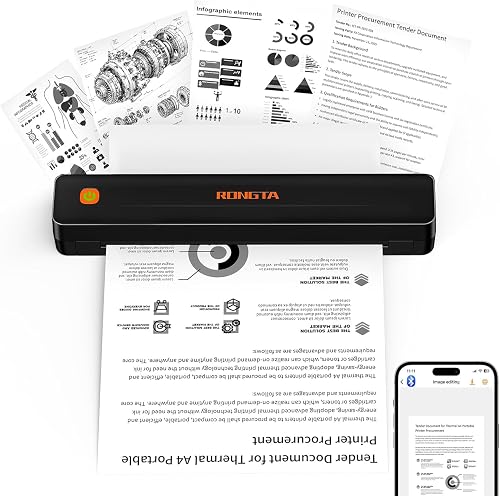
Rongta Thermal Portable Printers Wireless for Travel
Best for inkless travel forms - 5
 Check it
HP Envy 6155 Wireless All-in-One Color Inkjet
Best for home color documents - 6
 Check it
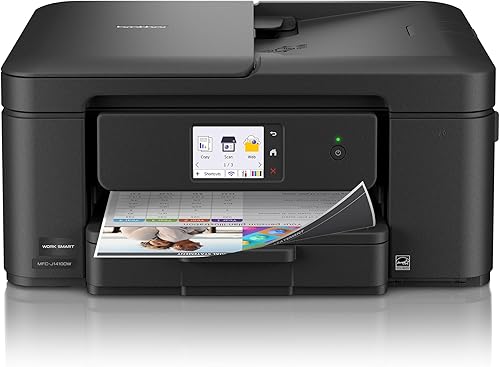
Brother Work Smart 1410 Wireless Color Inkjet
Best for frequent scanning and copying - 7
 Check it
HP Envy Photo 7975 Wireless Color Inkjet
Best for photos and family projects - 8
 Check it
Epson EcoTank ET-2900 Wireless All-in-One Color Supertank
Best for regular color printing with tanks - 9
 Check it
Epson EcoTank ET-M1170 Wireless Monochrome Supertank Printer
Best for regular monochrome tank printing
How we chose printers that don't dry out
The strongest picks for long idle gaps avoid liquid ink, so the list starts with a monochrome laser printer and a thermal printer. We also included color inkjets and tank models for readers who need scanning, photos or color documents, with clear notes about their limits.
We compared each printer's stated print technology, core functions, media needs and connectivity. The scores reflect how well those features fit people who print occasionally, along with the everyday tasks each model can handle.
A laser printer is the simplest answer when you only need black text on ordinary paper. The Brother HL-L2405W prints monochrome pages, while thermal models such as the Rongta require thermal paper.
Color needs change the decision. Inkjet printers offer color, scanning and photo options, and refillable tank designs reduce cartridge changes, but both still rely on liquid ink.
If you're choosing for a household with schoolwork, our guide to what type of printer is good for a student covers common school and home tasks. For large-format needs, consider these home printers that can print 11x17.
| Product | Best for | Print type | Paper capacity | Print speed | Our score |
|---|---|---|---|---|---|
| Brother HL-L2405W Wireless Compact Monochrome Laser Printer | occasional black-and-white pages | Monochrome laser | 250 sheets | Up to 30 ppm | 9.7 |
| Canon PIXMA TS6520 Wireless Color Inkjet Printer | occasional color and scanning | Color inkjet | 9.5 | ||
| Canon PIXMA TR160 Color Wireless Portable Printer | portable color printing | Color inkjet | 9.3 | ||
| Rongta Thermal Portable Printers Wireless for Travel | inkless travel forms | Monochrome thermal | 9.3 | ||
| HP Envy 6155 Wireless All-in-One Color Inkjet | home color documents | Color inkjet | 100 sheets | 8.8 | |
| Brother Work Smart 1410 Wireless Color Inkjet | frequent scanning and copying | Color inkjet | 150 sheets | 8.7 | |
| HP Envy Photo 7975 Wireless Color Inkjet | photos and family projects | Color inkjet | 8.5 | ||
| Epson EcoTank ET-2900 Wireless All-in-One Color Supertank | regular color printing with tanks | Color ink tank | 100 sheets | 8.2 | |
| Epson EcoTank ET-M1170 Wireless Monochrome Supertank Printer | regular monochrome tank printing | Monochrome ink tank | 250 sheets | 8.0 |
The best printers for long gaps between jobs
The Brother laser is the most direct answer for black-and-white documents, while the color and portable picks suit readers who need a different kind of output. Match the printer to what you actually print, since a machine that avoids drying may still lack the functions or color you want.
Brother HL-L2405W Wireless Compact Monochrome Laser Printer: Best for occasional black-and-white pages
- Monochrome laser printing
- 250-sheet tray
- Print speeds up to 30 ppm
- Dual-band wireless
Toner-based printing suits households that leave the printer idle between document jobs. It prints black-and-white pages and has a 250-sheet tray.
Pros
- Laser printing uses toner
- 250-sheet paper tray
- Wireless and USB connections
Cons
- Black-and-white printing only
- No scanning or copying
The Brother HL-L2405W is the clearest match for households that may go a while between print jobs and mostly need black text. Its laser process uses toner, so it avoids the liquid ink nozzles that can dry during long idle periods.
It prints one-sided monochrome pages at speeds up to 30 ppm and has a 250-sheet tray. Dual-band Wi-Fi supports wireless connections, and USB provides a local connection to one computer.
This is a print-only model, so it won't scan or copy documents. It also can't print color pages or photos, which makes the next inkjet pick a better fit for households with mixed needs.
Choose it if your usual jobs are forms, school handouts or other black-and-white documents. For a deeper look at the trade-offs, read Is a Laser Printer Worth It for Home Use?.
Canon PIXMA TS6520 Wireless Color Inkjet Printer: Best for occasional color and scanning
- Color inkjet printing
- Print, scan and copy
- Automatic two-sided printing
- Dual-band Wi-Fi
A compact all-in-one for home users who need color, photos, scanning and copying. Its cartridge ink system needs more care during long idle periods than toner.
Pros
- Prints color documents and photos
- Scans and copies
- Automatic two-sided printing
Cons
- Cartridge ink can dry during long idle periods
- Not designed for monochrome-only needs
The Canon PIXMA TS6520 fits a home that needs color, copying and scanning in one compact printer. Its two-cartridge hybrid ink system is useful for documents and photos, but it remains an inkjet, so long periods without use can bring the same drying concern as other cartridge printers.
Automatic two-sided printing helps reduce paper use on everyday jobs. Dual-band Wi-Fi and mobile printing support make it easier to print from a phone or computer, and the OLED display shows ink levels and printer status.
The printer supports media up to 8.5 x 11 in. It doesn't include an automatic document feeder, so scanning a stack of pages means handling them individually.
Choose it when color and all-in-one functions matter more than long-term idle storage. If you go several months between jobs, plan a regular print routine or consider the Brother laser instead.
Canon PIXMA TR160 Color Wireless Portable Printer: Best for portable color printing
- Portable color inkjet
- Prints up to 8.5 x 11 in
- Wireless Direct mode
- OLED display
This lightweight inkjet fits buyers who need color printing while away from home. Its portable design does not change the usual inkjet concern about long idle periods.
Pros
- Compact and lightweight
- Color printing up to letter size
- Wireless Direct mode
Cons
- Uses ink cartridges
- Prints one side at a time
The Canon PIXMA TR160 is for people who need color printing in a portable package. At 4.5 lb, it can fit into a bag or backpack, and it prints documents or photos up to 8.5 x 11 in.
Portability doesn't make it resistant to ink drying. It uses a five-color hybrid ink system, so its owner should follow Canon's care guidance and avoid leaving it idle for long stretches.
Wireless Direct mode lets a compatible device connect without a wireless router. The printer also supports the Canon PRINT app, Apple AirPrint and Mopria Print Service.
Choose the TR160 for occasional printing away from home, not as a way to avoid ink maintenance. It prints one side at a time and does not scan or copy.
Rongta Thermal Portable Printers Wireless for Travel: Best for inkless travel forms
- Thermal printing
- No ink cartridges or ribbons
- Letter-size thermal paper
- Bluetooth and USB
Thermal printing avoids liquid ink and toner, so there is no ink cartridge to dry out. It requires thermal paper and is limited to monochrome output.
Pros
- No ink cartridges or ribbons
- Portable design
- Bluetooth and USB connections
Cons
- Requires thermal paper
- Does not support Chrome
The Rongta thermal printer avoids ink cartridges and ribbons, making it another option for people wary of ink drying out. Instead of ink, it uses thermal paper, which limits the kinds of media it can handle.
The F11A supports letter and legal thermal paper and connects through Bluetooth or USB. Its maker describes it for forms, letters, assignments and travel documents, with monochrome output.
Phone and tablet pairing must happen through the RONGTA app, and the printer does not support Chrome. Check that your device and software fit these requirements before choosing it for everyday home printing.
This is the pick for portable forms and simple documents when thermal paper works for you. Choose a laser model if you want a printer for regular black-and-white pages on standard paper.
HP Envy 6155 Wireless All-in-One Color Inkjet: Best for home color documents
- Color print, scan and copy
- Automatic two-sided printing
- 100-sheet input tray
- Dual-band Wi-Fi
This all-in-one handles everyday color documents and photos, with scanning and copying included. Its cartridge ink can dry during extended periods without printing.
Pros
- Prints, scans and copies
- Automatic two-sided printing
- 100-sheet input tray
Cons
- Uses ink cartridges
- HP cartridges require original HP chips or circuitry
The HP Envy 6155 is an all-in-one choice for everyday home color printing, scanning and copying. It offers automatic two-sided printing, a 100-sheet input tray and dual-band Wi-Fi.
Its cartridge-based ink system can dry during long idle periods, so it suits households that use the printer more regularly. HP also says the printer works only with cartridges that have original HP chips or circuitry, which is a factor to check when planning supplies.
The 2.4 in touchscreen provides printer controls, and the HP app supports printing, scanning, copying and faxing from a smartphone. The listed functions make it more versatile than the print-only laser pick, but that versatility won't remove ink maintenance.
Choose it if color and an all-in-one design matter more than storing the printer unused for months. If you want color but print only now and then, build a small maintenance print into your routine.
Brother Work Smart 1410 Wireless Color Inkjet: Best for frequent scanning and copying
- Print, copy and scan
- Automatic two-sided printing
- 20-sheet ADF
- 150-sheet paper tray
Choose this inkjet if you need an automatic document feeder and a larger paper tray for home office tasks. It still needs regular printing to keep ink moving.
Pros
- 20-sheet automatic document feeder
- Automatic two-sided printing
- 150-sheet tray
Cons
- Uses ink cartridges
- Less suitable for long periods without printing
The Brother Work Smart 1410 suits a home office that needs printing, scanning and copying, plus an automatic document feeder. Its 20-sheet ADF can help with multi-page scan or copy jobs, and the 150-sheet tray holds more paper than the smaller home models here.
Automatic two-sided printing and a 2.7 in touchscreen add useful office features. Brother's Mobile Connect app can monitor ink usage, and the printer can connect by Wi-Fi or USB.
It still uses ink cartridges, so occasional use requires the same attention to inkjet upkeep. Page Gauge helps monitor ink use, but it does not change the fact that liquid ink is in the print system.
Choose the Work Smart 1410 if you need the feeder and document tools often enough to keep the printer active. For a student who mostly prints assignments, compare the needs in our student printer guide.
HP Envy Photo 7975 Wireless Color Inkjet: Best for photos and family projects
- Color photo printing
- Print, scan and copy
- Automatic two-sided printing
- Separate photo tray
This home all-in-one is aimed at photos, schoolwork and office documents. Choose it for those color tasks, and plan to print often enough to maintain its cartridge ink system.
Pros
- Photo features and separate photo tray
- Prints, scans and copies
- Automatic two-sided printing
Cons
- Uses ink cartridges
- Not the best fit for rare, black-and-white-only jobs
The HP Envy Photo 7975 is the color-focused choice for families that print photos, homework and creative projects. It has a separate photo tray, automatic two-sided printing and an automatic document feeder.
Those features make it more capable for mixed household work than a basic printer. They do not make it a good choice for long periods without printing, since it uses liquid ink cartridges.
The color touchscreen and wireless mobile printing support help with everyday access. Its range of functions makes sense if you use them regularly, especially for photo jobs and multi-page documents.
Choose it when home photos and family projects matter enough to justify an inkjet. If you mostly print a few black-and-white pages each month, the Brother laser is a better fit for idle periods.
Epson EcoTank ET-2900 Wireless All-in-One Color Supertank: Best for regular color printing with tanks
- Refillable ink tanks
- Print, scan and copy
- 100-sheet tray
- Heat-Free technology
Refillable tanks replace cartridges, but the printer still uses liquid ink. It suits regular color printing better than a household that may leave its printer idle for months.
Pros
- Refillable tanks
- Color printing with scanning and copying
- No warmup time
Cons
- Liquid ink can still dry during long idle periods
- Less compelling if you rarely print
The Epson EcoTank ET-2900 uses refillable ink tanks rather than small cartridges, and it can print, scan and copy. Its tank design can suit regular color printing, but it does not eliminate the risk of ink drying when the printer sits unused.
Epson says the included ink can print up to 3,600 black pages or 6,500 color pages. It also has a 100-sheet tray, a flatbed scanner and a 1.44 in color display.
Heat-Free technology and refillable tanks are part of this model's design. The main question for an occasional printer is still whether it will be used often enough to keep liquid ink moving.
Choose it for a household with steady color jobs and a preference for refillable tanks. For very infrequent black-and-white printing, a laser model is more aligned with the problem.
Epson EcoTank ET-M1170 Wireless Monochrome Supertank Printer: Best for regular monochrome tank printing
- Monochrome ink tank
- Automatic two-sided printing
- 250-sheet tray
- Wi-Fi Direct and Ethernet
A refillable black ink tank reduces cartridge replacement, and the printer adds automatic two-sided printing. It still uses liquid ink, so it is not as idle-friendly as a laser printer.
Pros
- 250-sheet tray
- Automatic two-sided printing
- Wi-Fi Direct and Ethernet
Cons
- Liquid ink can dry during extended idle periods
- Monochrome output only
The Epson EcoTank ET-M1170 is a monochrome tank printer with automatic two-sided printing and a 250-sheet tray. The included black ink bottle is stated to yield up to 6,000 pages, which can appeal to homes with steady document printing.
Its EcoFit bottle is keyed for refilling, and it supports Wi-Fi Direct and Ethernet. But like other ink tank printers, it uses liquid ink rather than toner, so a long idle stretch can still create ink maintenance concerns.
This makes more sense for regular black-and-white printing than for rare jobs. If you're looking for a printer to store between occasional uses, the Brother HL-L2405W's laser technology is the more direct match.
What printer technology is least likely to dry out?
Laser printers are the most practical choice for infrequent standard-paper printing because they use toner. Thermal models also avoid liquid ink, but they need specific thermal paper and may have fewer general-purpose features.
Inkjet and ink tank models use liquid ink. Even when a tank can hold more ink than cartridges, that doesn't mean the printhead is immune to drying or clogging if the printer sits unused.
Consider how often you print, whether you need color, and whether you need scanning or copying. If you need a printer mainly for occasional forms and documents, a monochrome laser keeps the decision simple.
How can you keep an inkjet from drying out?
Regular use is the most useful habit for an inkjet that might otherwise sit idle. Follow the care instructions for your model, and print a small page with both black and color elements on a recurring schedule that fits the manufacturer's guidance.
Avoid turning off the printer by unplugging it if its instructions call for a normal shutdown. Many inkjets perform maintenance when powered down correctly, though the exact process depends on the model.
Don't run repeated cleaning cycles without checking the manual. Cleaning can use ink, so start with the recommended maintenance steps if you notice faint lines or missing colors.
Is a laser printer worth it for occasional home use?
A laser printer can be worth considering if you mainly print black-and-white pages and want less concern about ink drying during idle periods. It may be less suitable if you need color photos, scanning or copying in the same device.
The Brother HL-L2405W is a print-only monochrome laser, so it works best when your needs are simple. Compare its toner-based approach with inkjets in our guide to whether a laser printer is worth it for home use.
Which printer should you choose if it may sit unused?
Pick the Brother HL-L2405W if you want ordinary black-and-white printing with toner and a 250-sheet tray. Choose the Rongta if thermal paper works for portable monochrome forms, or select a color inkjet when its photo, scan or copy features justify regular upkeep.
If you'll print in color steadily, the Epson EcoTank ET-2900 offers refillable tanks and all-in-one functions. For the fewest concerns during long gaps, choose laser technology; for color tasks, choose the inkjet whose functions you'll use often enough to keep it active.
Our top 3 picks at a glance
-
1
Best for occasional black-and-white pages
Brother HL-L2405W Wireless Compact Monochrome Laser Printer
9.7/10 our score
See it on Amazon -
2
Best for occasional color and scanning
Canon PIXMA TS6520 Wireless Color Inkjet Printer
9.5/10 our score
See it on Amazon -
3
Best for portable color printing
Canon PIXMA TR160 Color Wireless Portable Printer
9.3/10 our score
See it on Amazon
Frequently asked questions
Which printer type is least likely to dry out?
A laser printer is usually the safest choice for long gaps because it uses dry toner rather than liquid ink. Thermal printers also avoid ink cartridges, but they need compatible thermal paper and commonly print only in monochrome.
Choose between them based on whether you need ordinary paper and standard document printing.
Can an inkjet printer dry out if I rarely use it?
Yes. Ink can dry or clog around the printhead when an inkjet sits unused for a long time.
The risk varies by printer, ink system and storage conditions.
If you keep an inkjet, use its maintenance instructions and print a small page regularly.
Check the manual for the schedule recommended for your model.
Does an EcoTank printer dry out?
An EcoTank uses liquid ink in refillable tanks, so it can still face ink drying or clogging concerns during long idle periods. Its tanks reduce reliance on small cartridges, but they do not make it a toner printer.
Choose one when you print often enough to use its color or tank capacity.
Are thermal printers a good choice for home documents?
A thermal printer can work for monochrome forms, letters and travel documents if you use the right thermal paper. The Rongta F11A supports letter and legal sizes, connects by Bluetooth or USB, and does not use ink cartridges or ribbons.
Check app and computer compatibility before buying.
How often should I print to keep an inkjet from drying out?
There is no single schedule that fits every inkjet. Follow the printer manual, since maintenance needs depend on its design and ink system.
A small color and black page at regular intervals can help keep ink moving, but it uses ink and paper.
For very infrequent printing, consider a laser model.