What Type of Printer Is Good for a Student?
On this page (7 sections)
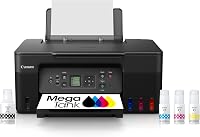
For students, the best type of printer is typically an inkjet printer because of its affordability and ability to print in color. Many students need to print assignments, research papers, and even colorful presentations. An inkjet printer offers a good balance of cost-effectiveness and functionality for these varied tasks.
When choosing a printer, think about your main needs. Will you print mostly black and white text, or do you also need to produce vibrant images? Your budget is also a key factor. We found that considering these points upfront helps narrow down your options considerably. Many students find that a printer with wireless connectivity is also very convenient.
- Inkjet printers are generally best for students.
- They offer good color printing at a lower price.
- Consider your printing volume and color needs.
- Wireless printing is a handy feature to look for.
Let’s walk through the different types of printers and what features are most important for your student life.
Choosing the Right Student Printer
Selecting the perfect printer for your academic journey can feel like a big decision. You need something that can handle essays, reports, and maybe even some colorful projects. We’ve researched what works best for students, and it often comes down to balancing features, cost, and how you’ll actually use it.
Inkjet vs. Laser: The Main Showdown
When you’re looking at printers, two main types usually pop up: inkjet and laser. Each has its own strengths, and understanding these can help you pick the one that fits your student life perfectly.
Inkjet Printers: The Colorful All-Rounders
Inkjet printers are like the friendly neighborhood car. They’re versatile and good for many everyday tasks. They work by spraying tiny droplets of ink onto the paper. This makes them excellent for printing pictures and graphics with smooth color transitions. For students, this means your biology diagrams or art history slides will look great.
One of the biggest draws of inkjet printers is their initial lower cost. You can often find a capable inkjet printer for a price that won’t break your student budget. This is a huge plus when you’re already juggling tuition, books, and ramen noodle expenses.
However, ink cartridges can add up over time. We found that the cost per page for ink can be higher than with laser printers, especially if you print a lot of black and white text. Think of it like this: a car that’s cheap to buy might cost more in gas over the long run. So, if your printing needs are mostly text-based, you’ll want to keep an eye on ink usage.
Laser Printers: The Text Masters
Laser printers use a different technology. They use a laser beam to create an image on a drum, which then attracts toner (a dry powder). This toner is then heated and fused onto the paper. This process is super fast and makes laser printers fantastic for printing crisp, sharp text. Understanding the print engine is key to knowing how laser printers operate, as this guide explains.
If your primary task is churning out essays, research papers, and dense reading materials, a laser printer will be your best friend. The text it produces is clean and professional-looking, often with very sharp edges that don’t smudge easily. Many experts say laser printers are the go-to for high-volume text printing (PCMag).
The upfront cost of laser printers is typically higher than inkjets. You might see a sticker shock when you first look. But, the toner cartridges often last much longer than ink cartridges. This can make the cost per page lower for black and white documents, even though the initial purchase is pricier. For a student printing hundreds of pages of notes, a laser printer could save money in the long run.
Most budget-friendly laser printers are monochrome, meaning they only print in black and white. If you need to print color charts or presentations, you’ll need to look at more expensive color laser printers. These can get quite pricey, often costing more than a good inkjet printer.
Key Features Every Student Should Consider
Beyond just the type of printer, there are specific features that can make your student life much easier. We looked at what helps students most.
Print Quality and Speed
For most student assignments, standard print quality is perfectly fine. You don’t necessarily need the highest resolution printing for an essay. However, if you’re printing graphics or photos for a presentation, look for printers that offer decent color accuracy and resolution. We found that most modern inkjets handle this well.
Speed can be important, especially when a deadline is looming. Do you want to wait around for pages to print? Laser printers are generally much faster for text documents than inkjets. However, for simple text printing, many inkjet printers today are plenty fast enough for a student’s needs. If you’re printing a stack of papers, you might appreciate the extra speed.
Connectivity: Wireless is a Game-Changer
This is a big one. Having a wireless printer means you can print from your laptop, tablet, or even your smartphone without needing to plug it in. This is super convenient, especially if you’re working from different spots in your dorm or apartment. You won’t be hunting for USB cables.
Many students share Wi-Fi networks. We found that setting up a wireless printer on a shared network is usually straightforward. Most printers now offer Wi-Fi setup through a mobile app, which makes the process less intimidating than it used to be. Many also support AirPrint for Apple devices or Mopria for Android, making printing even simpler.
Scanning and Copying: The All-in-One Advantage
Do you need to scan a signed form or make a quick copy of a lecture slide? Many students benefit from an all-in-one printer (also called an All-in-One or AIO). These devices combine printing, scanning, and copying functions into a single unit.
An AIO saves desk space, which is often at a premium in student housing. It also means you don’t need separate machines for these common tasks. We found that AIOs are widely available in both inkjet and laser formats, though the most affordable AIOs are typically inkjet models.
When considering an AIO, check the scanner’s resolution if you plan to scan documents or images that require detail. For most typical student uses, like scanning notes or forms, a standard resolution is usually sufficient.
Ink and Toner Costs: The Long-Term View
This is where many students run into unexpected expenses. The price of the printer itself is only part of the story. You’ll need to factor in the ongoing cost of ink or toner cartridges.
As we touched on, inkjet ink can be pricey per page. If you print infrequently, you might face issues with ink drying out in the cartridges, leading to waste. Some printer brands offer ink subscription services, where they send you ink before you run out. This can sometimes be cheaper if you print regularly, but you’ll want to do the math to see if it saves you money.
Laser toner, while having a higher upfront cost per cartridge, typically yields more pages. For students who print a lot of text, this often works out to be more economical over the lifespan of the printer. We found that looking up the “yield” (how many pages a cartridge can print) and the price of replacement cartridges is a smart move before buying.
Printer Types to Be Cautious About for Students
While there are many printer options, some might not be the best fit for a typical student budget or needs.
Large Format and Photo Printers
These printers are designed for printing very large documents or extremely high-quality photos. They are usually more expensive to buy and operate. Unless your major specifically requires large-format printing (like architecture or fine art), these are likely overkill for student needs.
Specialty Printers
Think label makers, receipt printers, or 3D printers. These are for very specific tasks. A student won’t typically need these for coursework. They are tools for hobbies or particular professions, not general academic printing.
Quick Checklist for Your Printer Search
Ready to make a choice? Keep this quick list handy:
- Do you need color printing for assignments or presentations?
- How much black and white text will you print?
- Is a scanner and copier important for you?
- Can you afford ongoing ink or toner costs?
- Do you want the convenience of wireless printing?
By considering these points, you’ll be well on your way to finding a printer that serves you well throughout your academic career without causing unnecessary stress or expense.
Conclusion
Choosing the right printer for your studies doesn’t have to be complicated. For most students, an inkjet printer strikes a great balance between affordability and the ability to handle diverse tasks, including color printing. If you print a lot of black and white text, a laser printer might offer long-term savings, though the initial cost is higher. Always consider your specific needs, like scanning or wireless convenience, and don’t forget to factor in the ongoing cost of ink or toner. To make your final decision, review our quick checklist and assess your printing habits and budget.
Frequently Asked Questions
Will an inkjet printer be enough for all my college assignments?
Yes, for most student needs, an inkjet printer is perfectly capable. They handle text documents well and excel when you need to print color charts, graphs, or images for presentations. Just be mindful of ink costs if your printing volume is very high.
Are laser printers too expensive for a student budget?
While laser printers have a higher upfront cost, they can be more economical in the long run if you print a lot of black and white text. The toner cartridges print many more pages than ink cartridges, leading to a lower cost per page. It’s worth comparing the total cost of ownership.
How important is wireless printing for a student?
Wireless printing is extremely convenient for students. It allows you to print from any device in your dorm or apartment without needing cables, making it easy to print from your laptop, tablet, or phone. It simplifies printing greatly, especially in shared living spaces.
Should I get an all-in-one printer if I have limited desk space?
An all-in-one (AIO) printer is an excellent choice for students with limited space. It combines printing, scanning, and copying into one compact unit, saving valuable desk real estate. This is very practical for common student tasks like scanning notes or making copies.
How can I avoid high ink costs with an inkjet printer?
To manage inkjet costs, consider printers with high-yield ink cartridges or look into ink subscription services if you print regularly. Printing in draft mode for non-essential documents can also save ink. Always compare the cost per page of different ink options before buying.