9 Best Printers for Product Labels (November 2026)
The best printers for product labels include the NULLTONEX Thermal Shipping Label Printer 4x6 Bluetooth for flexible small-batch labels, the Phomemo Bluetooth Thermal Label Printer for broad device compatibility, and the KNAON Shipping Thermal Label Printer for template-led label design.
On this page (6 sections)
The best printer for product labels for most small businesses is the NULLTONEX Thermal Shipping Label Printer 4x6 Bluetooth because it supports several label widths and connects by Bluetooth or USB. For a colorful brand sticker, choose the Liene PixCut S1; for narrow product details, consider a compact tape label maker.
Product labels do different jobs. A barcode on a small container needs a readable, compact format, while a branded seal may call for color and a custom cut.
This roundup compares shipping-style thermal printers, a business label printer, a color sticker maker and portable tape label makers. We checked the listed features against common packaging needs such as label size, print color, connection options and media format.
Our picks at a glance
-
1
 Best for flexible small-batch labels
NULLTONEX Thermal Shipping Label Printer 4x6 Bluetooth
9.5/10 our score
See it on Amazon -
2
 Best for broad device compatibility
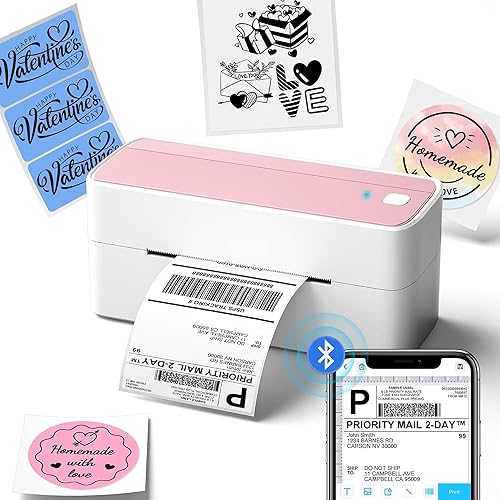
Phomemo Bluetooth Thermal Label Printer
9.4/10 our score
See it on Amazon -
3
 Best for template-led label design
KNAON Shipping Thermal Label Printer
9.2/10 our score
See it on Amazon
- 4
 Check it
JADENS Bluetooth Thermal Shipping Label Printer
Best for roll or fanfold labels - 5
 Check it
Brother QL-800 High-Speed Professional Printer
Best for black-and-red branding - 6
 Check it
Omezizy Bluetooth Shipping Label Printer with Built-in
Best for storing label rolls inside - 7
 Check it
Liene PixCut S1 Color Sticker Printer
Best for colorful custom stickers - 8
 Check it
Ponek Label Maker Machine with Tape
Best for narrow product details - 9
 Check it
NIIMBOT B1 Label Maker Machine with Tape
Best for portable product tags
How we chose a printer for product labels
The best printer for product labels depends on what goes on the package and how you prepare labels. We prioritized supported widths, print method, connection options and features that help with product identification or branding.
A printer that supports a 4 x 6 in shipping label may also handle smaller widths, but the supported range varies. Check that range against your jars, boxes or bags before you buy.
We included monochrome thermal printers for barcodes and product details, plus options for black-and-red output and full-color stickers. We also considered whether each model connects to a phone, computer or both.
Our score weighs specs and features against the needs of someone choosing a printer for retail packaging, product identification and branding.
| Product | Best for | Print method | Label width | Connection | Our score |
|---|---|---|---|---|---|
| NULLTONEX Thermal Shipping Label Printer 4x6 Bluetooth | flexible small-batch labels | Direct thermal | 1.57 to 4.3 in | Bluetooth and USB | 9.5 |
| Phomemo Bluetooth Thermal Label Printer | broad device compatibility | Direct thermal | 1 to 4.6 in | Bluetooth and USB | 9.4 |
| KNAON Shipping Thermal Label Printer | template-led label design | Thermal | 1.38 to 4.41 in | Bluetooth and USB | 9.2 |
| JADENS Bluetooth Thermal Shipping Label Printer | roll or fanfold labels | Thermal | 1.57 to 4.1 in | Bluetooth and USB | 9.1 |
| Brother QL-800 High-Speed Professional Printer | black-and-red branding | Thermal | USB | 9.0 | |
| Omezizy Bluetooth Shipping Label Printer with Built-in | storing label rolls inside | Thermal | 1 to 4.6 in | Bluetooth and USB | 8.9 |
| Liene PixCut S1 Color Sticker Printer | colorful custom stickers | Thermal dye-sublimation | 8.8 | ||
| Ponek Label Maker Machine with Tape | narrow product details | Direct thermal | 0.78 to 2 in | Bluetooth and USB | 8.5 |
| NIIMBOT B1 Label Maker Machine with Tape | portable product tags | Direct thermal | 20 to 50 mm | Bluetooth and USB | 8.1 |
Which product label printer fits your packaging?
For most small businesses, the NULLTONEX offers a flexible width range and both Bluetooth and USB connections. The other picks stand out for device compatibility, label formats, color, storage or portability.
NULLTONEX Thermal Shipping Label Printer 4x6 Bluetooth: Best for flexible small-batch labels
- Direct thermal printing
- Bluetooth and USB
- Supports widths from 1.57 to 4.3 in
- Black-and-white output
The broad supported width range and phone or computer connections suit a small business printing shipping, barcode and other monochrome labels.
Pros
- Bluetooth and USB options
- Supports multiple label widths
- App includes templates and editing tools
Cons
- Prints in black and white only
- Mobile Bluetooth printing requires its app
The NULLTONEX is a strong starting point for a small business that prints more than one kind of monochrome label. It supports widths from 1.57 to 4.3 in, so it can handle 4 x 6 shipping labels as well as narrower barcode or mailing labels.
You can connect it to a phone, laptop or PC by Bluetooth or USB. The FlashLabel Pro app includes templates, fonts and editing tools, and its offline capability lets you use saved designs without waiting for cloud downloads.
It prints in black and white, so it won't reproduce a colorful logo or product illustration. For many packages, a clean barcode, product name and short detail are easier to scan and read than decorative artwork.
Choose it when you want one compact thermal printer for shipping and several smaller label tasks. Before ordering label stock, check that its width falls within the supported range.
Phomemo Bluetooth Thermal Label Printer: Best for broad device compatibility
- Bluetooth and USB printing
- Supports widths from 1 to 4.6 in
- Works with several computer systems
- Black-and-white output
Its wide label range and support for phones, tablets and several computer systems make it a flexible option for mixed-device workspaces.
Pros
- Supports a wide range of label widths
- Bluetooth and USB printing
- Works with Windows, Mac, Chrome OS and Linux
Cons
- Prints in black and white
- Computer printing requires a driver
The Phomemo stands out for its 1 to 4.6 in label-width range and support for phones and several computer systems. That flexibility can help if the same workspace handles shipping labels, product codes and short text labels.
It supports Bluetooth and USB printing, with the Labelife app for phones and driver-based setup for computer use. Phomemo says the printer works with Windows, Mac, Chrome OS and Linux, so check the setup steps for your specific device before you begin.
Output is black and white. The product details note that compatible thermal color label paper can be bought separately, but the printer itself remains a monochrome option.
Pick it if you need wide media support and work across different devices. If you want full-color branding or cut-to-shape stickers, look at the Liene instead.
KNAON Shipping Thermal Label Printer: Best for template-led label design
- Bluetooth and USB
- Supports widths from 1.38 to 4.41 in
- App offers templates, icons and fonts
- Includes 20 test papers
The FlashLabel Pro app offers a large set of templates and design elements, while the supported width range fits shipping, barcode and price labels.
Pros
- Bluetooth and USB connections
- App offers templates and design elements
- Supports several label widths
Cons
- Bluetooth printing requires the app
- ChromeOS setup requires an extension
The KNAON gives label design more attention through the FlashLabel Pro app, which includes templates, icons and fonts. Its supported width of 1.38 to 4.41 in spans small product labels through standard shipping formats.
Bluetooth printing uses the app, while USB works with macOS, Windows, ChromeOS and Linux. For ChromeOS, KNAON says to install the FlashLabel extension; computer setup differs by operating system.
The printer can suit a shop that regularly changes between barcode labels, thank-you labels, price tags and mailing labels. It prints in monochrome, so use it for legible text and codes rather than colorful package art.
Choose it if you want templates in the app and a flexible media range. If your products need a more distinctive look, print a color sticker separately.
JADENS Bluetooth Thermal Shipping Label Printer: Best for roll or fanfold labels
- Bluetooth and USB
- Works with roll and fanfold labels
- Supports widths from 1.57 to 4.1 in
- 203 DPI thermal print head
This model works with both fanfold and roll labels, giving small businesses a choice of label format for shipping, warehouse or market use.
Pros
- Works with roll and fanfold labels
- Bluetooth and USB connections
- Supports several small-business label uses
Cons
- Phone printing requires the JADENS app
- Recalibrate when changing label stock
The JADENS works with both fanfold and roll labels, making it a useful choice when your preferred stock format matters. It supports widths from 1.57 to 4.1 in and connects by Bluetooth or USB.
For phone printing, Android and iOS users need the JADENS Printer app. The manufacturer also advises calibrating the printer when you change label stock, which is a helpful step when switching between product labels and shipping labels.
Its thermal output is monochrome. The listed uses include warehouse and market labels, as well as labels for small online businesses.
Choose this model if you already use fanfold labels or want the option to switch between fanfold and rolls. Confirm that the labels you plan to buy fit its width range.
Brother QL-800 High-Speed Professional Printer: Best for black-and-red branding
- Black and red printing
- USB connection
- Auto-cutter
- Brother DK labels and continuous tape
Black-and-red printing offers a way to highlight a product detail or brand element, and the auto-cutter handles label finishing.
Pros
- Can print in black and red
- Built-in auto-cutter
- Works with Windows and Mac
Cons
- Uses Brother DK labels and continuous tape
- Connects by USB
The Brother QL-800 is the color standout for buyers who want black-and-red printing rather than full-color artwork. A second color can help draw attention to a short product notice, name or brand element.
It connects by USB and works with Windows and Mac systems. Brother says its Plug & Label technology can print from Microsoft Word, Excel and Outlook, and the built-in auto-cutter trims the finished label.
The QL-800 uses Brother Genuine DK pre-sized labels and continuous-length tapes. That media requirement is worth checking if your products need a particular label shape or size.
Choose it when black-and-red labels fit your packaging style and compatible DK media suits your workflow. For full-color stickers with custom cutting, the Liene is a closer match.
Omezizy Bluetooth Shipping Label Printer with Built-in: Best for storing label rolls inside
- Built-in label compartment
- Bluetooth and USB
- Supports widths from 1 to 4.6 in
- Black-and-white thermal output
The built-in compartment can hold an internal roll of up to 250 4 x 6 labels, which may help keep a compact shipping and product-label station tidy.
Pros
- Built-in compartment for label rolls
- Bluetooth and USB connections
- Supports several label widths
Cons
- Prints in black and white
- Mobile Bluetooth pairing is done through the app
The Omezizy stands out for a built-in label compartment that can hold an internal roll of up to 250 4 x 6 labels. Keeping the roll inside may help reduce clutter in a small packing area.
It supports Bluetooth and USB and accepts label widths from 1 to 4.6 in. The manufacturer describes uses that include product labeling, pricing and barcode labels, in addition to shipping and mailing.
Mobile Bluetooth pairing happens in the app. The output is black and white, so plan on a separate printer if your packaging requires colorful artwork.
Choose the Omezizy if you want roll storage built into the printer and need multiple label widths. Check your label format and connection setup before making it part of your workflow.
Liene PixCut S1 Color Sticker Printer: Best for colorful custom stickers
- Color dye-sublimation printing
- 300 DPI resolution
- Prints and cuts stickers
- App connects by Bluetooth
This printer and cutter suits product branding that calls for colorful custom stickers, with an app workflow for editing, printing and cutting.
Pros
- Color output
- Prints and cuts in one device
- Sticker sheets are laminated during printing
Cons
- Sticker format differs from standard shipping labels
- Phone app is part of the workflow
The Liene PixCut S1 is the pick for colorful custom stickers that can add branding or decoration to retail packaging. It combines thermal dye-sublimation printing with sticker cutting, using a phone app for editing, printing and cutting.
Liene specifies 300 DPI output and says the printer produces color with 16.7 million colors. Its four-layer printing process automatically laminates the photo or sticker paper, and the brand describes the resulting stickers as waterproof and scratch-resistant.
This is a different kind of tool from a shipping label printer. It uses photo and sticker sheets, so consider how a sheet-based print-and-cut workflow fits the number and shape of labels you need.
Choose it for custom sticker designs and color. For rows of monochrome barcodes or shipping-style labels, a thermal label printer is likely a better fit.
Ponek Label Maker Machine with Tape: Best for narrow product details
- Supports widths from 0.78 to 2 in
- Bluetooth for phones
- USB for PC
- Prints barcodes and QR codes
The narrow width range suits small product details, barcodes and QR codes where a full-size shipping label would take up too much package space.
Pros
- Compact label width range
- Portable design
- Prints barcodes and QR codes
Cons
- Maximum width is 2 in
- Mobile printing requires the Print Master app
The Ponek suits product packages that need narrow labels from 0.78 to 2 in wide. That format works for compact address labels, barcodes, logos and QR codes, according to the manufacturer.
It connects to Android and iOS phones through the Print Master app, or to a PC by USB with the required software and drivers. Its portable design also makes it easier to move between a packing table and a product-prep area.
The width limit is the main consideration. Measure the label area on your products first, especially if you need a longer line of product details or a large barcode.
Choose the Ponek for small labels and a portable setup. If you need shipping labels up to 4 x 6 in, use one of the wider printers in this roundup.
NIIMBOT B1 Label Maker Machine with Tape: Best for portable product tags
- Portable rechargeable design
- Supports widths from 20 to 50 mm
- App includes templates and symbols
- Monochrome output
This compact label maker suits portable work such as making price tags, product details, QR codes and barcodes, with templates available in its app.
Pros
- Portable rechargeable design
- App includes templates and symbols
- Can print product details and codes
Cons
- Supports NIIMBOT thermal label paper only
- Prints in monochrome
The NIIMBOT B1 is a portable choice for small product tags and details. It supports label widths from 20 to 50 mm, and the NIIMBOT app includes templates, fonts, borders and symbols.
It prints in monochrome and connects to iOS or Android phones through the app. NIIMBOT says the B1 supports its own thermal label paper only, so factor that media restriction into your choice.
The maker also lists product uses such as price tags, product details, QR codes, barcodes and brand logos. Those uses suit small goods where a compact label is enough.
Choose the B1 if portability and app-based label design matter more than using third-party stock. If you need broad media choice or larger labels, compare it with the NULLTONEX or Phomemo.
How do you choose the right product label printer?
Choose by the physical label first, then match the printer's media and output to the job. A printer's maximum width alone doesn't confirm that a particular roll, tape or sheet will work.
What label width does your product need?
Measure a clear area on the package and leave enough room around the label for edges, seams and curves. Small jars may call for a narrow tape label, while a box can fit a broader product panel or barcode.
The Ponek supports widths up to 2 in, and the NIIMBOT supports up to 50 mm. For more width flexibility, the Phomemo, Omezizy, NULLTONEX and KNAON cover ranges reaching beyond 4 in.
Do you need color, or is monochrome enough?
Monochrome thermal labels suit product names, codes and short details when color isn't part of the design. For color, the Brother offers black and red with compatible media, while the Liene prints color stickers.
A product label needs enough contrast for its text and barcode to remain easy to read. If you use color for branding, keep important identification details clear and distinct.
Which label format will you use?
Some printers use rolls or fanfold stock, some use brand-specific labels or tape, and the Liene works with sheets. These formats affect how you store media and prepare a batch.
The JADENS supports both fanfold and roll labels. The Brother uses DK labels and continuous tape, while the NIIMBOT supports NIIMBOT thermal label paper only.
Will you print from a phone or computer?
Check whether your preferred device connects by Bluetooth, USB or both. Also confirm whether phone printing requires a particular app and whether computer printing needs a driver or browser extension.
For example, the NULLTONEX, Phomemo and KNAON offer Bluetooth and USB. The Phomemo and KNAON specify computer support across several operating systems, but their setup steps vary.
When should you choose a color sticker printer?
Choose a color sticker printer when artwork, custom shapes or decorative branding matter as much as the product information. The Liene PixCut S1 combines color printing and cutting, while most shipping-style models in this guide print monochrome labels.
Color can help a package stand out, but the label still needs to identify the product clearly. Keep the product name and other key details readable at the final label size.
For a photo-focused printer comparison, see Which Printer Is Better for Printing Photos? and Why Is Inkjet Better for Photo Printing?. Those guides cover photo printing; for cut stickers and product branding, check the Liene's sheet and app workflow.
How do product labels differ from shipping labels?
Product labels identify or brand an item, while shipping labels carry delivery information for a package. Some printers can do both if they support the needed label widths and media.
A wide thermal printer may be a practical fit for product barcodes, prices and shipping labels at one packing station. For broader label-specific comparisons, see our best printer for labels guide, best label printer for business roundup and best commercial label printer guide.
A commercial setup may need different media handling or a workflow built around higher volumes. Check the printer's supported stock and connection requirements against the labels your business already uses.
Which printer should you choose for product labels?
Choose the NULLTONEX if you want one monochrome printer for several label widths and Bluetooth or USB connections. Choose the Brother for black-and-red output, the Liene for color custom stickers, and a compact tape model for narrow tags.
For a product label printer, the right fit comes down to the package, label stock and design. Measure the label area, confirm media compatibility and choose the output that keeps your product details easy to recognize.
Our top 3 picks at a glance
-
1
Best for flexible small-batch labels
NULLTONEX Thermal Shipping Label Printer 4x6 Bluetooth
9.5/10 our score
See it on Amazon -
2
Best for broad device compatibility
Phomemo Bluetooth Thermal Label Printer
9.4/10 our score
See it on Amazon -
3
Best for template-led label design
KNAON Shipping Thermal Label Printer
9.2/10 our score
See it on Amazon
Frequently asked questions
What kind of printer is best for product labels?
A thermal label printer is a practical choice for monochrome product details, barcodes and shipping labels. If your package needs colorful artwork or a custom-cut sticker, a color sticker printer such as the Liene PixCut S1 may fit better.
Match the printer to your label size and the surface you plan to use.
Can a shipping label printer print product labels?
Yes. Several shipping-style thermal printers in this guide support widths smaller than 4 x 6 in, so they can print some product, barcode and price labels as well as shipping labels.
Check the supported width and the label stock format before choosing one for your packaging.
Can these printers make color product labels?
Most picks here print in black and white. The Brother QL-800 supports black and red on compatible Brother DK media, while the Liene PixCut S1 makes color stickers using thermal dye-sublimation.
Choose based on whether you need a second ink color, full-color artwork or simple monochrome text.
What should I check before buying a printer for product labels?
Check the label width, media format, connection method and whether you need color or cutting. Also confirm that the printer supports the label stock you plan to use, especially when a model is designed for a specific tape or label brand.
Leave room for the printer and the label roll or sheets at your work area.
Are portable label makers suitable for retail products?
Portable label makers can suit small tags, price labels, product details and codes when their maximum width fits the package. The Ponek and NIIMBOT models here support labels up to 2 in and 50 mm wide, respectively.
For larger front-facing branding, consider a wider printer or a color sticker option.