7 Best Canon All-in-One Laser Printers (November 2026)
The best Canon all in one laser printers include the Canon PIXMA TR8620a for home photo and document printing, the Canon Color imageCLASS MF753Cdw II for color laser printing and scanning, and the HP LaserJet Pro 3101fdw (best hp alternative for small teams).
On this page (10 sections)
- Best Canon all-in-one laser printers compared by use
- The best Canon all-in-one laser printers for different buyers
- Canon laser all-in-one models side by side
- How we compared these Canon all-in-one printers
- Should you choose color or black and white laser printing?
- Is laser better than inkjet or ink tank for you?
- What speed and paper capacity do you need?
- What scanning, copying and fax features matter?
- How should you set up and care for a laser all-in-one?
- Verdict: which Canon all-in-one should you buy?
The best Canon laser printer all in one for most buyers is the Canon Color imageCLASS MF753Cdw II, because it combines color laser printing at 35 pages per minute with scanning, copying and fax. If your pages are mostly black and white text, the Canon imageCLASS MF465dw is faster at 42 pages per minute.
Our score weighs specs, features and buyer feedback against what you're shopping for. We compared Canon laser multifunction models first, then added close alternatives where they help you choose.
Start with the best all-in-one laser printer guide if you want the wider market, not only Canon. For color output, read our best color laser printer all-in-one picks before you decide.
Our picks at a glance
-
1

-
2
 Best for color laser printing and scanning
Canon Color imageCLASS MF753Cdw II
9.4/10 our score
See it on Amazon -
3

- 4
 Check it
Canon Megatank G3290 All-in-One Wireless Printer
Best for low cost ink tank printing - 5
 Check it
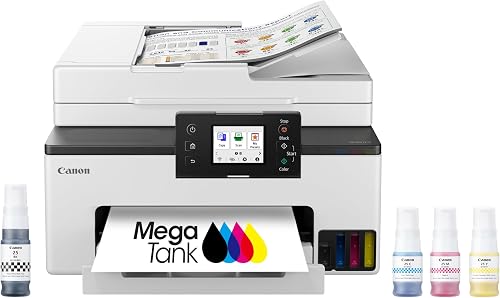
Canon MegaTank MAXIFY GX2020 All-in-One Wireless Color
Best for home office ink tank printing - 6
 Best for simple monochrome laser printingCheck it
- 7
 Best for fast monochrome office printingCheck it
Best Canon all-in-one laser printers compared by use
Color laser, monochrome laser, inkjet and ink tank models solve different jobs. The MF753Cdw II leads for color laser work.
The MF465dw leads for fast black and white office printing.
How to read this guide
We looked at print speed, color or monochrome output, scanning and copying features, paper capacity, toner or ink yield, size and warranty. A high score means the model fits the search for a Canon laser all-in-one well.
Not every model here is a laser. We kept a few Canon inkjet and ink tank models because many buyers compare them on price and running cost.
We label each one clearly.
The best Canon all-in-one laser printers for different buyers
Canon PIXMA TR8620a: Best for home photo and document printing
- Wireless 4-in-1 print, copy, scan and fax
- 15 pages per minute in black and white, 10 in color
- 200 sheet capacity, 100 cassette and 100 rear feed
- Auto 2-sided printing and auto document feeder
- Works with Alexa, AirPrint and Android
A home office inkjet with fax, auto document feeder and photo printing. It is not a laser model, so use it for mixed home printing rather than high volume office work.
Pros
- Print, copy, scan and fax in one unit
- Auto 2-sided printing
- 200 sheet capacity
- Alexa ink notifications and smart reorder option
Cons
- Inkjet, not laser
- Slower than the laser picks here
- 1,000 page duty cycle
The Canon PIXMA TR8620a suits a home office that prints photos, documents and occasional fax pages. It is an inkjet, not a laser, so set your expectations by print tech first.
That distinction matters for speed, ink cost and how often you will refill.
It prints at 15 pages per minute in black and white and 10 in color. That speed is fine for home use, but slower than the laser models here.
Copy resolution reaches 4800 x 1200 dpi in color, which helps with photo copies and detailed documents.
The 200 sheet capacity splits between a 100 sheet cassette and a 100 sheet rear feed. Auto 2-sided printing helps with longer documents.
The rear feed also gives you a separate place for photo paper or envelopes without changing the main tray.
You get print, copy, scan and fax, plus an auto document feeder for multi-page copies and scans. Alexa can send low ink notifications and place a smart reorder if you enroll.
It also works with AirPrint, Android and PC.
The unit weighs 17.4 lb and measures 13.8 x 17.3 x 7.5 in. Canon includes a 1 year warranty and lists a 1,000 page duty cycle.
The trade-off is clear: this is a flexible home printer, not a high volume laser.
Canon Color imageCLASS MF753Cdw II: Best for color laser printing and scanning
- Color wireless duplex 4-in-1 print, scan, copy, fax
- 35 pages per minute in black and white and color
- 250 sheets in standard cassette, 50 in multipurpose tray
- 50-sheet duplex automatic document feeder
- 5 inch color touchscreen
A color laser multifunction for small and home offices. It balances speed, a large touchscreen and an automatic document feeder for scanning and copying.
Pros
- 35 ppm color and black and white printing
- 50-sheet duplex document feeder
- Expandable paper capacity
- 3-year limited warranty from Canon
Cons
- 50 lb weight and 18.2 x 16.8 x 17 in size
- Starter toner yields are lower than standard cartridges
The Canon Color imageCLASS MF753Cdw II suits a small or home office that needs color documents and scanning in one machine. It is the top color laser pick in this guide.
Its mix of speed and office features makes it the main recommendation for color buyers.
It prints, scans, copies and faxes. Print speed reaches 35 pages per minute in black and white and color.
That pace keeps shared office work moving. First page print time is listed at 7 seconds, which helps short jobs start quickly.
Paper capacity starts at 250 sheets in the standard cassette, plus 50 sheets in the multipurpose tray. An optional cassette can expand total capacity to 850 sheets.
That expansion suits a busy office that wants fewer paper refills during the week.
The 50-sheet duplex document feeder scans both sides in one pass. That helps with contracts, invoices and multi-page copies.
Copy resolution reaches 1200 x 1200 dpi in color and 600 x 600 dpi in black and white for sharp reproductions.
A 5 inch color touchscreen makes daily tasks easier to find. The unit weighs 50 lb, so plan its desk or cabinet spot before it arrives.
Canon includes a 3 year limited warranty and spare part availability for 3 years in the EU listing.
HP LaserJet Pro 3101fdw: Best HP alternative for small teams
- Monochrome laser all-in-one print, scan, copy and fax
- Up to 35 black and white pages per minute
- Auto 2-sided printing and auto document feeder
- Wi-Fi, Ethernet and Bluetooth
- HP Wolf Pro Security
An HP monochrome laser multifunction for small teams. It matches Canon laser speeds for black and white documents, but it cannot print in color.
Pros
- 35 ppm black and white speed
- Auto 2-sided printing
- Ethernet and Bluetooth included
- Designed for up to 7 people
Cons
- Black and white only
- HP, not Canon
- No color scanning for color output
The HP LaserJet Pro 3101fdw suits a small team that prints mostly black and white reports. It is not a Canon, but it is a close laser alternative.
It fits buyers who value HP management tools and wireless flexibility over Canon toner.
It prints, scans, copies and faxes. Speed reaches up to 35 black and white pages per minute.
Auto 2-sided printing and an auto document feeder cut manual handling. Copy resolution reaches 1200 x 1200 dpi for crisp text copies.
HP positions it for up to 7 people. That makes it a fit for a small office, not a large department.
Maximum copies per run reach 5,000, which supports larger copying jobs without constant resetting.
You get Wi-Fi, Ethernet and Bluetooth. Wireless printing works from mobile devices, PCs and tablets.
HP Wolf Pro Security adds customizable settings for printer and data protection. Intelligent Wi-Fi looks for the best connection to stay online.
The trade-off is color. This model prints black and white only.
If you need color charts or photos, choose the Canon MF753Cdw II instead. It weighs 10.5 kg and uses cartridges with original HP chips.
Canon Megatank G3290 All-in-One Wireless Printer: Best for low cost ink tank printing
- Wireless print, copy and scan
- Up to 6,000 black pages and 7,700 color pages per ink set
- 2.7 inch LCD color touchscreen
- Auto 2-sided printing
- 100 sheet plain paper capacity
An ink tank home printer for buyers who print often and want low ink cost. It has no fax and no automatic document feeder.
Pros
- High page yield per ink set
- Auto 2-sided printing
- Compact 14.2 lb unit
- 2.7 inch color touchscreen
Cons
- Ink tank, not laser
- No fax
- 11 ppm black and 6 ppm color speed
The Canon Megatank G3290 suits a home user who prints often and wants low ink cost. It is a refillable ink tank model, not a laser.
Its value comes from ink yield rather than laser speed or toner cartridges.
Canon says one ink set yields up to 6,000 black pages and 7,700 color pages. That yield suits frequent home printing where cartridge cost adds up.
The system uses GI-21 pigment black and dye-based color bottles for text and photos.
It prints, copies and scans wirelessly. It does not include fax or an auto document feeder.
Multi-page scanning means more manual steps. That missing feeder is the main workflow limit compared with the GX2020 and laser models.
Print speed is 11 pages per minute in black and white and 6 in color. Paper capacity is 100 sheets for plain paper or 20 photo sheets.
A 2.7 inch LCD color touchscreen handles basic controls and status checks.
Auto 2-sided printing saves paper. The unit weighs 14.2 lb and measures 14.3 x 16.4 x 7 in, so it is easier to place than the laser models.
Canon includes a 1 year limited warranty. It prints borderless photos up to 8.5 x 11 inches.
Canon MegaTank MAXIFY GX2020 All-in-One Wireless Color: Best for home office ink tank printing
- Wireless print, copy, scan and fax
- Up to 3,000 black and 3,000 color pages per ink set
- 35 sheet auto document feeder
- Auto 2-sided printing
- 250 sheet paper capacity
A refillable tank inkjet with fax and a 35 sheet document feeder. It suits home office paper work where ink cost matters more than laser speed.
Pros
- Print, copy, scan and fax
- 35 sheet document feeder
- 250 sheet capacity
- 3-year limited warranty or 60,000 pages
Cons
- Inkjet, not laser
- 15 ppm black and 10 ppm color speed
- Larger than the G3290
The Canon MegaTank MAXIFY GX2020 suits a home office that needs fax, scanning and low ink cost. It is an inkjet tank model, not a laser.
It bridges home printing and small office tasks without toner.
It prints, copies, scans and faxes. That full set matters if you still handle fax documents.
Wireless print, scan and copy work from compatible devices, with USB also available for PC connection.
Canon says one ink set yields up to 3,000 black pages and 3,000 color pages. Paper capacity reaches 250 sheets.
That combination suits a home office that prints forms, invoices and color pages regularly without frequent ink purchases.
A 35 sheet auto document feeder helps with multi-page copies and scans. Auto 2-sided printing reduces paper use.
Copy resolution reaches 1200 x 2400 dpi in both black and white and color for detailed reproductions.
Print speed is 15 pages per minute in black and white and 10 in color. That is slower than laser picks, but ink cost per page can be lower for frequent printing.
A 2.7 inch LCD color touchscreen is included. Canon includes a 3 year limited warranty or 60,000 pages, whichever comes first.
Canon imageCLASS MF287dw: Best for simple monochrome laser printing
- Monochrome duplex wireless laser print, copy, scan and fax
- 35 pages per minute
- First print out in less than 4.9 seconds
- Auto document feeder
- 250 sheet maximum capacity
A straightforward Canon monochrome laser all-in-one for document printing and scanning. It trades a touchscreen and expandable trays for a lower, simpler setup.
Pros
- 35 ppm printing
- Duplex printing
- Scan to email or file server
- 1 year limited warranty
Cons
- Black and white only
- 600 x 600 dpi copy resolution
- 27.6 lb weight
The Canon imageCLASS MF287dw suits a buyer who wants simple monochrome laser printing, copying, scanning and fax. It keeps the focus on black and white documents.
Its spec list is leaner than the larger imageCLASS models.
It prints at 35 pages per minute. Canon lists first print out in less than 4.9 seconds for letter size.
That helps with short jobs where waiting matters. Print and copy resolution reach up to 600 x 600 dpi.
It includes duplex printing, so double sided documents print without manual flips. You can send scanned documents to email or a file server and forward received faxes.
Mobile printing works through Canon Print App, Apple AirPrint and Mopria.
Maximum sheet capacity is 250 sheets. An auto document feeder helps with scanning and copying multi-page documents.
Maximum media size is 8.5 x 14 inches, which covers legal size pages as well as letter.
The unit weighs 27.6 lb. Canon includes a 1 year limited warranty.
It uses Canon Genuine Toner 072 in standard and high capacity options. The trade-off is color and resolution.
If you need color, choose the MF753Cdw II. If you need faster office output, choose the MF465dw.
Canon imageCLASS MF465dw: Best for fast monochrome office printing
- Monochrome duplex wireless laser 4-in-1 print, scan, copy, fax
- 42 pages per minute
- 50-sheet one-pass automatic document feeder
- 5 inch color touchscreen
- Expandable paper capacity up to 900 sheets
The fastest laser here for black and white documents. It suits small businesses that need high volume printing, scanning and copying without color.
Pros
- 42 ppm speed
- 50-sheet one-pass document feeder
- Up to 900 sheets capacity
- 3-year limited warranty
Cons
- Black and white only
- 34.4 lb weight
- Optional cassette needed for full capacity
The Canon imageCLASS MF465dw suits a small business that prints black and white documents all day. It is the fastest laser printer here at 42 pages per minute.
That speed is its main selling point for office teams.
It prints, scans, copies and faxes. That 4-in-1 set covers most office tasks without a separate scanner.
First print time is listed at about 5 seconds, with an initial page time of 4.9 seconds in the specs.
A 50-sheet one-pass auto document feeder scans both sides in a single pass. Canon lists scan speeds up to 100 ipm in black and white and 80 ipm in color for letter size.
That helps with double sided packets and frequent copying.
Paper capacity starts with 250 sheets in the standard cassette and 100 sheets in the multipurpose tray. An optional cassette can expand total capacity to 900 sheets.
Copy resolution reaches up to 1200 x 1200 dpi for sharp black and white copies.
A 5 inch color touchscreen and Application Library help you reach common tasks faster. Canon includes a 3 year limited warranty.
The trade-off is color. This model prints black and white only.
Toner 070 yields about 3,000 pages, and the high capacity version yields about 10,200 pages.
Canon laser all-in-one models side by side
The table shows the main differences in speed, functions and paper capacity. Use it to narrow your choice before you read the buying advice below.
| Product | Best for | Print speed | Paper capacity | Functions | Our score |
|---|---|---|---|---|---|
| Canon PIXMA TR8620a | home photo and document printing | 15 ppm black, 10 ppm color | 200 sheets | Print, copy, scan, fax | 9.5 |
| Canon Color imageCLASS MF753Cdw II | color laser printing and scanning | 35 ppm | 250 sheets standard, expandable to 850 | Print, scan, copy, fax | 9.4 |
| HP LaserJet Pro 3101fdw | HP alternative for small teams | 35 ppm black and white | Print, scan, copy, fax | 9.4 | |
| Canon Megatank G3290 All-in-One Wireless Printer | low cost ink tank printing | 11 ppm black, 6 ppm color | 100 sheets | Print, copy, scan | 9.2 |
| Canon MegaTank MAXIFY GX2020 All-in-One Wireless Color | home office ink tank printing | 15 ppm black, 10 ppm color | 250 sheets | Print, copy, scan, fax | 9.0 |
| Canon imageCLASS MF287dw | simple monochrome laser printing | 35 ppm | 250 sheets maximum | Print, copy, scan, fax | 8.8 |
| Canon imageCLASS MF465dw | fast monochrome office printing | 42 ppm | Up to 900 sheets expandable | Print, scan, copy, fax | 8.7 |
How we compared these Canon all-in-one printers
We compared print speed first, then color versus monochrome output. A color laser printer costs more upfront, but it removes the need for a separate way to print charts and photos.
We checked scanning and copying features next. An auto document feeder matters if you scan multi-page documents often.
Duplex printing matters if you print double sided pages daily.
We checked paper capacity and toner yield. Larger trays mean fewer refills.
Higher yield toner means fewer replacements over time.
We also checked size and weight. A 50 lb laser printer needs a stable surface.
A 14 lb ink tank printer is easier to move.
We did not test these printers hands on. We compared specs and features from Canon and HP, and we checked buyer feedback patterns where they were available.
What the specs do not show
Specs show pages per minute and tray size, but they do not show how a printer fits your desk. Check depth and height before you buy, especially for larger laser units.
Also check whether an optional cassette is needed for the capacity you want, because that adds cost and space.
Should you choose color or black and white laser printing?
Color laser printing suits buyers who print charts, forms, photos and client documents. The MF753Cdw II prints color at 35 pages per minute.
Black and white laser printing suits text documents, invoices and reports. The MF465dw prints at 42 pages per minute and the MF287dw prints at 35 pages per minute.
If most of your pages are text, monochrome saves money upfront. You can still scan in color on many models, but printing stays black and white.
Read Do All Laser Printers Print in Color? What to Know before you assume a laser model prints color.
Not every laser printer does.
The best color laser printer all-in-one guide helps if color is a must. The best all-in-one laser printer black and white guide helps if text is your main job.
When color is worth it
Color is worth it for marketing pages, charts and photo documents. It is also worth it if clients see your printed work.
When black and white is enough
Black and white is enough for internal reports, contracts and everyday office text. It also keeps toner cost lower.
Is laser better than inkjet or ink tank for you?
Laser printing suits high volume document work. Toner does not dry out the way ink can, and laser speed is higher on most office models here.
Inkjet printing suits photos and mixed home use. The PIXMA TR8620a prints photos, documents and faxes in a smaller unit.
Ink tank printing suits frequent home printing with low ink cost. The G3290 and GX2020 use refillable tanks with high page yields.
Read What Are the Advantages of a Laser Printer? to weigh speed and toner against photo quality and ink cost.
The best Canon monochrome laser printer guide helps if you want a Canon laser without color. The best all-in-one laser printer guide covers the wider laser market.
Laser strengths
Laser strengths include speed, sharp text and lower cost per page at higher volume. Toner cartridges last a long time for office use.
Inkjet and ink tank strengths
Inkjet and ink tank strengths include lower upfront cost and better photo printing. Refillable tanks cut ink cost for frequent home printing.
What speed and paper capacity do you need?
Speed matters if you print more than a few pages a day. The MF465dw prints 42 pages per minute.
The MF753Cdw II and MF287dw print 35 pages per minute.
Paper capacity matters if you do not want to refill trays often. The MF465dw expands to 900 sheets.
The MF753Cdw II expands to 850 sheets.
A 100 sheet tray suits light home use. A 250 sheet tray suits daily office use.
A 900 sheet setup suits a small business with steady printing.
The best all-in-one laser printer for office use guide helps if office volume drives your choice. The best HP all in one laser printer color guide helps if you want to compare HP color models with Canon.
Choosing by daily volume
Choose 35 to 42 ppm if you print dozens of pages a day. Choose 10 to 15 ppm if you print a few pages a week.
Choosing by refill tolerance
Choose expandable trays if you hate refilling paper. Choose a basic tray if desk space is tight.
What scanning, copying and fax features matter?
Scanning features matter as much as printing in an all-in-one. Look for an auto document feeder if you scan multi-page documents.
Duplex scanning saves time because it captures both sides in one pass. The MF465dw and MF753Cdw II include duplex document feeders.
Fax matters only if you still use it for work. The MF753Cdw II, MF287dw, MF465dw and GX2020 include fax.
The G3290 does not.
Mobile printing matters for hybrid work. Canon models support mobile apps, AirPrint or Mopria on several picks here.
Document feeder basics
A 35 to 50 sheet document feeder handles most office packets. Load the pages once and let the feeder pull them through.
Fax basics
Fax is a niche feature now. Add it only if a client, court or medical office still requires it.
How should you set up and care for a laser all-in-one?
Place the printer on a stable, level surface with room to open trays and access toner. Leave space behind the unit for cables and paper output.
Connect wirelessly or with a cable, then install the print, scan and fax drivers on each computer. Test print, scan and copy before you load a full tray.
Use the paper size and type you print most often. Keep toner cartridges in a cool, dry place and replace them before print quality drops.
Clean the exterior with a dry cloth. Follow Canon instructions for toner handling and for clearing paper jams.
Keep the firmware and drivers updated. That helps with mobile printing and security settings.
Store spare paper flat and dry. Damp paper can cause jams and poor print quality.
Verdict: which Canon all-in-one should you buy?
Buy the Canon Color imageCLASS MF753Cdw II if you need color laser printing, scanning, copying and fax in one unit. It is the best Canon laser printer all in one for color document work.
Buy the Canon imageCLASS MF465dw if black and white speed matters most. It prints at 42 pages per minute and expands to 900 sheets.
Buy the Canon imageCLASS MF287dw if you want a simpler monochrome laser all-in-one. It prints at 35 pages per minute with duplex printing and scanning.
Buy the HP LaserJet Pro 3101fdw if you prefer HP for a small team. It matches laser speed at 35 pages per minute in black and white.
Buy the Canon PIXMA TR8620a or a MegaTank model if photo printing or ink cost matters more than laser speed. Those models are inkjet or ink tank, not laser, so choose them for home printing rather than office laser work.
Next, compare your shortlist in the best all-in-one laser printer for office use guide if office volume is your main concern.
Our top 3 picks at a glance
-
1
-
2
Best for color laser printing and scanning
Canon Color imageCLASS MF753Cdw II
9.4/10 our score
See it on Amazon -
3
Frequently asked questions
Is the Canon PIXMA TR8620a a laser printer?
No. Canon lists the PIXMA TR8620a as an inkjet printer.
It prints, copies, scans and faxes, and it prints photos and documents at 15 pages per minute in black and white.
If you want laser printing, choose a Canon imageCLASS model instead.
Laser models use toner and usually suit higher volume document work.
Which Canon all-in-one laser printer prints in color?
The Canon Color imageCLASS MF753Cdw II prints in color at 35 pages per minute. It also scans, copies and faxes.
The Canon monochrome imageCLASS models print black and white only.
Check whether you need color output before you choose, because color laser models cost more upfront.
Do I need a fax feature on a Canon all-in-one?
You need fax only if you still send or receive fax documents for work, legal or medical use. Most home users can skip fax and save space.
The MF753Cdw II, MF287dw and MF465dw include fax.
The Canon Megatank G3290 does not include fax.
What paper capacity should I choose?
Choose 250 sheets or more if you print daily and do not want to refill often. The MF465dw expands to 900 sheets with an optional cassette.
The MF753Cdw II expands to 850 sheets.
The G3290 holds 100 sheets, so it suits lighter home use.
Is an HP laser printer a good alternative to Canon?
Yes, if black and white printing is enough. The HP LaserJet Pro 3101fdw prints at up to 35 pages per minute and includes scanning, copying, fax and auto 2-sided printing.
It does not print in color.
Compare toner cost and included features before you decide.


