6 Best All-in-One Laser Printers (October 2026)
The best all-in-one laser printers include the Brother MFC-L2820DW Wireless Compact Monochrome All-in-One Laser for small offices needing fax, the Canon Color imageCLASS MF753Cdw II for color office documents, and the Brother Professional Laser Printer with Scanner for two-sided scanning.
On this page (9 sections)
- Which all-in-one laser printer fits your work?
- The best all-in-one laser printers for different needs
- How do color and monochrome models differ?
- When does an auto document feeder help?
- Do you need fax, duplex printing or duplex scanning?
- What are the advantages of a laser all-in-one printer?
- How should you choose an all-in-one laser printer?
- More guides on this topic
- Which all-in-one laser printer should you choose?
The Brother MFC-L2820DW is the best all-in-one laser printer for most small offices because it combines monochrome printing, scanning, copying and faxing with automatic duplex printing and a 50-page document feeder. For color output, choose the Canon Color imageCLASS MF753Cdw II; for a small desk, consider the HP LaserJet MFP M140w.
An all in one laser printer can save desk space by combining several office tasks in one device. For home use, compare Canon laser printers for home use.
The right choice depends on which jobs you do, whether you print in color and how often you handle multi-page originals.
For color options, compare our guides to the best color laser printer all-in-one and the best HP all in one laser printer color. If you mainly print black and white, see the best all in one laser printer black and white.
Our picks at a glance
-
1
 Best for small offices needing fax
Brother MFC-L2820DW Wireless Compact Monochrome All-in-One Laser
9.6/10 our score
See it on Amazon -
2
 Best for color office documents
Canon Color imageCLASS MF753Cdw II
9.4/10 our score
See it on Amazon -
3
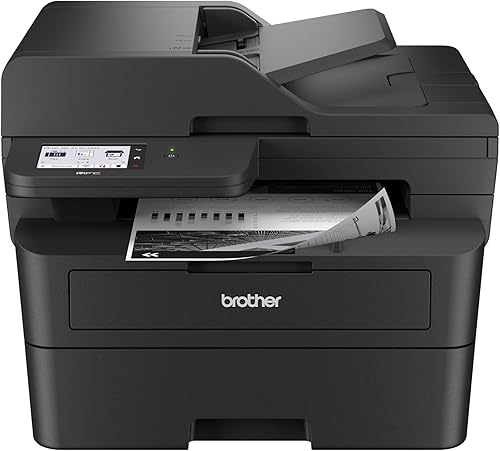 Best for two-sided scanning
Brother Professional Laser Printer with Scanner
9.3/10 our score
See it on Amazon
- 4
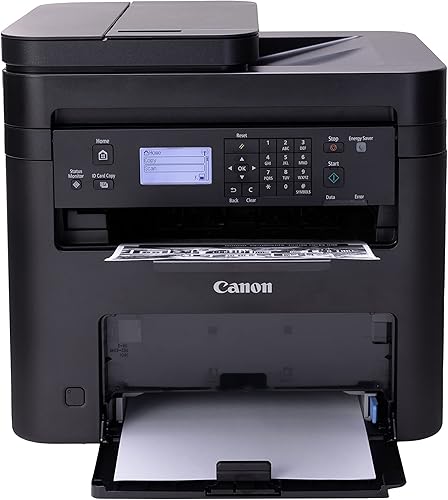 Best for simple monochrome scanningCheck it
 - 5
 Check it
HP Laserjet MFP M140w Wireless Black
Best for a tight desk space - 6
 Best for everyday two-sided printingCheck it
Which all-in-one laser printer fits your work?
The Brother MFC-L2820DW is the strongest match for small offices that need fax, while the Canon MF753Cdw II is the color pick. The remaining choices trade functions, scanning features and size for different workspaces.
We compared the listed functions, connectivity, document handling and print features against common home-office and small-team needs. Our score weighs specs and features against what you're shopping for.
| Product | Best for | Print type | Functions | Connectivity | Our score |
|---|---|---|---|---|---|
| Brother MFC-L2820DW Wireless Compact Monochrome All-in-One Laser | small offices needing fax | Monochrome laser | Print, copy, scan and fax | Dual-band wireless, Ethernet and USB | 9.6 |
| Canon Color imageCLASS MF753Cdw II | color office documents | Color laser | Print, scan, copy and fax | Wireless and USB | 9.4 |
| Brother Professional Laser Printer with Scanner | two-sided scanning | Monochrome laser | Print, copy and scan | Dual-band wireless, Ethernet and USB | 9.3 |
| Canon imageCLASS MF273dw | simple monochrome scanning | Monochrome laser | Print, copy and scan | Wireless and USB | 9.2 |
| HP Laserjet MFP M140w Wireless Black | a tight desk space | Monochrome laser | Print, scan and copy | 9.2 | |
| HP LaserJet MFP M235sdw | everyday two-sided printing | Monochrome laser | Print, scan and copy | Dual-band Wi-Fi, Ethernet and USB | 9.0 |
The best all-in-one laser printers for different needs
The best all-in-one laser printer for you depends on whether color, fax, two-sided scanning or a compact body matters most. These six picks cover those needs with a mix of monochrome and color models.
Brother MFC-L2820DW: best for small offices needing fax
Brother MFC-L2820DW Wireless Compact Monochrome All-in-One Laser: Best for small offices needing fax
- Print, copy, scan and fax
- Up to 36 ppm
- 50-page auto document feeder
- Automatic duplex printing
A compact four-function printer with a 50-page auto document feeder and several connection options. Its monochrome output suits document-heavy work.
Pros
- Print, copy, scan and fax
- Automatic duplex printing
- 50-page auto document feeder
Cons
- Black-and-white printing only
- Does not include color scanning speed in the stated scan figures
The Brother MFC-L2820DW brings printing, copying, scanning and faxing into a compact monochrome printer. It prints at up to 36 pages per minute, and the 50-page auto document feeder helps with multi-page copying, scanning and faxing.
Automatic duplex printing can reduce manual page handling for two-sided documents. For connectivity, it offers dual-band wireless, Ethernet and USB, so you can choose a network connection or a direct link to one computer.
The 2.7-inch touchscreen supports printing from and scanning to cloud apps such as Google Drive, Dropbox, Evernote and OneNote. Brother's Mobile Connect app also supports mobile printing, scanning and toner tracking.
Choose it if your small office wants fax alongside everyday black-and-white printing and scanning. For more office-focused comparisons, see best all in one laser printer for office use.
Canon Color imageCLASS MF753Cdw II: best for color office documents
Canon Color imageCLASS MF753Cdw II: Best for color office documents
- Color, wireless, duplex 4-in-1
- Print, scan, copy and fax
- Up to 35 ppm
- 5-inch color touchscreen
A color-capable four-function printer for offices that need both color and monochrome documents. It has automatic duplex printing and a 50-sheet duplex document feeder.
Pros
- Color printing and copying
- Automatic duplex printing
- Expandable paper capacity
Cons
- Heavier and larger than the monochrome compact picks
- Fax cable is included, but the listed hardware interface is USB
The Canon Color imageCLASS MF753Cdw II handles color printing, scanning, copying and faxing. Its stated print speed is up to 35 pages per minute, and automatic duplex printing supports two-sided jobs.
A 50-sheet duplex automatic document feeder can scan both sides of originals in one pass. The 5-inch color touchscreen is customizable, while wireless connectivity supports computers and mobile devices.
This is the largest and heaviest pick in this group, at 18.2 x 16.8 x 17 inches and 50 lb. Check the available desk space before choosing it, especially if you plan to use its standard paper cassette and multipurpose tray.
Pick this model when color documents and four-function versatility matter more than a compact footprint. Our best canon laser printer all in one guide covers more Canon options.
Brother Professional Laser Printer with Scanner: best for two-sided scanning
Brother Professional Laser Printer with Scanner: Best for two-sided scanning
- Up to 36 ppm
- Single-pass two-sided scanning
- 50-page auto document feeder
- 3.5-inch touchscreen
This monochrome model pairs a 50-page feeder with single-pass duplex scanning for double-sided originals. It also supports automatic duplex printing.
Pros
- Single-pass two-sided scanning
- 50-page auto document feeder
- Dual-band wireless, Ethernet and USB
Cons
- Monochrome printing only
- Fax is not included in the stated functions
This Brother monochrome model is built around multi-page document handling. It combines a 50-page auto document feeder with single-pass two-sided scanning, so it can capture both sides of a double-sided original in one pass.
It prints at up to 36 pages per minute and supports automatic duplex printing. Dual-band wireless, Ethernet and USB provide several ways to connect, and its 3.5-inch touchscreen offers access to cloud services including Google Drive, Dropbox and OneNote.
The stated functions include printing, copying and scanning, but not faxing. Choose it for document workflows that need two-sided scanning without a fax function.
Canon imageCLASS MF273dw: best for simple monochrome scanning
Canon imageCLASS MF273dw: Best for simple monochrome scanning
- Print, copy and scan
- Up to 30 ppm
- Automatic two-sided printing
- Wireless
A three-function monochrome option for home or small office use. Automatic two-sided printing helps reduce manual page handling.
Pros
- Print, copy and scan
- Automatic two-sided printing
- Up to 30 ppm
Cons
- No fax function
- The product description refers to print-only functionality despite the listed scan and copy features
The Canon imageCLASS MF273dw combines monochrome printing, copying and scanning with wireless connectivity. Its print speed is up to 30 pages per minute, and it supports automatic two-sided printing.
This is a straightforward option if you mainly handle black-and-white documents and don't need fax. Its stated dimensions are 14.6 x 15.4 x 14.4 inches, so compare them with your available shelf or desk space.
Canon describes this model for home or small office environments. Choose it for the basic three functions and automatic duplex printing, then confirm the scan workflow you need before buying.
HP LaserJet MFP M140w: best for a tight desk space
HP Laserjet MFP M140w Wireless Black: Best for a tight desk space
- Print, scan and copy
- Up to 21 ppm
- Wireless printing
- Small-team use
A small monochrome multifunction printer for basic document jobs. Its stated dimensions make it a compact choice, though it does not offer automatic duplex printing.
Pros
- Print, scan and copy
- Compact stated dimensions
- Wireless printing from mobile devices and computers
Cons
- No automatic duplex printing
- No fax function
The HP LaserJet MFP M140w is a compact monochrome option for printing, scanning and copying. It measures 10.4 x 14.2 x 7.8 inches and weighs 11.9 lb, which can suit a desk where space is limited.
It prints up to 21 black-and-white pages per minute for single-sided jobs. Wireless printing works with mobile devices, PCs and tablets, and HP's Smart app supports scanning to the cloud and printing or copying from a phone.
This model doesn't offer automatic duplex printing, so double-sided pages need more manual handling. Choose it for basic print, scan and copy tasks where a small footprint matters more than faster output or two-sided printing.
HP LaserJet MFP M235sdw: best for everyday two-sided printing
HP LaserJet MFP M235sdw: Best for everyday two-sided printing
- Print, scan and copy
- Automatic duplex printing
- Dual-band Wi-Fi, Ethernet and USB
- Auto document feeder
A monochrome printer with automatic duplex printing and several connection options. It fits everyday black-and-white jobs for a small office.
Pros
- Automatic duplex printing
- Ethernet and dual-band Wi-Fi
- Auto document feeder
Cons
- No fax function
- Black-and-white printing only
The HP LaserJet MFP M235sdw combines monochrome printing, scanning and copying with automatic duplex printing. It is aimed at offices of 1 to 5 people and supports dual-band Wi-Fi, Ethernet and USB.
HP describes its two-sided printing as the fastest in its class, and gives a single-sided speed of up to 28 pages per minute. The printer also has an auto document feeder and mobile printing through the HP app.
This model doesn't include fax among its stated functions. Choose it for everyday black-and-white office documents when automatic two-sided printing and wired network options are useful.
How do color and monochrome models differ?
Color all-in-one laser printers can print color documents, while monochrome models print in black and white. The Canon Color imageCLASS MF753Cdw II is the only color pick in this roundup; the Brother and HP models are monochrome.
Color is useful for charts, branded documents and materials where color carries meaning. If your work is mostly forms, reports and text, a monochrome model may be enough and leaves you with fewer toner colors to manage.
For a focused comparison, read do all laser printers print in color?. If color is central to your work, compare the best color laser printer with fax as well.
When does an auto document feeder help?
An auto document feeder helps when you regularly scan, copy or fax multi-page documents. The Brother MFC-L2820DW and Brother Professional Laser Printer with Scanner each have a 50-page feeder.
The Canon MF753Cdw II has a 50-sheet duplex feeder that scans both sides in one pass. If your originals are often double-sided, that feature may reduce the steps needed for scanning.
A feeder is less important if you mostly scan single pages or occasional receipts. Consider how often you process stacks before choosing a larger printer for a feature you rarely use.
Do you need fax, duplex printing or duplex scanning?
Fax, duplex printing and duplex scanning solve different tasks. A model may print on both sides automatically without scanning both sides of an original in one pass.
The Brother MFC-L2820DW and Canon MF753Cdw II include fax. Automatic duplex printing appears on several picks, while the Brother Professional Laser Printer with Scanner specifically supports single-pass two-sided scanning.
If fax matters, compare the best Brother laser printers with fax. If not, you can narrow your choice to models whose print, scan and copy features fit your workload.
What are the advantages of a laser all-in-one printer?
A laser all-in-one printer combines document printing with tasks such as scanning and copying, and some models add fax. Laser printing is a common fit for offices that handle regular text documents and want one device for several workflows.
The advantage depends on the model's specific features. A feeder can help with multi-page scans, duplex printing can reduce manual page handling, and network connections can let multiple devices reach the printer.
For a broader explanation, read what are the advantages of a laser printer?. Compare the model's size, functions and connection options with the work you actually do.
How should you choose an all-in-one laser printer?
Choose a color model if you print color documents, and a monochrome model if black-and-white pages cover your needs. Then check whether fax, an auto document feeder, duplex printing or duplex scanning will save time in your routine.
Measure your available space and review the connections you need, including wireless, Ethernet or USB. For small offices, compare the best all-in-one laser printers for office use with your team size and document volume.
More guides on this topic
- Best Laser Printers with Fax
Which all-in-one laser printer should you choose?
Choose the Brother MFC-L2820DW if your small office needs monochrome printing, scanning, copying and faxing with a 50-page feeder. Pick the Canon MF753Cdw II for color and a duplex document feeder, or the HP M140w when a compact body matters most.
For black-and-white work, the Brother Professional model adds single-pass two-sided scanning, while the HP M235sdw pairs automatic duplex printing with Ethernet. Match the functions to your regular tasks, then check that the printer fits your workspace.
Our top 3 picks at a glance
-
1
Best for small offices needing fax
Brother MFC-L2820DW Wireless Compact Monochrome All-in-One Laser
9.6/10 our score
See it on Amazon -
2
Best for color office documents
Canon Color imageCLASS MF753Cdw II
9.4/10 our score
See it on Amazon -
3
Best for two-sided scanning
Brother Professional Laser Printer with Scanner
9.3/10 our score
See it on Amazon
Frequently asked questions
What does all-in-one mean for a laser printer?
An all-in-one laser printer combines printing with other tasks such as scanning and copying. Some models also fax.
Check the functions on the specific model because not every multifunction printer includes fax.
A document feeder can also make multi-page scans and copies easier.
Are all-in-one laser printers color or monochrome?
They can be either color or monochrome. The Brother MFC-L2820DW, for example, prints in black and white, while the Canon Color imageCLASS MF753Cdw II handles color.
For more detail, see whether all laser printers print in color.
Do I need fax in an all-in-one laser printer?
Choose a model with fax if you still send documents by fax and want that function in the same device. The Brother MFC-L2820DW and Canon MF753Cdw II include fax, while the other picks here are described for printing, scanning and copying.
Compare more laser printers with fax if fax is essential.
What should I check before buying an all-in-one laser printer?
Check whether you need color, fax, automatic duplex printing and an auto document feeder. Also compare the printer's dimensions and connection options with your desk and devices.
For routine document printing, a monochrome model may cover your needs; color work calls for a color laser printer.


