6 Best Laser Printers Under $200 (November 2026)
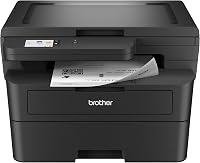
The best laser printers under 200 include the Brother HL-L2405W Wireless Compact Monochrome Laser Printer for compact home offices, the HP LaserJet M234sdw Monochrome Laser Printer for small teams needing all-in-one, and the Canon imageCLASS MF273dw for fast first pages.
On this page (11 sections)
- Our top picks for a laser printer under 200
- How we compared these budget laser printers
- The best laser printers under 200, in order
- Side-by-side: speed, duplex and size
- Should you choose print only or 3-in-1?
- How fast should a budget laser printer be?
- Does automatic duplex matter at this price?
- What paper capacity and resolution should you look for?
- How do toner and cartridge type affect cost?
- Should you stretch your budget or stay under 200?
- Our verdict: the best laser printer under 200
The best laser printer under 200 for most homes is the Brother HL-L2405W, because it pairs 30 ppm speed with a 250-sheet tray in a compact body.
Our top pick is print only, so choose an all-in-one below if you need to scan and copy.
We compared six laser printer under 200 models by speed, duplex, paper handling, size and functions.
All six print in black and white, so this guide is for text documents, forms and reports rather than photos or color brochures.
Our picks at a glance
-
1
 Best for compact home offices
Brother HL-L2405W Wireless Compact Monochrome Laser Printer
9.7/10 our score
See it on Amazon -
2
 Best for small teams needing all-in-one
HP LaserJet M234sdw Monochrome Laser Printer
9.5/10 our score
See it on Amazon -
3
- 4
 Check it
HP Laserjet MFP M140w Wireless Black
Best for tiny desks - 5
 Check it
HP Laserjet Pro 3001dw Wireless Black
Best for busy small teams - 6
 Best for two-sided office printingCheck it
Our top picks for a laser printer under 200
The Brother HL-L2405W leads on speed and paper capacity for a print-only home printer.
The HP LaserJet M234sdw and Canon imageCLASS MF273dw follow close behind because they add scanning and copying without a big speed loss.
How we compared these budget laser printers
We compared the specs each brand publishes for speed, first print time, duplex, resolution, size and weight.
We checked which models are print only and which are 3-in-1, then matched each one to a clear buyer type.
Our score weighs specs, features and buyer feedback against what you are shopping for.
A fast print-only model can outscore a slower all-in-one for a home that only prints, while an all-in-one wins for a small team.
We did not test these printers.
Speeds, resolutions and capacities above come from the brands, and toner yields where stated come from the brands as well.
The best laser printers under 200, in order
Brother HL-L2405W Wireless Compact Monochrome Laser Printer: Best for compact home offices
- 30 ppm black and white printing
- 250-sheet paper tray
- Dual-band wireless and USB
- Manual duplex
- 1200 x 1200 dpi print resolution
A compact print-only model with fast speed and a large tray for its size. It suits homes that print text documents often and do not need a scanner.
Pros
- Fast 30 ppm printing
- 250-sheet tray reduces refills
- Dual-band wireless
- Compact footprint
Cons
- Print only, no scan or copy
- Manual two-sided printing
The Brother HL-L2405W suits a home office that prints text documents daily and wants few paper refills.
Its 250-sheet tray is large for a compact printer, and Brother says it prints one-sided pages at up to 30 ppm.
Dual-band wireless lets several devices connect, and USB gives a wired option for a single computer.
The control method includes app and touch, with an LCD display for status checks.
At 14.2 x 14 x 7.2 inches and 15.1 lb, it fits a desk or shelf more easily than the all-in-one models here.
A manual feed slot helps with envelopes and specialty paper, though that is not stated for every model on this list.
The main trade-off is function.
This is a print-only printer, so you will need a separate scanner if you copy or scan often.
Manual duplex also means you flip pages yourself for two-sided jobs.
Buy it if you print black and white documents often and want speed, capacity and a small body.
Skip it if scanning and copying are regular jobs, or if automatic duplex is a must.
HP LaserJet M234sdw Monochrome Laser Printer: Best for small teams needing all-in-one
- Print, scan and copy
- 30 ppm single-sided, 19 ppm two-sided
- Automatic duplex
- 40-page auto document feeder
- Dual-band Wi-Fi with self-reset
A full all-in-one for a small team, with automatic two-sided printing and hands-free copying and scanning through the feeder.
Pros
- Print, scan and copy in one machine
- Fast automatic duplex
- 40-page feeder
- Ethernet included
Cons
- Larger and heavier than print-only picks
- No stated sheet capacity in the data
The HP LaserJet M234sdw suits a small team of 1 to 5 people that needs print, scan and copy in one machine.
HP says it prints up to 30 ppm single-sided and up to 19 ppm two-sided, which is fast for this price group.
Automatic duplex is standard here.
That matters for reports, because you do not need to flip the stack or reload pages in the middle of a job.
A 40-page auto document feeder lets you copy and scan a stack hands-free.
That is a real time saver for payroll sheets, signed forms and multi-page contracts.
At 19 lb and 12.13 x 16.46 x 11.59 inches, it takes more desk space than the compact print-only picks.
Dual-band Wi-Fi with self-reset and Ethernet give you wired and wireless options.
Buy it if you want a true all-in-one with fast duplex.
Skip it if desk space is very tight or if you only need to print and prefer a smaller body.
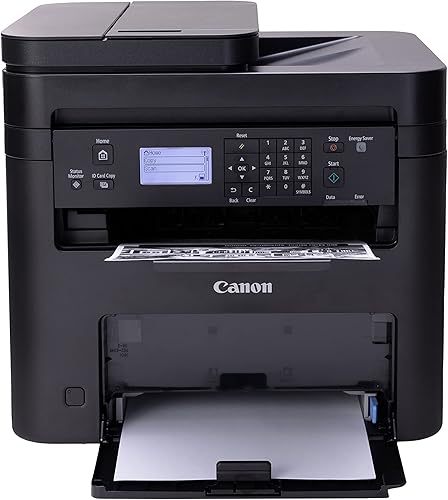
Canon imageCLASS MF273dw: Best for fast first pages
- Wireless 3-in-1 print, copy and scan
- 30 ppm black and white printing
- First print in about 5.3 seconds
- Auto two-sided printing
- Auto document feeder
A 3-in-1 Canon with the fastest first-page time on this list. It fits homes that print single pages often and want a scanner close by.
Pros
- Fast 5.3 second first print
- Auto two-sided printing
- Print, copy and scan
- Up to 2400 x 600 dpi
Cons
- Heaviest model on this list
- Uses Toner 071 cartridges
The Canon imageCLASS MF273dw suits a home or small office that prints short jobs all day.
Canon says the first print comes out in about 5.3 seconds, the fastest first-page time on this list.
It prints up to 30 ppm in black and white and supports auto two-sided printing.
That mix helps when you print one page at a time but still want duplex for longer files.
This is a wireless 3-in-1 model with print, copy and scan functions.
An auto document feeder is listed, so multi-page copying and scanning should be hands-free.
Resolution goes up to 2400 x 600 dpi for print and copy.
That is higher than the 600 x 600 dpi listed for some HP models here, which can help with fine text and lines.
The trade-off is size and weight.
At 24.7 lb and 14.6 x 15.4 x 14.4 inches, it is the heaviest and tallest pick here.
It also uses Toner 071 cartridges, with a starter cartridge listed at 700 yield.
Buy it if first-page speed and a 3-in-1 design matter most.
Skip it if you need the lightest printer or have limited desk space.
HP Laserjet MFP M140w Wireless Black: Best for tiny desks
- Print, scan and copy
- 21 ppm single-sided printing
- Smallest laser in its class
- Wireless with self-reset
- Copies both sides of ID cards onto one sheet
The smallest and lightest pick here, built for a tight desk. It trades speed and duplex for a very small footprint.
Pros
- Smallest footprint here
- Lightest model at 11.9 lb
- Print, scan and copy
- ID card copy feature
Cons
- Slower at 21 ppm
- No automatic duplex
The HP LaserJet MFP M140w suits a very small desk, a dorm shelf or a home office corner.
HP calls it the world's smallest laser in its class, and at 10.4 x 14.2 x 7.8 inches it has the smallest footprint here.
At 11.9 lb, it is also the lightest model on this list.
That makes it easier to move between a desk, a shelf and a storage closet.
It is a 3-in-1 model with print, scan and copy.
A handy feature is copying both sides of an ID card onto one sheet, which helps with small documents.
Speed is the trade-off.
It prints up to 21 ppm single-sided, slower than the 28 to 35 ppm models here.
Duplex is listed as no, so two-sided printing is manual.
For 1 to 3 people who print light documents, that speed is often enough.
For a busy team printing long reports, a faster model will save more time.
Buy it if space is your main limit and you need print, scan and copy.
Skip it if you print long jobs daily or want automatic duplex.
HP Laserjet Pro 3001dw Wireless Black: Best for busy small teams
- Up to 35 ppm single-sided
- Automatic two-sided printing
- 250-sheet maximum capacity
- Ethernet and Bluetooth
- HP Wolf Pro Security
The fastest printer on this list at 35 ppm, aimed at teams of up to 7 people. It pairs speed with automatic duplex and security features.
Pros
- Fastest speed at 35 ppm
- Automatic duplex
- 250-sheet capacity
- Ethernet, Bluetooth and Wi-Fi
Cons
- Print-focused for teams, check scan needs
- Larger depth than compact picks
The HP LaserJet Pro 3001dw suits a small team of up to 7 people with a steady print load.
HP says it prints up to 35 ppm single-sided, the fastest speed on this list.
Automatic two-sided printing is included.
That helps a team that prints reports and forms back to back, since pages flip without help.
Maximum sheet capacity is listed at 250.
That matches the Brother tray on this list and means fewer refills during a busy week.
Connection options include Wi-Fi, Ethernet and Bluetooth.
HP also lists Wolf Pro Security with customizable settings, plus shortcuts through the HP Smart app.
At 15.7 x 14.4 x 8.5 inches and 16.1 lb, it is not the smallest pick.
Print resolution goes up to 1200 x 1200 dpi, which is strong for text and office graphics.
Buy it if your team prints a lot and speed is the priority.
Skip it if you need a tiny printer or if a print-only design does not fit your scanning needs.
HP LaserJet M207dw: Best for two-sided office printing
- 28 ppm single-sided printing
- Automatic duplex
- Dual-band Wi-Fi with self-reset
- Ethernet included
- 150-sheet capacity
A lean print-only office printer with fast automatic duplex. It suits a desk that prints reports and brochures in black and white.
Pros
- Fast automatic duplex
- Compact 12.4 lb body
- Ethernet and dual-band Wi-Fi
- 150-sheet capacity
Cons
- Print only, no scan or copy
- Lower 600 x 600 dpi resolution
The HP LaserJet M207dw suits an office that prints black and white brochures, business documents and presentations.
HP says it prints up to 28 ppm single-sided with fast two-sided printing.
Automatic duplex is standard, and capacity is listed at 150 sheets.
That is less than the 250-sheet models here, but it is fine for light to moderate home use.
At 11 x 13.98 x 8.07 inches and 12.4 lb, it is compact and light for a duplex printer.
Dual-band Wi-Fi with self-reset, Ethernet and USB give you several ways to connect.
Print resolution is up to 600 x 600 dpi.
That is lower than the 1200 x 1200 dpi listed for the Brother and HP 3001dw, so fine lines may look softer.
This is a print-only model.
If you need scan and copy, choose one of the 3-in-1 models above instead.
Buy it if automatic duplex and a compact body matter most.
Skip it if you need scanning, higher resolution or a larger paper tray.
Side-by-side: speed, duplex and size
| Product | Best for | Print speed | Paper capacity | Duplex | Our score |
|---|---|---|---|---|---|
| Brother HL-L2405W Wireless Compact Monochrome Laser Printer | compact home offices | 30 ppm | 250 sheets | Manual | 9.7 |
| HP LaserJet M234sdw Monochrome Laser Printer | small teams needing all-in-one | 30 ppm | Automatic | 9.5 | |
| Canon imageCLASS MF273dw | fast first pages | 30 ppm | Automatic | 9.2 | |
| HP Laserjet MFP M140w Wireless Black | tiny desks | 21 ppm | No | 9.2 | |
| HP Laserjet Pro 3001dw Wireless Black | busy small teams | 35 ppm | Automatic | 9.1 | |
| HP LaserJet M207dw | two-sided office printing | 28 ppm | Automatic | 8.8 |
Use the table to spot the trade-offs fast.
The HP 3001dw is fastest at 35 ppm, while the Canon MF273dw wins on first print time at about 5.3 seconds.
The Brother HL-L2405W and HP 3001dw tie on 250-sheet capacity, but only the HP model here adds automatic duplex at that capacity.
Size cuts the other way.
The HP M140w is far smaller than the Canon, and the HP M207dw is lighter than the all-in-one models.
Pick the body that fits your desk before you chase the last few ppm.
Should you choose print only or 3-in-1?
Print only models are smaller, lighter and often faster for the same price group.
The Brother HL-L2405W and HP M207dw fit here, and both print at 28 to 30 ppm.
Choose print only if you print documents and send scans from a phone or a separate scanner.
You will spend less desk space and get more speed for printing.
When a 3-in-1 is worth it
Choose 3-in-1 if you copy signed forms, scan receipts or save documents as files often.
The HP M234sdw, Canon MF273dw and HP M140w cover those jobs in one machine.
A feeder matters too.
The HP M234sdw lists a 40-page feeder, which is a big help for multi-page copies.
If you scan one page at a time, a simpler scanner may be enough.
How fast should a budget laser printer be?
For home use, 20 to 25 ppm is enough for forms, school work and short reports.
The HP M140w at 21 ppm fits this range.
For a small office, 28 to 35 ppm makes a clear difference.
The HP 3001dw at 35 ppm, the Brother and HP M234sdw at 30 ppm, and the HP M207dw at 28 ppm all sit in this range.
First print time matters when you print single pages.
The Canon MF273dw at about 5.3 seconds and the HP 3001dw at about 6.6 seconds will feel quicker for short jobs than a printer that needs 8 seconds or more.
Does automatic duplex matter at this price?
Yes, if you print long documents.
Automatic duplex flips pages for you, saves paper and keeps multi-page jobs in order.
The HP M234sdw, Canon MF273dw, HP 3001dw and HP M207dw all list automatic duplex.
The HP M234sdw and HP M207dw both stress fast two-sided printing in their class.
Manual duplex is not a deal breaker for short jobs.
The Brother HL-L2405W lists manual duplex, and the HP M140w lists no duplex.
You can still print two-sided work, but you will flip the stack yourself.
What paper capacity and resolution should you look for?
Paper capacity decides how often you refill.
A 250-sheet tray, as listed for the Brother HL-L2405W and HP 3001dw, suits daily printing.
A 150-sheet capacity, as listed for the HP M207dw, suits lighter use.
Max media size is listed at 8.5 x 14 inches for most models here.
That covers letter and legal paper, which is useful for contracts and forms.
Resolution ranges from 600 x 600 dpi to 2400 x 600 dpi on this list.
Higher resolution helps with fine text, charts and lines.
For plain text, 600 x 600 dpi is often fine, but check the exact model if you print detailed graphics.
How do toner and cartridge type affect cost?
Toner type matters more than the printer price over time.
The Brother HL-L2405W uses TN830 or TN830XL toner, and Brother offers a Refresh subscription trial.
Canon uses Toner 071, with a starter cartridge listed at 700 yield.
HP models list original HP toner and chips.
HP says some models will block cartridges using non-HP chips, so check the exact cartridge before you order.
Starter yields are lower than full cartridges.
The HP M234sdw lists a toner cartridge at about 700 pages, and the Canon lists 700 yield for its starter cartridge.
Budget for a full cartridge soon after you buy if you print often.
If you want the big picture first, read What Are the Advantages of a Laser Printer? and What Are the Disadvantages of a Laser Printer?.
Those guides explain why laser wins on text cost and where inkjet may still fit.
Should you stretch your budget or stay under 200?
Stay under 200 if black and white printing is your main job.
The models here already cover 21 to 35 ppm, duplex options and wireless printing.
Stretch only if you need color.
A mono printer will not print in color, no matter how fast it is.
If color matters, compare a color laser printer under 200 or a color laser printer under 300 before you buy.
If your needs are very light, a cheaper printer may do.
Read Can You Buy a New Laser Printer Under 100 dollars? to see what you give up.
For more mono options, our best budget mono laser printer guide covers similar models in more depth.
Our verdict: the best laser printer under 200
Pick the Brother HL-L2405W for a compact home office, because it gives you 30 ppm speed, a 250-sheet tray and dual-band wireless in a small body.
Pick the HP LaserJet M234sdw for a small team that needs print, scan, copy and fast automatic duplex.
Pick the Canon MF273dw for fast first pages and a 3-in-1 design.
Pick the HP M140w for the smallest desk, the HP 3001dw for the fastest team printing, and the HP M207dw for lean two-sided office work.
Start with your must-have job: print only, scan and copy, or automatic duplex.
That one choice will narrow this list to one or two models.
Then check size, paper capacity and toner type before you order, and you will get a laser printer under 200 that fits your desk and your print load.
Our top 3 picks at a glance
-
1
Best for compact home offices
Brother HL-L2405W Wireless Compact Monochrome Laser Printer
9.7/10 our score
See it on Amazon -
2
Best for small teams needing all-in-one
HP LaserJet M234sdw Monochrome Laser Printer
9.5/10 our score
See it on Amazon -
3
Frequently asked questions
Is a laser printer under 200 good for home use?
Yes, for black and white documents. Models here print 21 to 35 pages per minute and handle forms, contracts and school work well.
Choose print-only models for speed and a smaller body, or 3-in-1 models if you need scanning and copying.
Check paper capacity and duplex before you buy.
Do I need automatic two-sided printing?
You need it if you print many multi-page reports. Automatic duplex flips pages for you and saves paper and time.
Manual duplex means you flip the stack yourself, which is fine for short documents.
It is slower and easy to get out of order.
What is the difference between ppm and first print time?
Ppm is speed after the job starts, usually pages per minute for a run. First print time is how long the first page takes to come out.
If you print single pages all day, first print time matters more.
If you print long reports, ppm matters more.
Can these printers scan and copy?
Some can and some cannot. The HP M234sdw, Canon MF273dw and HP M140w are 3-in-1 models with scan and copy functions.
The Brother HL-L2405W and HP M207dw are print only.
The HP 3001dw data lists copy and scan as additional functions, so check the exact model before you buy.
How much paper should a budget laser printer hold?
A 250-sheet tray means fewer refills during busy weeks. A 150-sheet capacity is fine for light home use.
If you print daily, a larger tray saves time.
If you print weekly, capacity matters less than speed, duplex and size.