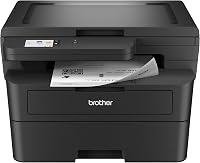
Can You Buy a New Laser Printer Under $100?
A new laser printer under 100 dollars is possible, but you should expect a compact black and white model with basic features. Check paper capacity, print speed, and toner costs before you buy, because the lowest price often comes with tradeoffs in convenience.
On this page (8 sections)
- What makes a laser printer under 100 dollars possible?
- Why do so few new laser printers cost under 100 dollars?
- What features should you expect at this price?
- Which products show the budget tradeoffs best?
- What are the downsides of a laser printer under 100 dollars?
- How should you shop for a laser printer under 100 dollars?
- How do you set up and care for a budget laser printer?
- What is the smartest way to choose at this budget?
A new laser printer under 100 dollars is not impossible, but the best finds are usually simple black and white models made for home offices and light document printing. You trade advanced features for a lower entry price.
That trade can work if you print text documents and do not need color, scanning, or automatic two-sided printing every day.
What makes a laser printer under 100 dollars possible?
A laser printer under 100 dollars is possible when the maker keeps the design focused. Most budget models print only in black and white, use a small paper tray, and skip extra functions such as scanning or faxing.
That simpler setup lowers manufacturing cost.
Speed also matters. Some compact models print at up to 30 pages per minute, while smaller multifunction models may print at 21 pages per minute.
Higher speed helps with several pages at once, but matters less for a single page here and there.
Paper handling is another clear tradeoff. A 250-sheet tray means fewer refills, while a smaller tray or manual feed slot needs more attention.
Neither choice is wrong, and the right one depends on how often you print.
Laser printing still has real benefits for text. Our guide on what are the advantages of a laser printer explains why sharp text and stable output matter for home offices.
Why do so few new laser printers cost under 100 dollars?
Few new laser printers cost under 100 dollars because the core parts cost money. A laser engine, drum unit, toner cartridge, power supply, and wireless radio all add to the build cost.
When a printer sells near that level, the maker has to simplify somewhere.
Simplification often shows up in paper capacity, display controls, or included toner. A printer may ship with a starter cartridge rather than a full-size one, so your first replacement comes sooner.
Subscription or trial offers can also change the math. Some Brother models include a Refresh trial, which lets you test a toner delivery plan.
Read the terms carefully, because a trial can turn into a monthly plan based on printed pages if you do not cancel or change it.
This is also why price alone tells you little. A low price with a small tray, manual two-sided printing, and starter toner may cost more over time than a slightly higher-priced model with a larger tray.
What features should you expect at this price?
Expect the basics at this price, and be clear about what you will not get. Most budget laser printers handle black and white documents well, and many connect by Wi-Fi or USB.
Some also offer mobile printing through an app or a built-in print service.
Three features matter most for daily use. First, wireless connection lets several devices share one printer.
Second, a decent paper tray cuts down on refills. Third, clear toner model numbers make replacements easier to find and compare.
That Brother HL-L2405W is a print-only model, so it does not scan or copy. For some buyers, that limit is fine.
For others, it is the main reason to step up to a multifunction model.
Do not expect color at this price. Color adds toner, drums, and calibration parts, so color models sit higher.
If color matters, read our guide on a color laser printer under 200 dollars and see how the budget shifts.
Which products show the budget tradeoffs best?
Three products show the tradeoffs clearly. The Brother HL-L2405W focuses on compact, fast, print-only output.
The Brother MFC-L2710DW adds copying, scanning, and faxing with automatic two-sided printing. The HP LaserJet MFP M140w keeps all-in-one functions in a smaller frame.
The Brother MFC-L2710DW prints at up to 32 pages per minute and uses TN730 or TN760 toner. It weighs 26 pounds and measures 15.7 by 16.1 by 12.5 inches, so it needs more desk space than the compact models.
The HP M140w measures 10.4 by 14.2 by 7.8 inches and weighs 11.9 pounds. It is the smallest of the three.
Its print speed is lower, but its size helps if space is tight.
How do the Brother models compare for home use?
The Brother HL-L2405W suits buyers who want print-only simplicity. It prints at up to 30 pages per minute, offers dual-band wireless, and holds 250 sheets in its tray.
A manual feed slot helps with envelopes and specialty paper.
The Brother MFC-L2710DW suits buyers who want one machine for print, copy, scan, and fax. It adds automatic two-sided printing, which saves time on longer reports.
It also includes a starter toner cartridge rated at 700 pages and a drum unit rated at 12,000 pages.
Both Brother models use genuine toner models that are easy to track. The HL-L2405W uses TN830 or TN830XL, while the MFC-L2710DW uses TN730 or TN760.
Check the cartridge name on your printer before you order replacements.
What are the downsides of a laser printer under 100 dollars?
The downsides start with limits on functions and paper handling. Many budget models print on one side only, so you flip pages by hand for two-sided documents.
Others have small trays that need refills during a busy week.
Toner cost is a second concern. Starter cartridges often hold less toner than standard replacements, so your first refill may come early.
High-yield cartridges cost more upfront but can lower the cost per page.
Space is a third concern. All-in-one models are taller and heavier than print-only models, so they need a stable shelf or desk.
A compact print-only model fits more easily, but it leaves scanning to another device.
Our guide on what are the disadvantages of a laser printer covers these tradeoffs in more detail. Read it before you buy, especially if you print photos or color graphics.
How should you shop for a laser printer under 100 dollars?
Shop by listing your must-have features first. Write down whether you need scanning, copying, fax, color, or automatic two-sided printing.
That short list will rule out most models and leave a clear shortlist.
Next, check three specs that affect daily use. Paper tray size tells you how often you will refill.
Print speed tells you how long a multi-page job takes. Toner model tells you what replacements cost and how easy they are to find.
Then check connections. Wi-Fi helps when phones, laptops, and tablets all print to one machine.
USB is simpler for a single computer. Mobile apps add convenience, but confirm that your devices are supported before you rely on them.
If your shortlist shows deals on Brother models, compare them with our notes on best Brother laser printer on sale. Deals change, but specs do not.
What should you check about toner before you buy?
Check the exact toner cartridge model before you buy. Some printers use standard cartridges, while others use high-yield versions that hold more toner.
The wrong cartridge will not fit, so match the model number to your printer.
Also check whether the printer ships with a starter cartridge. Starter cartridges are meant to get you started, not to last as long as a full replacement.
Budget for a replacement earlier than you might expect.
Refresh or Dash Replenishment plans can help you avoid running out. Brother Refresh tracks use and ships toner based on a page plan, while Amazon Dash Replenishment can order toner when levels run low.
Both need enrollment, so read the terms.
How do you set up and care for a budget laser printer?
Set up a budget laser printer in a flat, ventilated spot with room to open the paper tray and replace toner. Keep it away from direct sunlight, dust, and excess heat.
Give it a few inches of space so paper can feed and exit without bending.
Connect it by Wi-Fi or USB and install the app or driver your devices need. Brother offers the Brother Mobile Connect app for remote printing and supply tracking.
HP offers the HP Smart app for printing, scanning, and copying from a phone.
Load paper correctly and use paper that fits the tray and manual feed slot. The HL-L2405W manual slot helps with envelopes and specialty paper, while the MFC-L2710DW manual slot handles card stock and envelopes.
Correct loading prevents jams and keeps pages straight.
For care, replace toner with the exact model your printer uses and keep the drum unit clean and dry. Print regularly, even in small batches, because laser printers work best when used often.
Store spare paper flat and dry so sheets feed smoothly.
What is the smartest way to choose at this budget?
The smartest way to choose is to pick the fewest features you can live with and skip the rest. If you print text at home and scan on your phone, a compact print-only model may be enough.
If you need copies and scans on paper, an all-in-one is worth the extra space.
Use this simple rule. Choose the Brother HL-L2405W for compact, fast, print-only home use.
Choose the Brother MFC-L2710DW for print, copy, scan, fax, and automatic two-sided printing. Choose the HP M140w for a smaller all-in-one that fits a tight desk.
If your budget can stretch a little, compare models in our guide to best laser printer under 200. That step up often adds better paper handling or fuller functions.
If color matters, also check the color laser printer under 300 dollars guide before you settle.
Frequently asked questions
Is a new laser printer under 100 dollars a good buy?
It can be a good buy for home use with light printing. Look for wireless printing, a paper tray that fits your routine, and toner you can replace without hassle.
Accept that scanning, two-sided printing, or color may not be included at this budget.
Why are so few laser printers sold under 100 dollars?
Manufacturers balance the cost of the laser engine, drum, toner, paper handling, and wireless parts. At a very low price, they often limit paper capacity, functions, or speed.
That keeps the printer affordable while leaving room for toner and supply sales later.
What should I check before buying a budget laser printer?
Check print speed, paper tray size, manual or automatic two-sided printing, and the exact toner cartridge model. Also confirm which devices it connects to and how long the included toner is meant to last.
Those details matter more than the headline price.