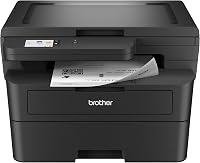
What Does Duplex Printing Mean on a Printer?
Duplex printing means printing on both sides of the same sheet of paper. Automatic duplex flips the sheet inside the printer, while manual duplex asks you to reinsert the pages yourself.
On this page (9 sections)
- What does duplex printing mean on a printer in plain terms?
- How does automatic duplex printing work?
- How does manual duplex printing work?
- What is the difference between duplex and simplex printing?
- Which duplex setting should you use for long edge or short edge?
- How do you print two sided documents without errors?
- What should you check before you buy a duplex printer?
- When is duplex printing worth it, and when is it not?
- What are common duplex printing problems and fixes?
Duplex printing means printing on both sides of the same sheet of paper. If you ask what does duplex printing mean on a printer in short terms, it is simply two sided output instead of one sided output.
That one feature changes how documents look, how much paper you use, and how you handle a long file. It also changes whether you need to stand by the printer or can walk away while it works.
What does duplex printing mean on a printer in plain terms?
Duplex printing means the printer creates output on the front and back of each page. The front side is often called side one, and the back side is side two.
A single sided job uses one sheet for one page. A duplex job can place page one on the front and page two on the back of the same sheet.
That cuts paper use in half for the same document.
The word duplex comes from printing in two directions. It does not mean the printer prints two copies at once.
It also does not mean color on one side and black and white on the other, unless the printer itself supports that mix.
People also use the terms two sided printing and duplex printing to mean the same thing. The difference is mostly in the settings menu.
Some drivers say duplex, some say two sided, and some say flip on long edge or flip on short edge.
How does automatic duplex printing work?
Automatic duplex printing means the printer flips the sheet itself and prints the back side. You load paper once, select two sided output, and collect finished pages in order.
A second paper path inside the printer turns the sheet over after side one prints. It then aligns it and feeds it past the toner or ink again.
That built in path is why most buyers prefer automatic duplex. You do not touch the paper between sides, and the machine handles alignment and page order.
Not every model supports every paper size in this mode. Some limit automatic duplex to letter or A4, while larger or heavier stock needs manual feeding, so check the specs first.
If you want a model built around this feature, this guide to a best duplex laser printer breaks down the main options.
How does manual duplex printing work?
Manual duplex printing means you flip and reinsert the paper yourself. The printer prints all front sides first, then prompts you to turn the stack over for the backs.
The process has three steps. Print side one, take the stack from the output tray, then place it back in the input tray as the prompt directs.
Placement matters for booklet, long edge, and short edge settings. Each one needs the stack turned a different way, and the driver usually shows a diagram for the next step.
Manual duplex works on printers without a built in duplexer. It also serves as a backup when automatic duplex does not support a special size or weight.
The tradeoff is time and attention. You must stay nearby, handle warm pages, and watch order.
That is fine for two pages, but slow for a 60 page report.
What is the difference between duplex and simplex printing?
Duplex and simplex differ by how many sides of the sheet get printed. Duplex uses both sides, and simplex uses one side only.
Simplex is the default on most printers. You choose single sided output, and each page lands on a fresh sheet.
That is simple, but it uses more paper and creates a thicker stack.
Duplex is two sided by design. Page one and page two share a sheet, page three and page four share the next sheet, and so on through the file.
Odd page counts still work, since the last sheet may have a blank back.
The difference shows up in binding too. A duplex job is ready to bind like a booklet or a report.
A simplex job often needs sorting or punching after printing, which adds a manual step.
Duplex can also affect how you read a document. Side by side comparisons are easier when related pages sit back to back.
Forms that need a signature on the back are easier to keep together as one sheet.
Which duplex setting should you use for long edge or short edge?
Long edge and short edge control how the back side is oriented when you flip the sheet. The right choice depends on how the reader will turn the page.
Flip on long edge suits most text documents. The sheet flips over its long side, so side two prints right side up and the reader turns pages like a book.
Flip on short edge suits calendars, notepads, and some reports. The sheet flips over its short side, so side two aligns with the bottom of side one and the reader turns pages like a notepad.
Wrong orientation still prints, but back side text can appear upside down. Most drivers default to long edge, so change it only for layouts that call for short edge.
How do you print two sided documents without errors?
Clean two sided printing starts with the right driver setting, the right paper, and a checked stack before you reinsert it. Most errors involve orientation, paper size, or order.
Choose two sided output in the print dialog and confirm the size and orientation match the loaded tray. A mismatch can shrink text or shift margins on one side.
Use paper the printer supports for duplex. Thin paper can jam in the flip path and thick stock may need manual duplex.
Clear any jam gently and check for curling before retrying.
For manual duplex, mark the stack before removing it and follow the onscreen diagram. Test with two pages on a new printer or driver, check order and orientation, then run the full file.
If photo documents are part of your work, see which printer is better for printing photos before choosing a model.
What should you check before you buy a duplex printer?
Before you buy, check whether duplex is automatic, manual, optional, or missing. That detail decides how much work each job will take.
Look for the exact phrase automatic duplex or automatic two sided printing in the maker specs. The word duplex alone can mean manual duplex, so read how pages flip.
Check supported sizes and weights for duplex mode. A model may flip letter paper automatically but require hand feeding for legal forms, labels, or card stock.
Check driver support for your operating system. Duplex controls live in the driver, and an older version may hide the flip option at the maker download page.
Check speed in context too, since the flip path can slow duplex output. Our guide to what does PPM mean on a printer explains how to read those figures.
For all in one picks, compare our best laser printer all in one duplex guide, or see best brother laser printer all in one duplex and best brother laser printer black and white duplex for brand focused options.
When is duplex printing worth it, and when is it not?
Duplex printing is worth it when you print reports, forms, manuals, or multi page files on a regular basis. It saves paper, space, and sorting time on every job.
It is less worth it when you print single page letters, shipping labels, or one off tickets. For those jobs, flipping the sheet adds a step with no real gain, and automatic duplex may slow the queue a little.
Duplex also helps with readability. A bound report reads better as two sided pages than as a loose stack of single sided sheets.
Clients and coworkers notice that difference, even when they do not name the feature.
The main cost is paper handling. Automatic duplex needs a clear internal path, so curled or damp paper can jam more often than in simplex mode.
Keep paper stored flat and dry if you plan to use duplex daily.
For most home offices, automatic duplex pays off fast. For a casual user who prints a few pages a month, manual duplex may be enough, and a lower cost printer without a built in duplexer can still work.
What are common duplex printing problems and fixes?
Common duplex problems come from wrong orientation, wrong paper, and wrong page order. Each has a simple check before the next job.
Upside down back sides mean the flip setting does not match the document. Switch long edge or short edge, print a two page test, and keep the setting that stays right side up.
Wrong order in manual duplex usually comes from reinserting the stack upside down. Mark the stack, follow the driver diagram, and check the prompt, especially when printing odd pages first.
Jams often involve thin, thick, or curled paper in the flip path. Try a standard 20 lb or 80 gsm sheet, set the guides, and keep the stack flat.
Faded backs usually point to toner, drum, paper type, or quality settings, not duplex itself. Blank backs on the last sheet are normal with odd page counts.
Pick automatic duplex for frequent multi page work and manual duplex for budget two sided output. Check specs for size, driver support, and flip options, and test two pages first.
Frequently asked questions
What does duplex printing mean on a printer?
It means the printer puts output on both sides of each sheet. Automatic duplex handles the flip inside the machine.
Manual duplex feeds one side first, then asks you to turn and reinsert the stack for the back sides.
Is automatic duplex faster than manual duplex?
Automatic duplex is usually faster and more reliable because the path is built in. Manual duplex adds handling time for every sheet.
The exact speed depends on the model, paper type, and how many pages you print at once.
Can any printer do two sided printing?
No. Some models have a built-in duplexer, some need an optional unit, and some offer manual duplex only.
Check the maker specs for automatic two sided printing, supported paper sizes, and whether the feature works with your operating system.
Does duplex printing use more toner?
It uses toner for both sides, so a full duplex job uses more toner than printing only the first side. Total toner use for a document is close to the same as printing it single sided, because the same pages still need ink or toner on each side.