6 Best Duplex Laser Printers (November 2026)
The best automatic duplex laser printers include the Brother HL-L2405W Wireless Compact Monochrome Laser Printer for simple home printing, the Brother MFC-L2820DW Wireless Compact Monochrome All-in-One Laser for home office workflows, and the HP LaserJet M234sdw Monochrome Laser Printer for two-sided office pages.
On this page (5 sections)
The best duplex laser printer for most home offices is the Brother MFC-L2900DW, which combines automatic two-sided printing with single-pass duplex scanning. For basic monochrome pages, choose the HP LaserJet M207dw; for color documents, the Canon Color imageCLASS LBP646Cdw adds automatic duplexing.
A duplex laser printer prints on both sides of the paper. That can reduce the number of sheets used for long reports, school work, and office documents, while toner-based printing suits people who regularly print text.
This roundup compares the listed functions, connection options, paper handling, and stated print speeds. If you're still weighing laser against inkjet for home use, read our guide on whether a laser printer is worth it for home use.
Our picks at a glance
-
1
 Best for simple home printing
Brother HL-L2405W Wireless Compact Monochrome Laser Printer
9.7/10 our score
See it on Amazon -
2
 Best for home office workflows
Brother MFC-L2820DW Wireless Compact Monochrome All-in-One Laser
9.6/10 our score
See it on Amazon -
3
 Best for two-sided office pages
HP LaserJet M234sdw Monochrome Laser Printer
9.5/10 our score
See it on Amazon
- 4
 Check it
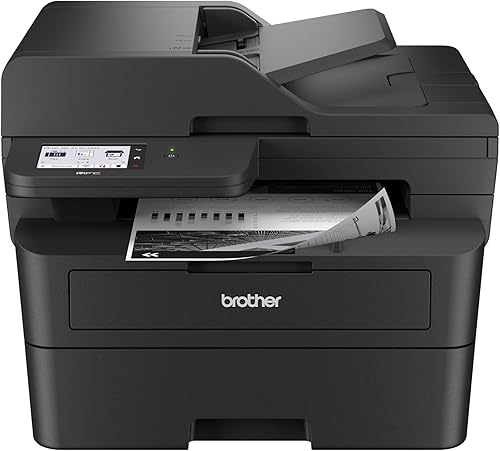
Brother Professional Laser Printer with Scanner
Best for two-sided scanning - 5
 Check it
Canon Color imageCLASS LBP646Cdw Wireless Laser Printer
Best for color documents - 6
 Best for compact duplex printingCheck it
Which duplex laser printer fits your document routine?
The right choice depends on whether you need automatic two-sided printing, color, or built-in scanning. These picks range from a compact manual-duplex printer to all-in-ones for heavier document tasks.
Brother HL-L2405W Wireless Compact Monochrome Laser Printer: Best for simple home printing
- Monochrome print-only
- Up to 30 ppm, one-sided
- 250-sheet tray
- Dual-band wireless and USB
A compact monochrome choice for everyday home documents when automatic duplexing is not essential. Its manual duplex setting means you turn and reload pages for two-sided jobs.
Pros
- 250-sheet paper tray
- Dual-band wireless
- Manual feed slot for envelopes and specialty paper
Cons
- No automatic duplex printing
- Print only, with no scan or copy function
The Brother HL-L2405W is a print-only monochrome printer, so it fits a home desk where the main job is everyday text. Its 250-sheet tray and dual-band wireless connection support routine printing from multiple devices.
This model's duplex setting is manual. For two-sided pages, you'll need to reload the paper between sides, so it is a weaker fit if you print long reports every week.
The manual feed slot handles envelopes and specialty paper. The printer also connects to one computer by USB, and Brother's Mobile Connect app supports remote printer management and mobile printing.
Choose it when compact monochrome printing matters more than automatic duplexing or scanning. If your home office prints two-sided documents often, consider an automatic duplex model below.
Brother MFC-L2820DW Wireless Compact Monochrome All-in-One Laser: Best for home office workflows
- Automatic duplex printing
- Print, copy, scan, and fax
- 50-page auto document feeder
- Dual-band wireless, Ethernet, and USB
Automatic duplex printing and an auto document feeder suit a home office that handles multi-page jobs. It also combines print, copy, scan, and fax functions in one device.
Pros
- Automatic duplex printing
- 50-page auto document feeder
- Wireless, Ethernet, and USB connections
Cons
- Monochrome output
- Larger than a print-only desktop printer
The Brother MFC-L2820DW is a four-function monochrome all-in-one with automatic duplex printing. It handles print, copy, scan, and fax jobs, making it a practical fit for a home office that needs more than a basic printer.
Its 50-page auto document feeder helps with multi-page copy, scan, and fax work. Dual-band wireless, Ethernet, and USB give you several connection choices, and the 2.7 in touchscreen supports common cloud apps.
Brother gives a print speed of up to 34 ppm in the description. This is a useful speed reference for one-sided work, but your actual job time can vary with document content and settings.
Pick this model if you want an all-in-one and automatic duplex printing in one compact device. For a closer look at multifunction choices, see our best all-in-one laser printers with duplex printing.
HP LaserJet M234sdw Monochrome Laser Printer: Best for two-sided office pages
- Automatic two-sided printing
- Print, scan, and copy
- 40-page auto document feeder
- Wireless and Ethernet
The M234sdw pairs automatic two-sided printing with scanning and copying. Its feeder supports hands-free multi-page copy and scan work.
Pros
- Automatic two-sided printing
- 40-page auto document feeder
- Wireless and Ethernet connections
Cons
- Monochrome output
- Two-sided speed is lower than its single-sided speed
The HP LaserJet M234sdw combines automatic two-sided printing with copy and scan functions. It is aimed at small teams, and the 40-page auto document feeder can handle hands-free multi-page copy and scan jobs.
HP states up to 30 pages per minute for single-sided printing and up to 19 images per minute for two-sided printing. That distinction is useful when estimating how quickly a long duplex job may finish.
Wireless printing works with mobile devices, PCs, and tablets, and Ethernet is included. HP also describes dual-band Wi-Fi with self-reset and security features.
Choose this model if you want an HP all-in-one with a stated two-sided speed and an automatic document feeder. If your scan jobs include double-sided originals, compare options in our guide to laser printers with duplex scanning.
Brother Professional Laser Printer with Scanner: Best for two-sided scanning
- Automatic duplex printing
- Single-pass duplex scanning
- 50-page auto document feeder
- 36 ppm monochrome
This Brother all-in-one combines automatic duplex printing with single-pass two-sided scanning. A 50-page feeder and 3.5 in touchscreen support larger document workflows.
Pros
- Single-pass duplex scanning
- Automatic duplex printing
- Wireless, Ethernet, and USB
Cons
- Monochrome output
- Larger footprint than a print-only model
The Brother MFC-L2900DW is the strongest match here for frequent two-sided print and scan work. It combines automatic duplex printing with single-pass duplex scanning, so it can process both sides of originals through its 50-page feeder.
The 3.5 in touchscreen offers access to cloud functions, while dual-band wireless, Ethernet, and USB support different office setups. Brother states print speeds up to 36 ppm for monochrome documents.
This is a larger feature set than a print-only model needs. The added scan workflow is most useful if you regularly digitize double-sided forms or copy multi-page documents.
Choose it for a small office that wants duplex output and scanning in one machine. For brand-specific alternatives, compare our best Brother all-in-one laser printers with duplex printing and best Brother black-and-white duplex laser printers.
Canon Color imageCLASS LBP646Cdw Wireless Laser Printer: Best for color documents
- Color print-only
- Automatic two-sided printing
- Up to 26 ppm in color and monochrome
- 250-sheet cassette
Choose this color laser printer when charts or other color documents matter and you want automatic two-sided printing. It does not scan, copy, or fax.
Pros
- Automatic two-sided printing
- Color and monochrome output
- Wireless, Ethernet, and USB
Cons
- Print only
- Lower stated print speed than the faster monochrome picks
The Canon Color imageCLASS LBP646Cdw is the color print-only pick. It prints both color and monochrome pages at up to 26 ppm and supports automatic two-sided printing.
A 250-sheet cassette and one-sheet multipurpose tray handle regular paper plus occasional specialty media. The five-line LCD screen, wireless setup, Ethernet, and USB offer practical control and connection options.
This model does not scan, copy, or fax. Choose it when color pages matter and you already have a separate way to digitize documents.
For a broader comparison of Canon options, see our best Canon duplex laser printers. If you need color scanning as well, our guides to color laser printers with duplex scanning and duplex color laser printers with scanners cover all-in-one alternatives.
HP LaserJet M207dw: Best for compact duplex printing
- Automatic duplex printing
- Monochrome print-only
- Up to 28 ppm
- Wireless, Ethernet, and USB
The M207dw focuses on wireless monochrome printing with automatic duplexing. It suits routine documents when you do not need scanning or copying.
Pros
- Automatic duplex printing
- Wireless, Ethernet, and USB connections
- Compact dimensions
Cons
- Print only
- No scan or copy function
The HP LaserJet M207dw keeps the job focused on automatic duplex monochrome printing. It is print-only, with wireless, Ethernet, and USB connections for common home and office setups.
HP states up to 28 ppm for single-sided output. The printer also supports mobile printing through the HP app and includes built-in security features.
There is no scanner or copier, so it is best suited to buyers who already have those functions elsewhere or rarely need them. Its automatic duplex feature makes it more convenient for two-sided reports than the manual-duplex Brother HL-L2405W.
Choose the M207dw for straightforward two-sided black-and-white printing. For a brand comparison, see our best Brother duplex laser printers alongside our best HP LaserJet duplex printers with scanners.
How we compared automatic two-sided laser printers
The most useful comparison is whether a printer handles duplexing automatically and whether it also copies or scans. We checked each model's stated functions, speed, feeder, and connections against the needs of home and small-office document printing.
For a basic printer, automatic duplexing saves the manual step of turning and reloading pages. The Brother HL-L2405W is included as a compact alternative, but its duplex feature is manual, so it suits occasional two-sided jobs better than frequent ones.
All-in-ones add value when you need to digitize paper or make copies. The Brother MFC-L2900DW stands out for single-pass duplex scanning, while the MFC-L2820DW and HP M234sdw offer automatic duplex printing with scan and copy functions.
What should you check before buying a duplex laser printer?
Check the duplex type, functions, and paper path before choosing a model. Those details decide whether the printer will fit your real workflow.
Is automatic duplex printing essential?
Automatic duplex printing is useful when you print two-sided documents often. It avoids the manual reload step required by the HL-L2405W, though both automatic and manual modes can produce two-sided pages.
A printer that prints duplex does not necessarily scan duplex. If you handle two-sided contracts or forms, verify the scanner and feeder details separately.
Do you need scanning or copying?
Choose an all-in-one if you regularly copy or scan paper documents. The Brother MFC-L2820DW and HP M234sdw include copy and scan functions, while the Brother MFC-L2900DW adds single-pass two-sided scanning.
If those jobs are rare, a print-only device may be easier to place and operate. The Canon LBP646Cdw and HP M207dw focus on printing rather than adding unused functions.
Will monochrome output cover your needs?
Monochrome laser printers are a straightforward fit for text, forms, and black-and-white reports. Select a color model if your pages need colored charts, diagrams, or handouts.
The Canon LBP646Cdw is the color printer in this group. It supports automatic duplex printing but does not scan or copy, so plan for a separate device if you need those tasks.
How much paper handling do you need?
A larger tray means fewer interruptions to refill paper during frequent jobs. The Brother HL-L2405W, MFC-L2820DW, and Canon LBP646Cdw specify 250-sheet trays or cassettes.
For multi-page originals, look at the auto document feeder capacity too. The Brother MFC-L2820DW and MFC-L2900DW each have a 50-page feeder, while the HP M234sdw has a 40-page feeder.
How do duplex printing and duplex scanning differ?
Duplex printing means putting ink or toner on both sides of a sheet, while duplex scanning captures both sides of a two-sided original. A printer may support one feature without supporting the other.
If your priority is scanning two-sided paper, check for a duplex scan method and compatible feeder. Our best all-in-one laser printers with duplex scanning explains that distinction, and our duplex color laser printers with scanners guide focuses on color models.
Which duplex laser printer should you choose?
Choose the Brother MFC-L2900DW if you regularly print and scan two-sided documents, the MFC-L2820DW if you want a versatile home-office all-in-one, or the HP M207dw for basic automatic duplex printing. Pick the Canon LBP646Cdw when color matters and a separate scanner is available.
For another brand-focused shortlist, see best Pantum laser printers.
For a home office, compare your weekly document volume with the printer's tray and feeder. For more office models, see our laser printers for office use guide.
Our guide to choosing a laser printer for a home office can help you match features to your routine.
Our top 3 picks at a glance
-
1
Best for simple home printing
Brother HL-L2405W Wireless Compact Monochrome Laser Printer
9.7/10 our score
See it on Amazon -
2
Best for home office workflows
Brother MFC-L2820DW Wireless Compact Monochrome All-in-One Laser
9.6/10 our score
See it on Amazon -
3
Best for two-sided office pages
HP LaserJet M234sdw Monochrome Laser Printer
9.5/10 our score
See it on Amazon
Frequently asked questions
What is the best duplex laser printer for home use?
For home use, choose by how often you print on both sides and whether you need color or scanning. The HP LaserJet M207dw provides automatic duplex printing for monochrome documents, while the Brother MFC-L2820DW adds copy, scan, and fax functions.
If you print only now and then, a lower-cost manual duplex model may be enough.
Does duplex printing turn the paper over automatically?
Automatic duplex printing handles both sides of a sheet without requiring you to turn and reload each page. Manual duplex printing asks you to reinsert the first side's pages before the printer prints the reverse.
Confirm which type a model supports before buying.
See our guide to what duplex printing means on a printer for the difference.
Do duplex laser printers scan both sides automatically?
No. Duplex printing and duplex scanning are separate features.
A printer may print on both sides but scan only one side at a time.
For two-sided originals, look for a feeder and scanning method that handle both sides.
The Brother MFC-L2900DW supports single-pass duplex scanning, while other all-in-ones may have different scan capabilities.
Should I choose a color or monochrome duplex laser printer?
Choose monochrome if your regular work is text, forms, and other black-and-white documents. Select a color model when you need color charts, graphics, or handouts; the Canon imageCLASS LBP646Cdw prints color and supports automatic two-sided printing.
For more color options, compare our best duplex color laser printers.
Is an all-in-one duplex laser printer worth it?
An all-in-one is useful when you also copy, scan, or fax, since it combines those tasks with printing in one device. The Brother MFC-L2820DW and HP LaserJet M234sdw add copy and scan functions, while the Brother MFC-L2900DW also offers single-pass duplex scanning.
If you only print, a print-only model can keep the setup simpler.


