7 Best Brother Monochrome Laser Printers (November 2026)
The best Brother monochrome laser printers include the Brother HL-L2405W Wireless Compact Monochrome Laser Printer for compact home offices, the Brother MFC-L2820DW Wireless Compact Monochrome All-in-One Laser for small office all-in-one use, and the HP LaserJet Pro 3101fdw for small teams wanting a non-Brother option.
On this page (8 sections)
- Our top Brother monochrome laser printer picks
- How the best Brother monochrome laser printer models compare
- How we compared these printers
- Which Brother monochrome laser printer should you buy for home use?
- Do you need automatic duplex printing?
- How fast should your monochrome laser printer be?
- How much paper capacity and toner yield do you need?
- Verdict: which best Brother monochrome laser printer pick is right for you?
The best Brother monochrome laser printer for most homes is the Brother HL-L2405W, because you get 30 ppm printing, dual-band wireless and a 250-sheet tray in a compact body. If you need scanning and copying, the MFC-L2820DW is the next step up.
We compared seven models by speed, functions, duplex, paper handling, size and toner yield. Our score weighs specs, features and buyer feedback against what you are shopping for.
If you are new to this type of machine, start with What Is a Monochrome Laser Printer? The Basics.
That guide explains why black and white laser printing suits text-heavy work.
Monochrome means black and white output only. That limits color work, but it keeps documents crisp and running costs predictable for text.
For most home offices, that trade is the right one. Invoices, contracts, school worksheets and shipping labels are all text first.
Our picks at a glance
-
1
 Best for compact home offices
Brother HL-L2405W Wireless Compact Monochrome Laser Printer
9.7/10 our score
See it on Amazon -
2
 Best for small office all-in-one use
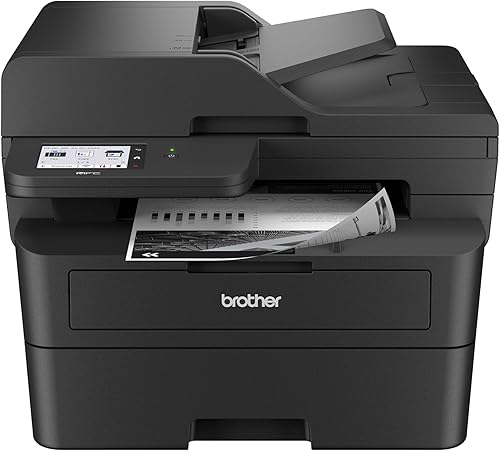
Brother MFC-L2820DW Wireless Compact Monochrome All-in-One Laser
9.6/10 our score
See it on Amazon -
3

- 4
 Check it
Brother Professional Laser Printer All-in-One with Scanner
Best for high-volume business printing - 5
 Check it
Brother Professional Laser Printer with Scanner
Best for cloud-ready small business scanning - 6
 Best for print-only high-volume workCheck it
- 7
 Check it
Brother MFC-L5710DW Business Monochrome Laser All-in-One Printer
Best for business duplex scanning
Our top Brother monochrome laser printer picks
Each pick below solves a different job. Print-only models keep costs down.
All-in-one models add copy, scan and fax for offices that handle paper in and out.
Think about desk space before you think about speed. A 50 ppm machine is fast, but it needs a workgroup footprint.
Think about workflow next. If you scan to email or cloud folders daily, a feeder matters more than a few extra pages per minute.
Brother HL-L2405W Wireless Compact Monochrome Laser Printer: Best for compact home offices
- Prints up to 30 ppm
- Dual-band wireless and USB
- 250-sheet paper tray
- Manual feed slot
- TN830 and TN830XL toner
A compact print-only Brother for homes that need fast black and white pages without copy or scan functions. Its wireless and mobile links suit shared family and work devices.
Pros
- Compact footprint
- Dual-band wireless
- 250-sheet tray
- Manual feed for envelopes
Cons
- Manual duplex only
- Print only, no scanning
The HL-L2405W suits a home office that prints contracts, school work and labels in black and white. It prints one-sided pages at up to 30 ppm, so a 10-page document takes well under a minute once it starts.
Its dual-band wireless connects several devices, and USB gives you a direct link for one computer. The Brother Mobile Connect app lets you print from a phone and check toner use.
The 250-sheet tray means fewer refills, and a manual feed slot handles envelopes and specialty paper. At 14.2 x 14 x 7.2 inches and 15.1 pounds, it fits on most desks.
Print resolution reaches 1200 x 1200 dpi, which keeps small text and tables easy to read. The first page time is listed at 8.5 seconds, so short jobs do not wait long.
The trade-off is clear: duplex is manual, and there is no scanner or copier. If you only need printing, that saves space and money.
If you scan weekly, look at an all-in-one below.
Brother MFC-L2820DW Wireless Compact Monochrome All-in-One Laser: Best for small office all-in-one use
- Prints up to 36 ppm
- Copy, scan and fax
- Automatic duplex
- 50-page auto document feeder
- 2.7-inch touchscreen
A compact four-function Brother for small offices that need print, copy, scan and fax in one unit. Automatic duplex and a 50-page feeder cut manual work on multi-page jobs.
Pros
- Four functions in one unit
- Automatic duplex
- 50-page feeder
- Touchscreen with cloud links
Cons
- Larger than print-only picks
- Copy resolution is 600 x 600 dpi
The MFC-L2820DW suits a small office that needs four functions in a compact footprint. It prints at up to 36 ppm in the title, with 34 ppm in the specs, and it copies, scans and faxes.
A 50-page auto document feeder helps with multi-page copies and scans. Automatic duplex printing reduces paper use, and the 2.7-inch touchscreen gives access to cloud apps such as Google Drive and Dropbox.
Dual-band wireless, Ethernet and USB give you flexible links for shared office use. The 250-sheet tray reduces refill frequency compared with smaller trays.
Scan speed is listed at up to 23.6 ipm in black and white, which suits regular office scanning without a long wait. Copy speed matches print speed at up to 34 ppm in the specs.
Trade-offs include a larger body than the HL-L2405W and copy resolution of 600 x 600 dpi. For a small office that needs all four functions, those trade-offs are usually worth it.
HP LaserJet Pro 3101fdw: Best for small teams wanting a non-Brother option
- Prints up to 35 ppm
- Print, scan, copy and fax
- Automatic two-sided printing
- Auto document feeder
- Wi-Fi, Ethernet and Bluetooth
An HP all-in-one for small teams that want a fast Brother alternative with automatic duplex. It prints, scans, copies and faxes with wireless and Ethernet links.
Pros
- Fast 35 ppm printing
- Automatic duplex
- Print, scan, copy and fax
- Ethernet and Bluetooth
Cons
- Not a Brother model
- Uses HP cartridges
The HP LaserJet Pro 3101fdw is included as a non-Brother comparison for small teams. It prints up to 35 ppm and handles print, scan, copy and fax.
Automatic two-sided printing and an auto document feeder cover the main office tasks. HP says it suits up to 7 people, which helps you judge it against Brother workgroup models.
Wi-Fi, Ethernet and Bluetooth keep it connected, and HP Wolf Pro Security gives customizable settings. It works with Microsoft, Mac, AirPrint, Android and Chromebook.
Copy resolution reaches 1200 x 1200 dpi, and maximum copies per run are listed at 5,000. That copy resolution is higher than the MFC-L2820DW at 600 x 600 dpi.
The trade-off is brand and supplies: it uses HP cartridges with original HP chips. If you want Brother toner and controls, stay with the Brother picks.
If you want an HP ecosystem, this is the alternative here.
Brother Professional Laser Printer All-in-One with Scanner: Best for high-volume business printing
- Prints and copies up to 50 ppm
- 70-page auto document feeder
- Single-pass two-sided scanning up to 56 ipm
- Gigabit Ethernet and dual-band wireless
- TN920UXXL 18,000-page toner
A high-speed Brother all-in-one for busy offices with large daily print and scan loads. Its 70-page feeder and ultra high-yield toner suit workgroups, not small desks.
Pros
- 50 ppm speed
- 70-page feeder
- 18,000-page toner option
- Gigabit Ethernet
Cons
- Large and heavy at 38.3 lb
- Visually larger than compact picks
The MFC-L5915DW suits a busy office or workgroup with high daily volume. It prints and copies at up to 50 ppm, which is the fastest speed in this group.
A 70-page auto document feeder offers single-pass, two-sided scanning up to 56 ipm. That helps when you scan contracts, invoices and multi-page reports every day.
Gigabit Ethernet and dual-band wireless support shared network use. The TN920UXXL ultra high-yield toner is rated for 18,000 pages, and a 3,000-page cartridge is included.
The 5-inch touchscreen allows customized shortcuts for frequent workflows. That matters when several staff use the same machine for different jobs.
The trade-off is size and weight: 18.6 x 19.5 x 19.1 inches and 38.3 pounds. This is not a small-desk printer.
Choose it for volume and speed, not for compact placement.
Brother Professional Laser Printer with Scanner: Best for cloud-ready small business scanning
- Prints up to 36 ppm
- 50-page auto document feeder
- Automatic duplex printing and scanning
- 3.5-inch touchscreen
- Dual-band wireless and Ethernet
A Brother all-in-one for small businesses that scan double-sided documents often. Its 3.5-inch touchscreen and cloud links support daily scan-to-folder work.
Pros
- Single-pass duplex scanning
- 50-page feeder
- 3.5-inch touchscreen
- Automatic duplex
Cons
- Heavier than compact models
- Starter toner is 700 pages
The MFC-L2900DW suits a small business that scans double-sided documents often. It prints at up to 36 ppm with automatic duplex printing.
A 50-page auto document feeder and single-pass two-sided scanning help you process multi-page jobs without flipping pages. The 250-sheet tray reduces refills.
The 3.5-inch touchscreen gives direct access to cloud services such as Google Drive, Dropbox and OneNote. Dual-band wireless, Ethernet and USB cover office links, and the Brother Mobile Connect app supports mobile printing and scanning.
Brother says the enhanced fuser uses 22% less electricity than its predecessor and warms up faster from sleep. The first page time is listed at 6.9 seconds.
Starter toner is listed at 700 pages, with a DR830 drum unit at 15,000 pages in the box contents. That starter yield is lower than some rivals, so plan for a TN830XL cartridge sooner.
The trade-off is size at 16.1 x 12.5 x 16.6 inches and weight of 11.8 kg, so it needs a firm desk or stand.
Brother Laser Printer: Best for print-only high-volume work
- Prints up to 50 ppm
- 520-sheet main tray and 100-sheet multipurpose tray
- Expandable to 1,660 sheets
- Automatic duplex
- TN920UXXL 18,000-page toner
A fast print-only Brother for offices that print in bulk and scan elsewhere. Its large trays and automatic duplex reduce refills during long runs.
Pros
- 50 ppm speed
- 520-sheet main tray
- Automatic duplex
- Expandable paper capacity
Cons
- Print only, no scanner
- Optional trays cost extra
The HL-6210DW suits an office that prints in bulk but scans elsewhere. It prints at up to 50 ppm with automatic duplex.
Paper capacity sets it apart: a 520-sheet main tray plus a 100-sheet multipurpose tray, expandable to 1,660 sheets with optional trays. That reduces interruptions during long runs.
Gigabit Ethernet and dual-band wireless support sharing across a business network, and mobile printing covers phone and tablet use. The TN920UXXL toner is rated for up to 18,000 pages, with a 3,000-page cartridge included.
The drum unit is listed at 45,000 pages, which spreads the replacement cost over a long period. Print resolution reaches up to 1200 x 1200 dpi for sharp text.
The trade-off is function: it is print only, with no scanner, copier or fax. If your office already has a separate scanner, this focused design can be a smart buy.
If not, choose an all-in-one.
Brother MFC-L5710DW Business Monochrome Laser All-in-One Printer: Best for business duplex scanning
- Prints and copies up to 48 ppm
- 50-page feeder with two-sided scanning up to 60 ipm
- Automatic duplex
- 3.5-inch color touchscreen
- TN920XXL 11,000-page toner
A business Brother all-in-one for offices that need fast duplex scanning and editable document scans. It is a strong pick for shared workgroup use.
Pros
- 48 ppm speed
- 60 ipm duplex scanning
- Editable Office scans
- Expandable to 1,390 sheets
Cons
- Large footprint
- Lower score due to size for home desks
The MFC-L5710DW suits a business office that needs fast duplex scanning. It prints and copies at up to 48 ppm with automatic duplex.
The 50-page auto document feeder offers single-pass, two-sided scanning up to 60 ipm. You can scan to cloud services, email, SharePoint and SFTP from the touchscreen, and create searchable, editable Word, Excel and PowerPoint documents.
Paper capacity is 250 sheets in the main tray plus 100 sheets in the multipurpose tray, expandable to 1,390 sheets. Gigabit Ethernet and dual-band wireless support shared use.
The included toner is rated at 3,000 pages, with the TN920XXL rated at 11,000 pages for lower cost per page. The 3.5-inch color touchscreen helps staff find scan destinations quickly.
Trade-offs are size at 18.1 x 16.4 x 17.6 inches and weight of 36 pounds. It scores lower here because it is a workgroup machine, not a compact home pick, but it is strong for document-heavy offices.
How the best Brother monochrome laser printer models compare
The fastest models here print at 48 to 50 ppm. The compact home models print at 30 to 36 ppm.
That gap matters only if you print long documents every day.
Paper capacity is the other big split. Compact models use a 250-sheet tray, while workgroup models start at 520 sheets or expand beyond 1,000 sheets.
Scanning speed also splits the group. The MFC-L5710DW scans at up to 60 ipm, the MFC-L5915DW at up to 56 ipm, and the MFC-L2820DW at up to 23.6 ipm.
| Product | Best for | Print speed | Duplex | Size | Our score |
|---|---|---|---|---|---|
| Brother HL-L2405W Wireless Compact Monochrome Laser Printer | compact home offices | 30 pages per minute | Manual | 14.2 x 14 x 7.2 in | 9.7 |
| Brother MFC-L2820DW Wireless Compact Monochrome All-in-One Laser | small office all-in-one use | 36 pages per minute | Automatic | 15.7 x 16.1 x 12.5 in | 9.6 |
| HP LaserJet Pro 3101fdw | small teams wanting a non-Brother option | 35 pages per minute | Automatic | 16.5 x 12.3 x 15.7 in | 9.4 |
| Brother Professional Laser Printer All-in-One with Scanner | high-volume business printing | 50 pages per minute | Print, copy and scan | 18.6 x 19.5 x 19.1 in | 9.3 |
| Brother Professional Laser Printer with Scanner | cloud-ready small business scanning | 36 pages per minute | Automatic | 16.1 x 12.5 x 16.6 in | 9.3 |
| Brother Laser Printer | print-only high-volume work | 50 pages per minute | Automatic | 15.3 x 14.7 x 11.4 in | 8.9 |
| Brother MFC-L5710DW Business Monochrome Laser All-in-One Printer | business duplex scanning | 48 pages per minute | Automatic | 18.1 x 16.4 x 17.6 in | 8.4 |
For a wider view of black and white models, see our best laser printer black and white guide. It places Brother models against other brands in the same speed range.
What the table shows in plain terms
Use the table to match jobs, not just headline speeds. A print-only 50 ppm model and an all-in-one 50 ppm model solve different problems.
Check duplex and feeder size together. Automatic duplex without a feeder still leaves multi-page scanning slow.
Check toner model as well. TN830, TN920XXL and TN920UXXL have very different yields, so cost per page will differ.
How we compared these printers
We compared specs, features and buyer feedback against the search for a Brother monochrome laser printer. We looked at print speed, duplex type, feeder size, paper capacity, connectivity, dimensions, weight and toner yield.
We did not test these printers ourselves. We checked the specs for each model and grouped them by job: compact home printing, small office all-in-one use, and high-volume business printing.
We also checked trade-offs. A 50 ppm model is fast, but it is larger and heavier.
A compact 30 ppm model is easier to place, but it has manual duplex and no scanner.
Our scores reflect fit for this search. The HL-L2405W scores highest because it matches most home buyers.
Business models score well for speed, but they suit fewer desks.
We paid close attention to first page time where it was listed. Models at 6.7 to 6.9 seconds feel quicker for single documents than models at 8.5 seconds.
We also weighed display and controls. Touchscreens at 2.7 inches, 3.5 inches and 5 inches suit shared use better than basic controls.
How scores were weighted
Speed mattered, but it did not decide the ranking alone. Size, functions and paper handling carried equal weight for home buyers.
All-in-one models gained points for feeder duplex scanning, because that saves daily time. Print-only models gained points for compact size and lower complexity.
Toner yield was a secondary factor. An 18,000-page cartridge helps a workgroup, but it matters less for a home that prints 100 pages a month.
Which Brother monochrome laser printer should you buy for home use?
Buy a compact print-only Brother if you mainly print documents at home. The HL-L2405W gives you 30 ppm, wireless links and a 250-sheet tray in 15.1 pounds.
Print-only for home offices
Choose print-only if you rarely copy or scan. You save desk space and you avoid paying for a feeder you will not use.
Check the size before you order. The HL-L2405W is 14.2 x 14 x 7.2 inches, so measure your desk and leave room for paper to exit.
Dual-band wireless helps in homes with many devices. It can use 2.4GHz or 5GHz, which suits phones, laptops and tablets in different rooms.
The manual feed slot is useful for envelopes. You can run specialty paper without using the main tray.
All-in-one for home offices
Choose an all-in-one if you scan school forms, receipts or contracts each week. The MFC-L2820DW adds copy, scan and fax with a 50-page feeder.
That feeder changes daily use. You can load a stack, scan to a cloud folder, and walk away.
For wireless-focused homes, our best monochrome wireless laser printer guide covers models with strong Wi-Fi and mobile links.
Do you need automatic duplex printing?
Automatic duplex is worth it if you print double-sided documents more than once a week. It flips pages for you and cuts paper use.
Automatic duplex models
The MFC-L2820DW, MFC-L2900DW, HL-6210DW and MFC-L5710DW all offer automatic duplex. That helps with reports, manuals and contracts.
Our best duplex monochrome laser printer guide ranks duplex models by speed, feeder size and paper capacity.
Automatic duplex also reduces mistakes. You do not need to reinsert a stack in the right order.
For scanning, single-pass duplex is the bigger gain. The MFC-L5710DW handles both sides in one pass at up to 60 ipm.
Manual duplex models
The HL-L2405W uses manual duplex. You print one side, reinsert the pages and print the other side.
That is fine for occasional double-sided work. If you print double-sided daily, automatic duplex will save more time than a higher print speed.
Manual duplex also uses more attention. On a 20-page document, reinserting pages can break your focus.
If budget is tight, manual duplex is a fair trade. You still get duplex printing, just with more handling.
How fast should your monochrome laser printer be?
About 30 ppm fits most home use, and 36 ppm fits most small offices. Higher speeds help only when you print long documents often.
30 to 36 ppm for homes and small offices
At 30 ppm, a 30-page document takes about a minute of printing time after the first page. At 36 ppm, that time drops a little more.
Speed matters more when you print in queues. If several people share one printer, 36 ppm or higher helps keep the tray moving.
First page time matters for short jobs. A 6.9-second first page beats an 8.5-second first page when you print single forms.
Copy speed follows print speed on most all-in-one models here. That helps when you duplicate multi-page packs.
48 to 50 ppm for workgroups
The MFC-L5915DW, HL-6210DW and MFC-L5710DW print at 48 to 50 ppm. Those speeds suit offices that print hundreds of pages per day.
At that volume, paper capacity matters as much as speed. Refilling a 250-sheet tray every hour wastes the speed gain.
Toner yield matters too. An 18,000-page cartridge keeps a 50 ppm printer running without frequent stops.
For context on laser printing in general, see What Are the Advantages of a Laser Printer? and What Are the Disadvantages of a Laser Printer?.
How much paper capacity and toner yield do you need?
A 250-sheet tray fits home use, while 500 sheets or more fits shared offices. Toner yield matters because high-yield cartridges lower cost per page.
Paper capacity
The HL-L2405W and MFC-L2820DW have 250-sheet trays. The HL-6210DW has 520 sheets in the main tray and can expand to 1,660 sheets.
Larger trays mean fewer refills, but they also mean a larger printer. Measure your space and check the tray size before you choose a workgroup model.
Expandable trays add cost later. The HL-6210DW and MFC-L5710DW both list optional trays, so budget for those if you need the full capacity.
Multipurpose trays help with mixed paper. The 100-sheet trays on business models suit envelopes, labels and custom sizes.
Toner yield
The TN830 and TN830XL fit the compact Brother models. The TN920UXXL is rated for 18,000 pages for the 50 ppm business models, and the TN920XXL is rated for 11,000 pages for the MFC-L5710DW.
Higher yield does not always mean lower cost, so compare cartridge size and your monthly page count. If you print under 500 pages per month, a standard cartridge may last long enough.
Starter cartridges are smaller. Several models include a 3,000-page cartridge, while the MFC-L2900DW lists a 700-page starter toner.
Drum life also affects cost. The HL-6210DW lists a 45,000-page drum, while the MFC-L2900DW lists a 15,000-page drum unit.
If you are comparing brands, our best canon monochrome laser printer guide covers Canon alternatives, and our best compact monochrome laser printer guide focuses on small footprints.
Verdict: which best Brother monochrome laser printer pick is right for you?
Pick the HL-L2405W if you want a compact home printer for black and white documents. Pick the MFC-L2820DW if you need copy, scan and fax in a small office.
Pick a 50 ppm Brother if you print at high volume and have space for a larger unit.
For most buyers, the HL-L2405W is the best Brother monochrome laser printer because it balances speed, size, wireless links and paper capacity. If scanning matters, move to the MFC-L2820DW or MFC-L2900DW.
If volume matters, move to the MFC-L5915DW or HL-6210DW.
If you need the fastest duplex scanning, the MFC-L5710DW at 60 ipm is the pick to beat.
Measure your desk, check your monthly page count, and choose the model that matches both. That simple check will point you to the right Brother, or to the HP alternative if you prefer that ecosystem.
Our top 3 picks at a glance
-
1
Best for compact home offices
Brother HL-L2405W Wireless Compact Monochrome Laser Printer
9.7/10 our score
See it on Amazon -
2
Best for small office all-in-one use
Brother MFC-L2820DW Wireless Compact Monochrome All-in-One Laser
9.6/10 our score
See it on Amazon -
3
Frequently asked questions
What is a monochrome laser printer?
A monochrome laser printer prints in black and white only. It uses toner to form text and images, and it often costs less per page than color printing for documents.
Is a Brother monochrome laser printer good for home use?
Yes, if your work is mostly black and white text. A compact Brother suits home offices where speed, low per-page cost and wireless printing matter more than color.
Should I buy print-only or all-in-one?
Buy print-only if you rarely copy or scan. Buy an all-in-one if you scan, copy or fax weekly, because a feeder and duplex scanning save time on multi-page jobs.
What speed do I need?
Around 30 ppm fits most home use. Around 36 ppm suits small offices.
Around 48 to 50 ppm suits busy workgroups that print long documents.
Does automatic duplex matter?
Automatic duplex matters if you print double-sided often. It flips pages for you, saves paper and reduces manual handling.
Manual duplex means you reinsert pages yourself.