What Is Duplex Scanning on a Printer?
Duplex scanning on a printer scans both sides of a sheet automatically, usually through an automatic document feeder, so you get one digital file without turning pages by hand. Duplex scanning captures paper; duplex printing puts ink or toner on both sides.
On this page (9 sections)
- How does duplex scanning on a printer work?
- What is the difference between duplex scanning and duplex printing?
- What is the difference between duplex and simplex scanning?
- Which scanner helps with two-sided photos and documents?
- Is a mobile scanner enough for duplex scanning?
- Can a flatbed scanner scan both sides?
- What should you look for in a duplex scanner?
- Does a printer stand help with scanner placement?
- Which type should you choose?
Duplex scanning on a printer scans both sides of a document into a digital file, often in one pass through an automatic document feeder. It is useful for contracts, forms, invoices, and notes with information on the front and back.
Duplex scanning is different from duplex printing. Scanning reads paper and creates a digital copy, while printing places ink or toner on both sides of paper.
How does duplex scanning on a printer work?
A duplex scanner captures the front and back of each sheet and combines the pages in order. Depending on the design, it may use two scanning sensors or feed the page through a scanning path more than once.
The result is usually a PDF or image file. With optical character recognition, scanned pages may also become searchable or editable documents.
An automatic document feeder makes the process practical for multi-page work. Read our guide to what is an ADF document scanner if you want to understand feeder capacity, page handling, and common ADF uses.
What is duplex scanning on a printer used for?
Duplex scanning helps when both sides of a paper document contain useful information. Common examples include signed agreements, two-sided application forms, insurance papers, receipts with notes, and school handouts.
It can also reduce manual work. Instead of scanning the front, turning the sheet, scanning the back, and sorting the pages, you load the document and let the scanner manage the sequence.
Before scanning, remove staples and clips, straighten bent corners, and arrange pages in the order you want. Keep fragile photos and unusually thick items away from a feeder unless the scanner is designed for them.
What is the difference between duplex scanning and duplex printing?
Duplex scanning digitizes both sides of an existing sheet, while duplex printing creates a two-sided paper copy. The word “duplex” describes two-sided handling in both cases, but the direction of the process is different.
A printer with duplex printing receives a digital document and outputs paper on both sides. A scanner with duplex scanning receives paper and outputs a digital document.
Some multifunction printers include both features. Others include a scanner but only scan one side automatically, or include duplex printing without duplex scanning.
What is the difference between duplex and simplex scanning?
Simplex scanning captures one side of a sheet automatically, while duplex scanning captures both sides. Simplex scanning can be enough for receipts, photos, and documents printed on only one side.
Duplex scanning is more useful for mixed paperwork. It saves time when a batch contains two-sided pages, but it may create blank pages when the backs are empty unless blank-page removal is enabled.
Your choice should match the paper you handle most often. If nearly all documents are single-sided, a compact simplex scanner may be easier to store and use.
Which scanner helps with two-sided photos and documents?
The Epson FastFoto FF-680W is the strongest fit for high-volume photo and document scanning with two-sided photo notes. Its single-step technology can capture a photo and handwritten notes on the back in one scan, and it can batch-scan up to 36 photos.
The FF-680W scans photos up to 8 x 10 in, including Polaroid photos, panoramas, and postcards. It offers 300 dpi, 600 dpi TIFF, and 1200 dpi interpolated options, plus auto enhancement, color restoration, red-eye reduction, de-skew, cropping, and rotation.
For documents, it includes Epson ScanSmart software with OCR and supports documents up to 240 in. Epson gives it USB and Wi-Fi connectivity, while the Epson FastFoto app can add voice and text to photos and support sharing through Dropbox and Google Drive.
Its 11.7 x 11.7 x 6.9 in size and 8.2 lb weight make it better suited to a permanent workspace than a travel bag. If you scan family photos as well as paperwork, the extra photo features may justify the larger footprint.
Is a mobile scanner enough for duplex scanning?
A mobile scanner is a good choice for light, single-sheet workflows, but the Epson WorkForce ES-50 is not a duplex scanner. It feeds one sheet at a time and connects to a computer through USB.
The ES-50 scans a single page in as quickly as 5.5 seconds and handles documents up to 8.5 x 72 in. Its automatic feeding mode combines multi-page scans into one file as you insert each sheet.
Nuance OCR can create searchable PDFs and editable Word and Excel files. The scanner includes Epson ScanSmart software, a TWAIN driver, and a USB cable, and it works with Windows and Mac computers.
At 10.7 x 10.7 x 1.3 in and 9.44 oz, it suits a small desk, mobile office, or travel setup. Choose it when portability and one-sided pages matter more than automatic two-sided capture.
Can a flatbed scanner scan both sides?
A flatbed scanner can digitize both sides, but you normally need to turn the page by hand. This approach works well for books, photos, delicate originals, and items that do not feed cleanly through an ADF.
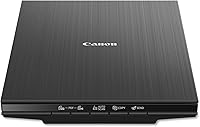
The Canon CanoScan LiDE 400 Slim Scanner is a flatbed document and photo scanner, so it is better for careful one-page work than automatic duplex batches.
The CanoScan LiDE 400 scans in as fast as 8 seconds and has 4800 x 4800 dpi resolution. Its EZ Buttons include auto scan and PDF functions, and the software can create editable and searchable multi-page PDFs.
It measures 7.7 x 14.5 x 0.4 in and weighs 3.6 lb. A USB Type-C cable supplies data and power, and the box includes a vertical stand, setup CD, and USB 2.0 Type-C cable.
Choose this Canon when photo detail and flatbed handling matter more than automatic two-sided feeding. For a broader explanation of flatbed designs, see what is a flatbed scanner on a printer.
What should you look for in a duplex scanner?
Look for an automatic document feeder, true two-sided capture, suitable page handling, and software that keeps pages in order. Compare printers with duplex scanning.
These features matter more than a high resolution number for ordinary office documents.
Check these points before you choose:
- ADF design: Confirm that the scanner feeds multi-page documents automatically.
- Duplex method: Look for explicit two-sided or duplex scanning support.
- Page sizes: Check whether it handles receipts, ID cards, long pages, or photos.
- OCR: Choose OCR if you need searchable PDFs or editable office files.
- Connectivity: USB suits a single computer, while Wi-Fi can make placement easier.
- Care: Keep rollers and the scanning path clean, and remove staples before feeding pages.
A digital scanner for documents buying guide can help you compare flatbed, sheet-fed, and multifunction designs. If you scan large batches, compare best high speed document scanner options for faster feeding and file handling.
Does a printer stand help with scanner placement?
A printer stand can help you create a stable scanning area with room for paper and cables. Place the scanner where the feeder path stays clear and where you can reach the controls without lifting the unit.
Use the printer stand buying guide to think about shelf width, working height, and storage. Measure the scanner footprint first, especially if you choose a photo scanner with a larger body.
Avoid placing a feeder scanner where loose pages can fall behind furniture. Keep the power and USB cables free from sharp bends, and leave enough space to open access panels for cleaning.
Which type should you choose?
For the question what is duplex scanning on a printer, the practical answer is simple: choose a duplex document scanner when you regularly need both sides of loose paper in digital form.
Pick the Epson FastFoto FF-680W for photo batches and two-sided photo notes. Pick the Epson WorkForce ES-50 for portable, one-sheet scanning.
Pick the Canon CanoScan LiDE 400 for high-detail flatbed scans where turning pages by hand is acceptable.
If automatic two-sided feeding is your main goal, start with best duplex document scanner options and confirm the exact duplex method before ordering.
Frequently asked questions
What is duplex scanning on a printer?
Duplex scanning means capturing the front and back of a sheet in one scanning workflow. A duplex document scanner uses an automatic document feeder or related two-sided scanning system to create digital pages without requiring you to flip every sheet by hand.
Is duplex scanning the same as duplex printing?
No. Duplex scanning reads both sides of existing paper and saves the result digitally.
Duplex printing uses a printer to place ink or toner on both sides of new paper.
A device may support one function, both functions, or neither.
Does duplex scanning scan blank backs?
It depends on the scanner and its software. Some systems can detect and remove blank pages, while others save every scanned side.
Check the scanner's software settings before scanning a large batch of single-sided documents.
Do I need an ADF for duplex scanning?
An ADF is the most useful setup for duplex scanning many loose pages because it feeds sheets automatically. A flatbed scanner can still scan both sides, but you usually need to lift, turn, and reposition each page yourself.