6 Best Wireless Color Laser Printers (November 2026)
The best wireless color laser printers for home use include the Canon Color imageCLASS LBP646Cdw Wireless Laser Printer for fast home color printing, the Canon Color imageCLASS MF652Cw for home color scanning and copying, and the Brother MFC-L8930CDW Business Color Laser All-in-One Printer for high-volume home offices.
On this page (11 sections)
- Which wireless color laser printer is best for home use?
- How we chose these wireless laser printers
- 1. Canon Color imageCLASS LBP646Cdw: best for fast home color printing
- 2. Canon Color imageCLASS MF652Cw: best for home color scanning and copying
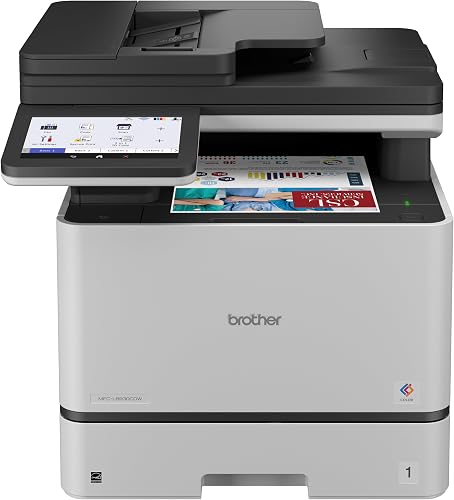
- 3. Brother MFC-L8930CDW: best for high-volume home offices
- 4. Brother HL-L2405W: best for compact black-and-white documents
- 5. HP LaserJet Pro 3105sdw: best for fast black-and-white office work
- 6. HP LaserJet MFP M140w: best for compact print, scan and copy
- What should you check before choosing a wireless color laser printer?
- How do you set up and care for a wireless laser printer?
- Which wireless color laser printer should you choose?
The best wireless color laser printer for home use is the Canon Color imageCLASS LBP646Cdw because it combines wireless printing, 26 pages per minute in color and black, automatic 2-sided printing, and a 250-sheet cassette. The Canon Color imageCLASS MF652Cw is the better choice when you also need scanning and copying.
This list includes two color laser printers and four monochrome models. The black-and-white printers cannot print color, but they can be sensible alternatives when your home documents rarely need color.
For a wider look at wireless printing, see our guide to best wireless laser printers. If you use Apple computers, our comparison of the best color laser printers for Mac covers another important compatibility question.
Our picks at a glance
-
1
 Best for fast home color printing
Canon Color imageCLASS LBP646Cdw Wireless Laser Printer
9.1/10 our score
See it on Amazon -
2
 Best for home color scanning and copying
Canon Color imageCLASS MF652Cw
9.0/10 our score
See it on Amazon -
3
 Best for high-volume home offices
Brother MFC-L8930CDW Business Color Laser All-in-One Printer
8.7/10 our score
See it on Amazon
- 4
 Check it
Brother HL-L2405W Wireless Compact Monochrome Laser Printer
Best for compact black-and-white documents - 5
 Check it
HP LaserJet Pro 3105sdw Monochrome Laser Printer
Best for fast black-and-white office work - 6
 Check it
HP Laserjet MFP M140w Wireless Black
Best for compact print, scan and copy
Which wireless color laser printer is best for home use?
The Canon Color imageCLASS LBP646Cdw is the best overall fit for home color documents because it prints at 26 ppm and automatically prints both sides of a sheet. For more options, see our Canon color laser printer guide.
It is print-only, so choose an all-in-one if you need to scan or copy.
Our score weighs specs, features and buyer feedback against what you're shopping for. The products are ordered by the supplied site scores, while the color recommendations focus on the needs of someone searching for a wireless color laser printer for home use.
| Product | Best for | Print speed | Paper capacity | Functions | Our score |
|---|---|---|---|---|---|
| Canon Color imageCLASS LBP646Cdw Wireless Laser Printer | fast home color printing | 26 ppm color and black | 250-sheet cassette, 1-sheet multipurpose tray | Print only | 9.1 |
| Canon Color imageCLASS MF652Cw | home color scanning and copying | 22 ppm color and black | Print, scan and copy | 9.0 | |
| Brother MFC-L8930CDW Business Color Laser All-in-One Printer | high-volume home offices | 33 ppm color and black | Print, scan and copy | 8.7 | |
| Brother HL-L2405W Wireless Compact Monochrome Laser Printer | compact black-and-white documents | 30 ppm black and white | 250-sheet tray | Print only | 9.7 |
| HP LaserJet Pro 3105sdw Monochrome Laser Printer | fast black-and-white office work | 33 ppm black and white | 250 sheets | All in one | 8.8 |
| HP Laserjet MFP M140w Wireless Black | compact print, scan and copy | 21 ppm black and white | Print, scan and copy | 9.2 |
How we chose these wireless laser printers
We compared wireless connection options, color capability, print speed, duplex support, paper handling, extra functions and physical size. These details affect daily home use more than a long feature list.
A color printer should have a clear reason to earn the extra space and toner planning. For many households, that reason is color reports, school work, charts, forms or marketing pages.
Automatic duplexing also matters if you print long documents. It turns two-sided printing into a normal print setting, while manual duplexing requires you to handle the pages between sides.
An all-in-one can replace separate print, scan and copy devices. It may take more desk space, so measure the printer area and leave room for paper access, cables and opening any trays.
If you need a printer that works with Apple computers, compare these picks with the best color laser printer for Mac. For more multifunction options, see the best all-in-one laser printer wireless guide.
1. Canon Color imageCLASS LBP646Cdw: best for fast home color printing
Canon Color imageCLASS LBP646Cdw Wireless Laser Printer: Best for fast home color printing
- 26 ppm in color and black
- Automatic 2-sided printing
- 250-sheet cassette and 1-sheet multipurpose tray
- 5-inch LCD screen
This print-only Canon is the best fit for home users who want fast wireless color documents, automatic duplexing and a standard 250-sheet cassette.
Pros
- Automatic duplex printing
- Wireless and mobile printing
- 26 ppm color output
Cons
- No scanning, copying or faxing
- Larger than compact monochrome models
The Canon Color imageCLASS LBP646Cdw is the strongest direct match for a home buyer who wants wireless color printing without scanning or copying. It prints up to 26 pages per minute in both color and monochrome, with an initial print time of about 10.3 seconds.
Automatic 2-sided printing helps reduce page handling for reports and other longer documents. Its 250-sheet standard cassette handles regular paper, while the 1-sheet multipurpose tray supports a separate sheet when you need a different paper type or size.
A 5-line LCD screen provides controls on the printer itself. Wireless setup is designed to take a few steps, and compatible mobile devices can print through the Canon PRINT app, Apple AirPrint or Mopria Print Service.
This model uses Canon Genuine Toner 075. The included starter toner has a 500-yield for cyan, magenta and yellow, and a 700-yield for black.
Choose this Canon when color output and automatic duplexing matter more than scanning. Its 16.5 x 16.8 x 10.5 in dimensions and 27.6 lb weight mean it needs a dedicated space rather than a very small shelf.
2. Canon Color imageCLASS MF652Cw: best for home color scanning and copying
Canon Color imageCLASS MF652Cw: Best for home color scanning and copying
- Wireless 3-in-1 design
- 22 ppm color and black
- 250-sheet cassette and 1-sheet multipurpose tray
- 3-year limited warranty
The MF652Cw adds scanning and copying to wireless color printing, making it a practical home choice when one device must handle more than print jobs.
Pros
- Print, scan and copy functions
- Color touchscreen
- 3-year limited warranty
Cons
- Simplex printing
- 39.7 lb weight
The Canon Color imageCLASS MF652Cw is the better wireless color laser printer for home users who need print, scan and copy functions in one device. It prints up to 22 ppm in color and black, with a first print time of about 10.3 seconds.
Its 250-sheet standard cassette is suited to regular home documents, and the 1-sheet multipurpose tray gives you another way to handle different media. The printer supports wireless printing from computers and mobile devices, along with USB and Ethernet connections.
A customizable 5-inch color touchscreen makes the controls easier to reach than a simple button panel. Canon also includes access to Poster Artist Online for creating posters, banners and signage.
The MF652Cw uses Canon Genuine Toner 067 or 067 high-capacity toner. It prints one side at a time, so it is less convenient than the LBP646Cdw for frequent automatic two-sided work.
This printer measures 18.2 x 17.8 x 14.2 in and weighs 39.7 lb. Its 3-year limited warranty adds a useful support term for a home office that expects to keep the same all-in-one for several years.
3. Brother MFC-L8930CDW: best for high-volume home offices
Brother MFC-L8930CDW Business Color Laser All-in-One Printer: Best for high-volume home offices
- 33 ppm color and black
- Automatic duplex printing
- 80-page auto document feeder
- Dual-band wireless and Gigabit Ethernet
This large Brother all-in-one suits a busy home office that needs fast color printing, automatic duplexing, advanced scanning and stronger network options.
Pros
- 33 ppm color and black
- 80-page auto document feeder
- Automatic duplex printing
Cons
- 71.2 lb weight
- 20.7 x 16.1 x 21.6 in footprint
The Brother MFC-L8930CDW is the most capable color all-in-one here for a busy home office. It prints and copies at up to 33 ppm in color and black, and automatic duplex printing helps with longer documents.
Its 80-page automatic document feeder supports faster scanning, including two-sided scanning at up to 104 images per minute under the stated scan conditions. The legal-size glass also gives you a larger scanning surface for documents up to legal size.
Wireless networking works on both 2.4GHz and 5GHz bands. Gigabit Ethernet provides a wired option, while the 7-inch color touchscreen gives access to menus, scan previews and up to 64 customized shortcuts.
The printer includes Brother Genuine standard-yield toner cartridges with stated yields of 3,000 black pages and 1,800 color pages. Brother also lists TN635XXL replacement toner with stated yields of 7,500 black pages and 6,500 color pages.
This is a large machine at 20.7 x 16.1 x 21.6 in and 71.2 lb. Choose it when speed, scanning and office workflow matter more than a compact footprint.
4. Brother HL-L2405W: best for compact black-and-white documents
Brother HL-L2405W Wireless Compact Monochrome Laser Printer: Best for compact black-and-white documents
- 30 ppm black-and-white printing
- 250-sheet paper tray
- Dual-band wireless
- USB connection
This compact Brother scores highly for everyday wireless documents, but it is not a color printer. Choose it only when most home printing is black and white.
Pros
- Compact 14.2 x 14 x 7.2 in size
- 30 ppm black-and-white output
- Dual-band wireless
Cons
- Monochrome only
- Manual duplex
The Brother HL-L2405W is not a color printer, but it is a strong home option when most documents are black and white. It prints one-sided pages at up to 30 ppm, so it can handle forms, letters and other everyday documents quickly.
Built-in dual-band wireless supports 2.4GHz and 5GHz networks. You can also connect one computer locally through USB, while the Brother Mobile Connect app supports mobile printing and toner tracking.
The 250-sheet paper tray reduces refill frequency for regular documents. A manual feed slot handles envelopes and specialty paper, giving you more flexibility than a printer with only one standard tray.
The compact body measures 14.2 x 14 x 7.2 in and weighs 15.1 lb. It includes an AC power cord, drum unit and toner cartridges, and it works with Brother TN830, TN830XL and TN830XL2PK toner.
Duplexing is manual, so you need to handle the pages when you want two-sided output. Pick this Brother if low-footprint black-and-white printing is the real need, not color documents.
5. HP LaserJet Pro 3105sdw: best for fast black-and-white office work
HP LaserJet Pro 3105sdw Monochrome Laser Printer: Best for fast black-and-white office work
- 33 ppm black-and-white printing
- Automatic 2-sided printing
- 250-sheet capacity
- Print, scan, copy and fax from the HP app
The HP LaserJet Pro is a fast wireless monochrome all-in-one for home offices that need scanning, copying and automatic 2-sided documents.
Pros
- 33 ppm black-and-white output
- Automatic duplex printing
- 250-sheet capacity
Cons
- Monochrome only
- 23.1 lb weight
The HP LaserJet Pro 3105sdw is a monochrome all-in-one for home offices that need fast printing, scanning and copying. It prints up to 33 ppm in black and white, with an initial print time of about 4.6 seconds.
Automatic 2-sided printing helps reduce manual page handling. The 250-sheet capacity works well for regular office documents, while the maximum media size reaches 8.5 x 11.7 in.
HP lists wireless, Ethernet and USB connections. The HP app supports printing, scanning, copying and faxing from a smartphone, and the printer is designed for office teams of up to 7 users.
The printer includes HP Wolf Pro Security with customizable settings. HP also describes Wi-Fi that looks for the best connection and an easy setup process through the HP app.
At 15.7 x 16.5 x 12.3 in and 23.1 lb, it needs more room than the compact HP M140w. It is a practical alternative when speed and automatic duplexing matter more than color.
6. HP LaserJet MFP M140w: best for compact print, scan and copy
HP Laserjet MFP M140w Wireless Black: Best for compact print, scan and copy
- 21 ppm black-and-white printing
- Print, scan and copy
- Wireless printing from mobile devices
- 10.4 x 14.2 x 7.8 in size
This compact HP handles black-and-white printing, scanning and copying where space matters more than color output or high speed.
Pros
- Small footprint
- Print, scan and copy
- Wireless mobile printing
Cons
- Monochrome only
- No automatic duplex
The HP LaserJet MFP M140w is a compact wireless all-in-one for black-and-white home documents. It prints up to 21 ppm, and it also scans and copies when you need more than a print-only device.
Its 10.4 x 14.2 x 7.8 in dimensions make it the smallest option in this roundup. The 11.9 lb weight also makes it easier to place on a suitable desk or move when you need to change your workspace.
Wireless printing works from mobile devices, PCs and tablets. HP lists support for Microsoft, Mac, AirPrint, Android and Chromebook, while the HP Smart app supports scanning to the cloud and printing or copying from a smartphone.
The printer can copy both sides of an ID card or another small document onto the same side of one sheet. It has no automatic duplexing, so two-sided documents need manual handling.
Choose this HP when compact size and scan-copy functions matter more than color or high speed. HP states that the printer is intended for cartridges with original HP chips or circuitry.
What should you check before choosing a wireless color laser printer?
Check whether you need color, automatic duplexing, scanning and copying before comparing print speed. These four choices narrow the field quickly.
Do you need color or mainly black-and-white printing?
A wireless color laser printer is useful for charts, forms, school work, presentations and documents where color improves quick reading. The Canon LBP646Cdw and MF652Cw are the color choices here.
The Brother HL-L2405W, HP LaserJet Pro 3105sdw and HP M140w print black and white only. They may be better fits when color is rare and you want to keep the printer simpler.
Read Can a Laser Printer Print in Color? A Simple Guide for a basic explanation of color laser printing.
Our What Is a Color Laser Printer? A Quick Overview also explains how color toner fits into the printing process.
Is automatic duplexing worth prioritizing?
Automatic duplexing is worth prioritizing if you print long documents or regularly want to use both sides of the paper. The Canon LBP646Cdw, HP LaserJet Pro 3105sdw and Brother MFC-L8930CDW include automatic duplex printing.
The Canon MF652Cw and HP M140w use simplex printing, while the Brother HL-L2405W has manual duplexing. These models can still handle normal home documents, but two-sided jobs require more attention.
How much wireless connection flexibility do you need?
Look for dual-band wireless when your home network uses both 2.4GHz and 5GHz connections. The Brother HL-L2405W and Brother MFC-L8930CDW specifically list dual-band wireless, while the Canon and HP models also support wireless printing.
Ethernet and USB can help when wireless placement is difficult or when one computer needs a direct connection. The Canon LBP646Cdw, Canon MF652Cw, HP LaserJet Pro 3105sdw and Brother MFC-L8930CDW list wired connection options.
For brand-specific comparisons, see best Canon wireless laser printers and best Brother wireless laser printer.
Should you choose a printer or an all-in-one?
Choose a print-only model if you already have a scanner or rarely copy documents. The Canon LBP646Cdw is the color print-only option here, while the Brother HL-L2405W is a compact monochrome print-only choice.
Choose an all-in-one if you need scanning and copying without adding another device. The Canon MF652Cw adds color scanning and copying, the Brother MFC-L8930CDW adds a large document feeder, and the HP models focus on monochrome work.
How do you set up and care for a wireless laser printer?
Start by placing the printer where paper trays can open fully and the wireless signal is reliable. Follow the model's setup steps, connect it to the home network, and install the matching app or printer software on the devices you plan to use.
Use the correct toner family for the printer. The Canon color models use Canon Genuine Toner 075 or 067 families, the Brother color model uses TN635 cartridges, the Brother monochrome model uses TN830 cartridges, and the HP models are intended for cartridges with original HP chips or circuitry.
Keep paper stored flat and load it in the tray's guides. Remove loose scraps if a paper jam occurs, and follow the printer's instructions for opening access panels rather than pulling hard on a stuck sheet.
Measure the printer's full working area before placing it in a cabinet. A model's listed dimensions describe the printer body, but open trays, cables and paper access still need room.
Which wireless color laser printer should you choose?
Choose the Canon Color imageCLASS LBP646Cdw if you want the best balance of home color speed, wireless printing and automatic duplexing. Choose the Canon MF652Cw if scanning and copying are essential.
Pick the Brother MFC-L8930CDW for a high-demand home office with space for a large color all-in-one. If you only print black-and-white documents, the compact Brother HL-L2405W or the faster HP LaserJet Pro 3105sdw may be a better match.
For the smallest print, scan and copy setup, choose the HP LaserJet MFP M140w. The best wireless color laser printer for home use is the one that matches your real document needs, available space and required functions.
Our top 3 picks at a glance
-
1
Best for fast home color printing
Canon Color imageCLASS LBP646Cdw Wireless Laser Printer
9.1/10 our score
See it on Amazon -
2
Best for home color scanning and copying
Canon Color imageCLASS MF652Cw
9.0/10 our score
See it on Amazon -
3
Best for high-volume home offices
Brother MFC-L8930CDW Business Color Laser All-in-One Printer
8.7/10 our score
See it on Amazon
Frequently asked questions
What is the best wireless color laser printer for home use?
The Canon Color imageCLASS LBP646Cdw is the strongest home color choice in this group because it prints up to 26 pages per minute in color and black, supports wireless printing, and includes automatic 2-sided printing.
Choose the Canon MF652Cw instead if you also need scanning and copying.
Can a wireless laser printer print in color?
Yes. A color laser printer uses cyan, magenta, yellow and black toner to produce color documents.
The Canon LBP646Cdw and Canon MF652Cw are color wireless models in this group.
The Brother HL-L2405W and both HP picks here are monochrome printers, so they print black only.
Is a color laser printer good for home use?
A color laser printer can suit home use when you print reports, charts, school projects or other documents that need color. Wireless printing also lets computers, tablets and smartphones send jobs over the home network.
Check the printer's size and whether you need scanning or copying before choosing a model.
What should I check before buying a wireless color laser printer?
Check color print speed, automatic duplexing, paper capacity, wireless and wired connections, toner type, and whether the printer scans or copies. Also measure the available space before ordering.
A print-only model may be the better fit if you already have a scanner, while an all-in-one saves space when one device must handle several tasks.


