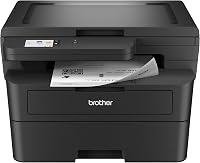
Brother MFC-L2820DW vs MFC-L2900DW: Which Should You Choose? (November 2026)
Choose the MFC-L2900DW for single-pass duplex scanning and its larger touchscreen; choose the MFC-L2820DW for a simpler document workflow. Both are monochrome all-in-ones with a 50-page feeder, fax, automatic duplex printing and wireless, Ethernet and USB connections.
On this page (7 sections)
Choose the MFC-L2900DW for single-pass duplex scanning and a larger touchscreen; choose the MFC-L2820DW for everyday paperwork with a 50-page feeder. In this Brother MFC-L2820DW vs MFC-L2900DW comparison, the deciding details are scanning workflow, controls and how much toner comes in the box.
Both are monochrome all-in-one laser printers with copy, scan and fax functions. For a direct answer, see whether the MFC-L2820DW prints in color.
They also offer wireless, Ethernet and USB connections, plus a 50-page automatic document feeder.
The MFC-L2900DW adds single-pass duplex scanning and a 3.5 in touchscreen. The MFC-L2820DW has a 2.7 in touchscreen and a feeder for multipage jobs.
 Best for two-sided scanning
Brother MFC-L2900DW XL Wireless Compact Monochrome All-in-One
 Best for everyday office paperwork
Brother MFC-L2820DW Wireless Compact Monochrome All-in-One Laser
Brother MFC-L2820DW vs MFC-L2900DW: what changes?
The MFC-L2900DW is the more capable fit for two-sided scanning and touchscreen control; the MFC-L2820DW covers common office paperwork. Both models share core functions, so start with the documents your team handles each week.
The MFC-L2820DW has print speeds up to 36 ppm in its product bullets, a 50-page feeder and a 2.7 in touchscreen. It can copy, scan and fax multipage jobs.
The MFC-L2900DW prints up to 36 ppm and pairs its 50-page feeder with single-pass duplex scanning. Its 3.5 in touchscreen provides direct access to cloud-based apps such as Google Drive and Dropbox.
For a broader overview of the best Brother all-in-one laser printers, compare these workgroup features with the kinds of documents you print and scan. Both printers are black-and-white models, so neither is right for color reports.
Which printer handles scanning better?
Choose the MFC-L2900DW when you regularly scan double-sided pages; choose either model for basic multipage scanning. The MFC-L2900DW's single-pass duplex scanning can read both sides in one pass, which reduces manual handling for two-sided forms and records.
Both printers have a 50-page automatic document feeder. That capacity can help when copying, scanning or faxing a stack rather than feeding sheets one by one.
The MFC-L2820DW supports feeder-based multipage work, but its product details don't specify single-pass duplex scanning. If two-sided scans are routine, confirm the exact model's workflow before choosing it.
What does single-pass duplex scanning help with?
Single-pass duplex scanning is useful when you handle double-sided invoices, forms, signed agreements or records. The feeder moves the pages through once while capturing both sides, according to the MFC-L2900DW product details.
It matters less if nearly all of your originals have printing on one side. In that case, both 50-page feeders may cover the task, and the smaller touchscreen on the MFC-L2820DW may be sufficient.
Is the MFC-L2900DW faster?
The product details describe both printers as reaching up to 36 pages per minute, so speed alone doesn't separate them. Print speed is only one part of office workflow; scanning, copying and setup can shape the time a job takes too.
The MFC-L2820DW's product bullets say up to 36 ppm, while one spec field gives 34 ppm. The MFC-L2900DW XL and MFC-L2900DW details say up to 36 ppm.
Treat those figures as maker-stated maximum speeds. Real output can depend on the document, connection and settings, so the listed maximum doesn't predict every print job.
If print speed is your main concern, look at the workload as a whole. A 50-page feeder and duplex scanning may save more handling time than a small difference in a speed figure.
How do their controls and connections compare?
The MFC-L2900DW has the larger 3.5 in touchscreen, while the MFC-L2820DW uses a 2.7 in touchscreen. Both support dual-band wireless, Ethernet and USB connections, so you can choose based on your office setup.
The larger screen on the MFC-L2900DW can be useful if staff regularly select copy or scan options at the printer. It also offers access to cloud services from the touchscreen.
The MFC-L2820DW's display is smaller, but it still supports cloud printing and scanning and works with Brother's Mobile Connect app. If most jobs start from a laptop or phone, a larger panel may matter less.
For a home office, also consider where the printer will sit and how often you'll walk over to it. Our guide to choosing a laser printer for a home office covers the practical fit alongside document volume and workspace needs.
Which model is the better toner fit?
Choose an XL version if you want more toner included at setup; the MFC-L2900DW XL and MFC-L2820DW XL each include up to 4,200 pages. The standard MFC-L2820DW and MFC-L2900DW details describe smaller starter toner amounts.
The MFC-L2900DW XL includes six times more toner in the box than the MFC-L2900DW, with a stated yield of up to 4,200 pages. The MFC-L2820DW XL also includes up to 4,200 pages, six times more than the MFC-L2820DW.
These are page-yield estimates, not a promise of a fixed number of pages in every office. Actual toner use depends on what you print and how much of each page is covered.
Compare the standard and XL versions in our Brother MFC-L2820DW vs MFC-L2820DW XL guide. If you want to compare a related model in the same family, see Brother MFC-L2807DW vs MFC-L2820DW.
Which one suits everyday office paperwork?
The MFC-L2820DW is a straightforward choice for one-sided scans, routine copies and faxing; the MFC-L2900DW suits a workflow with double-sided scans. Both have a 50-page feeder, so consider what happens after the pages enter it.
For a small office that scans mostly one-sided forms, the MFC-L2820DW provides the core functions without the larger touchscreen. Its automatic duplex printing can print on both sides of paper.
For staff processing two-sided records, the MFC-L2900DW's single-pass scan feature can reduce the need to turn originals by hand. The larger touchscreen may also help when jobs are started directly at the machine.
If copy, scan and fax are not all needed, compare a simpler device too. Our Brother DCP-L2640DW vs MFC-L2820DW comparison looks at a related option against the MFC model.
Which Brother printer should you choose?
Pick the MFC-L2900DW for single-pass duplex scanning and a 3.5 in touchscreen; pick the MFC-L2820DW for everyday multipage work with a 2.7 in display. If toner included at setup matters, compare the XL versions and their stated yields.
For the MFC-L2900DW family, the XL version adds up to 4,200 pages of toner in the box. The MFC-L2820DW XL offers the same stated in-box yield while keeping the smaller touchscreen.
A color office or a workflow without a need for faxing may call for a different printer. For other office comparisons, see Brother MFC-L3770CDW vs MFC-L3780CDW and Brother MFC-L6810DW vs MFC-L5915DW.
Our score weighs specs, features and buyer feedback against what you're shopping for.
Frequently asked questions
Does the Brother MFC-L2900DW scan both sides at once?
The MFC-L2900DW XL and the MFC-L2900DW product details specify single-pass duplex scanning with a 50-page auto document feeder. This can help with double-sided paperwork because both sides are scanned in one pass.
The MFC-L2820DW also has a 50-page feeder, but its provided facts don't specify single-pass duplex scanning.
Which Brother printer has the larger touchscreen?
The MFC-L2900DW has a 3.5 in touchscreen, while the MFC-L2820DW has a 2.7 in touchscreen. The larger display can make menus and cloud app access easier to work with, but the smaller screen may be enough if you mainly send jobs from a computer or phone.
Are the Brother MFC-L2820DW and MFC-L2900DW color printers?
No. Both models are monochrome laser all-in-ones for black-and-white printing, copying and scanning.
Choose another printer type if your office needs color documents.
Their differences center on scanning workflow, controls and included toner options.
Does the MFC-L2820DW have a document feeder?
Yes. The MFC-L2820DW has a 50-page automatic document feeder for multipage copy, scan and fax jobs.
The MFC-L2900DW models also have a 50-page feeder, and their product details add single-pass duplex scanning for two-sided documents.
Which model is better for a small office?
Choose the MFC-L2900DW if staff often scan double-sided paperwork and would use its 3.5 in touchscreen. Choose the MFC-L2820DW for everyday multipage tasks when a 2.7 in touchscreen is enough.
Both offer wireless, Ethernet and USB connections and handle monochrome office documents.