5 Best Duplex Color Laser Printers (November 2026)
The best duplex color laser printers include the Brother HL-L3230CDW Compact Digital Color Printer Providing for compact home offices, the Canon Color imageCLASS MF753Cdw II for fast all-in-one work, and the Canon Color imageCLASS LBP646Cdw Wireless Laser Printer for print-only Canon setups.
On this page (7 sections)
- How to choose the best duplex color laser printer
- Duplex color laser printer features compared
- Best duplex color laser printers by use
- What to check before buying a color laser printer with duplex
- Should you buy a print-only or all-in-one model?
- How does paper handling affect your choice?
- Which duplex color laser printer should you choose?
The Brother HL-L3230CDW is the best duplex color laser printer for straightforward home or small-office color printing. For Canon alternatives, see Canon color laser printers.
For scanning, copying or faxing, the Canon MF753Cdw II adds those functions and a duplex document feeder.
Automatic two-sided printing saves you from turning each sheet by hand. This roundup compares print-only and all-in-one choices, so start with the jobs you need the printer to handle.
If you are still deciding whether color laser output fits your work, read Can a Laser Printer Print in Color? A Simple Guide and [What Is a Color Laser Printer?
A Quick Overview](/what-is-a-color-laser-printer/). For a broader monochrome shortlist, see our guide to the best duplex laser printer.
Our picks at a glance
-
1
 Best for compact home offices
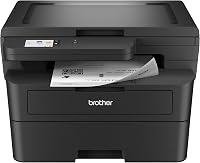
Brother HL-L3230CDW Compact Digital Color Printer Providing
9.5/10 our score
See it on Amazon -
2

-
3
 Best for print-only Canon setups
Canon Color imageCLASS LBP646Cdw Wireless Laser Printer
9.1/10 our score
See it on Amazon
- 4
 Check it
Canon Color imageCLASS MF662Cdw
Best for basic scanning and copying - 5
 Check it
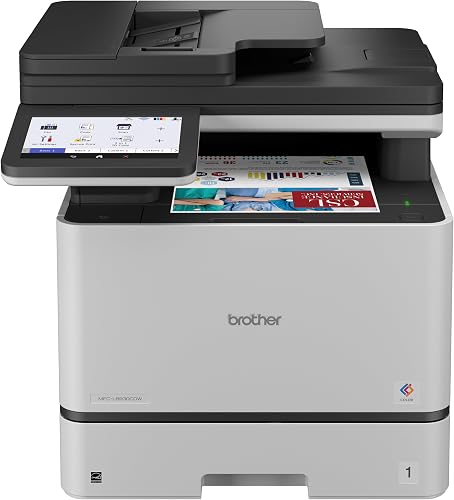
Brother MFC-L8930CDW Business Color Laser All-in-One Printer
Best for busy workgroups
How to choose the best duplex color laser printer
The best choice depends on whether you need printing alone or a device that also scans, copies or faxes. All five picks print automatically on both sides, but their extra functions and paper handling differ.
We compared the stated print speeds, paper capacity, connections and functions to match each model to a clear use. Our score weighs specs, features and buyer feedback against what you're shopping for.
Duplex color laser printer features compared
The key difference is how much work each printer can do beyond printing. Use this table to compare print speed, paper handling and included functions before reading the full picks.
| Product | Best for | Print speed | Paper capacity | Functions | Our score |
|---|---|---|---|---|---|
| Brother HL-L3230CDW Compact Digital Color Printer Providing | compact home offices | Up to 25 ppm | 250-sheet tray | 9.5 | |
| Canon Color imageCLASS MF753Cdw II | fast all-in-one work | Up to 35 ppm | 250-sheet cassette and 50-sheet multipurpose tray | Print, scan, copy and fax | 9.4 |
| Canon Color imageCLASS LBP646Cdw Wireless Laser Printer | print-only Canon setups | Up to 26 ppm | 250-sheet cassette and 1-sheet multipurpose tray | Print only | 9.1 |
| Canon Color imageCLASS MF662Cdw | basic scanning and copying | Up to 26 ppm | 250-sheet cassette and 1-sheet multipurpose tray | Print, scan and copy | 9.0 |
| Brother MFC-L8930CDW Business Color Laser All-in-One Printer | busy workgroups | Up to 33 ppm | Not specified | Print, scan and copy | 8.7 |
Best duplex color laser printers by use
The Brother HL-L3230CDW is the top pick for straightforward printing, while the Canon MF753Cdw II is the strongest fit when you need several office functions. Each model below supports automatic two-sided printing.
Brother HL-L3230CDW Compact Digital Color Printer Providing: Best for compact home offices
- Automatic duplex printing
- Up to 25 pages per minute
- Wireless, Ethernet and USB connections
- 250-sheet paper tray
Automatic duplex printing, flexible connections and a 250-sheet tray make this a useful fit for color documents in a home or small office. It prints without the scan, copy and fax functions found on the all-in-one picks.
Pros
- Automatic two-sided printing
- Wireless, Ethernet and USB connections
- Manual feed slot handles card stock and envelopes
Cons
- No scanning, copying or faxing
- Manual feed slot is for one sheet at a time
The Brother HL-L3230CDW is a practical match for home offices that print color documents and don't need an integrated scanner or copier. Its automatic duplex function handles two-sided pages without requiring you to reinsert them.
The printer offers up to 25 pages per minute and a 250-sheet adjustable tray for letter or legal paper. A manual feed slot accepts materials such as card stock and envelopes.
Connection options include built-in wireless, Ethernet, Wi-Fi Direct and USB. For more home options, see wireless color laser printers.
Mobile device compatibility includes AirPrint, Brother iPrint&Scan and Mopria.
Choose this Brother when its print-only focus and flexible connections cover your routine. If you need an all-in-one Brother, compare it with the best Brother duplex laser printer.
Canon Color imageCLASS MF753Cdw II: Best for fast all-in-one work
- Automatic duplex printing
- Print, scan, copy and fax
- Up to 35 pages per minute
- 50-sheet duplex automatic document feeder
This Canon combines automatic duplex printing with print, scan, copy and fax functions. Its duplex automatic document feeder can scan both sides in one pass.
Pros
- Print, scan, copy and fax
- Up to 35 ppm
- 50-sheet duplex automatic document feeder
Cons
- Larger and heavier than the print-only Canon pick
- Optional cassette needed to expand paper capacity
The Canon Color imageCLASS MF753Cdw II suits an office that needs color printing plus scanning, copying and faxing. Its automatic duplex printing and 50-sheet duplex document feeder also handle two-sided pages on the scanning side.
For more models, compare laser printers with duplex scanning.
Canon gives this model a print speed of up to 35 pages per minute. The standard cassette holds up to 250 sheets, with another 50 sheets in the multipurpose tray.
A customizable 5-inch color touchscreen gives you access to its controls. The printer connects wirelessly to computers or compatible mobile devices, and the included duplex feeder scans both sides in one pass.
Choose it if you need a versatile color laser device for more than printing. For more scanner-focused options, see our guide to the best color laser printer with duplex scanning.
Canon Color imageCLASS LBP646Cdw Wireless Laser Printer: Best for print-only Canon setups
- Automatic two-sided printing
- Print only
- Up to 26 pages per minute
- 250-sheet cassette and one-sheet multipurpose tray
The LBP646Cdw handles automatic two-sided color printing without adding scanning, copying or faxing. Choose it when a straightforward printer is enough and you want Canon's mobile printing options.
Pros
- Automatic two-sided printing
- Up to 26 ppm in color and monochrome
- Wireless and mobile printing
Cons
- No scanning, copying or faxing
- One-sheet multipurpose tray
The Canon Color imageCLASS LBP646Cdw fits a desk or office that needs color printing and automatic duplexing but no scanner, copier or fax. Its print-only design keeps the feature set focused on printed documents.
It prints up to 26 pages per minute in color and monochrome. The 250-sheet cassette handles the main paper supply, while the one-sheet multipurpose tray accommodates occasional alternate media.
Wireless setup and mobile printing are available through the Canon PRINT app, Apple AirPrint and Mopria Print Service. Canon says this model uses Toner 075 or 075 high-capacity cartridges.
Pick this Canon if you want duplex color printing and don't need extra office functions. If you may need scanning or copying later, look at an all-in-one option such as our best laser printer all in one duplex.
Canon Color imageCLASS MF662Cdw: Best for basic scanning and copying
- Automatic two-sided printing
- Print, scan and copy
- Up to 26 pages per minute
- 5-inch color touchscreen
The MF662Cdw adds scanning and copying to automatic duplex color printing. Its touchscreen and wireless mobile printing support suit users who want common office tasks in one device.
Pros
- Automatic two-sided printing
- Prints, scans and copies
- Three-year limited warranty
Cons
- No fax function
- One-sheet multipurpose tray
The Canon Color imageCLASS MF662Cdw adds scanning and copying to automatic duplex color printing. It fits users who want common document tasks in one machine but don't need faxing.
Its stated print speed is up to 26 pages per minute in both color and monochrome. A 250-sheet cassette and one-sheet multipurpose tray handle standard and occasional alternate paper needs.
The 5-inch color touchscreen offers customizable access to features, and mobile printing works through Canon PRINT, Apple AirPrint and Mopria. Canon includes a three-year limited warranty.
Choose the MF662Cdw if you need to scan and copy as well as print both sides. For a closer match with scanner features in the title, compare our best duplex color laser printer with scanner.
Brother MFC-L8930CDW Business Color Laser All-in-One Printer: Best for busy workgroups
- Automatic duplex printing
- Print, scan and copy
- Up to 33 pages per minute
- 80-page automatic document feeder
This business-focused Brother combines duplex printing with fast two-sided scanning and an 80-page automatic document feeder. Its dual-band wireless and Gigabit Ethernet connections can fit a workgroup network.
Pros
- Up to 33 ppm print and copy speeds
- Two-sided scanning up to 104 ipm
- 80-page automatic document feeder
Cons
- Large, heavy unit
- No fax function
The Brother MFC-L8930CDW is aimed at business workgroups that need fast color printing, two-sided scanning and network connections. It prints, scans and copies, with automatic duplex printing for double-sided documents.
Brother gives print and copy speeds of up to 33 pages per minute. Its 80-page automatic document feeder supports two-sided scanning at up to 104 images per minute.
For shared office setups, the printer includes dual-band wireless networking and Gigabit Ethernet. A 7-inch color touchscreen supports shortcuts for frequently used tasks.
Choose this Brother for a workgroup that will use its scanning and network features. It does not list faxing among its functions, so select the Canon MF753Cdw II if fax is part of your workflow.
What to check before buying a color laser printer with duplex
Check whether you need automatic duplex scanning as well as automatic duplex printing. A model can print both sides without being able to scan both sides in one pass.
For scanning workflows, the MF753Cdw II has a 50-sheet duplex feeder, and the MFC-L8930CDW supports two-sided scanning with its 80-page feeder. Learn what duplex scanning on a printer means before comparing feeder capacity and speed.
Should you buy a print-only or all-in-one model?
A print-only model is a sensible fit if scanning, copying and faxing are outside your needs. The Canon LBP646Cdw is the dedicated print-only choice in this group, while the Brother HL-L3230CDW also focuses on printing.
Choose an all-in-one when you want fewer separate devices for common office tasks. The MF662Cdw prints, scans and copies, while the MF753Cdw II adds faxing.
How does paper handling affect your choice?
Paper handling determines how often you refill trays and how easily you print on alternate media. The Brother HL-L3230CDW has a 250-sheet tray and a manual feed slot for materials such as card stock and envelopes.
The Canon LBP646Cdw and MF662Cdw each have a 250-sheet cassette plus a one-sheet multipurpose tray. The MF753Cdw II combines a 250-sheet cassette with a 50-sheet multipurpose tray, and it can expand to 850 sheets with an optional cassette.
Which duplex color laser printer should you choose?
Choose the Brother HL-L3230CDW for print-only home or small-office color documents with automatic two-sided printing. Pick the Canon MF753Cdw II if you need print, scan, copy and fax functions plus two-sided scanning, or choose the Brother MFC-L8930CDW for its workgroup scanning and network features.
Our top 3 picks at a glance
-
1
Best for compact home offices
Brother HL-L3230CDW Compact Digital Color Printer Providing
9.5/10 our score
See it on Amazon -
2
-
3
Best for print-only Canon setups
Canon Color imageCLASS LBP646Cdw Wireless Laser Printer
9.1/10 our score
See it on Amazon
Frequently asked questions
What does duplex printing mean on a color laser printer?
Duplex printing means the printer can print on both sides of a sheet. Automatic duplex models turn the page internally, so you don't have to feed it back by hand.
Check that the model says automatic duplex printing if you want hands-free double-sided documents.
Can a color laser printer print on both sides automatically?
Yes. Each printer in this guide supports automatic duplex printing, which prints on both sides of the paper without manual page flipping.
Choose a model based on the other work you need it to do, such as scanning or copying, as well as its paper tray and connection options.
Do duplex color laser printers scan both sides?
Duplex printing and duplex scanning are separate features. A printer may print both sides automatically but scan one side at a time.
The Canon MF753Cdw II has a 50-sheet duplex automatic document feeder, and the Brother MFC-L8930CDW supports two-sided scanning with an 80-page feeder.
Should I choose a print-only or all-in-one duplex printer?
Choose a print-only model if you only need paper documents printed. The Canon LBP646Cdw is a color duplex print-only option.
For scanning and copying, consider the Canon MF662Cdw or Brother MFC-L8930CDW.
The Canon MF753Cdw II also adds faxing.