Brother MFC-L3720CDW vs MFC-L3780CDW: Which to Choose? (November 2026)
Choose the MFC-L3780CDW if you scan two-sided pages often; choose the MFC-L3720CDW if you mainly need color printing, copying and one-sided scans. The key difference is the L3780CDW’s single-pass duplex scanning and Gigabit Ethernet.
On this page (7 sections)
- Brother MFC-L3720CDW vs MFC-L3780CDW: what is the main difference?
- Which printer is better for two-sided scanning?
- How do the printing features compare?
- Which has the better network connection?
- Which toner should you choose?
- Is the L3780CDW worth choosing over the L3720CDW?
- Which Brother MFC model should you pick?
Choose the MFC-L3780CDW if you scan two-sided documents often; choose the MFC-L3720CDW if you mostly print, copy and scan one side at a time. The Brother MFC-L3720CDW vs MFC-L3780CDW choice hinges on duplex scanning and network options.
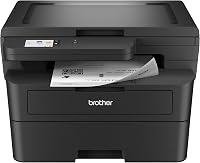
Both are color laser all-in-ones with print, copy and scan functions. The L3780CDW adds single-pass duplex scanning and Gigabit Ethernet, which can matter in a busy office with frequent two-sided paperwork or a wired network.
Brother MFC-L3720CDW vs MFC-L3780CDW: what is the main difference?
The L3780CDW can scan both sides of a document in one pass, while the L3720CDW does not offer duplex scanning. If your work includes double-sided forms, invoices or contracts, that distinction may save repeated handling.
Brother lists duplex scanning for the L3780CDW and no duplex scanning for the L3720CDW. Both include an automatic document feeder and scanning features such as blank-page skip and automatic deskew. (MFC-L3780CDW specifications, MFC-L3720CDW specifications)
This is the practical difference to check first. If you scan only occasional one-sided pages or use the flatbed for books and photos, duplex scanning may not justify choosing the more feature-rich model.
Which printer is better for two-sided scanning?
The MFC-L3780CDW is the better fit for regular two-sided scanning because it scans both sides in a single pass. Brother gives maximum duplex scan speeds of 58 images per minute for black and 34 for color.
Those speeds are maximum figures, so your actual job can take longer depending on page content and settings. Still, single-pass scanning is useful when you regularly process stacks of two-sided paperwork.
The L3720CDW can scan through its automatic document feeder, but it does not scan both sides automatically. A two-sided original may need to be turned and scanned again, which adds steps when you have a large batch.
If scanning is a major part of your day, compare the exact workflow you use: how many pages, whether they are double-sided, and whether color matters. If you mostly scan short one-sided items, the difference may be small in daily use.
How do the printing features compare?
Both models are color laser multifunction printers, so either can handle color documents and routine office printing. The L3780CDW is rated for print speeds up to 31 pages per minute.
Brother’s specifications also describe automatic duplex printing on both models. That lets you print on both sides of supported paper without manually turning each sheet.
Check paper-size and print settings for the documents you make most often.
The printing distinction is less decisive than the scanning one for many buyers. Choose based on the overall office workload and whether the L3780CDW’s duplex scanning and wired network connection solve a regular need.
For a simpler color laser option without the same all-in-one focus, see our Brother HL-L3300CDW review. If you need an all-in-one, our guide to the best Brother color laser all-in-one printer can help compare more models.
Which has the better network connection?
The MFC-L3780CDW adds Gigabit Ethernet, while both printers support dual-band Wi-Fi and USB 2.0. A wired connection may suit an office that connects printers to a router or network switch.
Wi-Fi can be a better fit if the printer needs to sit away from a network jack or be shared without a cable. Both models support 2.4 GHz and 5 GHz wireless bands, according to Brother’s specifications.
Consider where the printer will sit and which devices need access before choosing. Our guide on connecting a Brother MFC-L3720CDW to a network covers setup considerations for the L3720CDW.
Which toner should you choose?
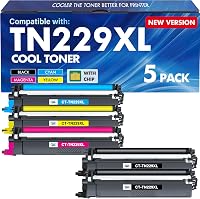
Check cartridge compatibility for the exact model before ordering, because the two toner options here differ in which printer they name. Brother’s TN229XXLBK black cartridge is specified for the L3780CDW, while the Cool Toner set names both printers.
The Cool Toner set lists a yield of 3,000 pages for each black cartridge and 2,300 pages for each color cartridge, based on 5% coverage. Its chips are pre-installed.
Those details can help you compare replacement needs, but compatibility and cartridge type are separate considerations.
Brother says its genuine toner is engineered to work with select Brother printers and the DR229CL drum unit. The TN229XXLBK data names the L3780CDW among its compatible printers, not the L3720CDW, so don't assume it fits both.
Is the L3780CDW worth choosing over the L3720CDW?
Choose the L3780CDW if duplex scanning or Gigabit Ethernet will save you time; choose the L3720CDW if those features would rarely be used. The higher-feature model is easier to justify when your routine includes double-sided scans or a wired office setup.
If you scan one-sided pages now and then, print and copy more often, and plan to use Wi-Fi, the L3720CDW may cover your needs. Your choice should reflect regular work, not an occasional task that could be handled manually.
For another comparison involving the L3780CDW, read Brother MFC-L3770CDW vs MFC-L3780CDW. If you want to look beyond Brother, compare printers comparable to the Brother MFC-L3780CDW.
Which Brother MFC model should you pick?
Pick the MFC-L3780CDW for frequent two-sided scanning and Gigabit Ethernet; pick the MFC-L3720CDW for a color laser all-in-one when those extras aren't central to your work. For home office use, consider how often you scan, print on both sides and share the printer across devices.
The reversed search phrasing, Brother MFC-L3780CDW vs MFC-L3720CDW, leads to the same decision: duplex scanning is the clearest separator. Match that feature to your usual documents, then confirm the toner compatibility for the model you select.