6 Best Wireless Laser Printers (November 2026)
The best wireless laser printers include the Brother HL-L2405W Wireless Compact Monochrome Laser Printer for home Wi-Fi printing, the Brother MFC-L2820DW Wireless Compact Monochrome All-in-One Laser for shared office tasks, and the HP Laserjet MFP M140w Wireless Black for a small shared desk.
On this page (11 sections)
- How we chose wireless laser printers for shared use
- Compare the best wireless laser printers
- 1. Brother HL-L2405W: Best for home Wi-Fi printing
- 2. Brother MFC-L2820DW: Best for shared office tasks
- 3. HP LaserJet MFP M140w: Best for a small shared desk
- 4. HP LaserJet Pro 3001dw: Best for faster team printing
- 5. Brother HL-L6210DW: Best for high-volume network use
- 6. Canon imageCLASS MF462dw II: Best for wireless office workflows
- How do you choose a laser printer with Wi-Fi?
- More guides on this topic
- Which wireless laser printer should you choose?
The Brother HL-L2405W is the best wireless laser printer for most home offices because it combines dual-band Wi-Fi, a 250-sheet tray and stated speeds up to 30 pages per minute. For shared offices that need copying, scanning or faxing, the Brother MFC-L2820DW and Canon imageCLASS MF462dw II add those functions.
Wi-Fi lets compatible computers, phones and tablets send jobs to one printer on the network. If several people print throughout the day, also compare speed, paper capacity and whether Ethernet gives you a useful wired option.
For more brand-specific choices, see our guides to best Brother wireless laser printers and best Canon wireless laser printers. This roundup focuses on monochrome models; our guide to the best wireless color laser printer for home covers color options.
Our picks at a glance
-
1
 Best for home Wi-Fi printing
Brother HL-L2405W Wireless Compact Monochrome Laser Printer
9.7/10 our score
See it on Amazon -
2
 Best for shared office tasks
Brother MFC-L2820DW Wireless Compact Monochrome All-in-One Laser
9.6/10 our score
See it on Amazon -
3

- 4
 Check it
HP Laserjet Pro 3001dw Wireless Black
Best for faster team printing - 5
 Best for high-volume network useCheck it
- 6
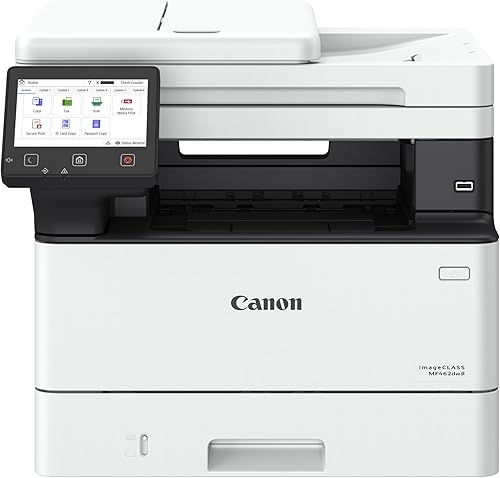 Best for wireless office workflowsCheck it
How we chose wireless laser printers for shared use
The best wireless laser printers pair a network connection with the functions and paper handling that match their workload. We compared the listed connection options, print speeds, print-only or all-in-one features, and paper capacity.
We gave the highest score to a compact home model with dual-band wireless and a useful tray capacity. Office picks rank well when they add features such as Ethernet, automatic duplex printing, an auto document feeder or faster stated output.
Our score weighs specs, features and buyer feedback against what you're shopping for. Wi-Fi performance depends on your router, placement and setup, so consider the printer's connection options alongside your network needs.
Compare the best wireless laser printers
The main differences are function set, speed and wired networking. Use the table to narrow your choices, then read each pick for details on its fit.
| Product | Best for | Print speed | Wireless | Functions | Our score |
|---|---|---|---|---|---|
| Brother HL-L2405W Wireless Compact Monochrome Laser Printer | home Wi-Fi printing | Up to 30 pages per minute | Dual-band Wi-Fi | Print only | 9.7 |
| Brother MFC-L2820DW Wireless Compact Monochrome All-in-One Laser | shared office tasks | Up to 34 pages per minute | Dual-band Wi-Fi, plus Ethernet | Print, copy, scan and fax | 9.6 |
| HP Laserjet MFP M140w Wireless Black | a small shared desk | Up to 21 pages per minute | Wi-Fi | Print, scan and copy | 9.2 |
| HP Laserjet Pro 3001dw Wireless Black | faster team printing | Up to 35 pages per minute | Wi-Fi, plus Ethernet | Print, copy and scan | 9.1 |
| Brother Laser Printer | high-volume network use | Up to 50 pages per minute | Dual-band Wi-Fi, plus Gigabit Ethernet | Print only | 8.9 |
| Canon imageCLASS MF462dw II | wireless office workflows | Up to 37 pages per minute | Wireless connection and mobile printing | Print, scan, copy and fax | 8.7 |
1. Brother HL-L2405W: Best for home Wi-Fi printing
Brother HL-L2405W Wireless Compact Monochrome Laser Printer: Best for home Wi-Fi printing
- Dual-band wireless (2.4 GHz and 5 GHz)
- Up to 30 pages per minute
- 250-sheet paper tray
- Print only
A compact monochrome printer with dual-band wireless and USB for a single computer. Its 250-sheet tray and 30-page-per-minute speed fit routine home and home-office printing.
Pros
- Dual-band Wi-Fi
- 250-sheet tray
- Mobile printing through Brother Mobile Connect
Cons
- Print only
- Duplex printing is manual
The Brother HL-L2405W is a strong fit when you want a straightforward wireless printer for black-and-white documents. Its dual-band wireless supports 2.4 GHz and 5 GHz, and USB provides a local connection to one computer.
Brother states a one-sided print speed of up to 30 pages per minute. A 250-sheet tray can reduce how often you refill paper during regular home or home-office use.
The Brother Mobile Connect app can print from mobile devices and help you manage the printer remotely. This model is print only, so choose an all-in-one if you also need to copy, scan or fax.
Its duplex printing is manual. If you print many two-sided documents, compare it with automatic duplex options such as the best wireless all-in-one laser printers.
2. Brother MFC-L2820DW: Best for shared office tasks
Brother MFC-L2820DW Wireless Compact Monochrome All-in-One Laser: Best for shared office tasks
- Dual-band wireless, Ethernet and USB
- Print, copy, scan and fax
- Automatic duplex printing
- 50-page auto document feeder
This monochrome all-in-one combines Wi-Fi with Ethernet and USB, so you can choose a wireless or wired connection. It adds automatic duplex printing and a 50-page feeder for multi-page tasks.
Pros
- Wi-Fi and Ethernet
- Automatic duplex printing
- 50-page auto document feeder
Cons
- Monochrome output
- Larger than a print-only compact model
Choose the Brother MFC-L2820DW when multiple people need printing, scanning, copying and faxing from one compact office machine. It supports dual-band wireless, Ethernet and USB, allowing you to use Wi-Fi or a wired network connection.
Brother gives a print speed of up to 34 pages per minute. Automatic duplex printing and a 50-page auto document feeder help with two-sided output and multi-page scan, copy and fax jobs.
The 2.7-inch touchscreen supports access to cloud apps including Google Drive, Dropbox, Evernote and OneNote. Brother Mobile Connect adds printing and scanning from mobile devices.
This is a monochrome all-in-one, so it won't print color documents. For more options from the same brand, compare our best Brother network laser printer guide.
3. HP LaserJet MFP M140w: Best for a small shared desk
HP Laserjet MFP M140w Wireless Black: Best for a small shared desk
- Wireless printing
- Print, scan and copy
- Up to 21 pages per minute
- Mobile printing from computers, phones and tablets
The compact HP MFP M140w combines wireless monochrome printing with scanning and copying. HP positions it for small teams of 1 to 3 people.
Pros
- Print, scan and copy
- Mobile printing support
- Compact footprint
Cons
- No automatic duplex printing
- Slower stated print speed than the other office-focused picks
The HP LaserJet MFP M140w is a compact wireless choice for a small team that also needs scanning and copying. HP positions it for 1 to 3 people, with monochrome print speeds up to 21 pages per minute.
You can print from mobile devices, PCs and tablets, and HP lists support for Mac, AirPrint, Android and Chromebook. The HP Smart app can handle printing, copying and cloud scanning from a smartphone.
This model doesn't have automatic duplex printing. Its stated print speed is lower than the office-focused printers here, which may matter if several people send large jobs during the same work period.
If you use a Chromebook, see our best laser printer for Chromebook guide for compatible picks and setup considerations.
4. HP LaserJet Pro 3001dw: Best for faster team printing
HP Laserjet Pro 3001dw Wireless Black: Best for faster team printing
- Wi-Fi and Ethernet
- Up to 35 pages per minute
- Automatic two-sided printing
- Designed for teams of up to 7 people
This HP printer pairs wireless networking with Ethernet, automatic two-sided printing and a stated speed of up to 35 pages per minute. It is aimed at teams of up to 7 people.
Pros
- Wi-Fi and Ethernet
- Automatic two-sided printing
- Up to 35 pages per minute
Cons
- Black-and-white printing
- Does not include fax
The HP LaserJet Pro 3001dw suits a small team that wants wireless printing, Ethernet and automatic two-sided output. HP describes it for up to 7 people and gives a one-sided print speed of up to 35 pages per minute.
Its Wi-Fi is designed to look for a strong connection, and HP Wolf Pro Security includes customizable settings. It also supports wireless printing from mobile devices, PCs and tablets, with compatibility listed for Mac, AirPrint, Android and Chromebook.
Although this printer includes copy and scan functions, it doesn't include fax. A wired option can help when you prefer an Ethernet connection; compare dedicated best Ethernet laser printers if that feature leads your decision.
5. Brother HL-L6210DW: Best for high-volume network use
Brother Laser Printer: Best for high-volume network use
- Dual-band wireless and Gigabit Ethernet
- Up to 50 pages per minute
- 520-sheet main tray and 100-sheet multipurpose tray
- Automatic duplex printing
The Brother HL-L6210DW is built for high-volume monochrome printing, with dual-band wireless and Gigabit Ethernet for shared network access. Its large paper trays and automatic duplex printing suit busy workgroups.
Pros
- Up to 50 pages per minute
- Large paper capacity
- Wireless and Gigabit Ethernet
Cons
- Print only
- Larger and heavier than home-focused choices
For a busy workgroup, the Brother HL-L6210DW offers dual-band wireless and Gigabit Ethernet alongside a stated print speed of up to 50 pages per minute. It prints monochrome documents only, with automatic duplex printing for two-sided jobs.
Paper capacity is a key reason to consider it: the main tray holds 520 sheets and the multipurpose tray holds 100 sheets. Optional trays can expand capacity up to 1,660 sheets.
Brother says its ultra high-yield replacement toner can print up to 18,000 pages. That figure refers to the toner option, not a guarantee of your page yield, which varies with what you print.
This is a print-only office model, so choose another pick if your team needs scanning or copying at the printer. For wired and wireless Brother choices, our best Brother laser printer with Ethernet guide may help.
6. Canon imageCLASS MF462dw II: Best for wireless office workflows
Canon imageCLASS MF462dw II: Best for wireless office workflows
- Wireless monochrome printing
- Print, scan, copy and fax
- Up to 37 pages per minute
- 50-sheet duplex automatic document feeder
Canon's monochrome all-in-one supports wireless printing from compatible devices, with AirPrint, Mopria and the Canon PRINT app. It adds a duplex feeder, automatic two-sided printing and a customizable touchscreen.
Pros
- Print, scan, copy and fax
- 50-sheet duplex feeder
- Automatic two-sided printing
Cons
- Larger and heavier than compact home models
- Wireless setup details should be checked for your network
The Canon imageCLASS MF462dw II combines wireless monochrome printing with scan, copy and fax functions. Canon gives a print speed of up to 37 pages per minute and supports mobile printing through its Canon PRINT app, Apple AirPrint and Mopria Print Service.
Its 50-sheet automatic document feeder scans both sides in one pass. The printer also supports automatic two-sided printing, with a 250-sheet standard cassette and a 100-sheet multipurpose tray.
A customizable 5-inch color touchscreen provides access to frequently used features. The wireless setup is designed to take a few steps, though you should check compatibility with your network and devices before buying.
For Apple-device options, compare our best AirPrint laser printer picks and guides to the best color laser printer for Mac, best laser printer for Mac and best laser printer for MacBook Air.
How do you choose a laser printer with Wi-Fi?
Choose a wireless printer by matching its functions, network options and paper handling to the people who will use it. A home printer for occasional forms has different needs from a shared office device handling multi-page jobs.
Do you need print-only or an all-in-one?
A print-only model can suit a desk where you mainly print documents. If you need to scan, copy or fax, the Brother MFC-L2820DW and Canon MF462dw II include all four functions, while the HP M140w adds scan and copy.
For a closer look at what laser printing offers, read what are the advantages of a laser printer? and consider the tradeoffs in what are the disadvantages of a laser printer?.
Is dual-band Wi-Fi useful?
Dual-band models here include both Brother picks and the Brother HL-L6210DW. They support 2.4 GHz and 5 GHz wireless, which gives you more choice when setting up around a compatible router.
Check the router band, printer placement and device compatibility before setup. If you need steps for joining a printer to your home or office network, follow our guide to putting a printer on a Wi-Fi network.
Should you choose Wi-Fi, Ethernet or both?
Wi-Fi lets supported devices send jobs over the network without a cable to the printer. Ethernet can suit a fixed office printer connected to a router or wired network.
Several picks support both connection types, including the Brother MFC-L2820DW, HP LaserJet Pro 3001dw and Brother HL-L6210DW. For a deeper comparison of wired models, see our best Brother laser printer with Ethernet guide.
How much speed and paper capacity do you need?
A stated speed of 21 to 30 pages per minute may be enough for a home desk or small team with modest print volume. If several people send jobs often, the 35 to 50-page-per-minute models and larger trays may help keep work moving.
Compare capacity with how often you want to refill paper. The Brother HL-L6210DW has the largest stated tray capacity in this group, while the smaller home options take less room.
Can wireless laser printers print in color?
The six picks in this roundup are monochrome models. For color output with automatic two-sided printing, see duplex color laser printers.
If your work includes color charts, labels or presentations, use a color laser printer instead and confirm that its Wi-Fi supports your devices.
See our guide to the best wireless color laser printer for home for color options. Bluetooth is a separate connection method, so read can a color laser printer print over Bluetooth? before expecting Bluetooth support from a Wi-Fi model.
More guides on this topic
- Best Brother Laser Printers for Windows 11
Which wireless laser printer should you choose?
Choose the Brother HL-L2405W for a compact home setup focused on monochrome printing, or the Brother MFC-L2820DW if you want Wi-Fi plus scan, copy and fax functions. For a faster workgroup, consider the HP LaserJet Pro 3001dw or high-capacity Brother HL-L6210DW.
If you rely on AirPrint or Mac devices, confirm support for your exact setup and compare the best AirPrint laser printer and best laser printer for MacBook Air guides before choosing.
Our top 3 picks at a glance
-
1
Best for home Wi-Fi printing
Brother HL-L2405W Wireless Compact Monochrome Laser Printer
9.7/10 our score
See it on Amazon -
2
Best for shared office tasks
Brother MFC-L2820DW Wireless Compact Monochrome All-in-One Laser
9.6/10 our score
See it on Amazon -
3
Frequently asked questions
What should you look for in a wireless laser printer?
Check that the printer supports the Wi-Fi band your router uses, then compare its functions, print speed and paper handling with your daily work. For a shared office, Ethernet can offer another way to connect.
Also check whether you need automatic two-sided printing, scanning or faxing.
Can several devices use one wireless laser printer?
Yes. A Wi-Fi printer can be available to compatible devices on the same network, subject to its setup and software support.
Check the printer's mobile and computer compatibility, and keep your router and printer connected to the network you intend to use.
Is a wireless laser printer always a color printer?
No. The six printers in this guide produce monochrome output.
If you need color documents, compare color laser models and confirm their wireless features, running supplies and supported paper sizes before choosing.
Should you choose Wi-Fi or Ethernet for a shared printer?
Wi-Fi avoids running a network cable to the printer, while Ethernet connects it to your router or wired network. Some models support both, giving you a choice based on printer placement and network setup.
Check the connection options on the specific model.
Can you print from a phone over Wi-Fi?
Many wireless printers support printing from phones through a brand app or services such as Apple AirPrint or Mopria. Compatibility varies by printer and device, so check the supported mobile systems and app before buying.


