6 Best Laser Printers for Office Use (November 2026)
The best laser printers for office use include the Brother HL-L2405W Wireless Compact Monochrome Laser Printer for compact shared printing, the Brother MFC-L2820DW Wireless Compact Monochrome All-in-One Laser for everyday office documents, and the HP LaserJet Pro 3101sdw for small teams needing an ADF.
On this page (4 sections)
The best laser printer for office use depends on the shared workload: choose the Brother MFC-L2820DW for everyday monochrome print, scan, copy and fax jobs, or the Canon MF753Cdw II when staff need color. For a print-only team, the HP LaserJet Pro 3001dw adds automatic two-sided printing and supports up to 7 people.
A shared printer needs to match more than page speed. Check who will use it, whether jobs include color, how often staff scan multipage documents, and whether a 250-sheet tray fits your refill routine.
If your office needs a small-team setup, compare these picks with our best laser printer for small business guide. For color-focused workloads, see our best color laser printer for small business and best color laser printer for office use roundups.
Our picks at a glance
-
1
 Best for compact shared printing
Brother HL-L2405W Wireless Compact Monochrome Laser Printer
9.7/10 our score
See it on Amazon -
2
 Best for everyday office documents
Brother MFC-L2820DW Wireless Compact Monochrome All-in-One Laser
9.6/10 our score
See it on Amazon -
3

- 4
 Check it
Canon Color imageCLASS MF753Cdw II
Best for shared color documents - 5
 Check it
HP Laserjet Pro 3001dw Wireless Black
Best for a small print-only team - 6
 Check it
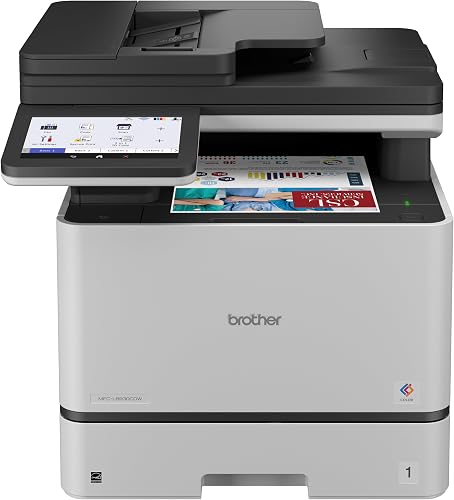
Brother MFC-L8930CDW Business Color Laser All-in-One Printer
Best for high-demand color workflows
Which laser printers for office use fit shared workloads?
The Brother MFC-L2820DW is the most versatile monochrome choice here, while the Canon MF753Cdw II and Brother MFC-L8930CDW cover color work at different scales. We compared print functions, paper handling, document feeders and connection options for shared use.
For another office-focused Brother comparison, see MFC-L6810DW vs MFC-L5915DW.
The Brother HL-L2405W suits a small office that mainly prints black-and-white pages and wants a compact machine with a 250-sheet tray. It prints up to 30 ppm and supports wireless connections, but it is print only and uses manual duplexing.
For a shared multifunction machine, the Brother MFC-L2820DW adds automatic duplex printing, scanning, copying, faxing and a 50-page auto document feeder. The HP LaserJet Pro 3101sdw is another monochrome all-in-one with up to 35 ppm black printing and a 50-page feeder.
For color, the Canon Color imageCLASS MF753Cdw II combines print, scan, copy and fax functions with a 250-sheet cassette and 50-sheet multipurpose tray. The Brother MFC-L8930CDW brings an 80-page feeder and high-speed two-sided scanning for bigger document-handling needs.
| Product | Best for | Functions | Print speed | Paper tray | Our score |
|---|---|---|---|---|---|
| Brother HL-L2405W Wireless Compact Monochrome Laser Printer | compact shared printing | Up to 30 ppm, black and white | 250 sheets | 9.7 | |
| Brother MFC-L2820DW Wireless Compact Monochrome All-in-One Laser | everyday office documents | Print, copy, scan, fax | Up to 34 ppm in the specs | 9.6 | |
| HP LaserJet Pro 3101sdw | small teams needing an ADF | Print, scan, copy | Up to 35 ppm, black | 9.6 | |
| Canon Color imageCLASS MF753Cdw II | shared color documents | Print, scan, copy, fax | Up to 35 ppm, color and black | 9.4 | |
| HP Laserjet Pro 3001dw Wireless Black | a small print-only team | Up to 35 ppm, single-sided black and white | 9.1 | ||
| Brother MFC-L8930CDW Business Color Laser All-in-One Printer | high-demand color workflows | Print, scan, copy | Up to 33 ppm, color and black | 8.7 |
What should you check before choosing an office laser printer?
Start with the jobs that will pass through the printer each week. A machine with scanning and faxing can save a team from sending documents to separate devices, while a print-only model may be enough when all other tasks happen elsewhere.
Is a monochrome laser printer best for office documents?
A monochrome printer fits offices where shared work is mostly text, forms and reports. The Brother HL-L2405W prints up to 30 ppm, while the HP LaserJet Pro 3001dw and HP LaserJet Pro 3101sdw support up to 35 ppm black printing.
If the team also needs copying, scanning or faxing, compare multifunction models before choosing on speed alone. The best monochrome laser printer for business guide focuses on black-and-white work for business teams.
When does color printing make sense for an office?
Color helps when documents rely on colored charts, labels, diagrams or customer-facing materials. The Canon MF753Cdw II is a color four-function model with automatic duplex printing, while the Brother MFC-L8930CDW adds an 80-page feeder and high-speed two-sided scanning.
If color is only needed occasionally, consider whether the extra color supplies and office space fit the budget and workload. For background on why offices choose this printer type, read what are the advantages of a laser printer?.
How much paper and feeder capacity should you plan for?
A 250-sheet tray reduces how often staff need to reload paper during ordinary shared use. The Canon also has a 50-sheet multipurpose tray, and its paper capacity can expand with an optional cassette.
The document feeder matters when staff handle forms or multipage reports. A 50-page feeder suits regular batches, while the Brother MFC-L8930CDW's 80-page feeder supports larger scan, copy and fax sets.
Which connections help a shared printer?
Wireless makes it easier for multiple devices to reach a printer without a direct cable. Ethernet can suit a fixed office location, while USB provides a direct connection to one computer.
The Brother MFC-L2820DW and HP LaserJet Pro 3101sdw offer wireless, Ethernet and USB. For Apple devices, the HP LaserJet Pro 3001dw supports AirPrint; see our best AirPrint laser printer guide for more options.
Which office laser printer should you choose?
Choose by the busiest regular task: the Brother MFC-L2820DW for monochrome multifunction work, the Canon MF753Cdw II for color documents, or the Brother MFC-L8930CDW for larger scan batches. Pick the HP LaserJet Pro 3001dw if your team mainly prints and wants a model designed for up to 7 people.
Brother HL-L2405W: Best for compact shared printing
Brother HL-L2405W Wireless Compact Monochrome Laser Printer: Best for compact shared printing
- Print speeds up to 30 ppm
- 250-sheet paper tray
- Dual-band wireless and USB
- Manual feed slot for envelopes and specialty paper
A compact monochrome printer with a 250-sheet tray, wireless connections and a manual feed slot for envelopes or specialty paper. It prints one-sided documents at up to 30 ppm.
Pros
- Compact footprint
- Dual-band wireless
- Manual feed slot
Cons
- Print only
- Manual duplex
The Brother HL-L2405W is a compact choice for an office that mainly needs sharp black-and-white documents. It prints one-sided pages at up to 30 ppm and has a 250-sheet tray, so teams can handle everyday print jobs without constant paper refills.
Its dual-band wireless connection supports multiple devices, and USB offers a local connection to one computer. The manual feed slot helps with envelopes and specialty paper when a job needs a different sheet type.
This is a print-only model, so it won't replace a scanner or copier. Duplexing is manual, which adds steps when the office often prints on both sides.
Choose it for a shared desk area with modest document needs and limited space. If staff regularly scan, copy or fax, compare the multifunction models below.
Brother MFC-L2820DW: Best for everyday office documents
Brother MFC-L2820DW Wireless Compact Monochrome All-in-One Laser: Best for everyday office documents
- Print, copy, scan and fax
- Up to 34 ppm in the specs
- Automatic duplex printing
- 50-page auto document feeder
This compact monochrome all-in-one combines a 250-sheet tray with automatic duplex printing and a 50-page auto document feeder. Wireless, Ethernet and USB connections support different office setups.
Pros
- Automatic duplex printing
- 50-page auto document feeder
- Wireless, Ethernet and USB
Cons
- Monochrome output
- Compact office use is the stated fit
The Brother MFC-L2820DW combines monochrome printing with copy, scan and fax functions. Its automatic duplex printing helps with two-sided documents, while a 50-page auto document feeder can handle multipage sets without loading each sheet by hand.
A 250-sheet tray supports regular document volume, and connection choices include dual-band wireless, Ethernet and USB. The 2.7-inch touchscreen can also access cloud-based apps such as Google Drive, Dropbox, Evernote and OneNote.
The published speed figures differ between the specifications and product description: the specifications give 34 ppm, while the description says up to 36 ppm. Treat it as a fast office option, and check the current manufacturer details if exact speed is central to your decision.
Choose it when a compact office wants one machine for routine black-and-white documents and document handling. For more on the brand's range, see our best Brother laser printer guide.
HP LaserJet Pro 3101sdw: Best for small teams needing an ADF
HP LaserJet Pro 3101sdw: Best for small teams needing an ADF
- Print, scan and copy
- Up to 35 ppm black
- 250-sheet input tray
- 50-sheet auto document feeder
The HP LaserJet Pro 3101sdw pairs monochrome printing with scanning and copying. Automatic two-sided printing, a 250-sheet tray and a 50-sheet auto document feeder suit recurring office jobs.
Pros
- Up to 35 ppm black
- Automatic two-sided printing
- Wireless, Ethernet and USB
Cons
- Monochrome output
- Cartridge use is restricted to HP chips or circuitry
The HP LaserJet Pro 3101sdw is a monochrome all-in-one for small teams that need printing, scanning and copying. It prints up to 35 ppm black and includes automatic two-sided printing, a 250-sheet input tray and a 50-sheet auto document feeder.
Wireless, Ethernet and USB give an office several ways to connect it. Its feeder and duplex features help with reports and multipage packets that would take longer to handle one sheet at a time.
HP states that the printer works only with cartridges that use HP chips or circuitry, and that firmware updates maintain this restriction. Check cartridge compatibility before choosing it if your office uses a specific supply process.
Choose this model for a small team that needs monochrome print and copy tasks with a feeder. For color output, look at the Canon or Brother business color options.
Canon Color imageCLASS MF753Cdw II: Best for shared color documents
Canon Color imageCLASS MF753Cdw II: Best for shared color documents
- Print, scan, copy and fax
- Color and monochrome output
- Automatic duplex printing
- 250-sheet cassette and 50-sheet multipurpose tray
This color all-in-one handles print, scan, copy and fax jobs, with automatic duplex printing. Its 250-sheet cassette and 50-sheet multipurpose tray give an office separate ways to load paper.
Pros
- Color output
- Automatic duplex printing
- Expandable paper capacity with optional cassette
Cons
- 50 lb unit weight
- Larger footprint than compact monochrome models
The Canon Color imageCLASS MF753Cdw II handles color and monochrome print jobs, along with scanning, copying and faxing. It prints up to 35 ppm in both color and black according to its specifications, and automatic duplexing helps with two-sided office documents.
Its paper setup includes a 250-sheet standard cassette and a 50-sheet multipurpose tray. An optional cassette can raise total capacity to 850 sheets, which may help when the office prints often and wants fewer paper refills.
The unit weighs 50 lb and measures 18.2 in deep, 16.8 in wide and 17 in high. Plan the placement before choosing it, especially if the printer will sit on a shelf or shared counter.
Choose it if color documents and four-in-one functions matter more than a compact footprint. The 50-sheet duplex automatic document feeder also supports multipage scanning and copying.
HP Laserjet Pro 3001dw: Best for a small print-only team
HP Laserjet Pro 3001dw Wireless Black: Best for a small print-only team
- Up to 35 ppm single-sided black-and-white printing
- Automatic two-sided printing
- Wireless, Ethernet and Bluetooth
- Designed for up to 7 people
A print-focused monochrome option for teams of up to 7 people, with automatic two-sided printing and wireless, Ethernet and Bluetooth connections. Its 250-sheet capacity suits regular document work.
Pros
- Up to 35 ppm single-sided
- Automatic two-sided printing
- AirPrint support
Cons
- No fax function
- Cartridges with non-HP chips or circuitry are blocked
The HP Laserjet Pro 3001dw focuses on printing for teams of up to 7 people. It supports up to 35 black-and-white pages per minute on single-sided jobs and has automatic two-sided printing for routine office documents.
Wireless printing works with mobile devices, PCs and tablets, and the connection options include Ethernet and Bluetooth. HP also lists AirPrint support, which can help offices that print from compatible Apple devices.
This model does not include a dedicated fax function, so confirm that the team doesn't need one before choosing it. HP says the printer blocks cartridges without original HP chips or circuitry, so account for that supply requirement.
Choose it when the team needs a shared monochrome printer and other document tasks are handled elsewhere. If scanning is part of the regular workflow, consider an all-in-one instead.
Brother MFC-L8930CDW: Best for high-demand color workflows
Brother MFC-L8930CDW Business Color Laser All-in-One Printer: Best for high-demand color workflows
- Print, scan and copy
- Up to 33 ppm color and black
- 80-page auto document feeder
- Dual-band wireless and Gigabit Ethernet
This business color all-in-one has an 80-page auto document feeder, a 7-inch color touchscreen and dual-band wireless or Gigabit Ethernet. It supports high-speed two-sided scanning and has optional super high yield toner cartridges.
Pros
- 80-page auto document feeder
- Two-sided scanning up to 104 ipm
- Wireless and Gigabit Ethernet
Cons
- 71.2 lb unit weight
- Larger footprint than compact models
The Brother MFC-L8930CDW is a business color all-in-one for offices with larger scan and print tasks. It prints and copies at up to 33 ppm, with an 80-page auto document feeder and two-sided scanning speeds up to 104 ipm.
Its 7-inch color touchscreen supports scan previews and up to 64 custom shortcuts. For network use, it offers dual-band wireless and Gigabit Ethernet, plus an integrated NFC card reader for badge authentication.
The printer weighs 71.2 lb and measures 20.7 in deep, 16.1 in wide and 21.6 in high. Allow for its larger footprint and weight when planning a shared workspace.
Brother says the standard yield cartridges include 3,000 pages of black toner and 1,800 pages of color toner, and offers optional super high yield cartridges. Choose it when color output, high-volume scanning and business security features all matter.
What is the best laser printer for office use for your team?
For an office that needs one compact monochrome machine for print, scan, copy and fax, choose the Brother MFC-L2820DW. Pick the HP LaserJet Pro 3001dw for a print-focused group of up to 7 people, the Canon MF753Cdw II for shared color jobs, or the Brother MFC-L8930CDW for heavier scanning.
Match paper capacity and feeder size to your real weekly workload, then confirm the printer's connections and cartridge requirements fit your office. If your team works from home, our guide to why choose a laser printer for a home office? covers a smaller workspace's needs.
Our top 3 picks at a glance
-
1
Best for compact shared printing
Brother HL-L2405W Wireless Compact Monochrome Laser Printer
9.7/10 our score
See it on Amazon -
2
Best for everyday office documents
Brother MFC-L2820DW Wireless Compact Monochrome All-in-One Laser
9.6/10 our score
See it on Amazon -
3
Frequently asked questions
What is the best laser printer for office use?
The Brother MFC-L2820DW is a strong fit for offices that need monochrome printing, scanning, copying and faxing in one compact machine. It has automatic duplex printing, a 250-sheet tray and a 50-page auto document feeder.
For color jobs, consider the Canon MF753Cdw II or Brother MFC-L8930CDW.
Should an office buy a monochrome or color laser printer?
Choose monochrome if most shared work is text, forms and internal reports. It keeps the printer focused on black-and-white documents.
Choose color if staff regularly print charts, marked-up drafts or customer materials.
A color model also adds the need to manage cyan, magenta and yellow toner.
How much paper capacity does a shared office printer need?
A 250-sheet tray is a practical starting point for recurring office jobs, but the right capacity depends on how often your team prints and refills paper. The Canon MF753Cdw II also has a 50-sheet multipurpose tray.
If refills interrupt work, compare larger or expandable paper handling.
When does an office need an automatic document feeder?
An automatic document feeder helps when staff regularly scan, copy or fax multi-page sets. The Brother MFC-L2820DW and HP LaserJet Pro 3101sdw each have a 50-page feeder, while the Brother MFC-L8930CDW has an 80-page feeder.
A print-only workflow may not need one.
Can an office share a laser printer over a network?
Yes. Several picks here support wireless connections, and some also offer Ethernet for a wired office network.
The Brother MFC-L2820DW and HP LaserJet Pro 3101sdw include wireless, Ethernet and USB.
Check how the printer will connect to your devices before settling on a location.


