6 Best Laser Printers for Small Business (October 2026)
The best laser printers for small business offices include the Brother HL-L2405W Wireless Compact Monochrome Laser Printer for focused black-and-white printing, the HP LaserJet Pro 3101sdw for shared team documents, and the Canon Color imageCLASS MF753Cdw II for color office workflows.
On this page (4 sections)
The HP LaserJet Pro 3101sdw is the best laser printer for most small businesses in this group because it combines monochrome printing, scanning, copying, automatic duplex and a 50-sheet document feeder. Choose the Brother MFC-L2900DW for faster stated monochrome speed and two-sided scanning, or Canon’s MF753Cdw II when your office needs color.
A laser printer for a small business office should match the pages your team produces every week. A print-only model can suit routine forms and invoices, while an all-in-one can keep scanning and copying close to the people who need them.
This roundup compares office printers for small teams by their stated functions, speed, paper handling and connections. For a broader view, see our best laser printer for office use guide.
Our picks at a glance
-
1
 Best for focused black-and-white printing
Brother HL-L2405W Wireless Compact Monochrome Laser Printer
9.7/10 our score
See it on Amazon -
2

-
3
 Best for color office workflows
Canon Color imageCLASS MF753Cdw II
9.4/10 our score
See it on Amazon
- 4
 Check it
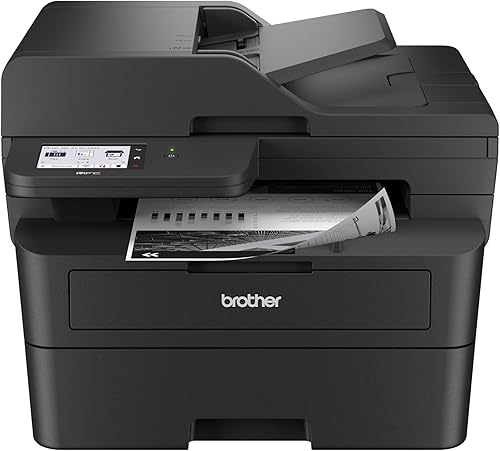
Brother Professional Laser Printer with Scanner
Best for fast two-sided scanning - 5
 Check it
HP Laserjet MFP M140w Wireless Black
Best for a tight desk area - 6
 Check it
Canon Color imageCLASS LBP646Cdw Wireless Laser Printer
Best for color printing without scanning
Which laser printers for small business teams stand out?
The HP LaserJet Pro 3101sdw is the strongest all-around monochrome fit here, while the Brother HL-L2405W is a simpler print-only choice and Canon’s color all-in-ones cover broader document work. Pick by task mix first, then check the paper handling and connections.
Brother HL-L2405W Wireless Compact Monochrome Laser Printer: Best for focused black-and-white printing
- Print only
- Up to 30 ppm
- 250-sheet paper tray
- Dual-band wireless
This compact Brother printer keeps the job simple with black-and-white output, wireless connections and a 250-sheet tray. It suits a small team that does not need a scanner or copier at the printer.
Pros
- Dual-band wireless
- Manual feed slot for envelopes and specialty paper
- 1-year limited warranty
Cons
- Print only, with no scanning or copying
- Duplex printing is manual
The Brother HL-L2405W suits an office where one person or a few staff share a printer for black-and-white pages. Its 250-sheet tray can reduce how often you reload paper, and the manual feed slot handles envelopes and specialty paper.
Dual-band wireless supports connections to multiple devices, while USB connects it locally to one computer. Brother also offers its Mobile Connect app for remote printing and supply tracking.
This model prints only. It has no scanner or copier, and duplex printing is manual, so consider whether staff can handle those tasks elsewhere before choosing it as a shared office device.
Choose it for straightforward monochrome output where a compact printer matters more than built-in scanning. If you need an all-in-one from Brother, compare our best Brother laser printer for small business picks.
HP LaserJet Pro 3101sdw: Best for shared team documents
- Print, scan and copy
- Up to 35 ppm, black and white
- Automatic duplex printing
- 50-sheet auto document feeder
Automatic two-sided printing and a 50-sheet document feeder help a small team handle reports and multi-page documents. It also offers Ethernet, USB and wireless connectivity.
Pros
- Automatic duplex printing
- 50-sheet auto document feeder
- Up to 35 ppm black-and-white speed
Cons
- Monochrome printing only
- Designed for HP cartridges with HP chips or circuitry
The HP LaserJet Pro 3101sdw is a good fit for teams that print reports and scan multi-page documents. It prints up to 35 pages per minute in black and white, with automatic two-sided printing and a 50-sheet auto document feeder.
A 250-sheet input tray supports routine shared use. Ethernet, USB and wireless connectivity give an office several ways to connect computers and mobile devices.
HP describes this model as a small-team printer for professional black-and-white documents. The cartridge system is limited to cartridges with HP chips or circuitry, and firmware updates maintain that restriction, so factor that into your supply decisions.
Choose it when scanning, copying and automatic duplex matter as much as printing. For related models and tradeoffs, read our guide to the best monochrome laser printer for business.
Canon Color imageCLASS MF753Cdw II: Best for color office workflows
- Print, scan, copy and fax
- Automatic duplex printing
- Wireless connection
- 250-sheet cassette and 50-sheet multipurpose tray
This color all-in-one adds scanning, copying and faxing to printing. Its automatic document feeder handles two-sided scans in one pass, and its standard cassette holds up to 250 sheets.
Pros
- Color and monochrome printing up to 35 ppm
- Automatic duplex printing
- 50-sheet duplex single-pass document feeder
Cons
- Large 18.2 x 16.8 x 17 in footprint
- Color toner adds more supplies to manage
Canon’s Color imageCLASS MF753Cdw II is a color all-in-one for offices that print graphics as well as text. It prints, scans, copies and faxes, with stated speeds up to 35 ppm in both color and monochrome.
The standard cassette holds up to 250 sheets, and a 50-sheet multipurpose tray provides another paper option. Its 50-sheet automatic document feeder scans two-sided pages in one pass, while wireless connections support computers and mobile devices.
The printer measures 18.2 x 16.8 x 17 in and weighs 50 lb, so plan its location before bringing it into a small office. Canon includes a 3-year limited warranty.
Choose it if color output and all-in-one functions justify the larger footprint. See our best color laser printer for small business guide for more color options.
Brother Professional Laser Printer with Scanner: Best for fast two-sided scanning
- Print, scan and copy
- Up to 36 ppm, black and white
- 50-page auto document feeder
- Single-pass two-sided scanning
Brother’s MFC-L2900DW pairs automatic duplex printing with single-pass two-sided scanning. It also offers wireless, Ethernet and USB connections for a shared office setup.
Pros
- Up to 36 ppm black-and-white speed
- Single-pass two-sided scanning
- Wireless, Ethernet and USB connectivity
Cons
- Monochrome output only
- A larger feature set may be unnecessary for print-only teams
The Brother Professional Laser Printer with Scanner, model MFC-L2900DW, fits teams that handle double-sided pages at both the scanner and printer. Its single-pass two-sided scanning and 50-page feeder can help process multi-page jobs without flipping each sheet by hand.
It prints up to 36 ppm in black and white and supports automatic duplex printing. A 250-sheet tray, dual-band wireless, Ethernet and USB provide the basic tools for a shared workflow.
Brother’s stated functions include printing, scanning and copying. Its product description also mentions faxing, but the functions data does not confirm fax, so verify fax support before relying on it for office workflows.
Choose it for monochrome work with frequent two-sided scans. For a model-to-model comparison, see Brother MFC-L6810DW vs MFC-L5915DW.
HP Laserjet MFP M140w Wireless Black: Best for a tight desk area
- Print, scan and copy
- Up to 21 ppm, black and white
- Wireless mobile printing
- Compact 10.4 x 14.2 x 7.8 in dimensions
This compact HP model combines printing, scanning and copying in a small footprint. It fits a solo worker or a team of 1 to 3 people with modest black-and-white needs.
Pros
- Compact dimensions
- Wireless printing from mobile devices, PCs and tablets
- Copies both sides of an ID card onto one sheet
Cons
- Up to 21 ppm, slower than the other monochrome picks here
- No automatic duplex printing
The HP LaserJet MFP M140w makes sense when desk space is scarce and a small team needs scanning and copying. If you need a printer to carry between locations, compare portable laser printers.
Its dimensions are 10.4 x 14.2 x 7.8 in, and HP describes it as suitable for 1 to 3 people.
It prints up to 21 black-and-white pages per minute and supports wireless printing from mobile devices, PCs and tablets. The HP Smart app can scan to the cloud, and the printer can copy both sides of an ID card onto one sheet.
There is no automatic duplex printing, so two-sided pages need manual handling. As with the HP 3101sdw, this model is intended for cartridges with HP chips or circuitry.
Choose it for a small desk and modest page volume. For a brand-focused home option, see best Canon laser printer for home use.
If the printer will serve a dedicated home workspace, our why choose a laser printer for a home office guide can help you weigh the fit.
Canon Color imageCLASS LBP646Cdw Wireless Laser Printer: Best for color printing without scanning
- Print only
- Up to 26 ppm in color and monochrome
- Automatic two-sided printing
- 250-sheet cassette
Canon’s color print-only model adds automatic two-sided printing and a 250-sheet cassette without adding scanning, copying or faxing. It suits teams that need color output but already have those tasks covered.
Pros
- Color and monochrome printing
- Automatic two-sided printing
- Ethernet, USB and wireless connectivity
Cons
- Print only, with no scanning or copying
- Up to 26 ppm, slower than the color all-in-one
The Canon Color imageCLASS LBP646Cdw is a color printer for offices that already have a separate scanner or copier. It prints up to 26 ppm in color and monochrome, with automatic two-sided printing and a 250-sheet cassette.
The 1-sheet multipurpose tray can take a different paper type without emptying the main cassette. Ethernet, USB and wireless connections support computer and mobile printing, and the 5-line LCD provides printer controls.
This is a print-only model, so it does not replace an all-in-one. Canon says it uses Toner 075 or high-capacity Toner 075 H, and includes a 1-year limited warranty.
Choose it when color and duplex printing matter, but scanning does not. For a closer look at office color options, see best color laser printer for office use.
How do you choose the best office laser printer for a small business?
The best office laser printer for a small business depends on print volume, document type and which tasks staff need the device to handle. A feature that saves time for one team can add cost and take up space for another.
Do you need monochrome or color printing?
Monochrome is a practical fit for invoices, forms and text-heavy reports. For another Brother monochrome option, see the HL-L2460DW laser printer review.
The Brother HL-L2405W, HP LaserJet Pro 3101sdw, Brother MFC-L2900DW and HP M140w all focus on black-and-white output.
Color helps when documents rely on charts, logos or signs. Canon’s MF753Cdw II adds scanning, copying and faxing, while the LBP646Cdw is print-only; compare our best Canon laser printer for small business guide if you want to narrow by brand.
Will scanning and copying save your team time?
An all-in-one can keep routine scanning and copying near the printer, which may simplify a small office workflow. For more device choices, see our all-in-one laser printer guide.
The HP 3101sdw includes a 50-sheet feeder, and the Brother MFC-L2900DW offers a 50-page feeder with single-pass two-sided scanning.
A printer-only model can be a better fit when those jobs are rare or handled by another device. The Brother HL-L2405W and Canon LBP646Cdw print only, so you avoid choosing unused multifunction features.
How much paper handling does the office need?
A 250-sheet tray is common across these picks, but the extra feed options differ. The Canon MF753Cdw II has a 50-sheet multipurpose tray, while the LBP646Cdw has a 1-sheet tray for occasional alternate media.
If staff print multi-page reports, automatic duplex can reduce manual steps and print both sides. The HL-L2405W uses manual duplex, while the HP 3101sdw, Brother MFC-L2900DW and both Canon models support automatic duplex printing.
Which connections fit a shared workspace?
Wireless can help staff print from multiple devices, while Ethernet can suit a fixed office network. The Brother HL-L2405W offers dual-band wireless and USB, and the MFC-L2900DW adds Ethernet.
Check the specific connection options against your office setup before buying. A printer that supports the connection your team already uses can be easier to share across desks.
What should a small business know about toner and ongoing costs?
Toner choice and page mix affect ongoing costs, but cost per page is not available for these models. Check the correct cartridge family and its yield for the pages your office prints most.
Brother lists TN830 and TN830XL toner for the HL-L2405W, and TN830 family options for the MFC-L2900DW. HP’s two models have cartridge chip restrictions, while Canon’s color options use separate color toner families, so compare replacement needs before committing to a fleet.
For more context on the technology, read what are the advantages of a laser printer. If a color all-in-one is on your shortlist, check the details on Brother color MFC-L5915DW before treating a model name as proof of color printing.
Which business laser printer should you choose?
Choose the HP LaserJet Pro 3101sdw if your team needs monochrome printing, scanning, copying, automatic duplex and a document feeder in one device. Choose the Brother MFC-L2900DW if two-sided scanning and its stated 36 ppm speed are the priority.
Pick the Canon MF753Cdw II for color plus scanning, copying and faxing, or the Canon LBP646Cdw for color printing without extra functions. For scanning help with another office model, see how to scan with the Brother MFC-L5915DW.
For a team that mostly prints black-and-white pages, choose a monochrome model based on the needed feeder, duplex and network features. If color work is routine, choose a Canon color model and confirm the available space and toner needs.
Our score weighs specs and features against what you’re shopping for.
Our top 3 picks at a glance
-
1
Best for focused black-and-white printing
Brother HL-L2405W Wireless Compact Monochrome Laser Printer
9.7/10 our score
See it on Amazon -
2
-
3
Best for color office workflows
Canon Color imageCLASS MF753Cdw II
9.4/10 our score
See it on Amazon
Frequently asked questions
What should a small business look for in a laser printer?
Match the printer to the work: choose monochrome for mostly text, color for graphics and client-facing documents, and an all-in-one if staff need to scan or copy. Check automatic duplex printing, tray capacity, connection options and replacement toner before deciding.
For shared use, also consider whether the printer’s speed and document feeder fit your team’s busiest days.
Is a monochrome laser printer enough for a small business?
A monochrome printer is enough if your routine work is invoices, forms, reports and other black-and-white pages. It can also keep the printer simpler if your staff rarely need color.
Choose a color model when charts, signs or branded materials need color output.
Do small business laser printers need automatic duplex printing?
Automatic duplex printing is useful if your team often prints multi-page documents and wants two-sided pages without manually turning the paper. It can reduce paper use for suitable jobs.
If you print on one side or only occasionally, a print-only model with manual duplex may be sufficient.
Should a small business choose an all-in-one printer?
Choose an all-in-one if staff need printing plus scanning or copying at the same desk. Models with an automatic document feeder can make multi-page jobs easier to handle.
If another device already covers scanning and copying, a print-only model may meet your needs with fewer functions.