Brother HL-L5210DW Review: Worth It? (November 2026)
The Brother HL-L5210DW suits busy offices that need fast monochrome printing, wireless sharing and room to expand paper capacity. Its standard trays hold 350 sheets together, and optional trays can raise total capacity to 1,390 sheets.

On this page (8 sections)
- The Brother HL-L5210DW at a glance
- How well does wireless printing fit a busy office?
- What paper handling does the printer offer?
- Is 48 ppm fast enough for your office?
- What does toner choice mean for running costs?
- What are the main trade-offs?
- How should you choose between the HL-L5210DW and alternatives?
- Is the Brother HL-L5210DW right for your office?
The Brother HL-L5210DW is a monochrome laser printer for busy offices that need fast shared printing and flexible paper handling. It prints at up to 48 pages per minute, supports automatic duplexing, and connects through dual-band wireless or Gigabit Ethernet.
Its standard 250-sheet tray and 100-sheet multipurpose tray cover routine office jobs, while optional trays expand capacity up to 1,390 sheets. Because it prints in black only, teams that need color should compare a high-volume color laser printer.
The Brother HL-L5210DW at a glance
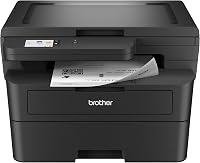
The HL-L5210DW combines up to 48 ppm printing, automatic duplexing and network sharing in a print-only monochrome device. Its standard setup gives you two paper sources, and optional trays support higher-volume workflows.
Brother HL-L5210DW Business Monochrome Laser Printer: Best for shared office printing

- Up to 48 ppm
- Automatic duplex
- Dual-band wireless and Gigabit Ethernet
- 350-sheet standard capacity
A monochrome office printer with wireless and wired networking, automatic duplex printing, and expandable paper capacity. It supports paper up to legal size.
Pros
- Fast stated print speed
- Wireless and wired network options
- Expandable capacity up to 1,390 sheets
Cons
- Prints in monochrome only
- Optional trays are needed to reach maximum capacity
The printer supports media up to 8.5 x 14 in, so the adjustable main tray can handle letter or legal paper. Its multipurpose tray is intended for custom media or envelopes, which helps when a job needs a different stock from the paper kept in the main tray.
When the HL-L5210DW makes sense
Choose it if your office sends frequent black-and-white jobs from several computers or mobile devices. Wireless and Ethernet connectivity allow it to join a shared network, while automatic duplexing handles two-sided documents without manual page flipping.
A best laser printer for high volume printing guide can help compare it with other office-focused models. If your main goal is a higher stated page speed, see our best fast laser printer options.
How well does wireless printing fit a busy office?
The HL-L5210DW supports dual-band wireless networking and mobile printing, alongside Gigabit Ethernet for wired network setups. That gives an office a choice between placing it on Wi-Fi or connecting it to the local network by cable.
For a shared printer, plan its network location around the people who use it and the devices they print from. The printer supports laptops, PCs, smartphones and tablets, so it can serve a mix of office equipment.
Brother describes mobile printing support, but the exact setup depends on your devices and network. Check the current Brother setup instructions for supported apps and operating systems before standardizing a team workflow.
If your office uses Windows 11, compare compatibility and setup considerations in our guide to the best Brother laser printer for Windows 11. For a broader brand comparison, start with our best Brother laser printer guide.
What paper handling does the printer offer?
The printer's 250-sheet adjustable tray and 100-sheet multipurpose tray provide 350 sheets of standard capacity. Optional trays raise the total to as much as 1,390 sheets, depending on the configuration you add.
| Paper feature | Brother HL-L5210DW |
|---|---|
| Main tray | 250 sheets, adjustable for letter or legal |
| Multipurpose tray | 100 sheets |
| Standard total | 350 sheets |
| Maximum expandable capacity | Up to 1,390 sheets with optional trays |
| Maximum media size | 8.5 x 14 in |
| Duplex | Automatic |
The multipurpose tray can handle custom media or envelopes, which keeps those jobs separate from the paper in the main tray. For frequent changes between paper types, check the manual for supported media and loading instructions.
Optional trays add capacity, but they also take extra space and require a separate purchase. Work out how many paper sizes or stocks the office needs at once before deciding whether the expansion is useful.
Is 48 ppm fast enough for your office?
Brother rates the HL-L5210DW at up to 48 pages per minute for one-sided printing. The actual time for a job can vary with document content, connection and settings, so treat the maximum speed as a reference point rather than a promise for every file.
The printer's listed first-page time is 6.7 seconds. That can matter for shorter jobs, where waiting for a print to start may feel more noticeable than the total time for a long batch.
Automatic duplex printing helps reduce manual handling for two-sided work. If your office routinely prints large reports, compare both speed and tray capacity against your normal job size; a fast engine still needs enough paper for the work queue.
What does toner choice mean for running costs?
The HL-L5210DW includes a Brother Genuine 3,000-page toner cartridge, and Brother lists higher-yield replacements for offices with heavier print volumes. Page yields are approximate and based on the stated cartridge rating, so actual replacement timing depends on what you print.
The Brother Genuine TN920XL High-Yield Black Toner Cartridge is a two-pack rated for up to 12,000 pages per cartridge. It is compatible with the HL-L5210DW and may suit offices that want to keep replacement cartridges available.
For lighter workloads, the Brother Genuine TN920 Standard Yield Toner Cartridge is rated for up to 3,000 pages and is also compatible with the printer. The smaller yield may be easier to match to occasional printing or a lower monthly volume.
Compare the rated yield with your typical monthly page count and decide how much backup toner to store. You can also review the advantages of a laser printer and the disadvantages of a laser printer when weighing office printing needs against other printer types.
What are the main trade-offs?
The HL-L5210DW's main trade-off is monochrome-only output. It is designed for black text and documents, so teams that need color charts, images or branded handouts should choose a color model or keep a second printer available.
Its paper capacity is expandable, but the maximum requires optional trays. If you use only the standard configuration, plan for reloads during larger print runs.
It is also a print-only device, so it does not replace a separate scanner or copier. That keeps its role straightforward, but an office that frequently copies or scans will need another device.
How should you choose between the HL-L5210DW and alternatives?
Choose the HL-L5210DW when wireless office sharing, fast monochrome output and tray expansion matter most. Look at alternatives if you need color, a different brand's workflow or a higher emphasis on print speed.
Our best HP high volume laser printer guide is useful if your office is comparing business printers across brands. Compare real requirements such as network setup, paper sizes and monthly printing habits rather than choosing by speed alone.
For teams that need color at high volume, a high-volume color laser printer may be a better fit. If your documents are mostly text and forms, the HL-L5210DW keeps the setup focused on monochrome office output.
Is the Brother HL-L5210DW right for your office?
The Brother HL-L5210DW is a strong fit for shared black-and-white printing when you can use its wireless or Ethernet connection and value expandable paper capacity. Pick it for routine text documents, legal-size paper support and automatic duplexing.
Choose a different printer if color output or built-in scanning and copying are essential. For a closer look at similar Brother models, compare the best Brother laser printers and match their features to your office's actual paper and connectivity needs.
Frequently asked questions
Is the Brother HL-L5210DW a good office printer?
The HL-L5210DW fits a busy office that mainly prints black-and-white documents and needs network sharing. It offers up to 48 pages per minute, automatic duplex printing, wireless and Gigabit Ethernet connections, plus capacity that can expand with optional trays.
Does the Brother HL-L5210DW print double-sided?
Yes, the HL-L5210DW supports automatic duplex printing. That can reduce manual steps for two-sided reports and office documents, though paper use still depends on your print settings and the document.
How much paper can the Brother HL-L5210DW hold?
The standard setup has a 250-sheet adjustable tray and a 100-sheet multipurpose tray, for 350 sheets total. Optional trays can increase the total capacity to 1,390 sheets, which may help a shared office reduce reloads.
Which toner works with the Brother HL-L5210DW?
Brother lists TN920, TN920XL and several other TN920-series toner options as compatible with the HL-L5210DW. The TN920 standard-yield cartridge is rated for up to 3,000 pages, while the TN920XL two-pack is rated for up to 12,000 pages per cartridge.