6 Best All-in-One Laser Printers with Duplex (November 2026)
The best all-in-one laser printers with duplex printing include the Brother MFC-L2820DW Wireless Compact Monochrome All-in-One Laser for compact small offices, the Canon Color imageCLASS MF753Cdw II for color small offices, and the HP LaserJet MFP M235sdw for light monochrome teams.
On this page (9 sections)
- Best laser printer all in one duplex models for print, copy and scan
- Side-by-side comparison of duplex all-in-one laser printers
- How we compared these duplex laser printers
- Should you buy color or monochrome in an all-in-one duplex laser printer?
- What does automatic duplex mean for printing and scanning?
- How fast should a duplex all-in-one laser printer be?
- What paper capacity and feeder size do you need?
- How do connectivity, security and toner cost affect your choice?
- What are the best all-in-one laser printers with duplex printing for different buyers?
The best laser printer all in one duplex for most small offices is the Brother MFC-L2820DW, because it gives you print, copy, scan, fax and automatic two-sided output in a compact monochrome unit. This guide compares six models by speed, color, scanning, paper handling, security and running cost.
A duplex all-in-one saves more than paper. It removes the manual step of flipping stacks, reinserting them and checking page order.
That matters when you print contracts, invoices, school packets or reports in batches.
Our score weighs specs, features and buyer feedback against what you're shopping for. We compared papers, speeds, paper capacity, feeder size, connectivity and security, then matched each model to a clear use case.
Our picks at a glance
-
1
 Best for compact small offices
Brother MFC-L2820DW Wireless Compact Monochrome All-in-One Laser
9.6/10 our score
See it on Amazon -
2

-
3

- 4
 Best for fast monochrome printingCheck it
- 5
 Check it
HP LaserJet Pro 3105sdw Monochrome Laser Printer
Best for teams up to 7 users - 6
 Check it
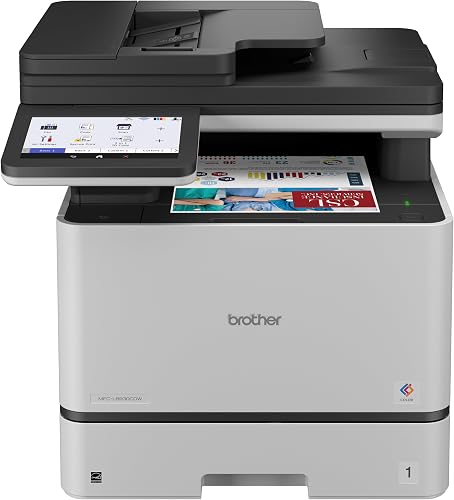
Brother MFC-L8930CDW Business Color Laser All-in-One Printer
Best for business color scanning
Best laser printer all in one duplex models for print, copy and scan
The Brother MFC-L2820DW leads for compact monochrome work. The Canon MF753Cdw II leads for color.
The Brother MFC-L8930CDW leads for heavy two-sided scanning. The HP and Canon monochrome picks split the lighter team roles.
Brother MFC-L2820DW Wireless Compact Monochrome All-in-One Laser: Best for compact small offices
- Monochrome all-in-one with copy, scan and fax
- Automatic duplex printing
- Dual-band wireless, Ethernet and USB
- 2.7-inch touchscreen
A compact monochrome 4-in-1 for high-volume office documents. It prints, copies, scans and faxes in black and white with automatic duplex.
Pros
- Compact footprint at 22.5 pounds
- 50-page auto document feeder
- Dual-band wireless and Ethernet
Cons
- Black and white output only
- Smaller touchscreen than business color models
This Brother suits a small office that prints mostly black and white documents and needs fax as well as copy and scan. Its compact 22.5-pound body fits a desk or shared shelf where larger color models would crowd the workspace.
Automatic duplex printing handles double-sided documents without manual flipping. The 250-sheet tray cuts refill frequency, and the 50-page auto document feeder helps with multi-page copy, scan and fax jobs.
Dual-band wireless, Ethernet and USB give you flexible placement. The 2.7-inch touchscreen supports print-from and scan-to cloud apps, and the mobile app helps you print and scan from a phone.
The trade-off is color. If your work needs charts or client-facing color, this model will not cover it.
For text-heavy office work, it is the cleanest fit in this group.
Canon Color imageCLASS MF753Cdw II: Best for color small offices
- Color all-in-one with print, scan, copy and fax
- Automatic duplex printing
- 50-sheet duplex automatic document feeder
- 5-inch color touchscreen
A color 4-in-1 for small and home offices that need color documents and two-sided scanning. It adds expandable paper capacity for heavier use.
Pros
- Color and black and white printing
- One-pass duplex scanning
- Expandable to 850 sheets with optional cassette
Cons
- Heaviest Canon pick here at 50 pounds
- Color toner costs more to replace
This Canon suits a small or home office that needs color for documents, charts and simple marketing material. It prints, scans, copies and faxes, with automatic duplex printing and a 50-sheet duplex document feeder.
Print speed reaches up to 35 ppm in both color and black and white. That shared speed matters, because you do not need a slower mode when a job turns colorful.
Paper capacity starts at 250 sheets in the standard cassette, plus 50 sheets in the multipurpose tray. Canon says capacity can expand to 850 sheets with an optional cassette, which helps when you print larger batches.
The trade-off is size and cost. At 50 pounds, it is heavier than the monochrome picks.
Color toner also adds ongoing cost, so choose it for real color demand, not occasional color.
HP LaserJet MFP M235sdw: Best for light monochrome teams
- Monochrome all-in-one with duplex
- Dual-band Wi-Fi with self-reset
- Ethernet and USB
- Auto document feeder
A light monochrome all-in-one for 1 to 5 people who print, scan and copy everyday documents. Automatic two-sided printing keeps manual flipping out of the workflow.
Pros
- Light at 21 pounds
- Dual-band Wi-Fi
- Fast two-sided printing in its class, per HP
Cons
- Black and white only
- Lower copy resolution than color picks
This HP suits 1 to 5 people who print, scan and copy black and white documents each day. It is the lightest model here at 21 pounds, which helps if you move it between rooms or place it on a shared desk.
HP says it offers the fastest two-sided printing in its class. Single-sided speed reaches up to 28 ppm, which suits brochures, business documents and presentations in black and white.
Dual-band Wi-Fi with self-reset can detect and resolve connectivity issues. Ethernet and USB stay available for wired setups, and wireless printing works from mobile devices, PCs and tablets.
The trade-off is color and copy detail. Copy resolution tops out at up to 300 x 300 dpi.
For plain office documents that is often enough. For detailed graphics, a color model will do better.
Canon imageCLASS MF287dw: Best for fast monochrome printing
- Monochrome all-in-one with print, copy, scan and fax
- Automatic duplex
- Auto document feeder
- 35 ppm printing
A fast monochrome all-in-one for offices that need 35 ppm output and automatic duplex. It suits straightforward black and white document work.
Pros
- 35 ppm print speed
- First print out in under 4.9 seconds
- High-capacity toner option
Cons
- Black and white only
- LCD display rather than a touchscreen
This Canon suits an office that values speed in a monochrome all-in-one. It prints up to 35 ppm, with a first print out in under 4.9 seconds for letter paper.
Automatic duplex printing helps save paper and related costs on multi-page documents. The auto document feeder handles copy, scan and fax batches without feeding each page by hand.
Canon offers a high-capacity toner option. That can limit interruptions when you print larger volumes between toner changes.
The trade-off is display and color. The LCD display is simpler than a touchscreen.
Output is black and white only, so it fits text and forms better than presentation work.
Choose it when fast monochrome printing is the priority. Choose a color pick when your documents need color even occasionally.
HP LaserJet Pro 3105sdw Monochrome Laser Printer: Best for teams up to 7 users
- Monochrome all-in-one
- Automatic 2-sided printing
- Auto 1-sided scanning through document feeder
- HP AI scan to email features
A monochrome all-in-one aimed at office teams up to 7 users. It adds scan to email helpers and HP security features for shared use.
Pros
- Built for up to 7 users
- Auto paper jam recovery
- HP Wolf Pro Security
Cons
- Black and white only
- Same score as the Canon MF287dw
This HP suits office teams up to 7 people who share one printer for professional black and white documents and reports. It offers automatic 2-sided printing and auto 1-sided scanning through the document feeder.
Print speed reaches up to 33 ppm, with auto paper jam recovery to reduce interruptions. That recovery feature matters in shared use, where a jam can stall several people at once.
HP adds scan to email with AI-generated subject lines, file names and summaries. HP AI Precise Print also helps turn web pages and emails into cleaner printed pages.
HP Wolf Pro Security adds customizable protection for shared devices. The trade-off is monochrome output only.
For a shared team with mostly text, that trade-off is often worth it.
Brother MFC-L8930CDW Business Color Laser All-in-One Printer: Best for business color scanning
- Color all-in-one with duplex print, scan and copy
- Two-sided scanning up to 104 ipm
- 80-page auto document feeder
- 7-inch color touchscreen
A larger business color all-in-one for teams that scan two-sided documents often. It pairs high-speed scanning with advanced security and low-cost toner options.
Pros
- High-speed two-sided scanning
- NFC badge authentication
- Super high yield toner options
Cons
- Largest and heaviest pick at 71.2 pounds
- Needs more desk space
This Brother suits a business team that scans a lot and prints in color. It offers two-sided scanning up to 104 ipm with an 80-page auto document feeder, plus legal-size glass for larger pages.
It prints and copies in color and black at up to 33 ppm. That makes it a step up for presentations, marketing collateral and reports with charts.
The 7-inch color touchscreen supports shortcuts and scan preview. Dual-band wireless and Gigabit Ethernet give you wired or wireless placement, and NFC badge authentication helps in managed offices.
The trade-off is footprint. At 71.2 pounds and 20.7 x 16.1 x 21.6 inches, it is the largest model here.
Measure your desk or cabinet before you order, and leave room to open trays and the scanner lid.
Side-by-side comparison of duplex all-in-one laser printers
| Product | Best for | Print speed | Duplex | Paper handling | Our score |
|---|---|---|---|---|---|
| Brother MFC-L2820DW Wireless Compact Monochrome All-in-One Laser | compact small offices | Up to 34 ppm black and white | Automatic | 250-sheet tray, 50-page ADF | 9.6 |
| Canon Color imageCLASS MF753Cdw II | color small offices | Up to 35 ppm color and black and white | Automatic | 250-sheet cassette, 50-sheet multipurpose tray | 9.4 |
| HP LaserJet MFP M235sdw | light monochrome teams | Up to 28 ppm black and white | Automatic | 9.0 | |
| Canon imageCLASS MF287dw | fast monochrome printing | Up to 35 ppm | Automatic | 8.8 | |
| HP LaserJet Pro 3105sdw Monochrome Laser Printer | teams up to 7 users | Up to 33 ppm | Automatic | 8.8 | |
| Brother MFC-L8930CDW Business Color Laser All-in-One Printer | business color scanning | Up to 33 ppm | Automatic | 8.7 |
All six models here do automatic duplex printing. The split is color, scanning depth, paper capacity and size.
Use the table to compare those four points before you read the buying advice below.
How we compared these duplex laser printers
We checked print speed, duplex type, color support, feeder size, paper capacity, connectivity, security and toner options. We also matched each model to a workload, such as light home use, a 1 to 5 person office or a team up to 7 users.
We did not add specs that are not in the product data. When a detail matters but is not confirmed, we say so plainly and tell you what to check before you buy.
Our scores reward fit for this search. A compact monochrome model can outscore a larger color model when your main job is fast two-sided black and white printing.
Should you buy color or monochrome in an all-in-one duplex laser printer?
Choose monochrome when most of your pages are text, forms, invoices and black and white reports. You get lower ongoing cost and less maintenance, and duplex printing still cuts paper use.
Choose color when you print charts, photos, logos, labels or client documents that need color. Our guide to color laser printers explains which models print in color and which jobs still need a separate photo printer.
When monochrome is the smarter buy
Monochrome suits legal, accounting, school and admin work. The Brother MFC-L2820DW, HP M235sdw, Canon MF287dw and HP 3105sdw all focus on black and white output.
That focus keeps toner cost down. It also keeps the buying choice simple, because every cartridge replaces the same black output.
When color earns its extra cost
Color earns its place when color changes how a document is read. Sales charts, floor plans, training material and marketing sheets often need it.
The Canon MF753Cdw II and Brother MFC-L8930CDW both print color and black. Pick between them by scanning load and desk space.
A note on photos
Laser color output is not the same as photo printing. If photos are your main need, read which printer is better for printing photos before you spend on color toner.
What does automatic duplex mean for printing and scanning?
Automatic duplex printing means the printer flips a page and prints the back side. You load paper once and collect a two-sided document in order.
Automatic duplex scanning means the feeder reads both sides in one pass. That saves time on contracts, IDs and forms that have content on the back.
Printing duplex
Check that duplex is automatic, not manual. Manual duplex asks you to reinsert the stack and can flip pages the wrong way.
Automatic duplex is standard on all six models here. That gives you a clean baseline for comparison.
Scanning duplex
Scanning is where models split. The Brother MFC-L8930CDW offers high-speed two-sided scanning.
The Canon MF753Cdw II offers one-pass duplex scanning through its feeder.
If you scan two-sided documents weekly, prioritize scanning duplex. If you mostly print two-sided, printing speed matters more.
Paper savings in daily use
Duplex printing can cut paper use on long documents. It also keeps reports, packets and handouts in the right order with less handling.
For a small office, the time saved is often the bigger win. You spend fewer minutes flipping and sorting stacks.
If you want brand-specific shortlists, see our best duplex laser printer guide, the best Canon duplex laser printer picks and the best Brother laser printer all in one duplex options.
How fast should a duplex all-in-one laser printer be?
Speed matters most for shared offices and batch jobs. A home user printing a few pages a day can accept a slower model.
A team printing reports all day should aim higher.
Speed for small offices
In this group, print speeds range from 28 ppm to 35 ppm. The Canon MF287dw and Canon MF753Cdw II reach 35 ppm.
The Brother MFC-L2820DW reaches 34 ppm in the title data.
Those speeds help with multi-page packets. They matter less for a single-page form.
First page speed
First print out time also matters. The Canon MF287dw prints in under 4.9 seconds.
The HP 3105sdw lists 4.6 seconds. The Canon MF753Cdw II lists 7 seconds.
For occasional printing, first page speed shapes how fast you get one page. For batch printing, pages per minute shapes the whole job.
Copy and scan speed
Copy and scan speed decide how the feeder feels in daily use. The Brother MFC-L8930CDW leads scanning at up to 104 ipm for two-sided scanning.
The Brother MFC-L2820DW lists scan speeds up to 23.6/7.9 ipm in black and color. That is plenty for small office batches.
What paper capacity and feeder size do you need?
Paper capacity decides how often you refill. Feeder size decides how large a copy, scan or fax batch you can load at once.
Paper capacity for home and small offices
A 250-sheet tray suits most small offices. All six models here sit around that level, with the Canon MF753Cdw II offering expansion to 850 sheets.
Larger capacity helps when you print training packets, reports or school documents. It does not change print quality.
Feeder size for copy, scan and fax
The Brother MFC-L8930CDW has an 80-page feeder. The Brother MFC-L2820DW and Canon MF753Cdw II have 50-page feeders.
A larger feeder matters when you scan contracts or fax multi-page forms. For short batches, 50 pages is already generous.
Media size and layout
Check maximum media size before you buy. The Brother MFC-L2820DW and Canon MF287dw list up to 8.5 x 14 inches.
The HP models list up to 8.5 x 11.7 inches.
The Brother MFC-L8930CDW supports legal-size glass for scanning. That helps with larger forms and documents.
If scanning depth matters most, compare our best all-in-one laser printer with duplex scanning picks.
How do connectivity, security and toner cost affect your choice?
Connectivity decides where the printer can sit. Security decides how safe it is in a shared office.
Toner cost decides what duplex printing really costs over time.
Connectivity for shared use
Dual-band wireless helps in crowded networks. Ethernet gives a stable wired link.
USB keeps a single-computer setup working without a network.
The Brother models list dual-band wireless and Ethernet. The HP models list dual-band Wi-Fi or Wi-Fi with Ethernet and USB.
The Canon models list wireless and USB options.
Security in a small office
Shared printers handle sensitive documents. Look for security features, password protection and network controls when several people use one device.
The Brother MFC-L8930CDW lists Triple Layer Security and NFC badge authentication. The HP 3105sdw lists HP Wolf Pro Security.
The Brother MFC-L2820DW lists advanced security features for secure connections.
Toner yield and subscription options
High-yield toner lowers refill frequency. The Brother MFC-L8930CDW includes standard yield cartridges and supports super high yield TN635XXL cartridges.
The Brother MFC-L2820DW supports TN830 and TN830XL cartridges and a Refresh subscription trial. The Canon MF753Cdw II uses Canon Genuine Toner 069.
The Canon MF287dw supports standard and high-capacity 072 cartridges.
Toner cost matters more than the printer price for heavy users. Estimate your monthly pages, then choose a model with the toner path you can afford.
What are the best all-in-one laser printers with duplex printing for different buyers?
The best all-in-one laser printer with duplex printing depends on color, scanning load and team size. Use this verdict to match the model to the job, then check size and toner cost before you order.
Pick the Brother MFC-L2820DW for a compact small office that needs monochrome print, copy, scan, fax and duplex. It is the strongest all-round monochrome pick here.
Pick the Canon MF753Cdw II for a small office that needs color with fast output. It also suits hybrid work where color documents and two-sided scanning both matter.
Pick the HP LaserJet MFP M235sdw for a light 1 to 5 person team that prints black and white documents. Its self-reset Wi-Fi helps keep a shared setup running.
Pick the Canon imageCLASS MF287dw for fast monochrome printing at 35 ppm. It suits straightforward text and form work with automatic duplex.
Pick the HP LaserJet Pro 3105sdw for a team up to 7 users. Its scan to email helpers and security features fit shared office use.
Pick the Brother MFC-L8930CDW for a business team that scans two-sided documents often and prints in color. Measure your space first, because it is the largest model here.
If a printer stops printing, check why your laser printer is not printing and how to troubleshoot laser printer problems before you replace parts.
Our top 3 picks at a glance
-
1
Best for compact small offices
Brother MFC-L2820DW Wireless Compact Monochrome All-in-One Laser
9.6/10 our score
See it on Amazon -
2
-
3
Frequently asked questions
What should I check first in a duplex all-in-one laser printer?
Check whether duplex is automatic for printing and scanning, not just manual. Confirm color or monochrome output, paper capacity, document feeder size and monthly workload.
Those five points decide fit faster than extra app features.
Is automatic duplex printing the same as duplex scanning?
No. Automatic duplex printing flips paper for two-sided output.
Duplex scanning reads both sides of a page in one pass.
Some models do one, the other, or both, so check each job you actually do.
When is a monochrome model the better buy?
Choose monochrome when most work is text, forms and black and white reports. You avoid color toner cost and get simpler maintenance.
Add a color model only when charts, logos or client documents need color.


