6 Best Wireless Monochrome Laser Printers (November 2026)
The best monochrome wireless laser printers include the Brother HL-L2405W Wireless Compact Monochrome Laser Printer for compact home printing, the Brother MFC-L2820DW Wireless Compact Monochrome All-in-One Laser for small office all-in-one work, and the HP LaserJet Pro 3101fdw for small teams needing speed.
On this page (10 sections)
- The best monochrome wireless laser printers for shared document printing
- How the best wireless monochrome laser printers compare
- How we compared these models
- Is a monochrome wireless laser printer right for your home or office?
- What are the advantages of a laser printer for shared printing?
- What are the disadvantages of a laser printer you should know first?
- Print-only or all-in-one: which monochrome wireless laser printer fits your desk?
- Does automatic duplex or a dual tray matter for your workload?
- How fast should your wireless laser printer be?
- Our verdict: pick the best monochrome wireless laser printer by your weekly jobs
The best monochrome wireless laser printer for most homes is the Brother HL-L2405W, because it pairs 30 ppm printing with dual-band wireless and a 250-sheet tray in a compact 15.1 lb body.
That mix suits a shared home office where several devices need crisp black and white documents without a cable.
Our score weighs specs, features and buyer feedback against what you're shopping for.
A score near 9.7 means the model fits this search well on speed, connection options and daily ease of use.
A lower score often means a trade-off, such as a larger cabinet or a narrower fit for small homes.
If you want the basics first, start with What Is a Monochrome Laser Printer? The Basics.
That guide explains why black and white laser printing still suits text-heavy work.
It also helps you decide if color is truly needed for labels, charts or photos.
Our picks at a glance
-
1
 Best for compact home printing
Brother HL-L2405W Wireless Compact Monochrome Laser Printer
9.7/10 our score
See it on Amazon -
2
 Best for small office all-in-one work
Brother MFC-L2820DW Wireless Compact Monochrome All-in-One Laser
9.6/10 our score
See it on Amazon -
3

- 4
 Best for simple wireless multifunction useCheck it
- 5
 Check it
HP Laserjet MFP M140w Wireless Black
Best for very small spaces - 6
 Best for busy duplex officesCheck it
The best monochrome wireless laser printers for shared document printing
These six models cover the main choices you will face.
Three are compact home picks, and three are fuller office machines with duplex and feeders.
Pick by the jobs you do each week, not by speed alone.
Brother HL-L2405W Wireless Compact Monochrome Laser Printer: Best for compact home printing
- Print only, up to 30 ppm
- Dual-band wireless and USB
- 250-sheet paper tray and manual feed slot
- 1200 x 1200 dpi print resolution
A compact print-only Brother for shared home documents, with wireless printing from phones, tablets and laptops and a tray that cuts refill trips.
Pros
- Compact footprint at 15.1 lb
- 250-sheet tray plus manual feed slot
- Dual-band wireless for multiple devices
Cons
- Manual duplex only
- No scan or copy functions
The Brother HL-L2405W suits a home or home office where printing is the main job and scanning happens elsewhere.
It prints one-sided documents at up to 30 ppm, which is fast enough for reports, forms and schoolwork shared across a household.
Its 250-sheet tray is the practical win for daily use.
You refill less often, and the manual feed slot gives you a path for envelopes and specialty paper without tying up the tray.
At 14.2 x 14 x 7.2 inches and 15.1 lb, it fits on a desk where larger all-in-ones will not.
Dual-band wireless lets several devices connect, and USB gives you a direct option for one computer.
Mobile printing through the Brother Mobile Connect app lets you print from a phone when you are away from your desk.
The trade-off is clear against the all-in-ones below.
There is no scanner, copier or fax, and duplex is manual.
If you need two-sided printing every day, the duplex models in this list will save you time.
Brother MFC-L2820DW Wireless Compact Monochrome All-in-One Laser: Best for small office all-in-one work
- Print, copy, scan and fax
- Up to 36 ppm print speed
- Automatic duplex and 50-page ADF
- 2.7-inch touchscreen
A compact 4-in-1 Brother for small offices that need duplex printing, a 50-page feeder for multi-page jobs, and cloud scanning from the touchscreen.
Pros
- Automatic duplex printing
- 50-page auto document feeder
- Dual-band wireless, Ethernet and USB
Cons
- Heavier than print-only picks
- Larger cabinet than the HL-L2405W
The Brother MFC-L2820DW suits a small office that wants print, copy, scan and fax in one compact unit.
It prints at up to 36 ppm in the main description, with a 34 ppm spec listed for copy speed, so plan on fast black and white output for shared office documents.
Its 50-page auto document feeder changes daily work.
Multi-page copies, scans and faxes run with less hand feeding, and the 250-sheet tray reduces refills.
Automatic duplex printing helps with reports where two-sided output is the norm.
Connection choice is flexible.
Dual-band wireless supports several devices, Ethernet suits a fixed office station, and USB supports one computer directly.
The 2.7-inch touchscreen helps you find cloud print and scan options without walking back to a PC.
Against the HL-L2405W, you gain four functions and duplex, but you also gain size and weight at 22.5 lb.
That is the right trade if scanning and copying are weekly jobs, and a poor trade if you only print.
HP LaserJet Pro 3101fdw: Best for small teams needing speed
- Print, scan, copy and fax
- Up to 35 ppm single-sided
- Automatic 2-sided printing and ADF
- Wi-Fi, Ethernet and Bluetooth
An HP all-in-one aimed at small teams, with fast duplex printing, an auto feeder, and wireless printing from phones, tablets and PCs.
Pros
- Fast 35 ppm print speed
- Auto duplex and auto feeder
- Built-in security settings
Cons
- Tall cabinet at 15.7 in high
- Designed for teams up to 7 people
The HP LaserJet Pro 3101fdw suits a small team that prints shared reports and needs speed with duplex.
HP rates it for up to 7 people, with print, scan, copy and fax plus auto 2-sided printing and an auto feeder for scan and copy work.
At up to 35 ppm single-sided, it sits near the top of this group for everyday office speed.
That speed matters when several people send jobs in the same hour and no one wants to queue behind a slow first page.
Intelligent Wi-Fi looks for the best connection, and Ethernet and Bluetooth give you wired and local options.
HP Wolf Pro Security adds customizable settings for teams that handle sensitive documents.
Wireless printing works from mobile devices, PCs and tablets, with support for Microsoft, Mac, AirPrint, Android and Chromebook systems.
The trade-off is cabinet height.
At 15.7 inches high, it needs more vertical clearance than the compact Brother print-only model.
Choose it for team speed and security, not for the smallest desk footprint.
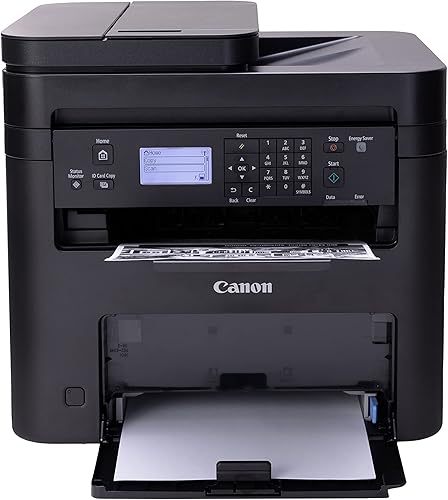
Canon imageCLASS MF273dw: Best for simple wireless multifunction use
- Print, copy and scan
- Up to 30 ppm, first page about 5.3 seconds
- Auto 2-sided printing
- Auto document feeder
A straightforward Canon 3-in-1 for home and small offices, with duplex printing and a feeder for routine copy and scan jobs.
Pros
- Auto 2-sided printing
- Fast first page at about 5.3 seconds
- Print, copy and scan in one unit
Cons
- Heaviest pick in this group
- No fax function
The Canon imageCLASS MF273dw suits a home or small office that needs print, copy and scan without fax.
It prints up to 30 ppm for letter size, and Canon puts the first print out at about 5.3 seconds, which helps when you need one page fast.
Its auto 2-sided printing covers routine duplex work.
You send a report and get two-sided pages without flipping the stack yourself.
The auto document feeder helps with multi-page copies and scans, which are common in small office paperwork.
Canon lists the unit at 14.6 x 15.4 x 14.4 inches and 24.7 lb.
It is the heaviest pick here, so desk loading and shelf placement need more care than with the lighter HP M140w.
Plan for a stable surface and room to open covers.
Against the Brother all-in-one, this Canon gives up fax and cloud touchscreen controls.
Against the HP 3101fdw, it gives up some speed.
It wins when you want a plain 3-in-1 with duplex and fast first-page output.
HP Laserjet MFP M140w Wireless Black: Best for very small spaces
- Print, scan and copy
- Up to 21 ppm single-sided
- Wireless with self-reset
- ID card copy feature
The smallest cabinet here, built for 1 to 3 people who need wireless print, scan and copy in a tight spot.
Pros
- Smallest footprint in this group
- Light at 11.9 lb
- Copies both sides of ID cards onto one sheet
Cons
- Slower at 21 ppm
- No duplex printing
The HP Laserjet MFP M140w suits a single person or a pair sharing a small desk.
HP positions it for 1 to 3 people, and at 10.4 x 14.2 x 7.8 inches and 11.9 lb, it is the smallest and lightest cabinet in this group.
It prints, scans and copies at up to 21 ppm single-sided.
That speed is slower than the 30 to 42 ppm models here, but it fits light home use where jobs are short and spread through the day.
Wireless with self-reset helps it stay ready on a home network.
One handy detail is ID card copying.
It can copy both sides of an ID card or other small document onto one side of one sheet.
That helps with forms that ask for front and back copies in one place.
The trade-off is no duplex.
If you print long reports often, manual flipping will slow you down.
Choose this model for space savings and basic wireless tasks, and choose a duplex model if two-sided printing is part of your weekly routine.
Canon imageCLASS MF465dw II: Best for busy duplex offices
- Print, copy, scan and fax
- Up to 42 ppm
- Automatic duplex and 50-sheet ADF
- 5-inch touchscreen, expandable paper capacity
The fastest printer here, with duplex 4-in-1 functions, a 5-inch touchscreen, and paper capacity that can expand to 900 sheets.
Pros
- Fastest print speed at 42 ppm
- 2-sided feeder scans both sides in one pass
- Expandable to 900 sheets
Cons
- Largest footprint in this group
- Lower score because it suits busy offices more than homes
The Canon imageCLASS MF465dw II suits a busy small or home office that prints shared documents all day.
It prints up to 42 ppm, the fastest speed in this group, and it combines print, copy, scan and fax with automatic duplex printing.
Its 50-sheet 2-sided auto document feeder scans both sides in a single pass.
That helps when a client sends a double-sided form and you need a clean scan without rescanning the back.
The 5-inch touchscreen gives you an intuitive place to start jobs without a PC.
Paper handling is a real strength for larger loads.
Canon lists 250 sheets in the standard cassette, 100 sheets in the multipurpose tray, and optional expansion to 900 sheets with cassette AH-1.
That range suits teams that print in batches rather than a few pages at a time.
The trade-off is size.
At 18.1 x 16.6 x 14.8 inches, it is the largest cabinet here.
It earns its place through speed and capacity, not through compact desk use.
How the best wireless monochrome laser printers compare
Speed, duplex and paper capacity separate these picks more than brand names do.
The table below lines up the shared specs we checked, so you can see the trade-offs side by side.
| Product | Best for | Print speed | Size | Weight | Our score |
|---|---|---|---|---|---|
| Brother HL-L2405W Wireless Compact Monochrome Laser Printer | compact home printing | 30 ppm | 14.2 x 14 x 7.2 in | 15.1 lb | 9.7 |
| Brother MFC-L2820DW Wireless Compact Monochrome All-in-One Laser | small office all-in-one work | 36 ppm | 15.7 x 16.1 x 12.5 in | 22.5 lb | 9.6 |
| HP LaserJet Pro 3101fdw | small teams needing speed | 35 ppm | 16.5 x 12.3 x 15.7 in | 10.5 kg | 9.4 |
| Canon imageCLASS MF273dw | simple wireless multifunction use | 30 ppm | 14.6 x 15.4 x 14.4 in | 24.7 lb | 9.2 |
| HP Laserjet MFP M140w Wireless Black | very small spaces | 21 ppm | 10.4 x 14.2 x 7.8 in | 11.9 lb | 9.2 |
| Canon imageCLASS MF465dw II | busy duplex offices | 42 ppm | 18.1 x 16.6 x 14.8 in | 8.8 |
How we compared these models
We compared specs, features and buyer feedback against what a buyer of a monochrome wireless laser printer wants.
That means we weighed print speed, wireless options, duplex, feeder size, tray capacity, cabinet size and weight, and whether the model scans and copies.
We also matched each model to a real use.
A print-only machine can score high for a home that only prints.
A 4-in-1 can score high for an office that scans daily, even if it is larger.
Scores reflect fit for this search, not a lab test.
Our score weighs specs, features and buyer feedback against what you're shopping for.
We did not test these printers ourselves.
Where a brand makes a claim, we label it as that brand's claim.
Where buyers often mention a pattern, we say so.
Is a monochrome wireless laser printer right for your home or office?
A monochrome wireless laser printer is right if most of your pages are text.
Invoices, contracts, forms, reports and schoolwork all print well in black and white.
You also save on toner use compared with color printing for those pages, because color cartridges sit unused.
It is the wrong pick if you print color labels, photo handouts or charts as your main job.
For those pages, a color printer or a dedicated label printer will serve you better.
Our guide to the best laser printer for candle labels covers a case where color and media choice matter more.
When black and white output is enough
Black and white is enough when readability matters more than color cues.
A typed contract, a tax form and a shipping label all read clearly in monochrome.
Even a chart with labels prints in a usable way if the labels carry the meaning.
When you should look at color instead
Look at color if your documents rely on color to show status, categories or brands.
Marketing handouts, photo prints and customer-facing color reports fall in that group.
In that case, treat this roundup as a starting point for speed and wireless needs, then compare color models on cost per page.
What are the advantages of a laser printer for shared printing?
Laser printing brings speed and crisp text for shared office use.
A 30 ppm model can clear a 30-page report in about a minute of print time, after the first page.
That pace keeps a shared printer from becoming a bottleneck when several people print in the morning.
Read What Are the Advantages of a Laser Printer? for the fuller case.
In short, laser output stays sharp on small text, and toner does not smear the way wet ink can on some pages.
Those traits suit forms and reports that people read closely.
Speed and text quality in daily use
Speed numbers here range from 21 ppm to 42 ppm.
At 21 ppm, short home jobs feel quick.
At 42 ppm, a busy office can move through a shared stack with less waiting.
Text quality at 1200 x 1200 dpi on several models helps with fine print on forms.
Cost per page for text-heavy work
Toner cost per page is the main reason many offices keep a monochrome laser printer.
High-yield cartridges lower that cost when you print a lot of text.
Check cartridge yield and price before you buy, and compare high-yield options on any model you shortlist.
What are the disadvantages of a laser printer you should know first?
Laser printers cost more upfront than basic inkjets, and they only print in black and white in this roundup.
If your household prints color photos weekly, a monochrome machine will not do that job at all.
That limit is the first check before you compare speeds.
See What Are the Disadvantages of a Laser Printer? for the full list.
Other trade-offs include larger cabinets, warmer toner fumes in small rooms, and the need to plan for cartridge replacement rather than ink refills.
Upfront cost and size
Expect a higher first price and a larger desk footprint than a compact inkjet.
The HP M140w is the smallest here at 11.9 lb, and the Canon MF465dw II is the largest at 18.1 inches deep.
Measure your desk and the space behind it for paper exit and cover clearance.
Replacement toner and drum care
Toner cartridges and drum units need replacement over time.
Store cartridges in a dry place, and replace them when print quality fades rather than forcing extra pages.
A high-yield cartridge can lower cost per page for heavy users.
Print-only or all-in-one: which monochrome wireless laser printer fits your desk?
Print-only fits if you print often and scan rarely.
The Brother HL-L2405W is the clear example, with a compact body and a 250-sheet tray.
You gain desk space and a lower score penalty for missing functions you would not use.
All-in-one fits if you copy IDs, scan signed pages or fax office forms.
The Brother MFC-L2820DW, HP 3101fdw, Canon MF273dw and Canon MF465dw II all add scan and copy, and three of them add fax.
A feeder matters most when multi-page jobs are weekly.
Best brother monochrome laser printer options in this group
If you prefer Brother for a home office, compare the HL-L2405W for print-only use with the MFC-L2820DW for 4-in-1 use.
Our sister guide to the best brother monochrome laser printer covers more Brother models if you want a wider choice.
Best lexmark laser printer black and white alternatives to consider
If you want another brand in the mix, our guide to the best lexmark laser printer black and white gives you a Lexmark-focused shortlist.
Compare it on duplex, feeder size and cabinet size against the models here before you decide.
Does automatic duplex or a dual tray matter for your workload?
Automatic duplex matters when you print two-sided pages every week.
Reports, manuals and school packets all benefit, because you save paper and you skip manual flipping.
Among these picks, the Brother MFC-L2820DW, HP 3101fdw, Canon MF273dw and Canon MF465dw II offer automatic duplex.
A dual tray or expandable capacity matters when you print in batches.
The Canon MF465dw II can expand to 900 sheets, which suits a busy office.
If you print mostly letter paper in small batches, a single 250-sheet tray is often enough.
For heavier paper needs, see the best monochrome laser printer with dual tray guide.
It covers models built around two trays for longer runs.
Best duplex monochrome laser printer picks for two-sided work
If duplex is your top need, start with the best duplex monochrome laser printer guide for more duplex-focused models.
Then compare feeder type, first-page speed and cabinet size against the duplex picks in this roundup.
How fast should your wireless laser printer be?
For home use, 21 to 30 ppm is usually enough for short jobs.
The HP M140w at 21 ppm suits light use, and the Brother HL-L2405W and Canon MF273dw at 30 ppm suit most shared home printing.
First-page speed matters too, and the Canon MF273dw is listed at about 5.3 seconds.
For a small office, 35 to 42 ppm helps when several people print at once.
The HP 3101fdw at 35 ppm and the Canon MF465dw II at 42 ppm fit that pattern.
Speed alone does not fix a small tray, so pair a fast model with enough paper capacity for your daily load.
Wireless, Ethernet and USB: which connection should you use?
Use wireless when several devices share the printer and the printer sits away from a PC.
Use Ethernet when the printer has a fixed office spot and you want a wired network connection.
Use USB when one computer is the main user and you want a direct link.
The Brother models here offer dual-band wireless, and the MFC-L2820DW adds Ethernet.
The HP 3101fdw adds Ethernet and Bluetooth.
That range lets you match the connection to your desk layout instead of forcing one setup.
Our verdict: pick the best monochrome wireless laser printer by your weekly jobs
Pick the Brother HL-L2405W if you want the best monochrome wireless laser printer for compact shared home printing.
Pick the Brother MFC-L2820DW if you need duplex 4-in-1 functions in a small office.
Pick the Canon MF465dw II if speed and expandable paper capacity matter most.
Pick the HP M140w if desk space is tight and jobs are light.
Pick the HP 3101fdw if a small team needs fast duplex printing with security settings.
Pick the Canon MF273dw if you want a plain 3-in-1 with auto duplex and fast first-page output.
Start with the job you do most.
Print-only for light home use, all-in-one with a feeder for weekly scanning, and duplex for two-sided reports.
That rule will point you to the right pick faster than any single spec.
Our top 3 picks at a glance
-
1
Best for compact home printing
Brother HL-L2405W Wireless Compact Monochrome Laser Printer
9.7/10 our score
See it on Amazon -
2
Best for small office all-in-one work
Brother MFC-L2820DW Wireless Compact Monochrome All-in-One Laser
9.6/10 our score
See it on Amazon -
3
Frequently asked questions
Is a monochrome wireless laser printer good for shared home printing?
Yes, if most of your documents are black and white text. Wireless lets phones, tablets and laptops share one printer without a cable run.
Choose a model with a tray size that matches your monthly page count, then check duplex and scan needs before you buy.
Print-only or all-in-one: which should I buy?
Choose print-only if cost and small size matter most and you rarely copy or scan. Choose an all-in-one if you scan signed forms, copy IDs, or fax office documents.
A feeder helps most when you handle multi-page jobs every week.
Does automatic duplex matter?
It matters if you print reports, contracts or schoolwork often. Duplex saves paper and saves you from flipping pages by hand.
If you print only a few pages a month, manual duplex or single-sided printing may be enough.


