6 Best Duplex Monochrome Laser Printers (November 2026)
The best duplex monochrome laser printer include the Brother MFC-L2820DW Wireless Compact Monochrome All-in-One Laser for small offices, the HP LaserJet M234sdw Monochrome Laser Printer for small teams, and the Brother Laser Printer for high-volume workgroups.
On this page (8 sections)
- Our top duplex monochrome laser printer picks
- The best duplex monochrome laser printers
- Best duplex monochrome laser printer: how to choose
- What are the advantages of a laser printer for documents?
- What are the disadvantages of a laser printer?
- Best duplex monochrome laser printer for occasional use
- How to set up and care for your printer
- Verdict: which duplex monochrome laser printer should you buy?
The best duplex monochrome laser printer for most small offices is the Brother MFC-L2820DW, because it adds copy, scan and fax to automatic duplex printing in a compact body. The HP LaserJet M234sdw is a close second for small teams without fax needs.
The Brother HL-L6210DW leads for speed and paper capacity when print-only output is enough.
A monochrome laser printer with duplex printing makes sense when most of your pages are text. You get crisp black and white output, automatic two-sided pages and lower running costs than a color machine for document work.
If you are new to this printer type, start with What Is a Monochrome Laser Printer? The Basics.
That guide explains why black-only output suits contracts, invoices and reports.
Our picks at a glance
-
1
 Best for small offices
Brother MFC-L2820DW Wireless Compact Monochrome All-in-One Laser
9.6/10 our score
See it on Amazon -
2

-
3

Our top duplex monochrome laser printer picks
The six picks below cover two clear jobs. All-in-one models add copy, scan and fax for small offices.
Print-only models focus on speed, lighter weight or larger paper capacity for document-only work.
How we compared these printers
We compared specs, features and buyer feedback against what you shop for here: automatic two-sided printing for black and white workloads. Our score weighs specs, features and buyer feedback against that goal.
We checked print speed, duplex type, paper capacity, included functions, connectivity, size and weight. We also noted toner types and tray expansion where they lower long-term hassle.
No pick here uses manual duplex. Every model shortlisted prints both sides automatically, so you do not need to flip paper or resend a job.
We also looked at how each machine handles shared use. Connectivity, security features and mobile printing decide whether one person or a whole team can use the printer without delay.
Paper capacity was weighed the same way, because a small tray can undo a fast print speed if you stop to refill it all day.
The best duplex monochrome laser printers
Brother MFC-L2820DW Wireless Compact Monochrome All-in-One Laser: Best for small offices
- Automatic duplex
- Print, copy, scan and fax
- 50-page auto document feeder
- 250-sheet paper tray
- Dual-band wireless, Ethernet and USB
- 2.7-inch touchscreen
A compact 4-in-1 with automatic duplex, a 50-page auto document feeder and wireless connection for small offices that need more than print-only output.
Pros
- Automatic duplex printing
- Copy, scan and fax in one unit
- 50-page auto document feeder
- Compact footprint
Cons
- Speed below the fastest print-only pick here
- 250-sheet tray fills sooner than high-capacity models
The Brother MFC-L2820DW suits a small office that needs printing, copying, scanning and faxing in one compact machine. Its 250-sheet paper tray cuts refill frequency, and the 50-page auto document feeder handles multi-page copy, scan and fax jobs without constant loading.
Brother states print speeds up to 36 ppm in its bullets and lists 34 pages per minute in its detailed specs. In daily use that pace keeps invoices, reports and forms moving without a long wait for the stack.
Scan speeds reach up to 23.6 ipm for black and white pages, which helps when you digitise a pile of signed papers.
Dual-band wireless, Ethernet and USB give you flexible connection choices for shared use. A 2.7-inch touchscreen lets you print from and scan to cloud apps such as Google Drive and Dropbox, so files do not have to pass through a computer first.
The Brother Mobile Connect app also lets you print, scan and check toner from a phone.
The trade-off is paper capacity and speed against the print-only workgroup pick below. High-volume teams will refill sooner than with a 520-sheet tray.
For a small office, the all-in-one set and compact 22.5-pound body matter more than raw speed.
HP LaserJet M234sdw Monochrome Laser Printer: Best for small teams
- Automatic duplex
- Print, scan and copy
- 40-page auto document feeder
- Up to 30 pages per minute single-sided
- Dual-band Wi-Fi with self-reset
- Ethernet and USB 2.0
An all-in-one HP for 1 to 5 people with automatic two-sided printing, a 40-page auto document feeder and dual-band Wi-Fi that can reset itself.
Pros
- Automatic duplex printing
- 40-page auto document feeder
- Dual-band Wi-Fi with self-reset
- Ethernet included
Cons
- Print-only busy offices may want higher tray capacity
- No fax function
The HP LaserJet M234sdw suits a small team of 1 to 5 people that prints professional black and white documents and reports. HP states up to 30 pages per minute single-sided and up to 19 two-sided images per minute, which keeps multi-page duplex jobs moving without a sharp slowdown.
A 40-page auto document feeder lets you copy and scan hands-free. That matters when you process signed forms or incoming reports through the day.
The feeder also keeps pages in order for a fax-free office that still handles paper in batches.
Dual-band Wi-Fi with self-reset can detect and resolve connectivity issues on its own. Ethernet is also included for a wired desk or shared office setup, so the machine does not depend on wireless signal alone.
Wireless printing works from mobile devices, PCs and tablets, and HP lists support for Microsoft, Mac, AirPrint, Android and Chromebook.
HP Smart app features help with repetitive tasks and scan-to-cloud work. At 19 pounds it is lighter than the top Brother pick, which helps if you move it between rooms.
The trade-off against the top pick is the lack of fax. If your office still sends faxes, the Brother all-in-one covers that job.
Brother Laser Printer: Best for high-volume workgroups
- Automatic duplex
- Print only
- Up to 50 pages per minute
- 520-sheet main tray
- 100-sheet multipurpose tray
- Gigabit Ethernet and dual-band wireless
A print-only Brother built for high-volume black and white work, with 50 pages per minute, a 520-sheet main tray and expansion to 1,660 sheets.
Pros
- Fastest print speed in this group
- Large 520-sheet main tray
- Expandable paper capacity
- Gigabit Ethernet
Cons
- Print only, with no copy or scan
- Heaviest pick in this group
The Brother Laser Printer HL-L6210DW suits busy offices and workgroups that print high volumes and do not need copy or scan functions. It delivers up to 50 pages per minute, the fastest speed in this group by a clear margin.
Paper handling is its other strength. A 520-sheet main tray plus a 100-sheet multipurpose tray supports long runs, and total capacity can expand to 1,660 sheets with optional trays.
That reduces downtime for shared printing and means fewer walks to the printer during a busy day.
Brother states ultra high-yield toner yields up to 18,000 pages. The included TN920 cartridge yields 3,000 pages, so check your monthly volume before you choose the larger cartridge.
In daily use the yield matters more than the headline speed, because a workgroup can burn through a standard cartridge quickly.
Gigabit Ethernet and dual-band wireless help with printer sharing across a business network. Triple Layer Security protects network, devices and documents.
The trade-off is weight and size for a small desk. At 29.8 pounds it is heavier than the all-in-one picks, and print-only means you still need a scanner elsewhere.
HP LaserJet M207dw: Best for simple home offices

- Automatic duplex
- Print only
- Up to 28 pages per minute
- 150-sheet maximum capacity
- Dual-band Wi-Fi with self-reset
- Ethernet and USB
A light, print-only HP with automatic duplex and dual-band Wi-Fi for offices that print everyday black and white documents and do not need scanning.
Pros
- Lightest pick in this group
- Automatic duplex printing
- Dual-band Wi-Fi with self-reset
- Compact depth
Cons
- Print only, with no copy or scan
- 150-sheet capacity is the smallest here
The HP LaserJet M207dw suits a home office or small office that prints everyday black and white documents and needs nothing beyond print. HP states up to 28 pages per minute with fast two-sided printing for multipage projects, and a 7-second first page time in the specs.
At 12.4 pounds, it is the lightest machine here. Its depth is also the smallest in this group, which helps on a narrow desk or shelf.
Auto-On/Auto-Off technology helps save energy when the printer sits idle between jobs.
Dual-band Wi-Fi with self-reset handles connectivity issues, and Ethernet and USB 2.0 give wired options. Wireless printing works with Microsoft, Mac, AirPrint, Android and Chromebook devices, so a mixed household or office can print without a cable.
The HP app adds mobile printing and routine management from a phone.
The main trade-off is capacity and functions. Maximum sheet capacity is 150 sheets, so heavy users will refill more often.
There is also no copy, scan or fax, so pair it with another device if you need those jobs. For light document work that trade-off keeps the machine simple and easy to place.
Canon imageCLASS MF462dw II: Best for touchscreen control
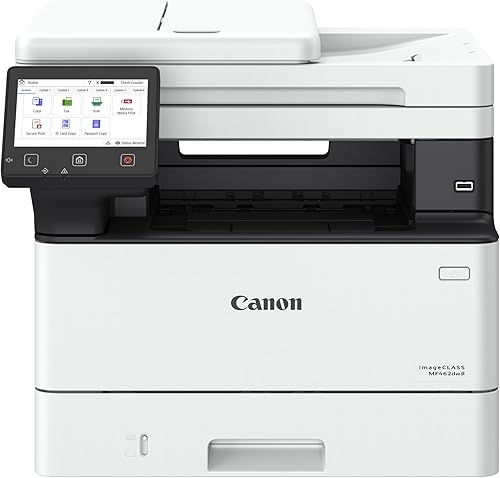
- Automatic duplex
- Print, scan, copy and fax
- 50-sheet duplex auto document feeder
- 5-inch color touchscreen
- 250-sheet cassette plus 100-sheet multipurpose tray
- Up to 37 pages per minute
A 4-in-1 Canon with a 5-inch color touchscreen, a 50-sheet duplex auto document feeder and paper capacity that can expand with an optional cassette.
Pros
- Large 5-inch color touchscreen
- Duplex auto document feeder
- Expandable paper capacity
- Print, scan, copy and fax
Cons
- Heaviest pick in this group
- Largest footprint in this group
The Canon imageCLASS MF462dw II suits a small or home office that wants a 4-in-1 with a large touchscreen and room to grow paper capacity. It prints, scans, copies and faxes, with up to 37 pages per minute and a first print time of about 5 seconds.
A 5-inch color touchscreen with Application Library gives quick access to features you use most. That layout suits shared use where different people use different functions.
You can keep print, scan and copy shortcuts in the order you actually use them.
The 50-sheet duplex auto document feeder scans both sides in one pass, which saves time on double-sided originals. That detail matters for contracts and forms that are already two-sided.
Standard paper capacity is 250 sheets in the cassette plus 100 sheets in the multipurpose tray, and an optional 550-sheet cassette can expand the total to 900 sheets.
Canon states Toner 070 yields about 3,000 pages, while Toner 070 High-Capacity yields about 10,200 pages. The trade-off is size and weight, so measure your desk before you buy.
At 46.6 pounds it is the heaviest pick here and the largest by footprint.
Canon imageCLASS LBP172dw: Best for single-function printing

- Automatic duplex
- Print only
- Up to 35 pages per minute
- 250-sheet standard cassette
- Wireless printing from mobile devices
- Chromebook compatible
A print-only Canon with automatic two-sided printing, a 250-sheet cassette and mobile printing for small offices that only need black and white pages.
Pros
- Automatic duplex printing
- 250-sheet standard cassette
- Mobile printing support
- Chromebook compatible
Cons
- Print only, with no copy or scan
- Tallest cabinet in this group
The Canon imageCLASS LBP172dw suits a small office that only needs single-function black and white printing. It prints up to 35 pages per minute with automatic two-sided printing to save paper and limit replacements.
A 250-sheet standard cassette gives it more capacity than the lightest HP pick here. That means fewer refills for regular document printing, without a large workgroup footprint.
In daily use a standard cassette suits a steady stream of reports and letters rather than occasional single pages.
Wireless printing works from computers and mobile devices through the Canon PRINT app, Apple AirPrint and Mopria Print Service. Chromebook compatibility helps with schoolwork and office documents printed from a Chromebook, which is common in a home office.
At 15.2 pounds it stays light enough to move between a desk and a shelf.
It uses Canon Toner 072 and 072 High-Capacity cartridges, so high-capacity toner can cut how often you order supplies. The trade-off is simple: there is no copy, scan or fax function.
Choose it when print-only output is the full job, and choose an all-in-one above when paper documents also need scanning.
Best duplex monochrome laser printer: how to choose
Start with the job, not the brand. If you only need pages, a print-only model is lighter and simpler.
If you handle paper forms, an all-in-one with an auto document feeder saves more time.
Do you need copy, scan and fax?
An auto document feeder matters more than a flatbed scan alone. It feeds multi-page originals while you do other work.
The Brother MFC-L2820DW, HP M234sdw and Canon MF462dw II all include an auto document feeder.
Fax still matters in some offices. The Brother MFC-L2820DW and Canon MF462dw II include fax.
The HP M234sdw does not, so check your workflow before you rule it out.
A larger feeder also changes how you scan. A 50-page feeder can take a full packet in one run, while a 40-page feeder needs a reload sooner on long sets.
For daily copying and scanning, that small gap adds up.
How fast should your printer be?
Print speed is measured in pages per minute for black and white printing. A 28 to 35 ppm printer suits most small offices.
A 50 ppm printer suits shared workgroups with long print runs.
Speed matters most with duplex jobs. A printer that is fast single-sided may still slow down when it flips pages.
The HP picks state two-sided speeds, so compare those figures for two-sided reports.
First page time is the other speed figure to check. A printer that wakes and prints the first page in about 5 to 8 seconds feels faster for short jobs than its headline ppm suggests.
For a single letter or form, that wait matters more than the full-run rate.
How much paper capacity do you need?
A 150-sheet capacity suits light, occasional printing. A 250-sheet tray is a better default for daily office use.
A 520-sheet tray suits shared machines that print all day.
Expandable trays help when volume grows. The Brother HL-L6210DW can expand to 1,660 sheets with optional trays.
The Canon MF462dw II can expand with an optional 550-sheet cassette.
Paper capacity also affects where you place the printer. A large tray adds depth and weight, so check desk space before you choose the biggest option.
A smaller tray can make sense if you print in short bursts.
If you want more tray options, see our guide to the best monochrome laser printer with dual tray.
Which brand should you pick?
Brand choice often comes down to toner cost, app quality and the functions you use daily. Our best Brother monochrome laser printer guide covers Brother models in more depth.
Canon fans can compare models in our best Canon monochrome laser printer guide. Wireless needs are covered in our best monochrome wireless laser printer guide.
What are the advantages of a laser printer for documents?
Laser printers suit document-heavy work because toner stays sharp on text and does not dry out. That makes them a strong fit for offices that print in bursts and then go quiet for days.
Read our What Are the Advantages of a Laser Printer? guide for a fuller look at speed, running costs and output quality.
Toner also suits high-volume printing. When a cartridge yields thousands of pages, cost per page stays low for reports and forms.
That is why many small offices choose monochrome laser over inkjet for text.
Sharp text also makes last-minute corrections easier. A reprint of a one-page form costs little time and still looks clean.
For contracts and invoices that detail matters more than photo quality.
What are the disadvantages of a laser printer?
The main trade-off is color. A monochrome laser printer cannot print color documents, photos or color charts at all.
Read What Are the Disadvantages of a Laser Printer? before you buy if color work is part of your job. Some offices keep a separate color printer for those pages.
Size and upfront cost are other trade-offs. Laser machines are often heavier than inkjet printers, especially all-in-one models.
If you only print a few pages a month, a smaller printer may fit your space better.
Toner replacement also needs planning. A high-yield cartridge lowers cost per page, but a standard cartridge in a busy office can run out fast.
Check the yield for each model above against your monthly volume.
Best duplex monochrome laser printer for occasional use
Occasional users should favor low waste and simple setup over top speed. Toner does not dry out in the cartridge, so a laser printer suits low-volume printing better than many inkjet models.
Our best laser printer for occasional use guide explains which features matter when you print only a few pages each week.
For occasional use, automatic duplex still helps. You can print a two-sided form without standing by the printer to flip the paper.
Wireless setup also helps when the printer lives in a different room.
Energy features matter in this case too. Auto-On and Auto-Off settings cut idle use when the printer waits for the next job.
Toner Save and Eco modes can also stretch a cartridge when you print in bursts.
How to set up and care for your printer
Set up wireless first, then turn on automatic duplex as the default. That keeps two-sided printing consistent for every document.
Place the printer on a flat, stable surface with room to open trays and the top cover. Keep the feed path clear so paper slides in straight.
Check the paper guides so sheets sit snug without bending.
Use the paper type your printer expects for best results. Standard office paper suits most document jobs in this group.
Keep spare paper in a dry place so sheets stay flat.
Replace toner when print quality fades, not when a low-toner warning first appears. Genuine toner types are listed for each model above, and high-capacity cartridges lower how often you replace them.
Clean the exterior with a dry cloth and keep vents clear of dust. If prints come out faded or streaked, follow the brand's cleaning steps for the drum or toner area before you replace parts.
How do you keep duplex printing reliable?
Test duplex with a short document after setup. Check that pages come out in the right order and that the second side is not upside down for your reading style.
Adjust the setting once so later jobs follow the same rule.
Keep the paper tray loaded with the same size paper when you can. Switching sizes between jobs can pause duplex printing or force a manual check.
A steady paper supply keeps the two-sided path smooth.
Verdict: which duplex monochrome laser printer should you buy?
Buy the Brother MFC-L2820DW if you want one machine for print, copy, scan, fax and duplex printing. It is the best fit for a small office that handles both digital and paper documents.
Buy the HP LaserJet M234sdw if you are a small team without fax needs. Its auto document feeder and self-resetting Wi-Fi suit daily document work.
Buy the Brother HL-L6210DW if speed and paper capacity top your list. It is a print-only workgroup machine, so pair it with a scanner if you need copying.
Buy the HP LaserJet M207dw if you want the lightest print-only option. It suits a simple home office that prints everyday documents.
Buy the Canon imageCLASS MF462dw II if you want a large touchscreen and expandable paper capacity. It is the largest machine here, so check your space first.
Buy the Canon imageCLASS LBP172dw if you need simple single-function printing. Its 250-sheet cassette and mobile printing cover basic document jobs.
Our top 3 picks at a glance
-
1
Best for small offices
Brother MFC-L2820DW Wireless Compact Monochrome All-in-One Laser
9.6/10 our score
See it on Amazon -
2
-
3
Frequently asked questions
What should I look for in a duplex monochrome laser printer?
Look for automatic duplex printing, a print speed that matches your monthly volume, enough paper capacity to reduce refills, and the functions you need. An all-in-one adds copy, scan and fax.
A print-only model costs less space and suits offices that scan elsewhere.
Is automatic duplex worth it for black and white documents?
Yes, if you print reports, contracts or invoices often. Automatic duplex saves paper and stops you from flipping pages by hand.
It also keeps page order correct in long documents.
Manual duplex can work for occasional two-sided jobs.
Do I need an all-in-one or a print-only laser printer?
Choose an all-in-one if you copy, scan or fax paper often. The auto document feeder matters most for multi-page jobs.
Choose print-only if your phone or a separate scanner handles those tasks and you want a lighter machine.
How much paper capacity do I need?
A 250-sheet tray suits light office use and fewer refills than a 150-sheet tray. A 520-sheet tray suits shared workgroups.
Check whether trays can expand later if your print volume grows.
Are monochrome laser printers good for home offices?
They suit home offices that print mostly text and black and white documents. Toner does not dry out like ink, so occasional printing wastes less.
You will still want a color printer if you print photos or color forms.


