8 Best Photo Printers for Professionals (October 2026)
The best photo printers for professional photographers include the Canon imagePROGRAF PRO-310 Professional 13" Wireless Inkjet for fine art studios, the Canon PIXMA PRO-200S Professional 13" Wireless Inkjet for vivid color portfolios, and the HP Envy Photo 7975 Wireless Color Inkjet for home studio multitasking.
On this page (7 sections)
- How we chose photo printers for professionals
- Compare the best photo printers for professional photographers
- Best photo printers for professionals by use
- How should you choose a photo printer for professional work?
- How do you set up and care for a photo printer?
- What mistakes should you avoid when printing photos?
- Which professional photo printer should you choose?
The Canon imagePROGRAF PRO-310 is the best photo printer here for professionals who want pigment ink, fine-art media work and dedicated print controls. The PIXMA PRO-200S is the dye-based alternative, while Epson's EcoTank Photo models add bottle refills and multifunction features.
These options cover different jobs, so start with the size and type of print you deliver most often.
This roundup compares 8 models for photographers, studios and creative businesses. It includes dedicated 13-inch photo printers, wide-format tank all-in-ones, a home photo and office printer, two compact 4 x 6 in printers, and a print-and-cut sticker machine.
If you're still weighing print technologies, see which printer is better for printing photos and our guide to why inkjet is better for photo printing. Those guides help set expectations before you choose a device.
Our picks at a glance
-
1
 Best for fine art studios
Canon imagePROGRAF PRO-310 Professional 13" Wireless Inkjet
9.2/10 our score
See it on Amazon -
2
 Best for vivid color portfolios
Canon PIXMA PRO-200S Professional 13" Wireless Inkjet
8.7/10 our score
See it on Amazon -
3
 Best for home studio multitasking
HP Envy Photo 7975 Wireless Color Inkjet
8.5/10 our score
See it on Amazon
- 4
 Check it
Epson EcoTank Photo ET-8500 Wireless Color All-in-One
Best for bottle-fed photo workflows - 5
 Check it
Epson EcoTank Photo ET-8550 Wireless Wide-Format All-in-One
Best for wide media projects - 6
 Check it
KODAK Dock Plus 4x6 Photo Printer
Best for phone-docked proofs - 7
 Check it
Liene M100 4x6'' Photo Printer
Best for shared event printing - 8
 Best for custom photo stickersCheck it
How we chose photo printers for professionals
The Canon PRO-310 ranks first because its 9-color pigment system, Chroma Optimizer and Matte Black ink make it the most focused option here for photographers who want print control. We compared each model's ink approach, maximum media size, functions and connections against common photo workflows.
Scores reflect how well a model's stated features match the needs behind this search. A dedicated wide-format printer ranks differently from a 4 x 6 in device because they solve different jobs, even when the compact printer's narrow use case is valuable.
We also considered whether you need one device for prints alone or a machine that handles scanning, copying and documents. The picks below are not interchangeable: format, ink supply and extra functions should decide the shortlist.
Compare the best photo printers for professional photographers
The Canon PRO-310 leads for pigment-based dedicated printing, and the PRO-200S follows for photographers who prefer dye-based color. Epson's EcoTank models combine wide-format media with bottle-based ink, while HP and the compact printers cover home tasks, 4 x 6 in output and sticker making.
| Product | Best for | Ink system | Maximum media size | Interface | Our score |
|---|---|---|---|---|---|
| Canon imagePROGRAF PRO-310 Professional 13" Wireless Inkjet | fine art studios | 9-color pigment plus Chroma Optimizer | 13 in wide | Ethernet, USB | 9.2 |
| Canon PIXMA PRO-200S Professional 13" Wireless Inkjet | vivid color portfolios | 8-color dye | Ethernet, USB | 8.7 | |
| HP Envy Photo 7975 Wireless Color Inkjet | home studio multitasking | 8.5 | |||
| Epson EcoTank Photo ET-8500 Wireless Color All-in-One | bottle-fed photo workflows | 6-color Claria ET Premium | 13 x 19 in | 8.4 | |
| Epson EcoTank Photo ET-8550 Wireless Wide-Format All-in-One | wide media projects | 6-color Claria ET Premium | 8.3 | ||
| KODAK Dock Plus 4x6 Photo Printer | phone-docked proofs | 9.6 | |||
| Liene M100 4x6'' Photo Printer | shared event printing | 9.5 | |||
| Liene PixCut S1 Inspire Kit | custom photo stickers | 4 x 7 in | 9.4 |
Best photo printers for professionals by use
The right pick depends on your deliverables and work space. Start with the Canon PRO-310 for dedicated pigment printing, the PRO-200S for dye output, and an Epson tank if bottle-based ink and multifunction use matter more.
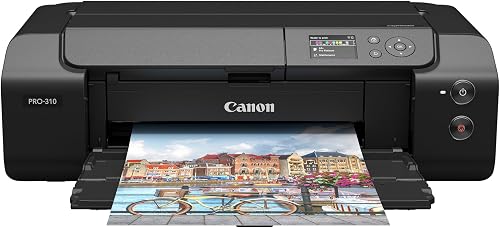
1. Canon imagePROGRAF PRO-310 Professional 13" Wireless Inkjet: Best for fine art studios
Canon imagePROGRAF PRO-310 Professional 13" Wireless Inkjet: Best for fine art studios
- 9-color pigment ink plus Chroma Optimizer
- Matte Black ink
- 3 in color LCD
The PRO-310 suits photographers who want a dedicated printer for color and black-and-white work. Matte Black ink supports deeper dark areas on fine art paper.
Pros
- Pigment ink system
- Chroma Optimizer for gloss uniformity
- LCD shows ink levels and printer status
Cons
- Print only
- Large desktop footprint
The Canon imagePROGRAF PRO-310 is the clearest choice here for photographers who want a dedicated printer with pigment ink and status controls. Its 9-color system includes Chroma Optimizer, and Matte Black ink supports enhanced black density and a wider dark-area range.
Canon describes it as a photo and fine art printer for color and black-and-white prints. Its 3 in color LCD shows ink levels, printer status and settings, while its anti-clogging system and skew correction support the print workflow.
The PRO-310 prints only and connects through Ethernet or USB. Its desktop body needs a permanent work surface, so measure the available depth and width before making room for it.
Choose this model if you make portfolio or fine-art prints and value the pigment system and control panel. Skip it if you need copying, scanning or a smaller machine for occasional 4 x 6 in snapshots.
2. Canon PIXMA PRO-200S Professional 13" Wireless Inkjet: Best for vivid color portfolios
Canon PIXMA PRO-200S Professional 13" Wireless Inkjet: Best for vivid color portfolios
- 8-color dye ink
- Borderless printing up to 13 x 19 in
- 3 in color LCD
This 13-inch printer suits photographers who favor vivid color output and want flexible print sizes. It supports borderless prints from 3.5 x 3.5 in to 13 x 19 in.
Pros
- 8-color dye system
- Wide borderless size range
- LCD shows ink levels and printer status
Cons
- Print only
- Dye ink rather than pigment
The Canon PIXMA PRO-200S suits photographers who want a dedicated 13-inch printer centered on an 8-color dye system. Canon positions it for photographers and graphic artists seeking vibrant color output, with flexible borderless print sizes from 3.5 x 3.5 in to 13 x 19 in.
Its 3 in color LCD shows ink levels, printer status and settings. Canon gives print times of 53 seconds for a bordered 8 x 10 in print and 90 seconds for a bordered A3+ print.
The PRO-200S is print only, with Ethernet and USB interfaces. It makes sense if your work calls for vivid color and a range of borderless sizes, but it is not the pick for someone who needs an all-in-one or is specifically seeking pigment ink.
Pick it when a dedicated dye printer fits your color workflow and you regularly print beyond standard photo sizes. Compare its dye emphasis with the PRO-310 before choosing paper and finish.
3. HP Envy Photo 7975 Wireless Color Inkjet: Best for home studio multitasking
HP Envy Photo 7975 Wireless Color Inkjet: Best for home studio multitasking
- Print, scan and copy
- Separate photo tray
- Automatic two-sided printing
The Envy Photo 7975 is a home all-in-one for photographers who also need document, scan and copy functions. Its separate photo tray keeps photo paper ready.
Pros
- Print, scan and copy
- Separate photo tray
- Automatic two-sided printing
Cons
- Home-focused all-in-one rather than dedicated photo printer
- Maximum media size is 8.5 x 11.7 in
The HP Envy Photo 7975 fits a home studio where photo printing shares space with paperwork. It prints, scans and copies, and its separate photo tray, automatic document feeder and automatic two-sided printing help cover more than one task.
A color touchscreen and mobile printing support suit users who want a general-purpose home device. Compare more options in our guide to wireless home printers.
The maximum media size is 8.5 x 11.7 in, which rules it out for photographers who need 13-inch output.
Choose the Envy when you need documents and scans as well as standard-size photos. Skip it if your paid work depends on larger prints or a dedicated, more specialized photo workflow.
4. Epson EcoTank Photo ET-8500 Wireless Color All-in-One: Best for bottle-fed photo workflows
Epson EcoTank Photo ET-8500 Wireless Color All-in-One: Best for bottle-fed photo workflows
- 6-color Claria ET Premium ink
- Cartridge-free ink bottles
- Print and copy
The ET-8500 combines photo printing with an all-in-one setup and refillable ink tanks. Its 6-color system and support for media up to 13 x 19 in suit photo and creative work.
Pros
- Cartridge-free ink bottles
- 6-color photo ink system
- Supports media up to 13 x 19 in
Cons
- Larger than a compact photo printer
- Ink costs depend on print volume and usage
The Epson EcoTank Photo ET-8500 combines photo printing, copying and bottle-based ink. It uses 6-color Claria ET Premium ink and supports media up to 13 x 19 in, so it can cover both photographs and creative projects.
Epson describes borderless 8.5 x 11 in photos, cardstock and other media up to 1.3 mm thick. A 4.3 in touchscreen and Wi-Fi or Wi-Fi Direct connectivity give you ways to manage jobs from the printer or connected devices.
The tank design is most appealing if you print regularly and want refill bottles instead of cartridges. If you print less often, compare printer choices for infrequent use.
Epson's cost comparisons depend on print tasks, volume and use, so decide based on your own mix rather than assuming every print job will cost the same.
Choose the ET-8500 if you want wide media and a photo-focused all-in-one that also copies. Skip it if you need scanning, or if a print-only model better suits your workflow.
5. Epson EcoTank Photo ET-8550 Wireless Wide-Format All-in-One: Best for wide media projects
Epson EcoTank Photo ET-8550 Wireless Wide-Format All-in-One: Best for wide media projects
- 6-color Claria ET Premium inks
- Borderless photos up to 13 x 19 in
- Print, scan and copy
The ET-8550 suits photographers who want wide-format output and an all-in-one with bottle-based ink. It supports cardstock and other media up to 1.3 mm thick.
Pros
- Wide-format borderless printing
- Print, scan and copy
- Cartridge-free ink bottles
Cons
- Large footprint
- Ink use and savings vary by print volume
The Epson EcoTank Photo ET-8550 is a strong fit for wide-format output, bottle-based ink and several studio tasks in one machine. Its 6-color Claria ET Premium system supports borderless photos up to 13 x 19 in.
It can print, scan and copy, and handles cardstock and other media up to 1.3 mm thick. The large body needs a stable, roomy work surface, so account for its footprint before setting up a home studio.
Choose the ET-8550 if you want to make wide photos and creative projects while keeping scan and copy functions nearby. Skip it if your work is limited to small prints, or if you don't want an all-in-one taking up substantial desk space.
6. KODAK Dock Plus 4x6 Photo Printer: Best for phone-docked proofs
KODAK Dock Plus 4x6 Photo Printer: Best for phone-docked proofs
- 4PASS dye sublimation
- Integrated smartphone dock
- Prints 4 x 6 in photos
A desktop choice for photographers who also need 4x6 prints from compatible phones. The built-in dock charges a phone during printing.
Pros
- Integrated phone dock
- Protective lamination layer
- App offers crop and edit tools
Cons
- Limited to 4 x 6 in media
- Print only
The KODAK Dock Plus suits photographers who want 4 x 6 in prints directly from compatible phones. The integrated dock holds and charges a phone while you print, making it a straightforward desktop station for small output.
Its 4PASS dye sublimation process lays down three color layers and finishes with a clear protective lamination layer. Bluetooth and the KODAK Photo Printer app let you crop, edit and customize images before printing.
This model is designed for desktop use and has a firm 4 x 6 in limit. Choose it for phone-based proofs, family-event prints or small client handouts; skip it if you need different paper sizes or larger portfolio pieces.
For a comparison aimed at household photo printing, see best photo printers for home use.
7. Liene M100 4x6'' Photo Printer: Best for shared event printing
Liene M100 4x6'' Photo Printer: Best for shared event printing
- Thermal dye sublimation
- Built-in Wi-Fi hotspot
- Up to 5 simultaneous connections
This 4x6 printer can serve a small team or family using compatible phones and computers. Its app includes image adjustments and print-status checks.
Pros
- Hotspot works without a home Wi-Fi network
- Supports up to 5 simultaneous connections
- App offers filters and brightness controls
Cons
- Limited to 4 x 6 in media
- Requires Liene proprietary cartridges
The Liene M100 fits a shared desk or event setup where several people send 4 x 6 in images to one printer. Its built-in hotspot lets compatible devices connect directly without a home Wi-Fi network, and up to 5 devices can connect at once.
For a closer look at mobile connection methods, see AirPrint and wireless printing.
The app provides cropping, filters, brightness and contrast adjustments, and print-status checks. It uses thermal dye sublimation, with a laminated print surface designed to resist water, scratches, fingerprints and fading.
The package includes photo paper and color cartridges, and the printer uses Liene proprietary cartridges. Choose it for shared small-format output from phones and computers; skip it if your work needs larger prints or you want a general-purpose photo printer.
If your needs center on everyday 4 x 6 in prints, compare other photo printers for home use in 4 x 6 in formats.
8. Liene PixCut S1 Inspire Kit: Best for custom photo stickers
Liene PixCut S1 Inspire Kit: Best for custom photo stickers
- Photo printing and cutting in one device
- 300 dpi
- Includes photo and sticker paper
This printer and cutter suits photographers who want to turn images into custom stickers or labels. It prints and cuts through the Liene app.
Pros
- Prints and cuts in one device
- Auto-laminated sticker output
- Includes photo and sticker paper
Cons
- Maximum media size is 4 x 7 in
- Focused on creative output rather than large photo prints
The Liene PixCut S1 combines color printing and cutting for photographers who make custom stickers, labels or other small creative pieces. The Liene app lets you edit images and send them through a print-and-cut workflow.
It uses thermal dye sublimation at 300 dpi, with automatic lamination during printing. The Inspire Kit includes 36 photo papers and 144 sticker papers, so it is set up for both small photo prints and sticker projects.
Its maximum media size is 4 x 7 in, which makes it a poor fit for portfolio printing. Choose it when the integrated cutter is useful to your creative work; skip it if you only need conventional photo prints.
How should you choose a photo printer for professional work?
Choose by the prints you deliver, the media you use and the other jobs the printer must handle. Think through those needs before comparing ink systems or convenience features.
What print size do you need most?
Choose a 4 x 6 in printer for small proofs, event photos and handouts, and a wide-format model if clients receive larger work. The KODAK Dock Plus and Liene M100 focus on 4 x 6 in output, while the Canon PRO models and Epson EcoTank Photo models support wider printing.
Don't buy a wide-format printer just because it has a larger maximum size. If your regular orders are small, the extra desk space and broader capabilities may add little value to the day-to-day workflow.
Should you choose pigment or dye ink?
Choose based on the output style and paper you plan to use. The PRO-310 uses a 9-color pigment system and Matte Black ink, while the PRO-200S uses an 8-color dye system and focuses on vibrant color printing.
The product descriptions and supported media provide a starting point, but your print workflow should guide the decision. Check compatible paper guidance from the printer maker and plan to use suitable settings for each media type.
Do you need a dedicated photo printer or an all-in-one?
A dedicated print-only model makes sense if printing is the main job and you don't need a scanner or copier. Both Canon PRO models are print only, while the HP Envy and Epson ET-8550 add scanning and copying, and the ET-8500 prints and copies.
An all-in-one can keep a small studio from needing separate equipment for routine office tasks. Its tradeoff is that it can take more space and may not match a specialist's needs as closely as a focused photo printer.
When does a photo tank make sense?
A photo tank can suit a photographer who prints often and wants bottle-based ink instead of cartridges. Epson's ET-8500 and ET-8550 both use 6-color Claria ET Premium ink, with wide media support.
Print volume matters. Consider the number and type of images you produce, how often you print, and the ongoing ink supply you prefer.
For occasional jobs, compare the whole workflow before choosing a tank solely because it uses bottles.
How do you set up and care for a photo printer?
Set up the printer around the media and connection you'll use most, then keep the print path and supplies organized. Good habits reduce avoidable errors and make repeat jobs easier to manage.
First, choose a level surface with enough space to load paper and access the printer. Leave room for wide sheets and any media path the printer needs, and keep paper in its packaging until you are ready to use it.
Follow the printer's setup prompts and install its software or app before sending important files. Connect it over the network or cable you plan to use, then check that your computer or phone can find the printer and select the correct paper size.
Load photo media in the correct orientation and choose the matching paper type in the print dialog. A mismatch between the paper in the tray and the selected settings can lead to poor results, wasted sheets or a job printed at the wrong size.
Keep ink levels visible and replenish supplies before a deadline. On models with a control screen, check status there; for app-based printers, confirm the device connection and paper supply before starting a batch.
For the compact dye-sublimation models, install the cartridge and paper according to the device instructions. The Liene M100 calls for the cartridge to click into place, and its print head should be cleaned promptly if smudges appear.
After a print run, store remaining photo paper flat and protected from dust. Keep the work area clean, and follow the manufacturer's cleaning and maintenance guidance rather than wiping internal parts with materials that may leave lint or residue.
What mistakes should you avoid when printing photos?
The most common avoidable errors are selecting the wrong paper size, using mismatched media settings, and choosing a printer that cannot produce the format you need. A short preflight check can save both time and supplies.
- Ignoring the size limit: a 4 x 6 in printer cannot make a larger portfolio print. Check the supported media before buying, not after a client requests a different format.
- Sending a file to the wrong printer: if several printers appear in your print menu, verify the selected device and paper before sending a large job.
- Skipping the paper setting: select a media type and size that match the sheet loaded. The print dialog and physical paper need to agree.
- Buying on one headline feature: bottle-based ink, borderless output or a phone dock only matters if it fits your routine jobs. Compare the whole workflow, including size and extra functions.
- Expecting a compact printer to replace a studio printer: the KODAK and Liene 4 x 6 in models are useful in their lane, but their size limits make them poor substitutes for wide-format machines.
- Printing a full batch before checking the setup: start with one image to confirm orientation, crop, paper size and color settings. Then send the rest of the job.
Which professional photo printer should you choose?
Choose the Canon imagePROGRAF PRO-310 for dedicated pigment printing and fine-art work, or the PIXMA PRO-200S if you want a 13-inch dye printer with flexible borderless sizes. Pick the Epson ET-8500 or ET-8550 for bottle-based ink and wide media, with the ET-8550 adding scanning.
For a home studio that also prints documents, choose the HP Envy Photo 7975 if standard-size output is enough. For shared 4 x 6 in jobs, choose the Liene M100 for multi-device connections or the KODAK Dock Plus for its phone dock; choose the PixCut S1 only when sticker cutting is part of the work.
These are the best photo printers for professionals when chosen to match a real workflow: size first, then ink approach and extra functions. For smaller phone prints, compare portable photo printers for 2 x 3 in and 4 x 6 in photos, and use which printer is better for printing photos to revisit the broader format choice.
Our top 3 picks at a glance
-
1
Best for fine art studios
Canon imagePROGRAF PRO-310 Professional 13" Wireless Inkjet
9.2/10 our score
See it on Amazon -
2
Best for vivid color portfolios
Canon PIXMA PRO-200S Professional 13" Wireless Inkjet
8.7/10 our score
See it on Amazon -
3
Best for home studio multitasking
HP Envy Photo 7975 Wireless Color Inkjet
8.5/10 our score
See it on Amazon
Frequently asked questions
What makes a photo printer suitable for professional photographers?
A suitable photo printer matches your output sizes and color goals. It should also fit your daily workflow.
The Canon PRO-310 uses a 9-color pigment system, while the PIXMA PRO-200S uses 8-color dye ink and supports borderless prints up to 13 x 19 in.
Decide what you deliver most often before choosing a printer.
Are pigment or dye photo printers better for photographers?
Pigment and dye systems serve different print preferences. The Canon PRO-310 uses pigment ink and a Chroma Optimizer, while the PIXMA PRO-200S uses an 8-color dye system.
Choose according to your intended paper and finish, then follow the printer maker's guidance for compatible media and settings.
Can a photo tank printer handle professional work?
A photo tank can fit photographers who want bottle-based ink and wide media support. The Epson ET-8500 and ET-8550 use 6-color Claria ET Premium ink and support media up to 13 x 19 in.
Match the model's functions and media range to the prints you actually produce.
Do professional photographers need a 13-inch printer?
A 13-inch printer is useful when your workflow includes prints wider than standard letter paper. The Canon PRO-310 and PRO-200S are 13-inch models, and both Epson EcoTank Photo models support media up to 13 x 19 in.
If you mostly make 4 x 6 in keepsakes, a compact printer may fit better.