9 Best Portable Photo Printers (October 2026)
The best portable photo printers for phones include the HP Sprocket Portable Photo Printer for pocket-size phone prints, the KODAK Dock Plus 4x6 Photo Printer for dockside family albums, and the Liene M100 4x6'' Photo Printer for family phone sharing.
On this page (6 sections)
- How we chose the best portable photo printers
- Which portable photo printer fits your print size?
- What should you compare before choosing a portable photo printer?
- What mistakes should you avoid with a portable photo printer?
- How can you get cleaner, more consistent prints?
- Which portable photo printer should you choose?
The best portable photo printers turn phone pictures into keepsakes without sending them to a separate photo service. The HP Sprocket is a strong choice for pocket-size sticky prints, while the KODAK Dock Plus and Liene M100 make larger 4x6 photos.
Start with the size you actually want to hold. A 2x3 print fits a journal or party favor, while a 4x6 print works better for a standard album or frame.
If you're comparing photo technologies, see which printer is better for printing photos. For inkjet photo output, read why inkjet is better for photo printing.
Our picks at a glance
-
1
 Best for pocket-size phone prints
HP Sprocket Portable Photo Printer
9.7/10 our score
See it on Amazon -
2

-
3

- 4
 Check it
HP Sprocket 2x3 Instant Smartphone Photo Printer
Best for party photo sharing - 5
 Check it
KODAK Step Instant Smartphone Photo Printer
Best for edited travel journals - 6
 Check it
Canon Ivy 2 Mini Photo Printer
Best for Canon app users - 7
 Best for fine-detail mini printsCheck it
 - 8
 Check it
Liene Pearl N200 Pro Portable Photo Printer
Best for creative portrait stickers - 9
 Check it
Canon Selphy CP1500 Wireless Compact Photo Printer
Best for flexible home printing
How we chose the best portable photo printers
The best portable photo printers should fit the way you capture, share, and keep photos. We compared print size, connection method, paper type, app features, and the supplied starter materials to identify useful options for distinct needs.
A pocket printer earns its place when it can travel easily and make photos that suit quick sharing or small projects. A larger desktop model makes more sense when you want 4x6 prints for a family album or frame and have a spot near an outlet.
For more household options, compare photo printers for home use.
We also considered how many steps separate a phone photo from a print. To compare common mobile printing methods, see AirPrint and wireless printing.
Bluetooth pairing, a built-in hotspot, an app for basic edits, or a screen and memory card slot can each simplify a different workflow.
Which portable photo printer fits your print size?
Choose a 2x3 printer for compact stickers and craft projects, or a 4x6 model for albums and frames. The picks below cover both sizes, with differences in connection, supplies, and editing.
| Product | Best for | Print size | Paper | Connection | Our score |
|---|---|---|---|---|---|
| HP Sprocket Portable Photo Printer | pocket-size phone prints | 2 x 3 in | Sticky-backed ZINK photo paper | Bluetooth | 9.7 |
| KODAK Dock Plus 4x6 Photo Printer | dockside family albums | 4 x 6 in | Photo paper with 4PASS printing | Bluetooth or smartphone dock | 9.6 |
| Liene M100 4x6'' Photo Printer | family phone sharing | 4 x 6 in | Thermal dye sublimation | Built-in Wi-Fi hotspot | 9.5 |
| HP Sprocket 2x3 Instant Smartphone Photo Printer | party photo sharing | 2 x 3 in | Sticky-backed ZINK photo paper | Bluetooth | 9.4 |
| KODAK Step Instant Smartphone Photo Printer | edited travel journals | 2 x 3 in | Sticky-backed ZINK photo paper | Bluetooth or NFC | 9.3 |
| Canon Ivy 2 Mini Photo Printer | Canon app users | 2 x 3 in | Sticky-backed ZINK photo paper | Bluetooth 5.0 | 9.2 |
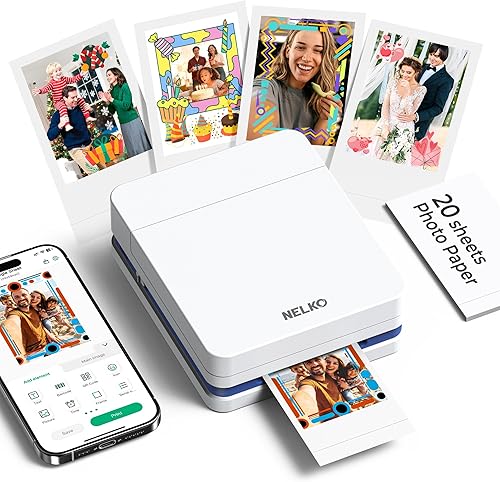
| Nelko PP01 Photo Printer | fine-detail mini prints | 2 x 3 in | Sticky-backed photo paper | Bluetooth | 8.9 |
| Liene Pearl N200 Pro Portable Photo Printer | creative portrait stickers | 2 x 3 in | Adhesive photo paper | Bluetooth | 8.4 |
| Canon Selphy CP1500 Wireless Compact Photo Printer | flexible home printing | 4 x 6 in | Thermal paper | Wi-Fi, USB or memory card | 7.9 |
HP Sprocket Portable Photo Printer: Best for pocket-size phone prints
- 2 x 3 in sticky-backed ZINK paper
- Bluetooth connection
- Prints from compatible phones with the HP Sprocket app
- Multiple devices can connect
This pocket-size printer makes small sticky-backed photos from a phone. Its app adds borders and stickers, and multiple devices can connect for shared printing.
Pros
- Small 2 x 3 in prints peel and stick
- App supports photo customization
- Multiple devices can connect
Cons
- Prints are much smaller than 4x6
- Uses a dedicated app and photo paper
The HP Sprocket Portable Photo Printer is the top choice for small phone snapshots you can carry and share. It prints 2x3 sticky-backed photos from a compatible smartphone through the HP Sprocket app.
The app lets you add borders and stickers, print from a camera roll or social media, and share photo albums. Multiple devices can connect, and a light indicates whose photo is printing when friends send pictures at the same time.
This format works well for journals, lockers, cards, and other small surfaces. Skip it if you want prints large enough for standard frames or if you prefer not to use an app and dedicated paper.
It includes 10 sheets of peel-and-stick ZINK photo paper. Choose it when portability and quick sharing matter more than print size.
KODAK Dock Plus 4x6 Photo Printer: Best for dockside family albums
- 4 x 6 in photos
- Integrated smartphone docking station
- Bluetooth and KODAK Photo Printer app
- 4PASS dye sublimation with protective lamination
The Dock Plus prints larger 4x6 photos and has a dock that can charge a compatible phone during printing. It is designed for a stable desktop setup near a power outlet.
Pros
- Prints standard 4x6 photos
- Phone dock can charge while printing
- App supports editing and cropping
Cons
- Designed for desktop use near an outlet
- Larger than pocket-size printers
The KODAK Dock Plus is the pick for 4x6 prints with a phone dock. A compatible smartphone sits on its integrated docking station, which provides a better connection and can charge the phone during printing.
Its 4PASS dye-sublimation process lays down three color layers and a clear protective lamination layer. KODAK describes the finished prints as resistant to fingerprints, water, and fading.
The printer connects to compatible iOS and Android devices through Bluetooth and the KODAK Photo Printer app. You can crop and edit a photo before printing.
This is a desktop station that needs a power outlet, so skip it if you want a pocket printer for outings. Pick it for home photo printing, family albums, and a phone-first workflow.
Liene M100 4x6'' Photo Printer: Best for family phone sharing
- 4 x 6 in prints
- Built-in Wi-Fi hotspot
- Up to 5 simultaneous connections
- Includes 100 sheets of photo paper and 3 cartridges
The M100 prints 4x6 photos from phones using its built-in hotspot, so it doesn't need a home Wi-Fi network for that connection. Its included paper and cartridges suit buyers who want supplies ready to start.
Pros
- Larger 4x6 print format
- Built-in hotspot for phone printing
- Can connect up to 5 devices
Cons
- Needs paper and cartridges
- Larger than the pocket-size options
The Liene M100 suits 4x6 phone printing with several people connecting. Its built-in hotspot connects phones directly, so you don't need a home Wi-Fi network for that connection.
The package includes 100 sheets of photo paper and 3 color cartridges. Its app can add a square border, apply filters, and adjust brightness or contrast before printing.
Up to 5 devices can connect at the same time. The thermal dye-sublimation printer is larger than a pocket model, and it needs its paper and cartridges to keep printing.
If you print only occasionally, compare printer choices for infrequent use.
Choose it for a household that wants to print 4x6 photos from several phones. Skip it if you mainly want little adhesive photos to carry around.
HP Sprocket 2x3 Instant Smartphone Photo Printer: Best for party photo sharing
- 2 x 3 in sticky-backed ZINK photos
- Bluetooth connection
- App filters, frames and stickers
- Multiple devices can connect
This Sprocket prints 2x3 photos from compatible iOS and Android devices. Its app offers editing tools, and a personalized LED light shows whose photo is printing.
Pros
- Peel-and-stick photo format
- App includes filters and frames
- Friends can connect at the same time
Cons
- Small prints are not suited to framing as 4x6 photos
- Requires compatible ZINK paper
The HP Sprocket 2x3 Instant Smartphone Photo Printer is a shared sticker-print option for compatible iOS and Android phones. It uses Bluetooth and ZINK paper to make small peel-and-stick photos.
The HP app includes filters, frames, stickers, and emojis. Multiple devices can connect, and a personalized LED light shows whose print is in progress.
Its 2x3 format suits a scrapbook, journal, or card, but won't replace a 4x6 printer for framed photos. Choose this Sprocket when shared printing and app edits matter; skip it if those features duplicate a printer you already own.
The first Sprocket pick has similar core uses, so compare their exact included accessories and preferred color before deciding.
KODAK Step Instant Smartphone Photo Printer: Best for edited travel journals
- 2 x 3 in sticky-backed ZINK photos
- Bluetooth or NFC pairing
- KODAK app editing tools
- Rechargeable battery
The Step makes small peel-and-stick prints and pairs through Bluetooth or NFC. Its app can add filters, borders, stickers and text before printing.
Pros
- Bluetooth and NFC pairing
- Editing tools in the app
- Rechargeable battery
Cons
- Only handles the small 2 x 3 in format
- Uses dedicated sticky-backed paper
The KODAK Step is a mini printer for edited, peel-and-stick photos. It pairs with compatible iOS or Android devices through Bluetooth or NFC and prints on 2x3 ZINK paper.
Use the KODAK app to add filters, borders, stickers, text, or collages before printing. Its rechargeable battery supports portable use, and KODAK says a full charge can print 25 photos.
Choose the Step if NFC pairing or the app's editing options suit your routine. Skip it if you need 4x6 prints or expect to make many photos without access to a charger.
Canon Ivy 2 Mini Photo Printer: Best for Canon app users
- 2 x 3 in sticky-backed ZINK photos
- Bluetooth 5.0
- Canon Mini Print app
- Includes 10 sheets of photo paper
The Ivy 2 prints 2x3 peel-and-stick photos from a compatible phone or tablet through the Canon Mini Print app. It suits buyers who want a compact printer tied to Canon's mobile app.
Pros
- Pocket-size format
- Bluetooth 5.0 connection
- Includes a starter paper pack
Cons
- Small prints only
- Uses the Canon Mini Print app
The Canon Ivy 2 is a compact option for Canon Mini Print app users. It connects over Bluetooth 5.0 to a compatible smartphone and prints 2x3 photos with peel-and-stick backing.
The Canon Mini Print app lets you select and customize photos from a compatible smartphone or tablet. Canon says the Ivy 2 uses ZINK technology, with color crystals embedded in the paper, so it doesn't need ink cartridges.
A 10-sheet paper pack is included to get started. Pick it for planners, journals, and personal sharing in the Canon app; skip it if you want larger prints or don't want another brand's app in your phone workflow.
Nelko PP01 Photo Printer: Best for fine-detail mini prints
- 2 x 3 in sticky-backed prints
- Inkjet printing
- 600 DPI print resolution
- Bluetooth and Nelko app
The PP01 uses inkjet printing for small sticky-backed photos and connects to iOS and Android phones over Bluetooth. Its app includes editing tools for collages, filters, borders and text.
Pros
- 600 DPI stated print resolution
- App has several editing tools
- Includes paper and a cartridge
Cons
- Small printable area
- Uses ink cartridges and dedicated paper
The Nelko PP01 is a mini printer for buyers who want inkjet output and editing tools. It prints 2x3 sticky-backed photos from iOS and Android phones over Bluetooth.
The Nelko app includes filters, borders, stickers, text, and collage tools. Nelko says each cartridge can print up to 80 full-color photos, and the stated resolution is 600 DPI.
The printable area is 45 x 58 mm, so the image won't fill the whole sheet edge to edge. Choose it if that smaller image area works for your craft project; skip it if you want a full-bleed 2x3 image or a cartridge-free setup.
Liene Pearl N200 Pro Portable Photo Printer: Best for creative portrait stickers
- 2 x 3 in adhesive paper
- Dye sublimation printing
- Bluetooth group pairing
- Built-in rechargeable battery
The Pearl N200 Pro combines a small sticker format with a phone app for frames, watermarks and background removal. It can print up to 27 stickers on a full charge.
Pros
- App includes creative editing options
- Multiple users can pair
- Rechargeable for wireless printing
Cons
- Small sticker format
- Uses cartridges and dedicated adhesive paper
The Liene Pearl N200 Pro is a creative sticker printer for phone portraits and group sharing. It makes small adhesive photos and connects to phones over Bluetooth.
The Liene Photo app includes frames, stickers, watermarks, and background removal. Its InstaPic Print mode supports taking and printing a photo in one flow, with built-in camera filters.
A full charge supports up to 27 sticker prints, and multiple users can connect over Bluetooth. Printing handles one job at a time, so a group may need to wait for each print to finish.
Choose it if you want app-based portrait effects and a rechargeable mini printer. Skip it if you need 4x6 prints or want a simpler phone-to-print workflow.
Canon Selphy CP1500 Wireless Compact Photo Printer: Best for flexible home printing
- 4 x 6 in prints
- Wi-Fi, USB and memory card connections
- 3.5 in display
- Optional battery pack for printing away from an outlet
The Selphy CP1500 supports several ways to send photos, including Wi-Fi, USB and memory cards. Its 3.5 in display lets you view and edit images before printing.
Pros
- Supports several connection types
- Built-in screen for viewing and edits
- Optional battery pack
Cons
- Larger than pocket-size printers
- Battery pack is optional
The Canon Selphy CP1500 is the 4x6 pick with several connection options. It can print from Wi-Fi, USB, or a memory card, and its 3.5 in display lets you view and edit photos.
The Selphy Photo Layout app supports smartphone printing. Canon says its prints are instantly dry and water resistant, and can continue to look good for up to 100 years.
The printer has a small footprint, and an optional battery pack supports printing away from an outlet. Plan on a power source unless you add that battery pack.
Choose the Selphy when its screen and range of connections are useful. Skip it if pocket portability is your main goal; its 4x6 output is better suited to albums and frames than quick sticker sharing.
What should you compare before choosing a portable photo printer?
Compare print size, supplies, connection, and where you'll set up the printer. Those choices affect what you can print, how you send a photo, and what you need to keep on hand.
Is a 2x3 or 4x6 portable photo printer better?
A 2x3 printer suits pocket-size photos, stickers, and small craft projects, while a 4x6 model fits albums and frames. Decide where the print will go before you pay for a printer that makes the wrong size.
For a closer comparison of larger options, browse these best portable photo printers for 4x6. If your main project is a scrapbook, see our guide to best photo printers for scrapbooking.
How do paper and printing methods change the choice?
Paper type determines whether prints have adhesive backing and whether you need cartridges. Several mini models use ZINK paper with color crystals embedded in it, while the Nelko PP01 uses an ink cartridge and photo paper.
The Liene M100 and KODAK Dock Plus use dye-sublimation printing for 4x6 photos. Before choosing a printer, check which matching paper and cartridge supplies are available and whether you want to manage them.
How do you set up a portable photo printer?
A typical setup is straightforward: charge or power the printer, load its matching media, install the brand app if required, then connect your phone using the supported method. Follow the model's paper orientation and pairing prompts because these steps vary by printer.
For the HP Sprocket, KODAK Step, and Canon Ivy 2, use the matching app and pair over Bluetooth; the Step also supports NFC. The Liene M100 connects through its built-in hotspot, while the Selphy CP1500 offers Wi-Fi, USB, and memory card options.
With the Nelko PP01, install the cartridge and load 2x3 paper with the smooth side facing down. Confirm that the cartridge clicks into place before printing, and don't load more than 10 sheets at once.
Can you print directly from an iPhone?
Yes, these printers connect with compatible phones through a brand app and a wireless method such as Bluetooth or Wi-Fi. Some also support NFC or a physical dock.
Check your phone's operating system against the app requirements, then confirm how the printer pairs. If you also want to digitize older prints, this guide to scanning photos to an iPhone covers that task.
Does print resolution matter for mini photo prints?
Resolution can matter for fine details, but print size and usable image area matter too. The Nelko PP01 lists a 600 DPI resolution, while the Liene M100 and Selphy CP1500 list 300 dpi print resolution.
For a pocket printer, check whether the photo has a border and how much of the sheet is printable. Our guide to what print resolution means in laser printers explains the term in more detail.
What mistakes should you avoid with a portable photo printer?
The common buying mistake is choosing by a feature headline before checking the print size and supplies. Think through the finished photo first, then confirm your phone can connect and the media fits your routine.
- Expecting a 2x3 print to work like a 4x6 photo: mini prints are useful for crafts and sharing, but they have much less image area for albums and frames.
- Buying before checking the app: confirm that your phone supports the required app and operating system, and consider whether you want to edit inside that app.
- Forgetting ongoing supplies: ZINK models need matching sticky paper; cartridge models need the right cartridge and paper combination.
- Loading paper the wrong way: check the printer's orientation instructions, keep sheets flat, and don't overfill a tray.
- Assuming portable means pocket-sized: 4x6 models offer bigger prints but are designed for a desktop or stable surface.
- Expecting several users to print at once: multiple people may be able to connect, but prints still come out one job at a time.
How can you get cleaner, more consistent prints?
Use compatible paper, load it in the correct direction, and prepare the image before sending it. A little care with media and photo selection reduces avoidable misprints and wasted sheets.
Keep photo paper sealed or stored as its packaging directs, and handle it by the edges so the printable surface stays clean. Avoid mixing paper types or cartridges that aren't made for the printer.
Crop the image on your phone before printing, especially for a 2x3 sticker. A phone picture with a wide landscape frame may lose important details when cropped to the small print shape.
For the Nelko PP01, clean the print head promptly if smudges appear. If paper jams, remove the stack, smooth each sheet, move the top sheet to the bottom, and reload no more than 10 sheets.
Which portable photo printer should you choose?
Choose the HP Sprocket for pocket-size 2x3 stickers, the KODAK Dock Plus or Liene M100 for 4x6 prints, and the Selphy CP1500 for more connection options. The best portable photo printers are the ones whose print size, app, and supplies match what you'll use most often.
If you're deciding among phone printers for larger photos, compare the best portable photo printers for 4x6. For a wider look at photo output by printer type, see photo printers for professionals, and read what a print engine does in laser printers if you're comparing how printer parts affect output.
Our top 3 picks at a glance
-
1
Best for pocket-size phone prints
HP Sprocket Portable Photo Printer
9.7/10 our score
See it on Amazon -
2
-
3
Frequently asked questions
What is the best portable photo printer for an iPhone?
For small sticky-backed phone photos, the HP Sprocket Portable Photo Printer is a compact choice with Bluetooth and an app for editing images. For 4x6 prints, compare the KODAK Dock Plus and Liene M100.
Check that your phone works with the printer's app and connection before choosing.
Are portable photo printers worth it?
They can be useful if you want small prints straight from a phone for journals, scrapbooks or sharing at an event. Check print size and paper needs over time, since pocket models often make 2x3 photos while home-style printers can make 4x6 prints.
Do portable photo printers need ink?
It depends on the printing method. Several mini models here use ZINK paper, which has color crystals embedded in it and needs no ink cartridges.
The Nelko PP01 and the 4x6 dye-sublimation printers use cartridges or color supplies, so include those in your ongoing supply needs.
Can I print 4x6 photos from my phone?
Yes. The KODAK Dock Plus and Liene M100 print 4x6 photos from compatible phones using their apps and wireless connections.
The Canon Selphy CP1500 also prints 4x6 photos and supports Wi-Fi.
These models take more space than the pocket printers that make 2x3 prints.