5 Best HP Printers for Low Monthly Print Volumes (October 2026)
The best HP printers for low monthly print volumes include the HP OfficeJet 250 Inkjet Mobile Printer for printing away from a desk, the HP LaserJet Pro 3101fdw for occasional team paperwork, and the HP OfficeJet Pro 8139 Wireless All-in-One Color for occasional home-office color.
On this page (8 sections)
- Which HP printer fits a low monthly print volume?
- 1. HP OfficeJet 250 Inkjet Mobile Printer: Best for printing away from a desk
- 2. HP LaserJet Pro 3101fdw: Best for occasional team paperwork
- 3. HP OfficeJet Pro 8139 Wireless All-in-One Color: Best for occasional home-office color
- 4. HP Laserjet MFP M140w Wireless Black: Best for occasional black-and-white pages
- 5. HP Envy 6155 Wireless All-in-One Color Inkjet: Best for everyday home color
- How should you choose an HP printer for occasional use?
- Which HP printer is the best fit for low monthly use?
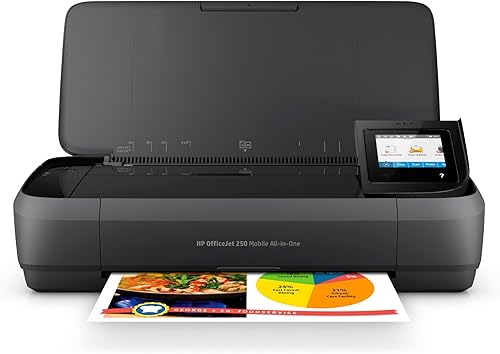
The HP OfficeJet 250 is the best HP printer for low monthly print volumes if you need to print away from a desk. It prints, scans and copies without a network connection, and its battery is included.
A low monthly page count does not automatically mean you need the simplest printer. If you print photos, scan forms or work away from home, those needs can matter more than speed.
For dedicated photo work, compare professional photo printers.
Our picks at a glance
-
1
 Best for printing away from a desk
HP OfficeJet 250 Inkjet Mobile Printer
9.7/10 our score
See it on Amazon -
2

-
3
 Best for occasional home-office color
HP OfficeJet Pro 8139 Wireless All-in-One Color
9.3/10 our score
See it on Amazon
- 4
 Check it
HP Laserjet MFP M140w Wireless Black
Best for occasional black-and-white pages - 5
 Check it
HP Envy 6155 Wireless All-in-One Color Inkjet
Best for everyday home color
Which HP printer fits a low monthly print volume?
The HP OfficeJet 250 ranks first for its portable print, scan and copy functions. The remaining picks suit shared black-and-white work, home-office color, compact monochrome printing and everyday home color.
Our score weighs each printer's features and specifications against the needs of someone printing modest monthly volumes. The picks are ordered by score and cover portable, home and small-team use.
| Product | Best for | Type | Functions | Print speed | Our score |
|---|---|---|---|---|---|
| HP OfficeJet 250 Inkjet Mobile Printer | printing away from a desk | Portable color inkjet all-in-one | Print, scan and copy | Up to 20 black-and-white pages per minute | 9.7 |
| HP LaserJet Pro 3101fdw | occasional team paperwork | Monochrome laser all-in-one | Print, scan, copy and fax | Up to 35 black-and-white pages per minute | 9.4 |
| HP OfficeJet Pro 8139 Wireless All-in-One Color | occasional home-office color | Color inkjet all-in-one | Print, scan, copy and fax | Up to 20 black-and-white pages per minute | 9.3 |
| HP Laserjet MFP M140w Wireless Black | occasional black-and-white pages | Monochrome laser all-in-one | Print, scan and copy | Up to 21 black-and-white pages per minute | 9.2 |
| HP Envy 6155 Wireless All-in-One Color Inkjet | everyday home color | Color inkjet all-in-one | Print, scan and copy | Up to 10 black-and-white pages per minute | 8.8 |
Which features matter in an HP printer for low monthly print volumes?
For a home printer, decide whether color is essential before comparing extras. If you only print forms and text, a black-and-white laser may fit; if you print homework, photos or color documents, consider an inkjet.
The difference between laser and inkjet printers for home use can help you make that first choice. If the printer is mainly for schoolwork, our guide to what type of printer is good for a student covers that use case.
1. HP OfficeJet 250 Inkjet Mobile Printer: Best for printing away from a desk
HP OfficeJet 250 Inkjet Mobile Printer: Best for printing away from a desk
- Portable print, scan and copy
- Can print without a network
- Battery included
- Supports letter, legal, cards and photo paper
This portable all-in-one suits occasional printing away from a home desk. It can print, scan and copy without a network connection.
Pros
- Portable design
- Battery included
- Print, scan and copy
Cons
- Manual duplex
- Uses HP 62 series cartridges
The OfficeJet 250 is suited to occasional printing in more than one place. It can print, scan and copy without a network connection, and its battery is included.
It supports wireless printing from a laptop or mobile device, with or without a router. Apple users can check AirPrint and wireless printing before buying.
HP describes it as compact enough to fit in a car, backpack or briefcase, which suits occasional work away from a fixed desk.
Supported paper sizes include letter, legal, cards, envelopes and several photo sizes. For snapshot printing away from a desk, compare portable photo printers.
That flexibility can help when a low-volume printer has to handle more than standard documents.
This model uses HP 62 series cartridges, and duplex printing is manual. Choose it when portability is central to your decision; for a printer that stays at home, compare its mobile features with the Envy 6155.
2. HP LaserJet Pro 3101fdw: Best for occasional team paperwork
HP LaserJet Pro 3101fdw: Best for occasional team paperwork
- Monochrome laser all-in-one
- Automatic two-sided printing
- Print, scan, copy and fax
- Designed for up to 7 people
Automatic two-sided printing and an automatic document feeder help with shared paperwork. Its small-team features may be more than a solo occasional printer needs.
Pros
- Automatic two-sided printing
- Automatic document feeder
- Ethernet and Bluetooth included
Cons
- Black-and-white printing only
- Designed for small teams
The LaserJet Pro 3101fdw is built for shared black-and-white work. It prints, scans, copies and faxes, with automatic two-sided printing and an automatic document feeder for scanning or copying documents.
HP describes it as suited to teams of up to 7 people. It also includes Wi-Fi, Ethernet and Bluetooth, and supports printing from mobile devices, PCs and tablets.
At up to 35 black-and-white pages per minute, it is the fastest print-speed pick in this group. That speed and its team features are useful when several people share paperwork, but may be more than a solo user needs for a few pages each month.
Choose it if you want a team-oriented monochrome all-in-one with automatic duplex. If you want a smaller laser option for occasional documents, consider the LaserJet M140w.
3. HP OfficeJet Pro 8139 Wireless All-in-One Color: Best for occasional home-office color
HP OfficeJet Pro 8139 Wireless All-in-One Color: Best for occasional home-office color
- Color print, scan, copy and fax
- Automatic two-sided printing
- Automatic document feeder
- 225-sheet input tray
This color all-in-one handles home-office documents and occasional scans or copies. Its 225-sheet tray and automatic document feeder suit buyers who want more than basic printing.
Pros
- Prints in color
- Automatic two-sided printing
- 225-sheet input tray
Cons
- Instant Ink trial changes to a monthly fee unless cancelled
- Uses HP 923 series cartridges
The OfficeJet Pro 8139 combines color printing with scanning, copying and faxing. Its automatic document feeder, automatic two-sided printing and 225-sheet input tray suit a home office that needs several functions in one machine.
It prints up to 20 black-and-white pages per minute and 10 color pages per minute. The 2.7 in color touchscreen and HP app offer printer controls and mobile printing options.
HP includes a one-year Instant Ink trial. A monthly fee applies after the trial unless you cancel, so consider whether a subscription suits your expected use.
This model uses HP 923 series cartridges and is intended to work with cartridges that have original HP chips or circuitry. Choose it if you want a feature-rich home-office color printer; if your needs are everyday home documents and photos, the Envy 6155 has a more home-focused feature set.
4. HP Laserjet MFP M140w Wireless Black: Best for occasional black-and-white pages
HP Laserjet MFP M140w Wireless Black: Best for occasional black-and-white pages
- Compact monochrome laser all-in-one
- Print, scan and copy
- Wireless printing
- Copies both sides of ID cards onto one sheet
This compact laser all-in-one suits occasional forms and black-and-white documents. It also scans and copies, including both sides of an ID card onto one sheet.
Pros
- Small laser all-in-one
- Wireless printing
- ID card copying feature
Cons
- Black-and-white printing only
- No automatic duplex
The Laserjet MFP M140w is a compact monochrome laser all-in-one for forms and other black-and-white documents. It prints, scans and copies, and its wireless printing works with mobile devices, PCs and tablets.
It can print up to 21 black-and-white pages per minute. A copy feature places both sides of an ID card or other small document onto the same side of a sheet.
This model does not have duplex printing, so you'll need to turn pages over yourself for two-sided jobs. It is intended to work with cartridges that have original HP chips or circuitry.
Pick the M140w if you want laser printing and occasional scanning or copying in a compact model. Choose an inkjet instead if your monthly print jobs include color documents or photos.
5. HP Envy 6155 Wireless All-in-One Color Inkjet: Best for everyday home color
HP Envy 6155 Wireless All-in-One Color Inkjet: Best for everyday home color
- Color print, scan and copy
- Automatic two-sided printing
- 100-sheet input tray
- Prints documents and borderless photos
This home inkjet suits color documents, homework and borderless photos. Its automatic two-sided printing and 100-sheet tray add useful features without a team-focused setup.
Pros
- Prints color documents and photos
- Automatic two-sided printing
- 100-sheet input tray
Cons
- No fax function
- Instant Ink trial changes to a monthly fee unless cancelled
The Envy 6155 is suited to home color documents and borderless photos. It prints, scans and copies, with automatic two-sided printing and a 100-sheet input tray.
Its print speed is up to 10 black-and-white pages per minute and 7 color pages per minute. A 2.4 in touchscreen provides printer controls, while wireless printing and the HP app support mobile use.
The printer uses HP 68 setup cartridges, and HP includes a three-month Instant Ink trial. A monthly fee applies after the trial unless you cancel, so factor that into your choice if you are considering the service.
Choose the Envy for home printing when you want color and duplex without team-oriented features. If you need faster color printing, fax or an automatic document feeder, compare it with the OfficeJet Pro 8139.
How should you choose an HP printer for occasional use?
Start with the pages you expect to print, then choose the functions you will use often. A fax or document feeder may not be worth choosing a larger, more feature-heavy printer if you rarely use it.
- Choose the Envy 6155 for home color documents, homework and borderless photos.
- Choose the LaserJet M140w for compact black-and-white printing with scanning and copying.
- Choose the OfficeJet 250 if you need portable print, scan and copy without a network.
- Choose the OfficeJet Pro 8139 if home-office color, fax and an automatic document feeder matter.
- Choose the LaserJet Pro 3101fdw if a small team needs shared black-and-white printing and automatic duplex.
If you expect regular high-volume work, look at the best home printers for high-volume printing or best office printers for high-volume printing. For occasional use, match the printer to the tasks you expect it to handle.
Which HP printer is the best fit for low monthly use?
Choose the OfficeJet 250 if you need portable printing, the LaserJet Pro 3101fdw for shared team paperwork, or the OfficeJet Pro 8139 for home-office color and fax. For compact monochrome printing, choose the LaserJet M140w; for home color documents and photos, choose the Envy 6155.
Before deciding, check which paper sizes your work needs. Our guide to home printers that print 11x17 can help if you need larger sheets.
Our top 3 picks at a glance
-
1
Best for printing away from a desk
HP OfficeJet 250 Inkjet Mobile Printer
9.7/10 our score
See it on Amazon -
2
-
3
Best for occasional home-office color
HP OfficeJet Pro 8139 Wireless All-in-One Color
9.3/10 our score
See it on Amazon
Frequently asked questions
What is a low duty cycle printer?
A low duty cycle printer is a model suited to a modest amount of printing, rather than heavy daily workloads. Check the maker's recommended monthly volume if available, and compare it with how often you print.
Our guide to what a printer duty cycle means explains the term and how to use it when comparing models.
Should occasional home printing be inkjet or laser?
Choose an inkjet if you need color documents or photos, and consider a monochrome laser if you mostly print black-and-white pages. An all-in-one can also scan or copy when those tasks come up.
Our laser printer vs inkjet guide explains the differences.
Is a fast printer necessary for low monthly volume?
Usually, print speed matters less when you only print a few pages at a time. Focus first on whether you need color, scanning, copying, mobile printing or automatic two-sided printing.
Speed matters more if you often print multi-page packets or share the printer with other people.
Can a low-volume printer handle a busy month?
It may handle a temporary increase, but a printer suited to modest use may not be the right choice for sustained heavy workloads. Compare its recommended monthly volume with your busiest regular month.
For larger workloads, compare our home printers for high-volume printing and office printers for high-volume printing.
Do these HP printers print large pages?
The HP OfficeJet 250 supports letter and legal paper among other sizes, while the other models support maximum media sizes up to letter or 8.5 x 11.7 in. Check supported sizes before choosing a printer for posters or wide layouts.
See our guide to home printers that print 11x17 if you need that paper size.