AirPrint vs Wireless Printing: What Is the Difference? (October 2026)
AirPrint is Apple’s print feature; wireless printing is the network connection a printer uses. A printer can support wireless printing without supporting AirPrint, while an AirPrint printer still needs a working connection to your network.
On this page (7 sections)
- AirPrint vs wireless printer: what is the difference?
- Can a wireless printer use AirPrint?
- What do you need for AirPrint to work?
- When is a wireless printer enough?
- Which connection should you choose for your devices?
- What should you check before buying?
- Which should you choose: AirPrint or wireless printing?
AirPrint vs wireless printing comes down to print support versus network access. AirPrint is Apple’s way to send print jobs from compatible Apple devices, while wireless printing means a printer connects without a direct cable, often through Wi-Fi.
The terms work together, but they don't mean the same thing. A printer can be wireless without supporting AirPrint, and AirPrint needs a connection that lets the Apple device communicate with the printer.
If you’re comparing models, start with the devices you use and the functions you need. For more options, see our best wireless printers that support AirPrint and best wireless home printers.
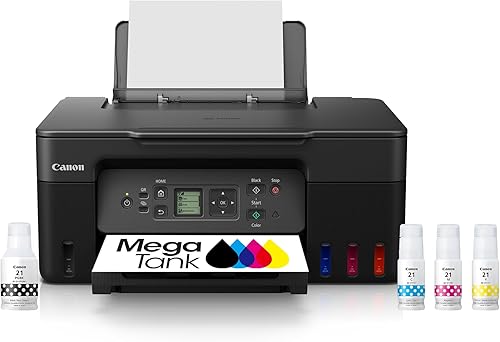 Best for wireless color printing
Canon MegaTank G3270 All-in-One Wireless Color Printer
 Best for wireless office documents
Brother DCP-L2640DW Wireless Compact Monochrome Multi-Function Printer
AirPrint vs wireless printer: what is the difference?
AirPrint is a printing feature; wireless is a connection method. One describes how a device sends a print job, and the other describes how the printer joins a network.
AirPrint is designed for supported Apple devices. When a printer supports it, you can send a job from an iPhone, iPad or Mac using the device’s print controls, without installing a separate printer driver for that job.
Wireless printing covers a wider range of setups. A printer may connect to Wi-Fi and accept jobs through a maker’s app, a computer’s driver, or another supported print service.
What does AirPrint do on a printer?
AirPrint lets compatible Apple devices find a supported printer and send print jobs over a network connection. The printer needs AirPrint support, and the network needs to allow the device and printer to communicate.
You don't need to treat AirPrint as a separate wireless network. It is a print feature that works through a supported connection, commonly the same Wi-Fi network used by your home devices.
What does wireless printing mean?
Wireless printing means a printer can receive print jobs over a wireless connection rather than requiring a cable between the printing device and printer. Wi-Fi is common, though connection choices depend on the printer.
A wireless printer might support AirPrint, another mobile print service, or a maker’s app. Look for the exact support you need instead of assuming that the word “wireless” guarantees it.
Can a wireless printer use AirPrint?
Yes, if that wireless printer also supports AirPrint. Wireless access alone doesn't add Apple’s print feature.
The Canon PIXMA TR8620a combines wireless printing with AirPrint support, plus copy, scan and fax functions. The Canon PIXMA TS702a also supports AirPrint, along with Wi-Fi and Ethernet, but it is a print-only printer.
By contrast, wireless connection details alone don't confirm AirPrint support for the Canon MegaTank G3270 or Brother DCP-L2640DW. If AirPrint is essential, verify it for the exact model before choosing.
For photo printing, your choice also depends on the printer’s ink and paper capabilities. See which printer is better for printing photos and why inkjet is better for photo printing.
What do you need for AirPrint to work?
You need an AirPrint-compatible printer, an Apple device that supports the feature, and a connection between them. In a typical home setup, both devices connect to the same Wi-Fi network.
Check that the printer has joined the correct network and that your phone, tablet or computer is on a network that can reach it. Guest networks or router settings may isolate devices, which can prevent discovery.
If the printer doesn't appear, confirm AirPrint support for the exact model, check the network connection, and restart the printer or router if the maker’s instructions recommend it. A printer’s own app may provide another way to print, but it isn't the same as AirPrint.
Does AirPrint need an app or driver?
AirPrint is intended to print from supported Apple device controls without a separate printer driver for the print job. Some printer models also offer maker apps for setup, maintenance or other functions.
A maker app can be useful for tasks beyond a basic print job. Check its supported features and device requirements if you want to scan or manage supplies from a phone.
Can AirPrint work over Ethernet?
It can, when the printer and network support communication between the Apple device and the printer. A printer connected by Ethernet may be reachable by an Apple device on Wi-Fi if both are on a network that allows them to communicate.
That setup depends on the router and network configuration. Follow the printer maker’s setup instructions if you plan to combine a wired printer connection with wireless Apple devices.
When is a wireless printer enough?
Wireless printing is enough when your devices can use a print method the printer supports. You may not need AirPrint if you print from a Windows computer, use the maker’s app, or have another compatible service.
The Brother DCP-L2640DW offers dual-band wireless, Ethernet and USB connections for printing, copying and scanning. It’s a black-and-white laser model with automatic duplex printing, which may suit office documents when color printing isn't required.
The Canon MegaTank G3270 supports wireless print, copy and scan, and its listed compatible devices include smartphones and tablets. Its product details here don't specify AirPrint, so confirm compatibility if you plan to print directly from Apple devices.
For other household needs, compare the features in our best wireless home printers. If you print many office pages, our guide to the best office printers for high volume printing can help you focus on document volume and workflow.
Which connection should you choose for your devices?
Choose AirPrint support if you want to print from Apple devices with their built-in print controls. Choose a wireless printer based on the app, print service or computer connection you already use.
Before buying, make a short device list: iPhone or iPad, Mac, Windows computer, Chromebook, or Android phone. Then check the printer’s listed support for each one, since “wireless” by itself doesn't answer that question.
If you want to print from a mix of devices, look for more than one supported connection option. Ethernet and USB can also help when you prefer a wired connection for a desktop or office setup.
Will AirPrint work with a non-Apple phone?
No, AirPrint is Apple’s print feature. Android users should check for support through the printer maker’s app or another compatible print service, such as Mopria where supported.
The Canon PIXMA TS702a supports Mopria Print Service as well as AirPrint. Verify the service and phone compatibility for the exact printer model you’re considering.
What should you check before buying?
Confirm the exact connection and print functions you need, then check the model’s compatibility information. This avoids paying for features you won't use or choosing a printer that can't serve your devices.
- Apple printing: Check for AirPrint support if you plan to print from an iPhone, iPad or Mac.
- Network setup: Confirm Wi-Fi band support, Ethernet or USB options if these matter in your home or office.
- Printer tasks: Decide whether you need print only, or also copy, scan or fax.
- Paper and print style: Check supported paper types and sizes if you print photos, labels or other specialty work.
A printer can be wireless and still need a specific app or computer driver. Read the connection instructions before setup, especially if your home network separates guest devices from personal devices.
For labels, choose a model around the label stock and print tasks you have. Our guides to the best printer for labels and best printer for product labels cover that separate choice.
Which should you choose: AirPrint or wireless printing?
Pick a printer with AirPrint when Apple’s built-in print controls matter; pick wireless connectivity that matches your devices and workflow. Many printers offer both, but the terms describe different parts of the setup.
The Canon PIXMA TR8620a and PIXMA TS702a are the two options here with AirPrint specified. The TR8620a adds copy, scan and fax functions, while the TS702a is for printing only.
If your priority is wireless color printing, consider the Canon MegaTank G3270 and confirm Apple compatibility if you need AirPrint. For black-and-white office documents with multiple connection choices, the Brother DCP-L2640DW offers wireless, Ethernet and USB.
Check your devices first, then compare the connection types and printer functions you’ll actually use. That gives you a clearer choice than treating AirPrint and wireless printing as competing features.
Frequently asked questions
Is AirPrint the same as wireless printing?
No. AirPrint is Apple’s feature for sending print jobs from supported Apple devices, while wireless printing describes a printer connecting over a wireless network.
AirPrint usually uses that network connection, but a wireless printer may use another print method or may not support AirPrint.
Does a wireless printer automatically have AirPrint?
No. Wireless capability means the printer can connect to a wireless network; it doesn't confirm support for Apple's AirPrint feature.
Check the exact printer’s compatibility information before buying if you plan to print from an iPhone, iPad or Mac without setting up another app or driver.
Does AirPrint work without Wi-Fi?
AirPrint generally needs your Apple device and printer to be connected in a way they can reach each other, often through the same Wi-Fi network. Setup can vary by printer and network, so check the printer maker’s instructions for supported connection methods.
Can I use AirPrint from an iPhone?
Yes, if the printer supports AirPrint and your iPhone can reach it over the network. Open the item you want to print, choose the share or print option, select the printer, and review the job before sending it.
Which is better, AirPrint or a printer app?
AirPrint is a straightforward option when your printer supports it and you want to print from an Apple device. A printer maker’s app may offer extra controls or printer tasks, but features vary by model.
Choose based on the devices and functions you use.