6 Best Laser Printers with Duplex Scanning (November 2026)
The best laser printers with duplex scanning include the Brother HL-L2480DW Wireless Compact Monochrome Multi-Function Laser for compact home offices, the Brother MFC-L2820DW Wireless Compact Monochrome All-in-One Laser for fax and batch scanning, and the HP LaserJet Pro 3101sdw for 35 ppm office printing.
On this page (6 sections)
- Which laser printer with duplex scanning fits your workflow?
- How we compared these duplex scanner laser printers
- What should you check before buying a duplex laser printer scanner?
- How much feeder capacity do you need?
- How should you set up and care for a duplex scanner laser printer?
- Which model should you choose?
The best laser printer with duplex scanning is the Brother Professional Laser Printer with Scanner, because it names single-pass two-sided scanning, a 50-page automatic document feeder and 36 ppm monochrome printing. That wording matters more than a general duplex label on the box.
Choose the Brother MFC-L2820DW if faxing matters, or the Canon if you only need color duplex printing. The right pick depends on what you do most each day.
A duplex printer can print both sides of a page, but that does not always mean it can scan both sides. The scanner needs the right path to capture the back of a sheet.
For document-heavy work, look for an automatic document feeder and clear wording about duplex or single-pass scanning. A feeder alone only proves that several pages can be loaded at once.
Single-pass scanning is the key detail for double-sided forms, contracts and reports. It lets the feeder process the front and back together, which cuts manual flipping and refeeding.
If your scans are mostly single-sided, a feeder still helps by keeping a stack moving. You load once, then copy, scan or fax the batch without lifting the lid for every sheet.
Keep print speed separate from scan speed in your mind. A printer rated at 36 ppm for printing may scan at a different pace.
Paper handling and setup are also worth a quick check. Automatic duplex printing saves page turning, while a larger tray means fewer refills.
Confirm the connections your office uses, whether that is wireless, Ethernet or a direct USB link to one computer. A shared printer benefits from a clear touchscreen and simple mobile access.
If you are comparing print-only duplex models, start with our guide to the best duplex laser printer. For color output, see the best duplex color laser printer roundup.
Color output does not by itself provide scanning, copying or faxing, so check the functions list before you assume an all-in-one. For most small offices, match the scanner wording to your actual pages.
If both sides must be captured without manual handling, choose a model that names single-pass duplex scanning. If you scan single-sided letters and print two-sided reports, a feeder plus automatic duplex printing may be enough.
Our picks at a glance
-
1
 Best for compact home offices
Brother HL-L2480DW Wireless Compact Monochrome Multi-Function Laser
9.7/10 our score
See it on Amazon -
2
 Best for fax and batch scanning
Brother MFC-L2820DW Wireless Compact Monochrome All-in-One Laser
9.6/10 our score
See it on Amazon -
3

- 4
 Check it
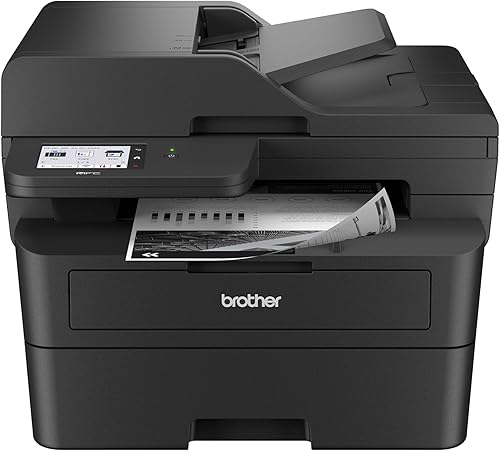
Brother Professional Laser Printer with Scanner
Best for true two-sided scanning - 5
 Check it
Canon Color imageCLASS LBP646Cdw Wireless Laser Printer
Best for color printing with duplex output - 6
 Best for small monochrome teamsCheck it
Which laser printer with duplex scanning fits your workflow?
The Brother MFC-L2900DW is the strongest choice for true two-sided scanning, while the MFC-L2820DW and HP LaserJet Pro 3101sdw suit multi-page feeder work when single-pass duplex scanning is not required. The compact Brother HL-L2480DW works better for occasional flatbed scanning.
Brother HL-L2480DW Wireless Compact Monochrome Multi-Function Laser: Best for compact home offices
- 36 ppm black-and-white printing
- Automatic duplex printing
- 250-sheet paper tray
- Flatbed scan glass
This compact Brother combines printing, copying and scanning with automatic duplex printing. Its flatbed scan glass suits occasional scanning, while the 250-sheet tray supports regular black-and-white work.
Pros
- Compact footprint
- Automatic duplex printing
- 36 ppm black-and-white output
Cons
- Flatbed scan glass instead of an automatic document feeder
- No fax function
The Brother HL-L2480DW is the highest-scoring pick for a small workspace that needs printing, copying and scanning in one compact unit. Its 15.7 x 16.1 x 10.7 in footprint is smaller in height than the other multifunction models here.
Its flatbed scan glass suits individual pages, identification documents and occasional copies. It does not use an automatic document feeder, so scanning a long double-sided stack requires more page handling.
Automatic duplex printing helps reduce manual page turning when producing two-sided documents. The 250-sheet paper tray also reduces refill frequency for routine black-and-white work.
The printer reaches up to 36 pages per minute and offers dual-band wireless, Ethernet and USB connections. Its 2.7 in touchscreen supports print and scan tasks, including cloud-based apps such as Google Drive, Dropbox, Evernote and OneNote.
Choose it for a home office that values a compact footprint and fast monochrome printing. Choose another model if your main task is scanning both sides of many pages through a feeder.
Brother MFC-L2820DW Wireless Compact Monochrome All-in-One Laser: Best for fax and batch scanning
- 34 ppm black-and-white printing
- 50-page auto document feeder
- Automatic duplex printing
- Print, copy, scan and fax
The MFC-L2820DW adds faxing and a 50-page automatic document feeder to a compact monochrome setup. It fits offices that scan multi-page documents but do not need single-pass duplex scanning.
Pros
- 50-page automatic document feeder
- Fax function
- 250-sheet paper tray
Cons
- Slower listed print speed than the 36 ppm Brother models
- Does not state single-pass duplex scanning
The Brother MFC-L2820DW is the better fit when your office needs printing, copying, scanning and faxing in one machine. Its 50-page automatic document feeder can move multi-page jobs without placing each sheet on the glass.
It prints black-and-white documents at up to 34 pages per minute and has a 250-sheet paper tray. Automatic duplex printing helps produce two-sided output without manually flipping each page.
The 2.7 in touchscreen provides access to print and scan functions, while dual-band wireless, Ethernet and USB support different office setups. The Brother Mobile Connect app can also handle mobile printing and scanning tasks.
This is a practical duplex laser printer scanner for offices that scan multi-page documents and still need fax capability. The product information does not state single-pass duplex scanning, so choose the MFC-L2900DW when capturing both sides in one pass is your main requirement.
HP LaserJet Pro 3101sdw: Best for 35 ppm office printing
- 35 ppm black-and-white printing
- 50-sheet auto document feeder
- Automatic 2-sided printing
- 250-sheet input tray
This HP combines 35 ppm monochrome printing with scanning, copying, automatic 2-sided printing and a 50-sheet feeder. It suits small teams that want a straightforward all-in-one office printer.
Pros
- 35 ppm black-and-white printing
- 50-sheet automatic document feeder
- 250-sheet input tray
Cons
- The product title does not state single-pass duplex scanning
- HP cartridge chip restrictions apply
The HP LaserJet Pro 3101sdw suits a small team that wants 35 ppm black-and-white printing, scanning, copying and automatic 2-sided printing. Its 50-sheet automatic document feeder supports multi-page work, while the 250-sheet input tray keeps common jobs moving.
Wireless, Ethernet and USB connections give you several setup options. That mix helps when a printer sits away from a desk or when one computer needs a direct wired link.
The printer also has a 7-second initial print time and supports up to 999 copies per run. A quick first page helps with short letters, while the copy limit suits batch work without constant resets.
Its 15.7 x 16.5 x 12.3 in dimensions place it in the same general desktop class as the Brother all-in-one models. Measure the shelf or desk space first, because depth and height affect where paper trays and output can sit.
The automatic 2-sided printing feature is useful for reports and internal documents. It reduces manual page turning and helps keep a long document in the right order.
This model is a strong general office pick, but its information does not state single-pass duplex scanning. If you scan double-sided stacks, check that wording before you treat a feeder as proof of two-sided capture.
Also note that HP says the printer is intended to work only with cartridges using HP chips or circuitry. That restriction affects toner choices and long-term running costs, so factor it into your plan.
For care, keep the feeder path clear of staples and folded pages. A clean scan area and flat paper help multi-page jobs feed evenly and copy more reliably.
Brother Professional Laser Printer with Scanner: Best for true two-sided scanning
- Single-pass two-sided scanning
- 36 ppm monochrome printing
- 50-page auto document feeder
- 3.5 in touchscreen
The Brother MFC-L2900DW is the clearest match for two-sided scanning because its product information names single-pass duplex scanning. It also includes automatic duplex printing and a 50-page feeder.
Pros
- Single-pass duplex scanning
- 36 ppm monochrome printing
- 3.5 in touchscreen
Cons
- Larger stated footprint
- The product data lists 1 ppm color printing
The Brother MFC-L2900DW is the best match for buyers who specifically need a duplex laser printer with scanner. Its product information names single-pass two-sided scanning, which means the automatic document feeder is designed to process both sides during the scanning workflow.
The 50-page automatic document feeder supports multi-page copy, scan and fax jobs. Automatic duplex printing handles two-sided output, and the 250-sheet paper tray reduces paper refills during regular office use.
Its 36 ppm monochrome print speed matches the fastest models in this group. A 3.5 in touchscreen provides a larger control surface than the 2.7 in screens on the compact Brother models.
Dual-band wireless, Ethernet and USB 2.0 support flexible connections. The Brother Mobile Connect app supports mobile printing and scanning, while direct access to Google Drive, Dropbox and OneNote supports cloud-based document work.
Choose this model when scanning both sides of forms, reports or other multi-page documents is the main reason you are shopping. Its stated 16.1 x 12.5 x 16.6 in dimensions need more height planning than the compact Brother HL-L2480DW.
Canon Color imageCLASS LBP646Cdw Wireless Laser Printer: Best for color printing with duplex output
- 26 ppm color and monochrome printing
- Automatic 2-sided printing
- 250-sheet cassette
- 5-line LCD screen
The Canon LBP646Cdw is the only color printer in this group, but it does not scan, copy or fax. Choose it when color output and automatic 2-sided printing matter more than duplex document scanning.
Pros
- Color and monochrome printing
- Automatic 2-sided printing
- 250-sheet standard cassette
Cons
- No scanner
- Print-only design
The Canon Color imageCLASS LBP646Cdw is not a duplex scanner. It is a print-only color laser printer with automatic 2-sided printing.
It prints color and monochrome pages at up to 26 ppm. That speed suits documents, charts and simple graphics where color helps the reader follow the page.
A 250-sheet standard cassette and 1-sheet multipurpose tray handle regular paper loading. The single-sheet tray gives a path for envelopes or specialty sheets.
The 5-line LCD screen provides straightforward controls for checking status and changing settings. Wireless, Ethernet and USB connections support computers and mobile devices.
The Canon PRINT app, Apple AirPrint and Mopria Print Service provide mobile printing options. Those tools help when a phone or tablet needs a quick print without opening a laptop.
The printer uses Canon Genuine Toner 075 and includes starter toner with 500-yield CMY cartridges and a 700-yield black cartridge. Budget for replacement toner after the first set runs down.
Choose it for color documents and duplex output, not for a duplex scanner workflow. If scanning both sides is a daily task, look at a multifunction model with a feeder instead.
HP LaserJet MFP M235sdw: Best for small monochrome teams
- Automatic duplex printing
- Wireless, Ethernet and USB 2.0
- Scanning and copying
- Dual-band Wi-Fi
This HP is aimed at offices with 1 to 5 people and combines monochrome printing, scanning and copying. It offers automatic duplex printing, but the information does not state duplex scanning.
Pros
- Compact stated depth
- Automatic duplex printing
- Dual-band Wi-Fi with self-reset
Cons
- Does not state duplex scanning
- Maximum copy speed is 14 ppm
The HP LaserJet MFP M235sdw is aimed at offices with 1 to 5 people that need everyday monochrome printing, scanning and copying. It supports automatic duplex printing, dual-band Wi-Fi, Ethernet and USB 2.0.
The printer reaches up to 30 black-and-white pages per minute, while maximum black-and-white copy speed is 14 pages per minute. Print speed will matter most for longer documents, while copy speed shapes how a feeder batch feels in practice.
Its 7-second initial print time can help with short jobs. A single letter or form should not keep you waiting beside the machine.
HP includes an automatic document feeder and mobile printing through the HP app. The feeder reduces page handling for multi-page copies and scans, and the app gives phone users a simpler route to print.
The printer works with Microsoft, Mac, AirPrint, Android and Chromebook devices. That range helps in a mixed office where laptops, tablets and phones all need access.
Its 12.13 in depth is the shortest stated depth in this group. That can help on a shallow desk, though you should still leave room for paper loading and output.
The information does not state duplex scanning, so it is better for general scanning and two-sided printing than for a dedicated double-sided scanning workflow. Feeder capacity alone does not prove that both sides are captured in one pass.
For setup, dual-band Wi-Fi can help a printer stay connected in a busy network. Ethernet remains a steady option when wireless signal or placement is a concern.
Keep the scan glass and feeder path clean and remove staples before scanning. That habit protects multi-page jobs and helps copies stay sharp.
How we compared these duplex scanner laser printers
We compared the products by the features that affect two-sided document work: explicit duplex scanning language, automatic document feeder capacity, duplex printing, scan and copy functions, print speed, connection options and footprint.
The most important distinction is between duplex printing and duplex scanning. A printer can automatically print both sides while still requiring manual page handling for two-sided scans.
The Brother MFC-L2900DW receives the clearest match for this keyword because it names single-pass two-sided scanning. The other all-in-one models include feeders or automatic duplex printing, but their information does not clearly promise single-pass duplex scanning.
Our score weighs specs, features and buyer feedback against what you’re shopping for. We did not treat color printing as a substitute for duplex scanning, which is why the Canon model ranks below the multifunction printers despite its automatic 2-sided output.
For broader color options, compare our guide to the best color laser printer with duplex scanning. If you want printing, scanning and copying in one unit, the best all-in-one laser printer with duplex scanning roundup narrows the field further.
| Product | Best for | Functions | Connections | Size | Our score |
|---|---|---|---|---|---|
| Brother HL-L2480DW Wireless Compact Monochrome Multi-Function Laser | compact home offices | Print, copy and scan | Dual-band wireless, Ethernet and USB | 15.7 x 16.1 x 10.7 in | 9.7 |
| Brother MFC-L2820DW Wireless Compact Monochrome All-in-One Laser | fax and batch scanning | Print, copy, scan and fax | Dual-band wireless, Ethernet and USB | 15.7 x 16.1 x 12.5 in | 9.6 |
| HP LaserJet Pro 3101sdw | 35 ppm office printing | Print, scan and copy | Wireless, Ethernet and USB | 15.7 x 16.5 x 12.3 in | 9.6 |
| Brother Professional Laser Printer with Scanner | true two-sided scanning | Print, copy and scan | Dual-band wireless, Ethernet and USB 2.0 | 9.3 | |
| Canon Color imageCLASS LBP646Cdw Wireless Laser Printer | color printing with duplex output | Print only | Wireless, Ethernet and USB | 9.1 | |
| HP LaserJet MFP M235sdw | small monochrome teams | Print, scan and copy | Dual-band Wi-Fi, Ethernet and USB | 12.13 x 16.46 x 11.59 in | 9.0 |
What should you check before buying a duplex laser printer scanner?
Check the scanning method first. If you need to scan both sides without manually flipping pages, look for single-pass duplex scanning rather than only automatic duplex printing.
That one detail decides whether a double-sided contract stays a smooth one-pass job. Without it, you may need to rescan the back and merge files by hand.
A 50-page automatic document feeder is useful for multi-page work, but feeder capacity does not prove that both sides are scanned automatically. The feeder moves pages, while duplex scanning decides how many sides each pass captures.
The Brother MFC-L2900DW is the clearest example here because its product information specifically names single-pass two-sided scanning. That wording gives you a firmer basis than a general claim about duplex capability.
Next, match the functions to your workflow. The MFC-L2820DW includes faxing, while the Brother HL-L2480DW, HP LaserJet Pro 3101sdw, Brother MFC-L2900DW and HP LaserJet MFP M235sdw cover printing, scanning and copying.
Faxing still matters in some offices for forms, orders and records. If no one sends faxes, that function may not justify a larger machine.
For color documents, the Canon LBP646Cdw prints in color but has no scanner. Color printing and color scanning are separate choices.
Also check connection options before you buy. Dual-band wireless suits shared spaces, Ethernet suits fixed desks, and USB suits a single computer.
Paper capacity and print speed should match your weekly volume. A 250-sheet tray reduces refills, while a faster print rate helps with long reports.
Care habits matter as well, because a feeder only works well with clean paths and flat pages. Remove clips and staples, keep the scan glass clean, and follow the brand guidance for toner changes.
How much feeder capacity do you need?
Choose a 50-page automatic document feeder for routine multi-page scanning, copying or faxing. Both the Brother MFC-L2820DW and Brother MFC-L2900DW use 50-page feeders, and the HP LaserJet Pro 3101sdw has a 50-sheet feeder.
That size suits a normal office batch without forcing you to split a stack into many small loads. A set of invoices or a short report can usually go in together.
A feeder does not remove the need to check duplex capability. For single-sided pages, a feeder reduces page handling.
Without a feeder, each sheet needs lifting, placing and removing. With one, you load the stack and let the machine pull pages through in order.
For double-sided pages, single-pass scanning can reduce handling further. The machine captures both sides during the same pass, so you avoid flipping the stack and rescanning the backs.
That saving grows with each double-sided document. Contracts, manuals and signed forms often land as two-sided stacks, and manual handling adds time at every step.
Feeder capacity still has limits in daily use. Very thick stacks, curled paper, staples and folded corners can jam or skew pages, so a quick check before loading pays off.
If your work is mostly one page at a time, the Brother HL-L2480DW flatbed scanner may be enough. Its 250-sheet paper tray and 36 ppm output still make it useful for regular printing.
A flatbed also suits fragile originals, book pages and items that should not pass through a feeder. You place the page by hand and choose the exact area to scan.
For mixed work, think about the pages you scan most, not the pages you scan once a month. Keep the feeder path clean and load paper flat.
In short, feeder capacity controls batch size, while duplex scanning controls sides per pass. You need to check both before you buy.
How should you set up and care for a duplex scanner laser printer?
Place the printer where you can open the paper tray, reach the document feeder or scan glass, and connect the power and network cables. Leave enough working room around the unit for loading paper and clearing document or paper problems.
Use the connection that fits your office. These models offer combinations of wireless, Ethernet and USB, while the Brother models also support mobile printing or scanning through Brother Mobile Connect.
Keep the feeder path and scan glass clean according to the brand's instructions. Remove clips, staples and folded pages before feeding documents, and keep paper flat so pages move through the feeder evenly.
Check toner compatibility before reordering. The Brother models identify TN830-family toner, the Canon uses Genuine Toner 075, and the HP models use HP toner systems with the restrictions described for the LaserJet Pro 3101sdw.
Which model should you choose?
Choose the Brother MFC-L2900DW if your main goal is true two-sided scanning through a document feeder. Its single-pass scanning language, 50-page feeder, 36 ppm printing and automatic duplex output give it the clearest fit.
Choose the Brother MFC-L2820DW if faxing matters and you need a compact all-in-one with a 50-page feeder. Choose the Brother HL-L2480DW if you mostly scan single pages and want the smallest stated multifunction footprint.
Choose the HP LaserJet Pro 3101sdw for 35 ppm office printing with scanning, copying and automatic 2-sided output. Choose the Canon LBP646Cdw only when color printing and duplex output matter more than scanning.
For a general comparison of laser technology before you decide, read What Are the Advantages of a Laser Printer? and What Are the Disadvantages of a Laser Printer?. If mobile printing is central to your setup, see the best airprint laser printer guide or compare the best canon duplex laser printer.
Our top 3 picks at a glance
-
1
Best for compact home offices
Brother HL-L2480DW Wireless Compact Monochrome Multi-Function Laser
9.7/10 our score
See it on Amazon -
2
Best for fax and batch scanning
Brother MFC-L2820DW Wireless Compact Monochrome All-in-One Laser
9.6/10 our score
See it on Amazon -
3
Frequently asked questions
What is the best laser printer with duplex scanning?
The Brother Professional Laser Printer with Scanner is the strongest match here because it names single-pass two-sided scanning, a 50-page automatic document feeder and 36 ppm monochrome printing.
If you need faxing, choose the Brother MFC-L2820DW instead, but its information does not state single-pass duplex scanning.
What does duplex scanning mean on a laser printer?
Duplex scanning captures both sides of a document during one scanning workflow. Single-pass duplex scanning uses the document feeder to process the front and back together, which can save handling time on double-sided forms, contracts and reports.
Automatic duplex printing is different because it prints both sides of paper.
Is an automatic document feeder enough for duplex scanning?
No. An automatic document feeder can move multiple pages through a scanner, but it does not always scan both sides in one pass.
Check for wording such as single-pass two-sided scanning or duplex scanning.
The Brother MFC-L2900DW is the product here that clearly names single-pass duplex scanning.
Do all duplex laser printers scan both sides?
No. A duplex laser printer may only print on both sides.
The Canon LBP646Cdw, for example, has automatic 2-sided printing but is print only and has no scanner.
Look for a scanner, an automatic document feeder and explicit two-sided scanning language before choosing a multifunction model.