6 Best Laser Printers with AirPrint (November 2026)
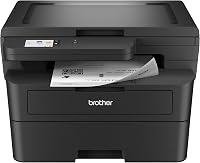
The best AirPrint laser printers include the Brother HL-L2405W Wireless Compact Monochrome Laser Printer for simple home printing, the Brother MFC-L2820DW Wireless Compact Monochrome All-in-One Laser for small office workflows, and the HP LaserJet M234sdw Monochrome Laser Printer for two-sided documents.
On this page (5 sections)
The best airprint laser printer for most homes is the Brother HL-L2405W, because it combines dual-band wireless, a 250-sheet tray and black-and-white speeds up to 30 pages per minute.
That balance suits homes and home offices that print letters, forms, reports and other everyday documents in black and white.
For scanning and copying, choose the Brother MFC-L2820DW or HP LaserJet M234sdw instead.
AirPrint lets you send documents from compatible Apple devices without installing extra printer software.
That can keep setup simpler for iPhone, iPad and Mac users who want to print a document or photo from the app they are already using.
Wireless printing still needs the printer and the Apple device on the same wireless network.
The best choice depends on whether you need monochrome or color output, automatic duplexing, scanning, copying, faxing or a compact footprint.
Monochrome models often suit text heavy work where color is not needed.
Color models add cost and care for separate toner colors, but they suit charts, signs and branded pages.
Automatic duplexing turns pages for you, while manual duplexing asks you to handle the second side yourself.
Print only models keep the controls simpler if you already have a scanner.
All in one models reduce the number of devices on the desk when you copy or scan often.
Paper capacity matters in daily use because a larger tray means fewer refills during busy weeks.
A 250 sheet tray can carry a home office through longer runs without constant attention.
Speed also matters, but it should be read alongside first page time and the size of your typical jobs.
A short print run of a few pages feels different from a stack of reports.
Footprint matters too, because a printer needs room to load paper, open panels and collect output.
Weight matters when you move a printer, place it on a shelf or keep it in a fixed spot.
Connections should match the room, with wireless for Apple devices, USB for a local computer and Ethernet for a fixed office network.
Check the exact model for AirPrint support before you buy, because wireless alone does not guarantee AirPrint.
If you want more wireless options, compare these picks with our guide to best wireless laser printers.
For Apple printing, also confirm that the printer and iPhone, iPad or Mac are connected to the same wireless network.
Keep the printer within a reliable wireless range and restart the app or device if the printer does not appear.
Plan paper loading and toner checks into your routine so large jobs do not stall.
Choose the model that fits your documents first, then your desk and the devices you use each day.
Our picks at a glance
-
1
 Best for simple home printing
Brother HL-L2405W Wireless Compact Monochrome Laser Printer
9.7/10 our score
See it on Amazon -
2
 Best for small office workflows
Brother MFC-L2820DW Wireless Compact Monochrome All-in-One Laser
9.6/10 our score
See it on Amazon -
3
 Best for two-sided documents
HP LaserJet M234sdw Monochrome Laser Printer
9.5/10 our score
See it on Amazon
- 4
 Check it
Canon Color imageCLASS MF753Cdw II
Best for color office documents - 5
 Check it
HP Laserjet MFP M140w Wireless Black
Best for small spaces - 6
 Check it
Canon Color imageCLASS LBP646Cdw Wireless Laser Printer
Best for color print-only work
The best AirPrint laser printer picks
The Brother HL-L2405W is the strongest simple choice, while the other models fit different needs such as scanning, color output, automatic duplexing and limited desk space.
Brother HL-L2405W Wireless Compact Monochrome Laser Printer: Best for simple home printing
- Wireless and USB connections
- Up to 30 pages per minute
- 250-sheet paper tray
- Manual feed slot
A compact monochrome printer for homes and home offices that need wireless printing without scanning or copying.
Pros
- 250-sheet tray
- Dual-band wireless
- Compact 15.1 lb design
Cons
- Manual duplex
- Print-only design
The Brother HL-L2405W is the best airprint laser printer here for straightforward black-and-white printing. It is a print-only model, so there are no scanning, copying or fax functions to manage.
Its 250-sheet paper tray reduces refill work for home offices. The manual feed slot supports envelopes and specialty paper, while the dual-band wireless connection works with laptops, PCs, smartphones, tablets and iPhones.
The printer produces up to 30 pages per minute and supports black-and-white print resolution up to 1,200 x 1,200 dots per inch. Its 14.2 x 14 x 7.2 in dimensions and 15.1 lb weight suit a desktop where space matters.
Automatic duplexing is not included. If you print on both sides, you will need to manage that process manually.
Choose this model for letters, forms and reports. Consider a multifunction model if your workflow includes paper copies or scans.
Brother MFC-L2820DW Wireless Compact Monochrome All-in-One Laser: Best for small office workflows
- Print, copy, scan and fax
- Up to 34 pages per minute
- 50-page auto document feeder
- Automatic duplex
A compact four-function printer for small offices that need automatic two-sided printing and multi-page scanning.
Pros
- 50-page auto document feeder
- Automatic duplex
- Ethernet connection
Cons
- Heavier 22.5 lb design
- More functions than print-only users need
The Brother MFC-L2820DW is the best airprint laser printer here for a small office that needs one machine for printing, copying, scanning and faxing. It prints black-and-white pages at up to 34 pages per minute.
Its 50-page auto document feeder helps with multi-page copy, scan and fax jobs. Automatic duplex printing can reduce paper use, and the 250-sheet tray limits frequent refills.
Connection choices include dual-band wireless, Ethernet and USB. A 2.7 in touchscreen supports printer controls plus print-from and scan-to features for services such as Google Drive, Dropbox, Evernote and OneNote.
At 15.7 x 16.1 x 12.5 in and 22.5 lb, it needs more desk or shelf space than the HL-L2405W. That extra size pays off when you use the feeder and automatic two-sided printing.
Choose it when office documents involve several functions. For a wired network, compare it with our guide to the best ethernet laser printer.
HP LaserJet M234sdw Monochrome Laser Printer: Best for two-sided documents
- Print, scan and copy
- Automatic duplex
- Up to 30 pages per minute
- 40-page auto document feeder
A monochrome all-in-one for small teams that want automatic two-sided printing, scanning and copying.
Pros
- Automatic duplex
- 40-page auto document feeder
- Works with AirPrint and Chromebook
Cons
- No fax function listed
- 19 lb design
The HP LaserJet M234sdw is a strong airprint laser printer for small teams that need black-and-white printing, scanning and copying. It prints up to 30 pages per minute on one-sided pages and up to 19 black-and-white images per minute when printing two-sided pages.
Automatic duplexing makes it useful for reports and forms that need pages on both sides. The 40-page auto document feeder supports hands-free copying and scanning.
This model includes dual-band Wi-Fi with self-reset, Ethernet and USB 2.0. It works with AirPrint, Android, Chromebook, Mac and Microsoft devices, so it fits mixed-device workspaces.
For a MacBook Air, see laser printers for MacBook Air.
The 12.13 x 16.46 x 11.59 in body weighs 19 lb. It is larger than the HP M140w, but it offers faster printing and automatic duplexing.
Choose it when two-sided documents matter more than the smallest footprint.
Canon Color imageCLASS MF753Cdw II: Best for color office documents
- Color print, scan, copy and fax
- Up to 35 pages per minute
- Automatic duplex
- 50-sheet duplex automatic document feeder
A large color all-in-one for offices that need fast color output, automatic duplexing and four core functions.
Pros
- 35 pages per minute
- 5-inch color touchscreen
- Expandable capacity up to 850 sheets
Cons
- 50 lb design
- Larger footprint
The Canon Color imageCLASS MF753Cdw II is the best airprint laser printer here for color office output. It combines color printing, scanning, copying and faxing with speeds up to 35 pages per minute.
Its automatic duplex system includes a 50-sheet duplex automatic document feeder, which helps process multi-page documents with fewer manual steps. The standard cassette holds 250 sheets, the multipurpose tray holds 50 sheets, and optional equipment can expand capacity up to 850 sheets.
A 5 in color touchscreen provides printer controls. The model connects wirelessly from compatible computers or mobile devices and supports Canon Genuine Toner 069.
This is the largest and heaviest pick at 18.2 x 16.8 x 17 in and 50 lb. Plan the printer's location before delivery, especially if it will sit on a shelf.
Choose it for color reports, signs and other office documents. For color print-only work, the Canon LBP646Cdw takes a simpler approach.
HP Laserjet MFP M140w Wireless Black: Best for small spaces
- Print, scan and copy
- Up to 21 pages per minute
- Wireless printing
- ID card copying
A small wireless all-in-one for 1 to 3 people who need basic black-and-white printing, scanning and copying.
Pros
- Small 11.9 lb design
- AirPrint support
- ID card copying
Cons
- No automatic duplex
- Slower than the other monochrome picks
The HP LaserJet MFP M140w is the best airprint laser printer for a very small desk. It prints, scans and copies black-and-white documents, with speeds up to 21 pages per minute.
Its 10.4 x 14.2 x 7.8 in dimensions and 11.9 lb weight make it the smallest and lightest model in this roundup. Wireless printing works with mobile devices, PCs, tablets, AirPrint, Android, Chromebook and Mac devices.
The printer can copy both sides of an ID card onto one side of a sheet. The HP Smart app supports printing, copying and scanning from a smartphone.
This model does not include automatic duplexing, so it is less convenient for regular two-sided reports. It also prints more slowly than the other monochrome models here.
Choose it for basic printing, scanning and copying in a compact workspace. If you need faster pages, look at our best fast laser printer guide.
Canon Color imageCLASS LBP646Cdw Wireless Laser Printer: Best for color print-only work
- Color print-only output
- Up to 26 pages per minute
- Automatic duplex
- 250-sheet cassette
A color print-only model for users who want automatic two-sided pages without paying for scanning, copying or faxing functions.
Pros
- Automatic duplex
- Wireless and Ethernet
- 250-sheet cassette
Cons
- No scanning or copying
- 26 pages per minute
The Canon Color imageCLASS LBP646Cdw is the best airprint laser printer here for color printing without extra all-in-one functions. It prints color and monochrome pages at up to 26 pages per minute.
Automatic two-sided printing helps reduce manual page turning. The 250-sheet standard cassette and 1-sheet multipurpose tray suit regular office documents, while the 5-line LCD screen keeps the controls simple.
This print-only model supports wireless printing from compatible mobile devices through Apple AirPrint, Mopria Print Service and the Canon PRINT app. Ethernet and USB are also available.
The printer measures 16.5 x 16.8 x 10.5 in and weighs 27.6 lb. It uses cyan, magenta, yellow and black Canon Genuine Toner 075.
Choose it when color and automatic duplexing matter, but scanning and copying do not. For a color printer designed for home use, see our guide to the best wireless color laser printer for home.
How we compared these AirPrint laser printers
We compared wireless connections, AirPrint support, output type, print speed, duplexing and extra functions.
We also checked paper handling, device compatibility and the space each model needs.
Our score weighs specs, features and buyer feedback against what you're shopping for. The scores are fixed across Be Printer, so the order reflects the supplied score and the fit for this search.
AirPrint support matters first because it decides whether Apple devices can print in the way you expect.
A printer can be wireless and still require a different mobile printing method, so check the exact model's compatibility before setup.
Output type comes next because monochrome and color suit different documents and different toner routines.
Print speed matters most for longer runs, while first page time matters for short jobs sent through the day.
Duplexing changes daily work in a practical way, especially for reports and handouts.
Next, decide whether you need more than printing.
The Brother HL-L2405W and Canon LBP646Cdw are print-only models.
The Brother MFC-L2820DW, HP M234sdw, Canon MF753Cdw II and HP M140w add at least scanning and copying.
Faxing is an extra function on some all in one models, so check the list if your office still uses it.
The Brother HL-L2405W uses manual duplexing, while the Brother MFC-L2820DW, HP M234sdw, Canon MF753Cdw II and Canon LBP646Cdw support automatic duplexing.
The HP M140w does not include duplexing.
Paper handling also affects workflow because tray size and feeder support change how often you refill and walk over.
Device compatibility matters for mixed homes and offices, where Mac, Windows, Android and Chromebook devices may all need to print.
Space needs differ across the group, from a small desktop model to a larger all in one unit.
Weight and clearance matter as well, because access panels and paper loading need room around the body.
For general laser-printer benefits, read What Are the Advantages of a Laser Printer?.
If you are unsure about toner, space or maintenance trade-offs, our guide to What Are the Disadvantages of a Laser Printer? covers the limits.
How to choose an AirPrint laser printer
The right choice depends on your documents and the functions you use every week. Start with output type, then check duplexing, paper capacity, connections and available space.
What should you print with an AirPrint laser printer?
Choose monochrome for black-and-white forms, letters, reports and shipping documents. The Brother HL-L2405W, Brother MFC-L2820DW, HP M234sdw and HP M140w are built around black-and-white output.
Choose color when you need colored charts, signs or branded documents. The Canon MF753Cdw II adds scanning, copying and faxing, while the Canon LBP646Cdw focuses on color printing.
Is automatic duplexing important?
Automatic duplexing is useful when you print reports, handouts or long documents on both sides. It saves you from turning pages manually and makes repeat jobs easier.
The Brother MFC-L2820DW, HP M234sdw, Canon MF753Cdw II and Canon LBP646Cdw include automatic duplexing. The Brother HL-L2405W uses manual duplexing, and the HP M140w does not include duplexing.
Which connections should you use?
Wireless is the key connection for AirPrint from Apple devices. Ethernet can be useful for a fixed office location, while USB provides a local connection to one computer.
The Brother MFC-L2820DW and HP M234sdw include wireless, Ethernet and USB connections. The Canon LBP646Cdw also includes Ethernet and USB, while the Brother HL-L2405W supports dual-band wireless and USB.
If the printer will sit away from your desk, measure the route and shelf first. A printer stand can add storage and raise a printer to a more usable height, but it must support the model's size and weight.
How much space do you need?
The HP M140w is the smallest model here at 10.4 x 14.2 x 7.8 in. The Brother HL-L2405W is also compact, while the Canon MF753Cdw II needs the most room at 18.2 x 16.8 x 17 in.
Leave enough space to load paper, open access panels and handle cables. A printer's listed body size does not describe the working clearance around it.
How to set up and use an AirPrint laser printer
Set the printer on a stable surface, load the correct paper and connect it to the wireless network before sending a print job.
Keep the printer close enough to the router for a reliable connection, especially during initial setup.
A stable surface helps with paper feeding and keeps the printer level for scanning and copying on all in one models.
Load paper flat and aligned in the tray, then close the tray without forcing it.
Check the paper size setting on the printer or in the print dialog before you send a job.
On an Apple device, open the document or photo, choose the share or print control, select the AirPrint printer and confirm the paper and page settings.
The exact menu names can vary by app and device, so look for a print or share option in the app you are using.
If the printer does not appear, confirm that the iPhone, iPad or Mac and the printer share the same wireless network.
Move the printer or device closer to the router for setup, then test placement for daily use.
For a USB connection, connect the cable to the printer and computer, then follow the computer's printer setup steps.
USB can be useful when wireless is not available or when you want a direct local link to one computer.
Use Ethernet when the printer will remain in one office location and your network uses a wired connection.
Ethernet can suit a fixed desk or shared office setup where a cable is already in place.
Keep paper flat and refill the tray before a large job so you do not run out mid run.
Store paper in a dry place and keep the tray free of mixed sizes and bent sheets.
Replace paper that is curled, damp or damaged, because poor paper can affect feeding and output.
When output quality changes, check the toner supply, paper path and printer instructions for the model's care steps.
Look for toner levels, cartridge fit, drum condition where fitted and any paper jams along the path.
Feeding problems often trace back to paper loading, paper type or a sheet caught inside the printer.
Clean up spills and keep hands, jewelry and loose items away from moving parts and hot areas.
Follow the manual for the exact opening panels, replacement steps and disposal guidance for toner parts.
Prompt cleaning and correct loading usually help more than repeated printing when pages look faint or streaked.
Test with a short job after any change so you can see whether the issue has cleared.
Keep cables tidy and leave space to open panels, remove trays and handle output without crowding.
Final verdict on the best AirPrint laser printer
The Brother HL-L2405W is the best airprint laser printer for most homes that need fast black-and-white printing in a compact body.
It suits homes and home offices that mainly print documents and do not need scanning or copying on the same device.
Pick the Brother MFC-L2820DW for an office all-in-one, the HP M234sdw for automatic duplexing, or the HP M140w for the smallest setup.
The Brother MFC-L2820DW fits small offices that want printing, copying, scanning and faxing in one machine.
The HP M234sdw suits small teams that print two-sided reports and also need scanning and copying.
The HP M140w suits a very small desk where basic printing, scanning and copying matter more than speed or duplexing.
Choose the Canon MF753Cdw II for color printing plus scanning, copying and faxing.
That model fits offices that need color output and a full set of core functions in one larger unit.
It also needs more desk space, so measure the spot before you commit to it.
Choose the Canon LBP646Cdw when you want color, wireless AirPrint and automatic duplexing without all-in-one functions.
That print-only approach can suit users who already have separate scanning and copying tools.
Color printing adds separate toner colors to manage, which suits documents that truly need color.
Monochrome models can suit text heavy work where color is not needed for daily pages.
Automatic duplexing helps with long reports, while manual duplexing asks for more hands on steps.
Smaller models help with tight desks, but larger all in one models can reduce the number of devices you own.
Match the choice to your documents, your Apple devices and the space you can set aside.
For more device-specific guidance, compare these models with the best laser printer for Chromebook guide before you decide.
Our top 3 picks at a glance
-
1
Best for simple home printing
Brother HL-L2405W Wireless Compact Monochrome Laser Printer
9.7/10 our score
See it on Amazon -
2
Best for small office workflows
Brother MFC-L2820DW Wireless Compact Monochrome All-in-One Laser
9.6/10 our score
See it on Amazon -
3
Best for two-sided documents
HP LaserJet M234sdw Monochrome Laser Printer
9.5/10 our score
See it on Amazon
Frequently asked questions
What is the best airprint laser printer for most homes?
The Brother HL-L2405W is the best airprint laser printer for most homes that mainly print black-and-white documents. It has dual-band wireless, a 250-sheet tray and speeds up to 30 pages per minute.
Choose the HP LaserJet M234sdw instead if you also need scanning and copying.
Do all wireless laser printers support AirPrint?
No. Wireless connection and AirPrint are different features.
Check that the exact model supports Apple AirPrint before you buy.
The HP LaserJet M234sdw, HP LaserJet M140w and Canon Color imageCLASS LBP646Cdw specifically include AirPrint support in their product information.
Should you choose a monochrome or color AirPrint laser printer?
Choose a monochrome AirPrint laser printer for letters, forms and reports when black-and-white output is enough. Choose the Canon MF753Cdw II or Canon LBP646Cdw when charts, signs or other documents need color.
Color models use separate cyan, magenta, yellow and black toner.
Is an all-in-one AirPrint laser printer worth it?
An all-in-one is useful when you scan, copy or fax documents often. The Brother MFC-L2820DW and HP LaserJet M234sdw add those functions while keeping wireless printing.
A print-only model takes less planning if you already have a separate scanner.