Brother HL-L3280CDW vs HL-L3220CDW: Which Should You Choose? (November 2026)
Choose the HL-L3280CDW for its color touchscreen and broader controls, or choose the HL-L3220CDW if a simpler control setup fits your office. Both are color laser printers for everyday documents, so your workflow matters most.
On this page (8 sections)
- Brother HL-L3280CDW vs HL-L3220CDW: which should you choose?
- Which printer is easier to control?
- Which model suits everyday color documents?
- What should you consider before buying?
- How do you install and care for toner?
- Is the HL-L3280CDW a laser printer?
- How does the HL-L3280CDW compare with the HL-L3295CDW?
- Brother HL-L3280CDW vs HL-L3220CDW: final choice
Choose the HL-L3280CDW if you want a color touchscreen and more direct printer controls. Choose the HL-L3220CDW if you prefer a simpler color laser printer for routine office documents.
The Brother HL-L3280CDW vs HL-L3220CDW choice is less about basic color printing and more about how you control the printer. Consider who will use it, how often they work from the printer's panel and which documents they print.
Both models belong in the same general office category. They can suit reports, invoices, forms and other everyday documents that need black text and color output.
The practical difference shows up when a job needs a change at the machine itself. Paper size, network details, toner status and reprints are all faster to handle when the screen explains the next step.
A shared office feels that difference more than a single user setup. Several people may need to check status, release a job or fix a paper message without asking the person who installed the printer.
That control gap does not make one model right for everyone. A focused workspace where printing starts on a computer can use a simpler panel without losing much day to day convenience.
Think about your normal documents as well as your controls. Text heavy pages with charts, headings and occasional color blocks are the core use for both machines.
Color output matters most when it helps a reader scan a page quickly. It matters less when most pages are plain black text that could be printed in a simpler way.
Placement also shapes the decision. A printer used by a small team benefits from clear prompts, while a printer beside one desk may need little on panel guidance.
Start with your workflow, then narrow the model choice to fit it. The better printer is the one your users can operate confidently for the jobs they print every week.
 Best for full-color replacement coverage
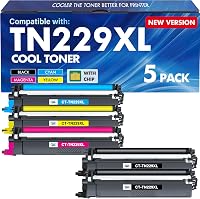
E-Z Ink Pro TN229XL TN229 Toner Cartridges
 Best for a 4-pack replacement set
Valinkso Compatible for Brother TN229XL TN229 Toner
Brother HL-L3280CDW vs HL-L3220CDW: which should you choose?
Pick the HL-L3280CDW for a more visual control experience. Pick the HL-L3220CDW when a simpler panel meets your needs.
The HL-L3280CDW is the stronger fit for an office where people often change settings at the printer. A color touchscreen can make menus and prompts easier to understand than a basic control layout.
The HL-L3220CDW makes more sense when most print jobs start on a computer or mobile device. If users rarely walk up to the printer, the extra panel convenience on the HL-L3280CDW may matter less.
For a closer look at the larger model, read our Brother HL-L3280CDW Review. It can help you decide whether the model's controls fit your daily routine.
The touchscreen also helps when a printer is shared across a room or floor. A new user can follow visible options instead of learning a fixed button sequence by memory.
That said, a simpler layout can feel calmer in a small setup. Fewer visual choices may suit an office that handles the same print routine each day.
Consider who manages setup and troubleshooting. If that person is always available, panel guidance matters less than a straightforward machine that stays ready for computer sent jobs.
Which printer is easier to control?
The HL-L3280CDW has the clearer advantage for on-printer navigation because it uses a color touchscreen. That can help when several people share the printer and not everyone remembers the same button sequence.
A touchscreen can also make it easier to follow prompts for paper, toner and settings. It doesn't automatically make every task faster, but it gives the printer a more visual interface.
The HL-L3220CDW suits a user who sends most jobs from a computer. A simpler panel may be enough for basic status checks and occasional changes.
Think about the tasks you perform at the printer itself. If you often adjust copies, paper choices or network settings from the panel, the HL-L3280CDW is the safer choice.
When is the HL-L3220CDW the better fit?
The HL-L3220CDW is a practical choice for a home office, small team or shared workspace that mainly prints standard documents from connected devices.
It may also suit offices where the printer sits near the users and only one person handles setup. In that case, a simpler control layout may not create much friction.
Choose the HL-L3280CDW instead if several users need to understand the panel without much instruction. The color touchscreen gives that model a more approachable control experience.
Which model suits everyday color documents?
Either model can fit everyday color office work, but the best choice depends on how much color printing you do and how you send jobs.
Use a color laser printer for documents where black text and occasional color elements matter. Examples include proposals, schedules, internal reports, invoices and client handouts.
For frequent graphics-heavy work, check the exact printer specifications and your expected paper types before you decide. Office color output is not the same as choosing a printer for photo production.
The HL-L3280CDW is the better match when color controls and printer-side adjustments are part of your routine. The HL-L3220CDW is sensible when the printer mainly receives prepared jobs.
If you're still deciding whether this printer type fits your space, read Why Choose a Laser Printer for a Home Office?.
What should you consider before buying?
Choose by control needs, document habits and toner planning rather than by model name alone.
First, decide whether users will operate the printer from the panel. A color touchscreen has more value in a shared office than in a private workspace where every job is sent from one computer.
Next, consider your document mix. Text-heavy work with occasional color is a natural match for either model, while specialized media needs a closer check of the exact printer's supported paper handling.
Finally, plan for toner. Both models use toner cartridges from the TN229 family, so replacement compatibility is part of the long-term choice.
How should you compare replacement toner?
Match the cartridge family and your preferred pack size to the exact Brother model before ordering. The printer model and cartridge designation should agree.
The E-Z Ink Pro option is a 5-pack with 2 black TN229XL TN229 XL cartridges, 1 cyan, 1 magenta and 1 yellow cartridge. It lists a chip for toner-level monitoring and compatibility with the HL-L3220CDW and HL-L3280CDW.
The Valinkso option is a 4-pack with black, cyan, magenta and yellow cartridges. It lists smart chip technology and compatibility with both Brother models.
Both products list up to 3,000 pages for black toner and up to 2,300 pages for each color toner at 5% coverage. Actual use varies with how much toner your documents place on each page, so treat those figures as stated yield limits rather than a promise for every document.
How do you install and care for toner?
Replace toner with the printer powered and handled according to its instructions, then keep cartridges protected until needed.
Open the printer access area, remove the old cartridge from its drum unit and insert the replacement into the matching slot. Close the access area and allow the printer to recognize the cartridge.
Keep toner cartridges in their packaging until replacement time. Avoid touching sensitive cartridge surfaces, and follow the printer's prompts if it asks you to confirm or calibrate a replacement.
Print a short document after installation to check the black and color output. If a color looks weak, check that the matching cartridge is seated correctly before changing other settings.
Do not choose a cartridge only because the printer name appears in a product title. Compare the full compatible model list and the TN229 or TN229XL designation with your printer.
Is the HL-L3280CDW a laser printer?
Yes, the Brother HL-L3280CDW is a color laser printer. It uses toner cartridges for black and color document output.
If you want the terminology explained in more detail, see Is the Brother HL-L3280CDW a Laser Printer?. That guide can help separate laser printers from inkjet and LED printer descriptions.
The HL-L3220CDW belongs to the same color laser printer category. The important buying difference here is the control layout, not a change from inkjet to laser.
Toner based printing suits offices that produce frequent text documents. Toner cartridges are generally planned around page volume, so they fit reports, contracts and forms that are printed again and again.
That does not mean toner is right for every kind of image work. A printer chosen mainly for photographs or very large graphics needs a separate check of its media handling and output goals.
For everyday office pages, the color laser category is about producing clear black text with color when needed. Headings, charts, tables and highlighted sections can be read more easily with that mix.
Both Brother models sit in that same category for document printing. Their shared technology means your choice should focus on controls, placement and how jobs are sent.
It also means replacement planning follows the same toner family approach for each machine. Confirm the exact cartridge designation for your printer before ordering, rather than relying on a similar name.
Liquid ink printers work differently and may suit lower volume or photo focused use. This comparison stays within color laser models, so the laser question is settled for both options.
How does the HL-L3280CDW compare with the HL-L3295CDW?
The HL-L3280CDW vs HL-L3295CDW comparison is useful when the HL-L3280CDW looks close to another Brother color model. Compare the control panel, document workflow and toner plans across the exact models you are considering.
Don't assume a related model is automatically better because its number is higher. Printer names can represent different control and office-use priorities.
Read Brother HL-L3280CDW vs HL-L3295CDW: Which Should You Choose? if that model is also on your shortlist.
A shortlist with nearby model numbers can be confusing at first glance. The suffix and series digits may signal a different panel, output routine or office fit.
That is why a direct comparison helps more than a quick scan of names. Look at how each printer is operated, where it will sit and who will use it most often.
Document workflow matters just as much as the panel. A model that fits computer sent jobs may not suit a team that changes settings at the printer each day.
Toner planning should also be checked across exact models. Confirm the supported cartridge family before you assume a replacement pack will work across a whole shortlist.
Keep the HL-L3280CDW in view while you compare, since its touchscreen is a key part of its appeal. If another model lacks that control style, the choice may come down to how much panel guidance you actually need.
Do not let a higher number decide the outcome on its own. The right printer is the one whose controls, document fit and upkeep match your office routine.
Brother HL-L3280CDW vs HL-L3220CDW: final choice
Choose the HL-L3280CDW when a color touchscreen will help several people manage print jobs. Choose the HL-L3220CDW when you want a straightforward color laser printer and most work begins from a computer.
Whichever model you select, confirm the supported toner family before stocking replacements. The E-Z Ink Pro 5-pack suits buyers who want 2 black cartridges, while the Valinkso 4-pack suits buyers who want one black and 3 color cartridges.
The right answer for the Brother HL-L3280CDW vs HL-L3220CDW question is the model that matches your control habits. More panel guidance helps a shared office, while a simpler setup can be enough for a focused home workspace.
Picture the person who will stand at the printer most often. If that is a rotating group, the touchscreen on the HL-L3280CDW gives each user a clearer path through common tasks.
Picture a single desk setup instead, where jobs are prepared and sent from one computer. In that case, the simpler HL-L3220CDW panel may be all you need, with less screen to manage.
Document habits should confirm the choice rather than complicate it. Both printers are color laser models for reports, invoices, forms and everyday office pages with black text and color elements.
Toner is the next practical step after the printer choice. Match the TN229 or TN229XL designation to your exact Brother model, and check the full compatible list before you order.
The pack size is a plain trade-off between the two replacement options here. The E-Z Ink Pro 5-pack includes 2 black cartridges plus cyan, magenta and yellow, which can help offices that use black faster.
The Valinkso 4-pack includes one black, one cyan, one magenta and one yellow cartridge. That suits a buyer who wants a balanced set without an extra black cartridge in the box.
Both options list up to 3,000 pages for black and up to 2,300 pages for each color at 5 percent coverage. Treat those as stated yield figures, since real documents vary with text and color coverage.
Store spare cartridges in their packaging until they are needed. Keep them dry and avoid touching sensitive surfaces, then follow the printer prompts when you install a replacement.
Print a test page after fitting new toner and check black text and each color. If output looks uneven, reseat the matching cartridge first before changing document settings.
In the end, choose by workflow first and model name second. The HL-L3280CDW fits shared, panel led use, while the HL-L3220CDW fits simpler, computer led printing.
Frequently asked questions
What is the main difference between the Brother HL-L3280CDW and HL-L3220CDW?
The main difference is the control experience. The HL-L3280CDW offers a color touchscreen, while the HL-L3220CDW uses a simpler control layout.
Both are color laser printers designed for everyday office documents, so choose based on how much you value on-printer controls.
Is the Brother HL-L3280CDW better for a small office?
The HL-L3280CDW may suit a small office that wants clearer on-printer navigation and color document output. Its color touchscreen can make common controls easier to follow, while the HL-L3220CDW may be enough when printing is mostly sent from computers or mobile devices.
Which toner works with the HL-L3280CDW and HL-L3220CDW?
The E-Z Ink Pro TN229XL TN229 Toner Cartridges and Valinkso Compatible for Brother TN229XL TN229 Toner both list compatibility with the HL-L3280CDW and HL-L3220CDW. Their listed black yield is up to 3,000 pages, while each color cartridge is rated up to 2,300 pages at 5% coverage.
Are the Brother HL-L3280CDW and HL-L3220CDW laser printers?
Yes, both models are color laser printers. Laser printing uses toner rather than liquid ink, which can fit offices that print frequent text documents, forms and color pages.
Read our guide to how an LED printer works for a related look at another toner-based printing method.