6 Best Wireless All-in-One Laser Printers (November 2026)
The best wireless all-in-one laser printers include the Brother MFC-L2820DW Wireless Compact Monochrome All-in-One Laser for compact small offices, the Canon Color imageCLASS MF753Cdw II for fast color documents, and the HP OfficeJet Pro 8139 Wireless All-in-One Color for color home offices.
On this page (10 sections)
- The best all in one wireless laser printers for different offices
- Brother MFC-L2820DW: Best for compact small offices
- Canon Color imageCLASS MF753Cdw II: Best for fast color documents
- HP OfficeJet Pro 8139: Best for color home offices
- Brother MFC-L2900DW: Best for fast monochrome workflows
- HP LaserJet MFP M235sdw: Best for everyday office documents
- Canon imageCLASS MF275dw: Best for quick first pages
- How to choose a wireless laser printer all in one
- Wireless all-in-one laser printer setup and care
- Final choice
The best all in one laser printer wireless pick for most small offices is the Brother MFC-L2820DW. It pairs laser printing with scanning, copying and faxing, so one device can cover the main jobs that come up during a normal office day.
That mix matters because many small teams now share one printer for customer forms, invoices, contracts and internal reports. A compact design helps it fit on a desk or a small side unit, while wireless access lets laptops and phones print without running a cable across the room.
Automatic duplex printing is a useful extra for two sided work. It turns sheets for you, which cuts down on manual handling and helps keep multi page sets in the right order.
Choose a color model if your reports, presentations or client documents need more than black and white. The Canon Color imageCLASS MF753Cdw II is the laser choice here, while the HP OfficeJet Pro 8139 adds color but uses inkjet printing rather than laser technology.
That difference is worth weighing before you buy. Laser models suit steady document output, while an inkjet may suit a home office that prints color more often and values a different set of running costs.
If you only need wireless printing, compare these picks with our guide to the best wireless laser printers. For a color-focused shortlist, see the best wireless color laser printer for home guide.
Our picks at a glance
-
1
 Best for compact small offices
Brother MFC-L2820DW Wireless Compact Monochrome All-in-One Laser
9.6/10 our score
See it on Amazon -
2

-
3
 Best for color home offices
HP OfficeJet Pro 8139 Wireless All-in-One Color
9.3/10 our score
See it on Amazon
- 4
 Check it
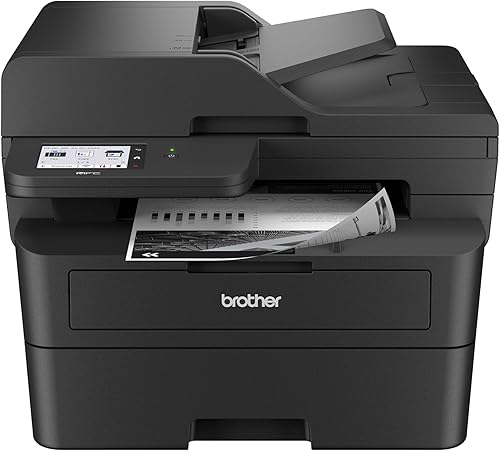
Brother Professional Laser Printer with Scanner
Best for fast monochrome workflows - 5
 Best for everyday office documentsCheck it
- 6
 Best for quick first pagesCheck it
The best all in one wireless laser printers for different offices
The best wireless laser printer all in one depends on your document type, speed needs and space. Monochrome models suit text-heavy work, while the color Canon handles color printing without giving up scanning, copying or faxing.
A careful shortlist should start with the work you do most often. Frequent black and white documents point one way, while regular color presentations or reports point another.
Our score weighs specs, features and buyer feedback against what you are shopping for. We checked the stated functions, connections, document handling, duplex support and print speeds.
Speed alone does not tell the whole story. Paper capacity, feeder size and physical dimensions shape how smooth daily use feels.
Connection choices also deserve attention. Wireless is handy for phones and laptops, while Ethernet or USB can add a steadier option for a desk setup.
Use the comparisons below to match each model to a clear job. That makes the trade offs easier to judge, from compact monochrome work to faster color output.
| Product | Best for | Functions | Print type | Connections | Our score |
|---|---|---|---|---|---|
| Brother MFC-L2820DW Wireless Compact Monochrome All-in-One Laser | compact small offices | Print, copy, scan and fax | Monochrome laser | 2.4GHz and 5GHz wireless, Ethernet and USB | 9.6 |
| Canon Color imageCLASS MF753Cdw II | fast color documents | Print, scan, copy and fax | Color laser | 9.4 | |
| HP OfficeJet Pro 8139 Wireless All-in-One Color | color home offices | Print, scan, copy and fax | Color inkjet | 9.3 | |
| Brother Professional Laser Printer with Scanner | fast monochrome workflows | Print, scan and copy | Monochrome laser | Dual-band wireless, Ethernet and USB 2.0 | 9.3 |
| HP LaserJet MFP M235sdw | everyday office documents | Print, scan and copy | Monochrome laser | 9.0 | |
| Canon imageCLASS MF275dw | quick first pages | Print, scan, copy and fax | Monochrome laser | 8.7 |
Brother MFC-L2820DW: Best for compact small offices
Brother MFC-L2820DW Wireless Compact Monochrome All-in-One Laser: Best for compact small offices
- Up to 36 ppm
- 50-page automatic document feeder
- Automatic duplex printing
- Dual-band wireless, Ethernet and USB
A compact monochrome multifunction printer with automatic duplexing, a 50-page document feeder and flexible wireless, Ethernet and USB connections.
Pros
- Compact footprint
- Automatic duplex printing
- Dual-band wireless
Cons
- Black-and-white printing only
- No color printing
The Brother MFC-L2820DW is the best all in one laser printer wireless choice when a small office needs several functions in a compact footprint. It prints, copies, scans and faxes in black and white.
Its stated print speed reaches 36 pages per minute, while the specifications list 34 pages per minute for black-and-white printing. The 50-page automatic document feeder helps with multi-page copy, scan and fax work.
Dual-band wireless supports both 2.4GHz and 5GHz connections. Ethernet and USB add wired options, and the 2.7-inch touchscreen provides control at the printer.
Automatic duplex printing can reduce manual page turning for two-sided documents. The printer also accepts TN830, TN830V and TN830XL toner cartridges.
In daily use, that feeder size is helpful for batches of signed pages, ID copies or short reports. It lets you load a stack once and let the machine handle the rest.
The compact size suits a desk that also holds a monitor, keyboard and files. Just leave clear space around it for paper loading and for reaching the touchscreen.
Choose it for text-heavy office work, especially when faxing and a compact footprint matter. It is not the right fit if your regular documents require color.
Canon Color imageCLASS MF753Cdw II: Best for fast color documents
Canon Color imageCLASS MF753Cdw II: Best for fast color documents
- Up to 35 ppm in black and color
- Automatic duplex printing
- 5-inch color touchscreen
- 250-sheet cassette and 50-sheet multipurpose tray
A color wireless all-in-one laser printer for offices that need fast color output, automatic duplexing and a large document feeder.
Pros
- Color laser printing
- 35 ppm black and color speed
- 5-inch color touchscreen
Cons
- 50 lb weight
- Larger footprint than compact monochrome picks
The Canon Color imageCLASS MF753Cdw II is the best wireless laser printer all in one here for fast color work. It prints, scans, copies and faxes, with automatic duplex printing and a 5-inch color touchscreen.
Black-and-white and color output reach 35 pages per minute. A 250-sheet cassette and 50-sheet multipurpose tray support different office jobs, while the 50-sheet duplex automatic document feeder handles two-sided originals.
The printer uses Canon Genuine Toner 069. Its included media includes starter cyan, magenta and yellow toner with a stated 1,100-page yield, plus standard black toner with a stated 2,100-page yield.
At 50 lb and 18.2 in deep, it needs more planning than the compact monochrome models. Choose it when color laser output and fast document handling are worth the larger footprint.
The larger touchscreen can make common tasks quicker to find at the machine itself. That helps when more than one person shares the printer during the day.
The multipurpose tray adds flexibility for labels, envelopes or heavier stock. Keep a check on its settings before a large run, so the machine picks the right paper type.
Choose it when color laser output and fast document handling are worth the larger footprint.
For another Canon-focused comparison, read about the best canon laser printer all in one. That guide can help if you want to see how this model sits beside other Canon options.
Color is not standard on every laser model, so our guide answers [Do All Laser Printers Print in Color?
What to Know](/do-all-laser-printers-print-in-color/). It explains why monochrome and color laser printers serve different needs.
That distinction matters before you commit to a color machine. If most of your pages are plain text, a monochrome model may be simpler.
If color pages are part of your regular workflow, the extra cost and size may be justified. Check your recent documents before deciding which route fits your office.
HP OfficeJet Pro 8139: Best for color home offices
HP OfficeJet Pro 8139 Wireless All-in-One Color: Best for color home offices
- 20 ppm black and 10 ppm color
- Automatic duplex printing
- 225-sheet input tray
- Dual-band Wi-Fi
This color wireless all-in-one uses inkjet printing rather than laser printing, but it adds automatic duplexing, an ADF and home-office color features.
Pros
- Color printing
- 225-sheet input tray
- Dual-band Wi-Fi
Cons
- Inkjet rather than laser
- Slower than the laser color pick
The HP OfficeJet Pro 8139 is a color wireless all-in-one printer, but it is an inkjet rather than a laser model. It prints, scans, copies and faxes, with automatic duplex printing and an automatic document feeder.
Black output reaches 20 pages per minute, and color output reaches 10 pages per minute. The 225-sheet input tray suits a home office that handles regular reports, presentations and other color documents.
Dual-band Wi-Fi, Ethernet and USB provide connection choices. The 2.7-inch color touchscreen and HP app support printer control from the device or a smartphone.
This model includes a 1-year Instant Ink trial, and its title states that it works with original HP cartridges. Choose it when color home-office output matters more than laser printing.
For a home office, that app based control can be handy for checking jobs from another room. It also keeps scanning and copying within reach from a phone.
The paper tray size helps with longer documents, so you refill less often. Still, check that the loaded paper size matches the job settings before printing a batch.
Choose it when color home-office output matters more than laser printing.
Brother MFC-L2900DW: Best for fast monochrome workflows
Brother Professional Laser Printer with Scanner: Best for fast monochrome workflows
- 36 ppm monochrome output
- 50-page automatic document feeder
- Single-pass two-sided scanning
- 3.5-inch touchscreen
A fast Brother monochrome all-in-one with single-pass duplex scanning, automatic duplex printing and a 50-page document feeder.
Pros
- Fast 36 ppm output
- Single-pass duplex scanning
- 3.5-inch touchscreen
Cons
- Black-and-white printing
- No fax function stated in the title or bullets
The Brother Professional Laser Printer with Scanner is a strong wireless laser printer all in one for fast monochrome document workflows. Its title identifies the MFC-L2900DW, with printing, scanning, wireless duplex printing and scanning.
Output reaches 36 pages per minute. A 50-page automatic document feeder and single-pass two-sided scanning help process multi-page originals without manually flipping each sheet.
The 3.5-inch touchscreen provides control, and direct access to Google Drive, Dropbox and OneNote supports cloud-based document work. Dual-band wireless, Ethernet and USB 2.0 give you several ways to connect.
Automatic duplex printing helps reduce paper use. The included DR830 drum unit is rated for 15,000 pages, and the included starter black toner cartridge is rated for 700 pages.
Choose it when speed and two-sided scanning matter most. The product title and bullets focus on printing, scanning and copying, so choose the MFC-L2820DW if faxing is required.
Brother has several options for this category. Compare this pick with the best brother wireless laser printer guide.
That comparison can help you see how the MFC-L2900DW differs from other Brother models. Pay close attention to speed, scanning and feeder size.
Those details shape whether it fits a busy monochrome workflow. A quick check now can save time later.
HP LaserJet MFP M235sdw: Best for everyday office documents
HP LaserJet MFP M235sdw: Best for everyday office documents
- Up to 28 ppm single-sided printing
- Automatic duplex printing
- Dual-band Wi-Fi with self-reset
- Ethernet and USB
A compact HP monochrome laser multifunction printer for everyday office documents, with wireless printing, scanning, copying and automatic duplexing.
Pros
- Compact dimensions
- Automatic duplex printing
- Dual-band Wi-Fi
Cons
- Monochrome only
- Copy speed is 14 ppm
The HP LaserJet MFP M235sdw suits offices that print, scan and copy everyday black-and-white documents. It offers wireless printing, automatic duplexing, Ethernet and USB connections.
Single-sided black-and-white printing reaches up to 28 pages per minute in the product bullets, while the specifications list 30 pages per minute. The maximum copy speed is 14 pages per minute.
Dual-band Wi-Fi includes self-reset functionality that automatically detects and resolves connectivity issues. The model also supports printing from mobile devices, PCs and tablets.
At 12.13 in deep, 16.46 in wide and 11.59 in high, it has a compact stated footprint. Choose it for a small office with monochrome needs and no requirement for color printing or faxing.
That size makes it easier to place on a desk or a small cabinet. It still needs room for paper to load and for the output to collect without blocking.
The lower copy speed is worth noting if copying large batches is a daily task. For occasional copies, it is less likely to slow you down.
Choose it for a small office with monochrome needs and no requirement for color printing or faxing.
Canon imageCLASS MF275dw: Best for quick first pages
Canon imageCLASS MF275dw: Best for quick first pages
- 30 ppm printing
- About 5.3-second first print
- 35-sheet automatic document feeder
- 150-sheet paper cassette
A wireless monochrome laser all-in-one with a quick first print, automatic duplexing, a 35-sheet feeder and a 150-sheet cassette.
Pros
- Quick first print
- 30 ppm output
- 6-line adjustable touchscreen
Cons
- Smaller paper cassette
- 35-sheet document feeder
The Canon imageCLASS MF275dw is a monochrome wireless all-in-one laser printer with printing, scanning, copying and faxing. Its stated first print time is about 5.3 seconds, which suits short jobs and quick page requests.
Print speed reaches 30 pages per minute. Automatic duplex printing helps with two-sided documents, and the 35-sheet automatic document feeder handles multi-page copy and scan tasks.
The 150-sheet paper cassette is smaller than the 250-sheet trays on some Brother models. A 6-line adjustable touchscreen provides printer controls, while the Canon PRINT Business app, Apple AirPrint and Mopria support mobile printing.
The printer uses Canon Genuine Toner 071 or 071 H. Choose it when quick first pages and faxing matter more than a large paper tray or higher document-feeder capacity.
The adjustable screen can help when the printer sits on a low unit or a higher shelf. That small detail makes daily controls easier to reach.
For mixed media, check the listed media types before loading envelopes. Correct settings help avoid misfeeds and uneven output.
Choose it when quick first pages and faxing matter more than a large paper tray or higher document-feeder capacity.
How to choose a wireless laser printer all in one
Start with the kind of pages you print. Monochrome laser models fit text-heavy office work, forms and business documents, while the Canon Color imageCLASS MF753Cdw II suits color reports and presentations.
Next, check the functions. Printing, scanning and copying are common, but faxing is not included in every model.
The Brother MFC-L2820DW and Canon MF275dw include faxing, while the HP M235sdw is described for printing, scanning and copying.
Is automatic duplex printing worth it?
Automatic duplex printing is useful when you regularly create two-sided documents. It turns the pages without requiring you to remove and reload the paper manually.
The Brother MFC-L2820DW, Canon MF753Cdw II, HP OfficeJet Pro 8139, Brother MFC-L2900DW, HP M235sdw and Canon MF275dw all specify automatic duplex printing.
How much does the document feeder matter?
The document feeder matters most when you scan, copy or fax several pages at once. Larger feeders reduce the number of pages you load for a single job.
The Brother MFC-L2820DW, Canon MF753Cdw II and Brother MFC-L2900DW each specify a 50-page feeder. The HP OfficeJet Pro 8139 includes an ADF, and the Canon MF275dw specifies a 35-sheet feeder.
Should you choose wireless, Ethernet or USB?
Wireless is convenient for laptops, phones and tablets, but Ethernet can provide a wired office connection. USB is useful when you want to connect directly to a computer.
The Brother MFC-L2820DW and MFC-L2900DW specify dual-band wireless, Ethernet and USB. The Canon MF753Cdw II lists USB, while the HP M235sdw lists Ethernet and USB alongside wireless features.
Wireless all-in-one laser printer setup and care
Place the printer where the stated dimensions leave room for paper loading and access to the touchscreen. Keep the power cord and any required connection cable accessible instead of trapping them behind furniture.
During setup, connect the printer to your wireless network and add it to your computers or mobile devices. Use the brand's stated app when you want mobile printing, scanning or supply management.
Keep the paper tray loaded with the media you use most often, and check the correct paper size before starting a large job. Automatic duplex printing can lower paper use, but it still needs the right paper settings.
Replace toner with the cartridge family specified for your model. The Brother MFC-L2820DW uses TN830, TN830V or TN830XL, while the Canon MF275dw uses Canon Genuine Toner 071 or 071 H.
For care, keep the paper path clear and store spare paper away from dust and damp air. That helps with smooth feeding and cleaner pages over time.
Clean the exterior and scanner glass with a soft, dry cloth when needed. Avoid harsh cleaners near the touchscreen or inside the paper path.
Check toner levels before a deadline or a large batch of pages. That simple habit reduces the risk of faint output part way through a job.
If you use faxing, connect the phone line and test a short send once setup is complete. Make sure the number and date settings are correct before you rely on it.
For more context on why laser models suit document-heavy work, read What Are the Advantages of a Laser Printer?. If two-sided output is your main priority, compare the best all-in-one laser printers with duplex printing.
Final choice
The Brother MFC-L2820DW is the best all in one laser printer wireless choice for most small offices that need compact monochrome printing, scanning, copying and faxing.
Its mix of automatic duplex printing, a 50-page feeder and dual-band wireless covers the core jobs in one unit. That makes it a sensible default when space is tight.
Pick the Canon MF753Cdw II for fast color laser documents. Its larger paper capacity and color output suit teams that print charts and presentations often.
Pick the Brother MFC-L2900DW for faster monochrome workflows with single-pass duplex scanning. That feature helps when two sided originals are common.
Pick the Canon MF275dw when a quick first page and faxing are more important than tray size. It suits short jobs and mixed office tasks.
If color home office output matters more than laser printing, the HP OfficeJet Pro 8139 is the inkjet alternative in this guide. The HP LaserJet M235sdw remains a compact choice for everyday black and white work.
Our top 3 picks at a glance
-
1
Best for compact small offices
Brother MFC-L2820DW Wireless Compact Monochrome All-in-One Laser
9.6/10 our score
See it on Amazon -
2
-
3
Best for color home offices
HP OfficeJet Pro 8139 Wireless All-in-One Color
9.3/10 our score
See it on Amazon
Frequently asked questions
What is the best all in one laser printer wireless for most offices?
The Brother MFC-L2820DW is the strongest choice for most small offices because it combines monochrome laser printing, copying, scanning, faxing, automatic duplexing and dual-band wireless in a compact footprint.
Choose the Canon Color imageCLASS MF753Cdw II when color output matters more than size.
Do wireless all-in-one laser printers scan and copy?
Yes. An all-in-one model combines printing with scanning and copying, while some also include faxing.
Check the functions listed for the exact model because the Brother MFC-L2900DW is described for printing, scanning and copying, while the MFC-L2820DW also includes faxing.
An automatic document feeder helps with multi-page jobs.
Are all wireless all-in-one printers laser printers?
No. The HP OfficeJet Pro 8139 is a wireless all-in-one color inkjet printer, not a laser printer.
The other picks in this guide are laser models.
Choose laser for monochrome document workflows or color laser output, and choose inkjet when the HP feature set fits your home office needs.
What should I check before buying a wireless laser all-in-one?
Check the print type, functions, duplex support, document feeder size, paper capacity, connections and physical dimensions. Also confirm whether you need color, faxing or two-sided scanning.
Wireless access is only one part of the decision.
A printer with Ethernet or USB gives you more connection choices.


