Brother DCP-L2540DW vs DCP-L2640DW: Is It Worth Upgrading? (November 2026)
Upgrade to the DCP-L2640DW if its 50-page feeder, faster printing and Ethernet or dual-band wireless solve a real need. Keep the DCP-L2540DW if its 35-page feeder and 30 ppm printing already cover your work.
On this page (7 sections)
- Brother DCP-L2540DW vs DCP-L2640DW: what changes?
- Which model fits your connection setup?
- Are either of these printers right for color documents?
- What do the paper and document capacities mean day to day?
- Is the DCP-L2640DW worth the upgrade for an existing owner?
- What should you check before changing printers?
- Which Brother printer should you choose?
Upgrade to the DCP-L2640DW if you regularly scan or copy larger batches, want faster stated print speed, or need its Ethernet and dual-band wireless options. If your DCP-L2540DW already handles your workload, its 30 ppm printing, 35-page feeder and 250-sheet tray may be enough.
The DCP-L2640DW is rated up to 36 ppm and has a 50-page automatic document feeder. Both are compact, monochrome multifunction printers with automatic duplex printing, so the best choice depends on the work your current printer struggles with.
For a home office that prints tax forms, work reports and household paperwork, the older model may already cover most weeks without interruption. The newer model matters more when the same batch work happens several times a week.
Think about scanning as well as printing. A 35-page feeder can handle many everyday stacks, while a 50-page feeder reduces reloading for longer records kept in a single pile.
Connection needs can also decide the upgrade. Ethernet suits a fixed desk spot, while dual-band wireless gives more flexibility when a router uses both 2.4 GHz and 5 GHz bands.
Neither model removes the limits of monochrome output. If your routine needs color, that point deserves more weight than a small change in maximum speed.
Set up whichever printer you keep by testing a typical print, scan and copy job on day one. That early check shows whether paper loading, network connection and feeder handling fit your habits.
Care is simple when you follow the manual for paper path cleaning and toner changes. Keeping spare paper dry and sheets flat also helps pages feed smoothly.
A working printer that meets your normal workload is usually a sensible keeper. An upgrade earns its place when it removes friction you notice again and again.
 Best for current owners
Brother DCPL2540DW Wireless Compact Monochrome Laser Printer
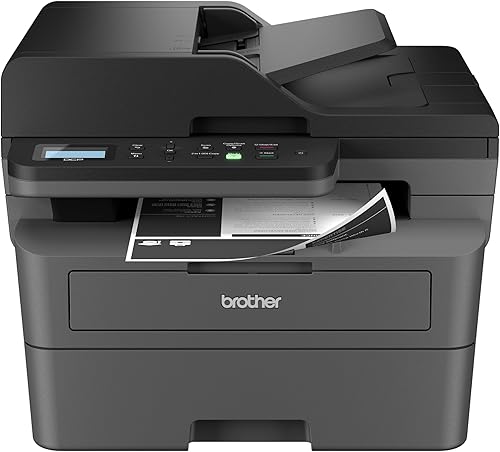 Best for heavier document work
Brother DCP-L2640DW Wireless Compact Monochrome Multi-Function Printer
Brother DCP-L2540DW vs DCP-L2640DW: what changes?
The DCP-L2640DW offers faster stated printing, a larger feeder and Ethernet alongside dual-band wireless. The DCP-L2540DW remains capable of monochrome printing, copying and scanning, with wireless and wired networking and USB 2.0.
The older model's stated print speed is up to 30 pages per minute. The DCP-L2640DW is rated up to 36 pages per minute, a difference most useful when you send larger jobs often.
Their automatic document feeders hold 35 and 50 pages, respectively. That extra room can reduce how often you reload originals during a multi-page scan or copy job.
Does faster printing justify the upgrade?
A higher maximum speed can shorten larger print jobs, but it won't change every workday. If you mostly print a few pages at a time, the difference may not be noticeable enough to justify replacing a working printer.
Think about your normal jobs rather than the largest job you've ever printed. A steady stream of multi-page reports makes the speed gap more relevant than occasional forms.
When does the larger feeder help?
The 50-page feeder is useful when you often scan or copy documents longer than 35 pages. If your originals are usually short, both feeders may handle your routine without frequent reloading.
Feeder capacity is only one part of document handling. Check the setup and care instructions for your exact model, and prepare originals as the manual directs.
Which model fits your connection setup?
Choose the DCP-L2640DW if you need Ethernet or dual-band wireless; keep the DCP-L2540DW if its wireless, wired networking or USB 2.0 connection already fits. A connection only helps when it matches your network and devices.
The DCP-L2640DW lists built-in dual-band wireless for 2.4 GHz and 5 GHz networks, Ethernet and USB. Its Brother Mobile Connect app supports printing, scanning and printer management from a mobile device.
The DCP-L2540DW supports wireless and wired networking and has a USB 2.0 interface for local connection. Its listed compatible devices include PCs and smartphones.
Before replacing a printer, note how each computer and mobile device currently sends jobs. Confirm that your router, network access and operating system work with the model you plan to use.
For a broader look at nearby Brother models, compare the Brother DCP-L2640DW vs HL-L2480DW if you're weighing an all-in-one against a printer-focused alternative. If you want to see more options, our best Brother laser printer all in one guide covers other multifunction choices.
Are either of these printers right for color documents?
Neither printer is meant for color output; both are monochrome models. Upgrading from one to the other will not help if color charts, photos or marked up documents are part of your routine.
The DCP-L2640DW is described as black and white, and the DCP-L2540DW uses black and white laser technology. Both suit text and documents where black output is sufficient.
If you are considering the newer model, see our answer to whether the Brother DCP-L2640DW works with color ink. For color printing, compare a suitable color printer and its supply costs before deciding.
Monochrome output fits contracts, invoices, letters and forms that need clear black text. It is a poor fit for photos, charts with colored categories or documents where redlining matters.
Many households and small offices accept black output for most work and send color jobs elsewhere. That can work well, as long as it matches how often color pages actually appear.
The trade off is workflow as well as print quality. Sending a job to another printer or shop adds time, even when the main printer handles everything else quickly.
A color printer also needs more than one ink or toner source, so total supply spending can rise over time. Sort a recent stack of pages into black only and color needed before choosing either Brother model.
If color pages are rare, monochrome printing may stay practical. If they appear weekly, plan for a separate color option instead.
Paper choice does not turn black output into color output. It only affects how cleanly text and simple graphics lay on the page.
For setup, print a sample you will truly use, such as a form or an invoice. That page tells you more about daily fit than a generic test image.
Keep both printers away from excessive dust and follow the manual for cleaning. A clear paper path helps text pages feed without jams.
The smartest upgrade matches your document mix. Speed and feeder size cannot fix a missing color function.
What do the paper and document capacities mean day to day?
Both models have a 250-sheet paper tray, while the DCP-L2640DW's 50-page feeder holds 15 more originals than the DCP-L2540DW's. Tray capacity and feeder capacity serve different jobs.
The DCP-L2540DW's tray adjusts for letter or legal paper and includes a manual feed slot for envelopes. The DCP-L2640DW also has a 250-sheet tray, and its product information describes that tray as reducing the need to refill during work.
Don't confuse paper in the tray with pages in the feeder. The tray holds blank paper for printing; the automatic document feeder holds originals you want to scan or copy.
How often will you refill the paper tray?
A 250-sheet tray can make longer print runs less interrupted than a small-capacity tray. The actual refill interval depends on how many pages you print and the paper you load.
Keep paper within the supported sizes and follow the manual's loading guidance. Avoid overfilling, and store spare paper in a dry place so sheets stay flat.
Can you rely on the feeder for every original?
Use the feeder for suitable multi-page originals, following the model's manual for paper condition and loading. Fragile, folded or unusually sized pages may need a different handling method.
For long batches, stack pages in order and check the first scan or copy before continuing. That simple check can help catch a misplaced page or an upside-down stack early.
Is the DCP-L2640DW worth the upgrade for an existing owner?
It is worth considering when the larger feeder, higher speed or connection choices solve a problem you face repeatedly. If none of those differences matter, keeping a working DCP-L2540DW is reasonable.
Upgrade candidates include small offices that scan multi-page records, users who print larger batches, and people who need Ethernet or dual-band wireless. The newer model also supports a mobile app for printing, scanning and printer management.
Stay with the DCP-L2540DW if 30 ppm is fast enough, its 35-page feeder handles your originals, and its connections work reliably. A printer that fits your routine does not become unsuitable simply because a newer model exists.
If you are comparing other options in this family, read the Brother DCP-L2640DW vs MFC-L2820DW comparison. The model names are similar, so compare the specific functions you need before switching.
Start with your most common bottleneck. If you wait at the feeder while a stack reloads, the larger feeder may help.
If you wait for pages to finish printing, the higher stated speed may matter more.
Network problems deserve a separate look. Ethernet can suit a desk that stays in one place, while dual-band wireless can help when devices sit farther from a router.
Toner management also differs. The DCP-L2640DW uses Brother Genuine TN830 or TN830XL toner, while the DCP-L2540DW is described as Amazon Dash Replenishment Ready.
Pick the supply approach that fits how you like to reorder.
Set up the new printer by checking paper sizes, network names and scan destinations before you clear the old unit. Keep the older printer available until the first real job passes cleanly.
The best upgrade test is a normal week of work. If the newer model shortens repeated tasks, it has earned a place.
If your week feels the same, keeping the current printer remains practical.
What should you check before changing printers?
Check your recurring workload, network and toner needs before you decide. A short checklist can show whether the newer model solves a daily limitation or only offers a larger maximum.
- Count how many pages you print in a typical week and how often jobs exceed a few pages.
- Note the longest original you scan or copy, then compare it with the 35-page and 50-page feeder capacities.
- Confirm whether you need Ethernet, dual-band wireless, a local USB connection or mobile app controls.
- Check the current printer's condition and whether it still completes the jobs you rely on.
- Confirm the replacement toner model and setup instructions for the printer you choose.
The DCP-L2640DW uses Brother Genuine TN830 or TN830XL replacement toner. The DCP-L2540DW is described as Amazon Dash Replenishment Ready, which can automatically order toner from Amazon when activated and low; consider whether that service suits how you manage supplies.
For either printer, keep the paper path clear and follow its manual for cleaning, toner replacement and troubleshooting. Store paper and toner as directed, and avoid forcing parts that do not move freely.
A monochrome laser printer can be a practical fit for text-heavy home work, but the right choice depends on what you print. Our guide on whether a laser printer is worth it for home use explains the broader trade-offs.
Which Brother printer should you choose?
Keep the DCP-L2540DW if its 30 ppm speed, 35-page feeder and connections already cover your work; choose the DCP-L2640DW when its 36 ppm rating, 50-page feeder or Ethernet and dual-band wireless address a regular need. The upgrade makes most sense when one of those differences removes a real bottleneck.
For heavier document work, the newer model's larger feeder and added connection options are the clearest reasons to switch. For occasional printing and short scan jobs, a working older model may remain the more sensible fit.
Both printers share the same basic role in a home or small office. They print, copy and scan in black and white, and both use automatic duplex printing for two-sided pages.
That shared role means your daily habits matter more than small spec differences.
Look at paper handling next. Both models list a 250-sheet tray, so tray capacity alone gives little reason to switch.
Feeder size is the clearer split for scan and copy batches.
Connections complete the picture. The DCP-L2540DW lists wireless and wired networking with USB 2.0, while the DCP-L2640DW adds Ethernet and dual-band wireless.
Match those choices to your router and desk layout.
Also weigh the app and supply path. The newer model supports the Brother Mobile Connect app, while the older model is described as Amazon Dash Replenishment Ready for automatic toner ordering when activated.
A fair test is to list your last month of printing and scanning. Count pages, note the longest originals and mark any job that felt slow.
If those jobs were short and steady, the current printer likely still fits.
If long batches and network limits kept appearing, the newer model addresses a clear need. Set up either choice with a real document and confirm the network before relying on it.
Keep the paper path clear and replace toner as directed. Small care habits help either printer stay reliable for text-heavy work.
Frequently asked questions
Is the Brother DCP-L2640DW a direct replacement for the DCP-L2540DW?
Both are compact monochrome multifunction printers with printing, copying, scanning and automatic duplex printing. The DCP-L2640DW adds a higher stated print speed, a 50-page feeder and dual-band wireless plus Ethernet.
Check your connection and document needs before treating it as a replacement.
Will the DCP-L2640DW print color?
No. The DCP-L2640DW is a monochrome printer, so it produces black-and-white output.
If color documents are part of your regular work, compare a color inkjet or color laser model instead of upgrading between these two monochrome printers.
What is the biggest difference between the two Brother printers?
The clearest differences are speed, feeder size and listed connection options. The DCP-L2640DW is rated up to 36 ppm and has a 50-page automatic document feeder, while the DCP-L2540DW is rated up to 30 ppm and has a 35-page feeder.
Can I keep using the DCP-L2540DW if it meets my needs?
Yes. If its print speed, paper handling and connections fit your routine, there is no need to replace it just because a newer alternative exists.
Consider an upgrade when a specific limit, such as feeder capacity or network connection, slows work you do often.


