8 Best A3 Flatbed Scanners (November 2026)
The best A3 flatbed scanners for large originals include the Canon Canoscan Lide 300 Scanner for compact photo and document scanning, the Epson Workforce ES-50 Compact & Lightweight Mobile for portable single-sheet scanning, and the Canon CanoScan LiDE 400 Slim Scanner for slim high-resolution photo scans.
On this page (9 sections)
- Our A3 flatbed scanner picks for oversized originals
- How the best A3 flatbed scanner picks compare
- Is an A3 flatbed scanner right for your originals?
- What size glass do you need for A3 scanning?
- Flatbed versus overhead: which large format flatbed scanner style fits?
- What resolution, color depth and speed matter most?
- Which software features save time after the scan?
- How do you set up and care for a large format scanner?
- Which best A3 flatbed scanner should you buy?
The best A3 flatbed scanner for most large originals is the VIISAN VF3240 A3 Scanner, because it gives you a full A3 glass, frameless edge-to-edge scanning and a 4-second A3 color scan at 200 dpi. This guide compares true A3 flatbeds with compact flatbeds, mobile sheet-fed models and overhead book scanners, so you can see the trade-offs plainly.
Our score weighs specs, features and buyer feedback against what you are shopping for. A high score does not always mean the largest glass, because portability, resolution and ease of use also matter.
If you mainly scan loose office pages, start with our guide to a digital scanner for documents. If your originals are oversized or fragile, a flatbed or overhead model is the safer path.
Our picks at a glance
-
1
 Best for compact photo and document scanning
Canon Canoscan Lide 300 Scanner
9.7/10 our score
See it on Amazon -
2
 Best for portable single-sheet scanning
Epson Workforce ES-50 Compact & Lightweight Mobile
9.6/10 our score
See it on Amazon -
3
 Best for slim high-resolution photo scans
Canon CanoScan LiDE 400 Slim Scanner
9.4/10 our score
See it on Amazon
- 4
 Check it
CZUR Aura Pro Book & Document Scanner
Best for portable A3 and A4 book capture - 5
 Check it
CZUR ET24 Pro Professional Book Scanner
Best for high-resolution A3 book scanning - 6
 Best for true A3 flatbed originalsCheck it
- 7
 Best for simple A3 office scanningCheck it
- 8
 Check it
VIISAN Large Format Book & Document Scanner
Best for A2 overhead capture
Our A3 flatbed scanner picks for oversized originals
The picks below cover three different jobs. True A3 flatbeds handle flat oversized sheets, overhead scanners handle bound books, and compact models handle standard pages and photos.
Choose by the original first, then by features.
Canon Canoscan Lide 300 Scanner: Best for compact photo and document scanning
- 2400 x 2400 dpi
- 48-bit color depth
- Auto Scan Mode
- USB connection
A slim flatbed for standard documents and photos, with Auto Scan Mode and one-touch PDF, Copy and Send buttons.
Pros
- Compact 3.6 lb body
- 48-bit color and 2400 dpi
- Auto Scan Mode
Cons
- Standard sheet capacity is 1
- Not an A3-size glass
The Canon Canoscan Lide 300 suits people who need a compact flatbed for standard documents and photos. Its 2400 x 2400 dpi resolution and 48-bit color depth give you room to enlarge ordinary scans without the work getting soft too quickly.
Auto Scan Mode detects what you are scanning and adjusts settings for you. That helps when you switch between a photo, a receipt and a business card during one session.
Image enhancements such as fade correction and dust reduction help older photos hold up in the file.
The 4 EZ buttons cover PDF, Copy, Send and a custom function. The built-in PDF button saves searchable PDFs with OCR, and Send to Cloud can upload to services such as Microsoft OneDrive and Dropbox.
The LED light source means no warm-up wait before the first scan.
It weighs 3.6 pounds and measures 14.5 by 9.9 by 1.7 inches, so it sits on a small desk more easily than an A3 model. The trade-off is glass size, because this is not a large format flatbed scanner for A3 sheets.
Choose it for everyday flat scanning at a small footprint.
Epson Workforce ES-50 Compact & Lightweight Mobile: Best for portable single-sheet scanning
- 9.44 oz portable body
- Scans up to 8.5 x 72 in
- 5.5 second single-page scan
- USB powered
A mobile sheet-fed scanner for receipts, ID cards and long pages on the go, not a flatbed.
Pros
- Very light and USB powered
- Handles long documents
- Nuance OCR included
Cons
- Single-sheet feeding only
- Not for fragile or bound originals
The Epson Workforce ES-50 suits people who scan on the go rather than at a fixed desk. It weighs 9.44 ounces, runs from USB power and scans a single page in as fast as 5.5 seconds.
That speed is listed at 300 dpi for an 8.5 by 11 inch sheet, so set your expectations by resolution.
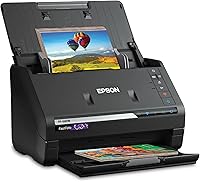
It is not a flatbed, and that matters for your choice. This single-sheet-fed scanner pulls each page through, so fragile originals, thick items and bound books are poor fits.
The CIS sensor and LED light keep the body thin and light for a bag or drawer.
Its strength is long and odd paper. It handles documents up to 8.5 x 72 inches, plus receipts and ID cards, which makes accounting and bookkeeping simpler.
Automatic feeding mode accepts each new sheet as you insert it and can combine multi-page scans into one file.
Epson ScanSmart software lets you scan, review and save files, and Nuance OCR creates searchable PDFs and editable Word and Excel files. It also scans to the cloud.
Choose it for mobile document work and long loose pages, not for flat A3 originals.
Canon CanoScan LiDE 400 Slim Scanner: Best for slim high-resolution photo scans
- 4800 x 4800 dpi
- 48-bit color depth
- USB Type-C cable
- 8 second scan
A slim flatbed with higher 4800 dpi resolution for detailed photos and standard documents.
Pros
- 4800 dpi resolution
- Slim vertical stand option
- USB Type-C data and power
Cons
- Standard A4/Letter glass
- Sheet capacity is 1
The Canon CanoScan LiDE 400 suits people who want a slim flatbed with more resolution than the LiDE 300. Its 4800 x 4800 dpi resolution helps preserve fine detail in photos and documents.
That headroom is useful when you crop a small part of a page and still want readable text.
It scans in as fast as 8 seconds, and a single USB Type-C cable carries both data and power. That single-cable setup reduces desk clutter.
It connects through USB 2.0 Type-C, with the cable included in a USB A to Type-C form.
The 5 EZ buttons include PDF and other one-touch tasks. Auto Scan Mode detects the item type, and the built-in PDF button saves multi-page PDFs that are editable and searchable.
Color restore and dust removal help faded photos look closer to the original.
Paper size is listed as 8.27 x 11.69 and 8.50 x 11.69 inches, so plan for standard Letter and A4 work rather than A3. A vertical stand clips on for storage, which helps in tight spaces.
Choose it for detailed photo scanning on a slim body.
CZUR Aura Pro Book & Document Scanner: Best for portable A3 and A4 book capture
- Capture A3 and A4
- 4320 x 3240 resolution
- 2 second page scan
- Flattening curved book page technology
A foldable overhead scanner that captures A3 and A4 pages and flattens curved book pages in software.
Pros
- Folds for travel
- Auto skew correction
- Smart lamp with 4 color temperatures
Cons
- Overhead capture, not a flatbed
- Very glare-prone paper needs care
The CZUR Aura Pro suits people who need to capture A3 and A4 pages from books without pressing a spine flat. Its overhead camera captures at 4320 x 3240 resolution in about 2 seconds per page.
It outputs JPG, Word, PDF and searchable PDF files.
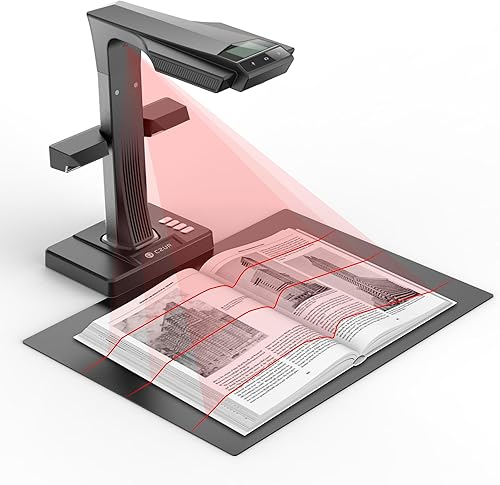
Three laser lines help the software flatten curved book pages. The result is a flatter digital page than a phone photo taken at an angle.
The software can also correct skew when a document is placed crooked, and it can detect multiple small items and split them into separate images.
The scanner folds 90 degrees and weighs 1.5 kg, so it packs into a backpack more easily than a fixed A3 flatbed. The side light is detachable for travel.
A smart lamp offers 4 color temperature settings, with glare-free and non-flickering light for reading as well as scanning.
A 2-inch preview screen shows the scan area before you capture. Auto-scan can trigger when the software detects a page change, and a foot pedal can speed up work.
OCR supports 180 plus languages, with some exceptions listed by CZUR. Choose it for portable book capture.
CZUR ET24 Pro Professional Book Scanner: Best for high-resolution A3 book scanning
- 24MP camera
- 5696 x 4272 resolution
- A3 size up to 16.5 x 11.7 in
- ABBYY OCR
A professional overhead book scanner with a 24MP camera for A3 documents, books and paintings.
Pros
- 24MP capture
- HDMI document camera use
- 180+ language OCR
Cons
- 4.5 kg body
- Very glare papers are not recommended
The CZUR ET24 Pro suits librarians, teachers and archivists who need higher-resolution A3 capture. Its 24MP camera records at 5696 x 4272 resolution, with 320 DPI listed for the camera.
The CMOS sensor and upgraded CPU and graphic processing help keep capture stable at that size.
It scans documents up to A3 size, 16.5 by 11.7 inches, including books, receipts, business cards, paintings and magazines. That makes it a true large format option, even though it is overhead rather than a flatbed.
It supports macOS 10.13 or later, Windows XP to 11, and Ubuntu 20.04 to 24.04 on Linux.
CZUR flattening technology transforms curved book surfaces into flatter pages. A 2.0-inch preview screen shows the area in real time.
Two side lights plus a head light let you reduce reflection on glossy paper by switching the head light off and using the side lights only.
ABBYY OCR converts JPG files into editable PDF, Excel and Word files, with support for 180 plus languages for text recognition. HDMI support lets you use it as a document camera.
Choose it for serious A3 book work where camera height is available.
VIISAN VF3240 A3 Scanner: Best for true A3 flatbed originals
- A3 glass up to 11.98 x 17 in
- 2400 dpi maximum
- 4-second A3 scan at 200 dpi
- 48-bit color
A frameless A3 flatbed for CAD drawings, blueprints and wide documents that sheet feeders cannot handle.
Pros
- Full A3 flatbed glass
- Edge-to-edge frameless design
- Auto-scan when lid closes
Cons
- Large 22.24 in wide body
- Windows A3 resolution is 1200 dpi via ViiScan
The VIISAN VF3240 suits people whose main need is a true A3 flatbed scanner. Its glass scans up to 11.98 by 17 inches, with a frameless design for edge-to-edge capture of large materials.
The frameless glass helps when a drawing or blueprint fills the full sheet.
It reaches 2400 dpi maximum resolution with 48-bit color and 16-bit greyscale. At full A3 size, Windows users get 1200 dpi through ViiScan software, while MacOS with native ICA support can use the full 2400 dpi.
The three-color RGB LED light source needs no warm-up, so you can start a session quickly.
Speed is a key reason to shortlist it. VIISAN says it scans an A3 color document in 4 seconds at 200 dpi, which suits high-volume office work.
Actual time varies with resolution, document size and settings, so use that figure for comparison rather than as a promise for every scan.
The scanner auto-scans when the lid closes, and four buttons cover Scan, Email, Print and PDF. It supports Windows 7 to 11 through TWAIN and WIA, and MacOS 10.15 and later through ICA.
Choose it for CAD drawings and blueprints.
Plustek OS1180: Best for simple A3 office scanning
- Maximum scan size 11.7 x 17 in
- A3 in about 9 seconds
- 48-bit color
- ABBYY OCR
A straightforward A3 flatbed for libraries, schools and small offices with one-touch scan functions.
Pros
- True A3 scan area
- Removable lid for bulky items
- One-touch buttons
Cons
- Heavier at 9.5 lb
- 1200 dpi maximum copy resolution
The Plustek OS1180 suits libraries, schools and small offices that need simple A3 scanning. Its maximum scan size is 11.7 by 17 inches, which covers A3 and tabloid paper.
The flatbed format keeps large sheets flat, unlike a sheet feeder that must pull the page through rollers.
It scans A3 documents in about 9 seconds, with 48-bit color and 16-bit gray-scale modes. An LED light source needs no warm-up, so the scanner is ready when you turn it on.
The listed maximum copy resolution is 1200 dpi in both black and white and color.
Four one-touch buttons scan to folder, send to email, convert to text and create PDFs. ABBYY OCR and DocAction software help with file sharing and searchable output.
The included TWAIN driver lets you scan directly into a wide range of editing applications without extra steps.
The removable lid makes room for large and bulky items that would not close under a fixed lid. That can help with thicker originals, though you should still follow care advice for the glass and lid.
Choose it for straightforward A3 office work.
VIISAN Large Format Book & Document Scanner: Best for A2 overhead capture
- A2 size 594 x 420 mm
- 26MP, 5888 x 4522 pixels
- Auto-flatten curved pages
- Multi-language OCR
An overhead A2 scanner for large journals, manuscripts, newspapers and maps, with fingerprint removal.
Pros
- Largest A2 capture here
- Fingerprint removal
- 90-degree foldable hinge
Cons
- Overhead camera, not a flatbed
- Very glary papers are not recommended
The VIISAN Large Format Book & Document Scanner suits people who need even more than A3 capture. It scans A2 size at 594 by 420 mm, which covers large journals, manuscripts, newspapers and maps.
The height adjusts for A2 and A3 work, and the hinge folds 90 degrees for storage.
Its camera delivers up to 26MP at 5888 x 4522 pixels, with software-enhanced output up to 600 DPI. The fixed-focus lens and automatic exposure help keep framing simple.
It can also take snapshots, record video and support remote collaboration through third-party conferencing software.
The software auto-flattens curved pages, removes fingers from images and splits double pages into separate images. Embedded OCR converts files into PDF or editable Word, Excel, Epub and text files.
It can also recognize 1D barcodes and QR codes and export data into an Excel sheet.
A built-in 3-level LED light helps in low light. The scanner can also convert documents into MP3 or WAV audio on Windows software.
Choose it for A2 overhead capture, and check that your system uses x64 or x86 architecture before you buy.
How the best A3 flatbed scanner picks compare
The table below puts the key specs side by side. Use it to check size, resolution and format before you read the buying advice.
| Product | Best for | Resolution | Color depth | Size | Our score |
|---|---|---|---|---|---|
| Canon Canoscan Lide 300 Scanner | compact photo and document scanning | 2400 x 2400 dpi | 48-bit | 14.5 x 9.9 x 1.7 in | 9.7 |
| Epson Workforce ES-50 Compact & Lightweight Mobile | portable single-sheet scanning | 1200 dpi | 9.6 | ||
| Canon CanoScan LiDE 400 Slim Scanner | slim high-resolution photo scans | 4800 x 4800 dpi | 48-bit | 9.4 | |
| CZUR Aura Pro Book & Document Scanner | portable A3 and A4 book capture | 4320 x 3240 | 5.12 x 7.09 x 17.44 in | 9.1 | |
| CZUR ET24 Pro Professional Book Scanner | high-resolution A3 book scanning | 5696 x 4272 | 8.8 | ||
| VIISAN VF3240 A3 Scanner | true A3 flatbed originals | 2400 dpi | 48-bit | 15.51 x 22.24 x 2.4 in | 8.6 |
| Plustek OS1180 | simple A3 office scanning | 48-bit | 16.02 x 23.18 x 2.67 in | 8.3 | |
| VIISAN Large Format Book & Document Scanner | A2 overhead capture | 26MP, 5888 x 4522 | 8.1 |
We compared specs, features and buyer feedback for each model. We checked glass size, resolution, color depth, weight, connectivity and software features against the job each scanner is meant to do.
We did not test these scanners hands on. Scores reflect how well the stated specs fit the search for an A3 flatbed scanner, including honest limits for models that are not true A3 flatbeds.
How to read the comparison without missing a limit
A spec can look strong in isolation and still miss your job. The Epson ES-50 reaches 8.5 by 72 inches, but it feeds one sheet at a time rather than resting a page on glass.
The CZUR and VIISAN overhead models reach A3 or A2, but they rely on a camera angle and software flattening.
Check the operating system notes in the table as well. The VIISAN VF3240 gives different A3 resolution on Windows and MacOS, and the VIISAN A2 model needs x64 or x86 systems.
Those details decide whether the headline spec applies to your computer.
Is an A3 flatbed scanner right for your originals?
A true A3 flatbed is right when your originals are flat, oversized or fragile. The glass holds the page still while the scanner reads it, so you avoid bending or feeding the item.
Flatbed scanner A3 models for sheets and drawings
Choose a flatbed for blueprints, CAD drawings, legal-size pages and presentation boards. The VIISAN VF3240 and Plustek OS1180 are the clearest examples here.
Overhead scanners for bound books
Choose an overhead scanner when a book spine cannot lie flat. The CZUR and VIISAN overhead picks use cameras and software flattening instead of a glass bed.
When a standard flatbed is enough
Choose a standard flatbed when your largest pages are Letter or A4. The Canon picks cover that job with smaller bodies and higher photo resolution.
What size glass do you need for A3 scanning?
You need a glass that fits your largest original with room to spare. A3 paper measures about 11.7 by 16.5 inches, so check both dimensions before you buy.
A3 and tabloid pages
Look for a maximum scan size of at least 11.7 by 17 inches. The Plustek OS1180 lists exactly that maximum, and the VIISAN VF3240 lists up to 11.98 by 17 inches.
Legal and ledger sheets
Legal paper is 8.5 by 14 inches, and ledger or tabloid sheets are often 11 by 17 inches. An A3 glass usually covers both, but confirm the exact scan area.
Larger than A3 originals
If you regularly scan A2 maps or oversized journals, a large format photo scanner or an A2 overhead model may fit better. Our guide to how to choose a large format photo scanner explains the size checks.
Measure your largest original before you compare prices. A scanner that is one inch short on the long edge will crop the sheet, and rescanning the missing strip rarely lines up cleanly.
Overhead models add a different check, because the page must fit inside the camera frame at the height you set.
Flatbed versus overhead: which large format flatbed scanner style fits?
Flatbeds win for thin, flat and delicate originals because the page rests on glass. Overhead scanners win for books because the spine stays curved and the software flattens the page image.
Contact quality and edge control
A flatbed gives you direct contact from edge to edge. That helps with thin drawings and photos where a camera angle could distort the image.
Book handling and page turning
Overhead scanners let you turn pages without pressing the spine into a lid. The CZUR ET24 Pro and VIISAN A2 model both offer software flattening for curved pages.
Desk space and height
Flatbeds need width and depth on the desk. Overhead scanners need height above the desk, so check ceiling clearance and shelf space before you choose.
Think about where each style will live for daily use. A 22 inch wide flatbed needs a clear desk run, while an overhead arm needs vertical room and a stable surface.
If you move the scanner between rooms, a foldable overhead model such as the CZUR Aura Pro is easier to carry than a fixed A3 glass.
What resolution, color depth and speed matter most?
Resolution matters most when you plan to enlarge or archive detail. Speed matters most when you scan many large pages in one session.
Resolution for archives and enlargements
The Canon LiDE 400 offers 4800 dpi for standard photos. The VIISAN VF3240 offers up to 2400 dpi for A3 work, with 1200 dpi for A3 on Windows through ViiScan.
Color depth for artwork and photos
48-bit color depth is common in this group and gives you more tones to work with in editing software. The Canon, VIISAN and Plustek flatbeds all list 48-bit color.
Speed at A3 size
A fast A3 scan saves real time on large jobs. VIISAN says the VF3240 scans A3 color in 4 seconds at 200 dpi, while Plustek puts the OS1180 at about 9 seconds for A3.
Speed figures need a like for like reading. The 4 second figure is at 200 dpi, so a higher resolution archive scan will take longer on any model.
Use speed to compare the same size and resolution, then weigh it against color depth and the maximum resolution you actually need.
Which software features save time after the scan?
Software decides whether a scan becomes a usable file or just a picture of a page. OCR, auto-crop and one-touch buttons save the most time for regular users.
OCR and searchable PDFs
OCR turns scanned text into searchable or editable text. The Epson ES-50 includes Nuance OCR, while CZUR models use ABBYY OCR for editable files.
Auto crop, deskew and split pages
Auto framing helps when you scan multiple small items at once. CZUR software can split multiple targets into separate images, and VIISAN software can split double pages.
One-touch scan buttons
Buttons for PDF, email, print and folder save clicks. The Plustek OS1180 and VIISAN VF3240 both use preset buttons for common tasks.
Check which file formats the software produces before you buy. Some workflows need a searchable PDF, while others need editable Word or Excel files for reuse.
The CZUR ET24 Pro, Epson ES-50 and VIISAN models list those editable outputs, so match the output to the next step in your process.
How do you set up and care for a large format scanner?
Setup is simple when you match the scanner to your computer from the start. Care matters because dust on a large glass shows up in every scan.
Check computer and driver support first
Confirm your operating system before you buy. The VIISAN A2 model needs x64 or x86 systems, while CZUR models list specific macOS and Windows versions.
Clean the glass and lights with care
Wipe the glass with a soft, dry cloth and avoid harsh cleaners. Check the manual for cleaning advice if white lines appear, since VIISAN mentions that troubleshooting point.
Store overhead scanners folded when you can
Fold overhead arms and detach side lights where the design allows it. The CZUR Aura Pro folds 90 degrees for storage in a backpack or cabinet.
Test the preview before you commit to a full session. Overhead models show a live preview on a small screen, while flatbeds let you check the lid position and page alignment by eye.
A quick first scan will show whether lighting, glare or framing needs adjustment.
Which best A3 flatbed scanner should you buy?
Buy the VIISAN VF3240 if your main job is flat A3 originals, because its frameless glass and fast A3 scan match that job directly. Buy the Plustek OS1180 if you want simpler one-touch A3 office scanning.
Buy the CZUR ET24 Pro if you scan bound books at A3 size and want 24MP capture. Buy the VIISAN A2 model if your originals go beyond A3 and you can use an overhead setup.
If you scan mostly standard pages, the Canon LiDE 400 gives you higher resolution in a slim body. If you scan on the move, the Epson ES-50 is the portable sheet-fed option.
For more choices by format, see our best large format scanner roundup. For sheet-fed A3 document work, compare the best A3 scanner for documents.
For print and scan in one unit, see the best large format printer scanner combos. For artwork, see the best large format scanner for artwork guide.
If photos are your main subject, our best photo scanner machine list covers compact flatbeds. If you want a feeder plus a flatbed, see the best flatbed scanner with adf picks.
Our top 3 picks at a glance
-
1
Best for compact photo and document scanning
Canon Canoscan Lide 300 Scanner
9.7/10 our score
See it on Amazon -
2
Best for portable single-sheet scanning
Epson Workforce ES-50 Compact & Lightweight Mobile
9.6/10 our score
See it on Amazon -
3
Best for slim high-resolution photo scans
Canon CanoScan LiDE 400 Slim Scanner
9.4/10 our score
See it on Amazon
Frequently asked questions
What is the best A3 flatbed scanner for originals?
The VIISAN VF3240 is the clearest pick for flat A3 originals because its glass takes up to 11.98 by 17 inches. The Plustek OS1180 is a simpler A3 alternative for offices and libraries.
Is a flatbed scanner A3 model better than a sheet-fed scanner?
Yes for fragile, bound or oversized originals. A flatbed keeps the page flat and lets you place items by hand.
A sheet-fed scanner suits loose multi-page documents instead.
What is a large format flatbed scanner used for?
It digitizes originals too wide or delicate for a feeder. Common uses include blueprints, CAD drawings, newspapers and presentation boards.
Check the glass size before you buy.
Can an overhead scanner replace an A3 flatbed?
Sometimes. Overhead models such as the CZUR picks capture books without flattening the spine.
They need more desk height and can struggle with very glare-prone paper.