Why Is Epson Ink So Expensive?
Epson ink can be expensive because cartridges combine specialized ink, printhead design, brand supply costs, and limited page yields. You can manage the cost by checking yield, reducing waste, and matching the printer to your print volume.
On this page (12 sections)
- Why is Epson ink so expensive?
- Does cartridge yield explain the cost?
- How do cleaning cycles increase ink use?
- Do printer settings affect Epson ink costs?
- Can a laser printer reduce ink spending?
- What should you compare before buying replacement ink?
- What can replace Epson ink for black document printing?
- Who should consider a high-yield toner cartridge?
- Is toner better than ink for text documents?
- How can you lower Epson ink costs?
- Is Epson ink still worth buying?
- FAQ
Epson ink can be expensive because cartridges combine specialized ink, printer-specific design, brand supply costs, and limited page yields. Your real cost also depends on how often the printer cleans its printhead, how much color you use, and how many pages each cartridge produces.
The cartridge price is only one part of the calculation. A low-cost printer that uses small cartridges can cost more over time than a printer with higher-yield supplies.
Why is Epson ink so expensive?
Epson ink costs more when the cartridge yield is low, the ink system is specialized, or the printer uses ink during maintenance. Color printing can also raise costs because one document may draw from several cartridges at once.
Epson makes different ink systems for home documents, photos, and office printing. Those systems may use different ink types, cartridge shapes, and color sets, so a cartridge made for one printer may not work in another.
Printer brands also build supply costs into the long-term ownership model. The printer may be affordable at the start, while replacement cartridges become the larger expense for people who print often.
For a broader explanation of cartridge pricing, see our guide to why printer ink is so expensive.
Does cartridge yield explain the cost?
Page yield is one of the clearest reasons Epson ink can feel expensive. A cartridge that produces fewer pages needs replacement sooner, even if its purchase price looks reasonable.
Yield is usually based on a standard test page, not every document you print. Large photos, dark graphics, heavy bold text, and full-color pages use more ink than short black text.
Color cartridges create another cost point. If one color runs low, your printer may stop color printing or ask for a replacement even when the other cartridges still contain ink.
Check the expected yield for your exact Epson model and compare it with your monthly page volume. Our guide to ink costs for printers explains how to compare supply use over time.
How do cleaning cycles increase ink use?
Printhead cleaning can use ink because the printer moves ink through the nozzles to clear or prevent clogs. Occasional maintenance may help print quality, but repeated cleaning can reduce cartridge life.
A printer that sits unused for long periods may need more maintenance than one used regularly. Leaving the printer powered according to its instructions can also help it follow its normal maintenance routine.
Don't run deep cleaning repeatedly just because a page looks slightly uneven. Check the manual, inspect the cartridge installation, and use the least intensive maintenance option that addresses the problem.
Printing a small document regularly may be more practical than leaving the printer unused for months. However, every printer behaves differently, so follow the care guidance for your Epson model.
Do printer settings affect Epson ink costs?
Printer settings can change how much ink a page uses. Draft, economy, grayscale, and black-and-white settings may reduce consumption when you don't need photo-quality color.
Use print preview before sending a job. It can catch blank pages, oversized images, and accidental pages that would otherwise use ink.
For routine documents, select the lowest quality setting that still gives you readable text. Save higher-quality settings for final copies, photos, or pages where color and detail matter.
You should also check whether the printer is set to print in color by default. A black-and-white document can still draw from color cartridges when the driver or application sends it as a color job.
Can a laser printer reduce ink spending?
A laser printer can reduce supply costs when you mainly print black text and need regular, predictable output. Laser printers use toner rather than liquid ink, so they suit a different type of printing.
Our guide to why laser printers do not use ink cartridges explains the difference between toner powder and liquid ink. If your work is mostly reports, forms, and shipping labels, that distinction may matter more than the printer's starting price.
Toner cartridges can cost more upfront, but the page yield may make the total cost easier to manage for frequent document printing. See why toner costs more upfront than ink for the trade-off.
A laser printer is not automatically the better choice. Photo printing, occasional color work, and a need for compact inkjet hardware may still favor an Epson inkjet printer.
What should you compare before buying replacement ink?
Compare cartridge yield, color requirements, printer compatibility, and your monthly page count before buying. A cartridge that lasts longer can be a better fit even when its shelf price is higher.
Check these points:
- Confirm the exact Epson printer model.
- Compare standard and high-yield cartridge options.
- Estimate how many black, color, and photo pages you print.
- Check whether replacing one color stops the printer.
- Include cleaning and wasted pages in your estimate.
- Decide whether a laser printer would suit your routine better.
Don't assume a third-party cartridge will work simply because the shape looks similar. Printer firmware, cartridge recognition, ink type, and printhead design can affect compatibility.
What can replace Epson ink for black document printing?
A Brother mono laser toner cartridge can be a practical alternative when you need black-and-white documents rather than color pages. These products are for specific Brother printers, so confirm your printer model before ordering.
The Brother Genuine TN420 Mono Laser Toner Cartridge is designed for Brother mono laser printers and has an approximate 1,200-page yield. It suits lower-volume black-and-white printing when your printer is one of its compatible models.
Choose this type of cartridge when crisp black text matters more than color output. It won't solve Epson ink costs for an Epson printer, but it shows how a mono laser setup can separate document printing from color ink use.
Who should consider a high-yield toner cartridge?
A high-yield toner cartridge suits people who print many black-and-white pages and want fewer supply changes. The right choice still depends on whether your Brother printer supports that cartridge.
The Brother Genuine High Yield TN660 Toner Cartridge has a page yield of up to 2,600 pages and works with specified Brother laser printers and all-in-ones. It is a better match for regular document work than occasional color printing.
This cartridge also supports Amazon Dash Replenishment on eligible Brother printers after activation. That feature can help you avoid running out unexpectedly, but it does not replace checking your printer's compatibility.
Is toner better than ink for text documents?
Toner is often better suited to frequent text documents because it is designed for mono laser printing and avoids liquid ink maintenance. Ink remains useful when you need color, photos, or an inkjet printer you already own.
Read our comparison of toner and ink for text documents before changing printer types. Think about your real work: black reports favor a mono laser, while mixed color and photo printing may favor an inkjet.
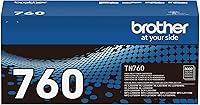
The Brother Genuine TN760 High Yield Black Toner Cartridge has an approximate 3,000-page yield and is compatible with specified Brother models, including MFC-L2710DW, MFC-L2750DW, HL-L2350DW, HL-L2370DW, HL-L2395DW, HL-L2390DW, and DCP-L2550DW.
Its high-yield design may suit a busy home office or small office that prints black text often. It is not a color replacement for Epson ink, so choose it only when your work fits mono laser printing.
How can you lower Epson ink costs?
Lower Epson ink costs by reducing wasted pages, limiting unnecessary cleaning, and matching print quality to the task. The biggest savings usually come from changing print habits and choosing a printer with supplies that fit your volume.
Use these habits:
- Check print preview before every large job.
- Print black-and-white documents in grayscale when appropriate.
- Use draft or economy mode for internal copies.
- Avoid printing images at full size unless needed.
- Combine short documents when practical.
- Keep cartridges installed and follow the printer's maintenance instructions.
- Track how often each cartridge needs replacement.
If you print only a few pages each month, buying a different printer may not save money. If you print hundreds of black pages each month, compare the total supply cost of a mono laser printer with your current Epson ink use.
Is Epson ink still worth buying?
Epson ink is worth considering when you need color, photo output, or an Epson printer that already fits your work. It becomes harder to justify when your printing is mostly black text and frequent cartridge replacements.
Choose Epson ink when color and image quality matter more than the lowest document cost. Reduce waste with previews and suitable quality settings, and compare yields for your exact model.
Choose a Brother mono laser setup when you mainly print black documents and want to compare higher-yield toner options. The key decision is not why is Epson ink so expensive by itself, but whether your printer and supply system match what you print each week.
FAQ
Why is Epson ink expensive compared with toner?
Epson ink can cost more for frequent document printing because cartridges contain liquid ink, may have lower page yields, and can use ink during maintenance. Toner cartridges often suit high-volume black-and-white work.
Compare yield, color needs, cleaning use, and printer compatibility before deciding which system costs less for you.
Does using draft mode save Epson ink?
Draft or economy mode may reduce ink use for internal documents, but the result can be lighter and less detailed. Use it for working copies, then switch to a higher-quality setting for final pages.
Check the print preview first so the lower setting doesn't create unreadable text or poor images.
Should you buy high-yield Epson cartridges?
Buy a high-yield Epson cartridge when your printer supports it and you print often enough to use the ink before storage becomes a concern. Compare its page yield with the standard option and your monthly page count.
A high-yield cartridge is less useful for occasional printing.
Is a Brother laser printer cheaper than an Epson inkjet?
A Brother laser printer may cost less to run for regular black-and-white documents, but the answer depends on printer cost, toner yield, color needs, and usage. Compare your actual monthly pages with the supplies for compatible models.
An Epson inkjet remains useful when you need color or photo printing.
Frequently asked questions
Why is Epson ink so expensive?
Epson ink can cost more because cartridges contain specialized ink and are designed for specific printers and print systems. The cost per page also depends on cartridge yield, cleaning cycles, color use, and how much of the cartridge you use before replacing it.
Compare page yield and total ink use, not only the cartridge price.
Does Epson ink dry out?
Inkjet ink can dry or clog when a printer sits unused for long periods, especially around the printhead. Use the printer regularly, keep cartridges installed as directed, and run cleaning cycles only when needed.
Frequent cleaning uses ink, so it can add to your total printing cost.
Is laser toner cheaper than Epson ink?
Laser toner can be cheaper for frequent black-and-white document printing because toner cartridges often produce many pages and do not use liquid ink. The better choice depends on your printer, page volume, color needs, and cartridge yield.
Compare total cost per page before switching.
How can I make Epson ink last longer?
Use draft or economy mode for internal documents, print only the pages you need, check the preview before sending a job, and avoid unnecessary cleaning cycles. Keep the printer maintained and compare high-yield cartridge options when your Epson model supports them.