Why Is My Laser Printer Not Printing Dark Enough?
A laser printer that is not printing dark enough often has a low toner density setting, uneven or depleted toner, or a dirty print path. Check the print settings first, then inspect the cartridge and follow the printer's maintenance instructions.
On this page (8 sections)
- Why is my laser printer not dark enough?
- How do you adjust laser printer density?
- Could the toner cartridge be causing faint pages?
- Can cleaning the printer improve darkness?
- Does paper or print quality affect how dark a page looks?
- Which printer features matter if you need darker output?
- Is the Tatu-Derm tracing paper right for laser printing?
- What should you do if prints are still faint?
A laser printer that is not dark enough often has a low density setting, uneven or depleted toner, or a maintenance issue. Check the print settings first, then inspect the toner cartridge and follow the printer's care instructions.
Print a test page after each change so you can tell what helped. If the problem affects only one document, check its font color and print settings before troubleshooting the printer.
Why is my laser printer not dark enough?
A laser printer can print faint text when its print density is set too low, toner is running low or uneven, or a printer component needs attention. Paper choice and print quality settings can also change the result.
Start with a page that has both text and a solid black area. If everything looks light, check density and toner; if the page has streaks, spots, or only one faded area, inspect the cartridge and print path.
For a broader troubleshooting checklist, see how to fix common problems with printers.
How do you adjust laser printer density?
Raise the printer's density or toner darkness setting one step at a time, then print another test page. The setting may be in the printer menu, computer driver, or print dialog, depending on the model.
Look for options called Print Density, Toner Density, Darkness, or Print Quality. Choose a normal or higher setting, rather than a draft or toner-save mode, and compare the result.
If the printer is shared, check both the computer's print dialog and the printer's own control panel. A driver setting can override what you expect from the device menu.
Can toner-save mode make prints look faint?
Yes. Toner-save or economy mode uses less toner and can make text and graphics appear lighter.
Turn it off for a test page if dark, readable output matters more than reducing toner use.
If turning off the mode makes no difference, return to the density setting and toner checks. Don't keep increasing darkness if the printer begins smudging or using too much toner.
Could the toner cartridge be causing faint pages?
A toner cartridge can cause light pages when it is nearly empty, unevenly distributed, damaged, or not seated correctly. Check the printer's toner warning and follow the manual before removing or replacing anything.
Some printers allow gentle side-to-side rocking of a cartridge to redistribute toner for a short time. Do this only if your printer's instructions permit it, keep the cartridge level, and avoid touching the drum or exposed contacts.
If replacing toner is needed, use a cartridge compatible with your exact model. A toner cartridge's shape and contacts can differ even between printers from the same brand.
Should you replace toner when the printer says it is low?
Replace it when the printer's guidance or the print quality indicates the cartridge is depleted. A low-toner message alone may leave some printing capacity, but faint output can mean the cartridge is no longer supplying toner evenly.
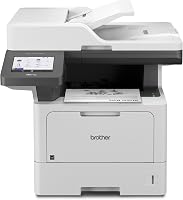
The Brother MFC-L5915DW is a monochrome laser all-in-one with a Brother Genuine 3,000-page toner cartridge included and compatibility with TN920UXXL and TN760U cartridges.
Choose a printer based on the workload and features you need, not only the toner yield. For alignment issues on a Brother model, see how to fix Brother laser printer alignment problems.
Can cleaning the printer improve darkness?
Cleaning can help when dust, toner residue, or a buildup inside the printer interferes with the print path. Follow the maker's instructions for your exact model and use only the cleaning steps it approves.
Turn the printer off and let it cool if the manual directs you to do so. Avoid touching the imaging drum, fuser, or other parts that the manual identifies as sensitive or hot.
Don't use household cleaners, compressed air, or improvised tools inside the printer unless the manufacturer specifically allows them. These can spread toner or damage parts.
If the output also has dots or smears, troubleshoot those marks separately with laser printer leaving spots on paper.
Does paper or print quality affect how dark a page looks?
Yes. The wrong paper type or a draft-quality setting can make output look lighter or uneven, even when the toner cartridge is fine.
Use dry paper that meets the printer's requirements, and confirm that the media type in the print driver matches what is loaded. A mismatch can affect how the printer handles toner and heat.
For photo work, a laser printer may not give the look you want. Compare the tradeoffs in which printer is better for printing photos.
Is toner the same as ink?
No. Laser printers use toner powder, while inkjet printers use liquid ink cartridges.
Learn why laser printers do not use ink cartridges, and see why printer ink may not be drying if you're troubleshooting an inkjet.
Which printer features matter if you need darker output?
Choose a printer with print-quality controls that fit your workload, and check the toner cartridge options for the model. A small office may want an all-in-one, while occasional home printing may call for a compact device.
The HP LaserJet MFP M140w prints, scans, and copies black-and-white documents, with wireless printing and a stated print speed of up to 21 pages per minute for single-sided pages.
The Brother MFC-L5915DW is intended for higher-volume office printing, with monochrome print and copy speeds up to 50 pages per minute and an option for a high-yield Brother toner cartridge.
Neither speed nor connectivity guarantees darker output. Check the density controls and consumable compatibility for the specific model you plan to use.
Is the Tatu-Derm tracing paper right for laser printing?
No. Tatu-Derm Inkjet Stencils Tracing Paper is designed for inkjet stencil printing, so it is not a fit for troubleshooting laser printer darkness.
The paper comes in a 500-sheet ream and is designed to fit desktop inkjet printers for printing artwork and transferring stencils. Use media that your laser printer supports instead.
What should you do if prints are still faint?
If density, toner, paper, and approved cleaning steps don't help, check the printer manual for model-specific troubleshooting and service guidance. Persistent faint areas may point to a worn or faulty imaging component that needs attention.
Keep a test page from before and after each change. That makes it easier to describe whether the issue is full-page fading, repeating marks, or a single light area when you contact support.
For a laser printer not dark enough, adjust density first, check the cartridge next, and clean only as the manual allows. If the printer still produces faint output, use the model's support guidance before buying replacement parts.
Frequently asked questions
Why is my laser printer printing faded text?
Faded text can come from a low toner density setting, a toner cartridge nearing the end of its life, an uneven toner supply, or a dirty printer component. Print a test page, check density and toner settings, then inspect the cartridge and follow your manual's cleaning steps.
Can low toner make a laser printer print light?
Yes. A cartridge with little toner left can produce faint or uneven pages, though a density setting or printer maintenance issue can look similar.
Check the printer's toner status and page quality before replacing the cartridge, and use a cartridge that matches the printer model.
Should I shake a laser toner cartridge?
Only if the printer maker's instructions allow it. Some manuals advise gently rocking a cartridge side to side to redistribute toner temporarily, while others warn against doing so.
Keep the cartridge level, avoid touching its drum, and follow the steps for your exact model.
Does the paper affect laser print darkness?
Paper can affect how toner transfers and how dark the page looks, especially if the paper type setting does not match the paper loaded. Select the right media type and use dry, clean paper approved for your printer.
If only some pages look faint, check the toner path too.