Brother MFC-L2900DW Review: Worth It? (October 2026)
The Brother MFC-L2900DW suits small offices that scan and print multi-page black-and-white documents. Its 50-page feeder supports single-pass duplex scanning, while the XL bundle adds a second toner cartridge for up to 4,200 pages in the box.
On this page (6 sections)
The Brother MFC-L2900DW is a compact monochrome all-in-one for small offices that print and scan two-sided documents. Its 50-page feeder supports single-pass duplex scanning, and the XL package includes up to 4,200 pages of toner.
The main choice is the bundle. The standard MFC-L2900DW includes a 700-page starter toner cartridge, while the XL version includes TN830 and TN830XL cartridges with six times more toner in the box, according to Brother.
What does the Brother MFC-L2900DW review find?
The Brother MFC-L2900DW combines black-and-white printing, copying, scanning and faxing with a 50-page feeder and automatic duplex printing. Its stated print speed reaches 36 pages per minute, and the 3.5-inch touchscreen provides access to popular cloud services.
Brother MFC-L2900DW XL Wireless Compact Monochrome All-in-One: Best for higher in-box toner yield

- Up to 36 ppm
- 50-page auto document feeder
- Single-pass duplex scanning
- Up to 4,200 pages of toner included
A compact monochrome all-in-one for small businesses that need printing, copying, scanning and faxing. The XL bundle includes TN830 and TN830XL toner, with up to 4,200 pages of toner yield.
Pros
- 50-page feeder supports single-pass duplex scanning
- Automatic duplex printing
- Dual-band wireless, Ethernet and USB connectivity
- 3.5-inch touchscreen with access to popular cloud apps
Cons
- Black-and-white printing only
- The included page yield is an estimate, not a guarantee of your exact output
For routine office documents, the duplex feeder is a practical feature: it can scan both sides in a single pass. That can reduce handling when digitizing contracts, forms or other multi-page records.
This model prints in monochrome only. If color output is necessary, consider a color all-in-one such as the Brother MFC-L3720CDW vs MFC-L3780CDW comparison.
Who should choose the MFC-L2900DW?
Choose it if your work is mostly black-and-white paperwork and you want printing, copying, scanning and faxing in one machine. Ethernet, dual-band wireless and USB give you several ways to connect it to an office network or a computer.
It may be more machine than you need if you only print occasional pages and don't scan multi-page jobs. For a smaller all-in-one, compare the Brother MFC-L2820DW review.
How useful is duplex scanning?
Duplex scanning is most useful when you regularly digitize double-sided pages. The MFC-L2900DW's feeder scans both sides in one pass, which saves you from flipping each sheet and feeding it again.
Brother lists scan speeds of up to 23.6 images per minute in black and 7.9 in color. Actual job time can vary with settings, document condition and destination, so treat those figures as rated maximums rather than a promise for every scan.
The 50-page feeder can hold a batch of documents, but it doesn't remove the need to check the first few pages for orientation, page order and legibility. For a one-sided original, duplex scanning is unnecessary; set the scan mode to match the source.
The MFC-L2900DW also scans to popular cloud apps through its touchscreen. If you handle mostly one-sided pages, compare it with the Brother DCP-L2640DW vs MFC-L2820DW to see whether a simpler feature set better fits your work.
What does the XL bundle add?
The MFC-L2900DW XL includes two toner cartridges, TN830 and TN830XL, with up to 4,200 pages of yield in the box. The standard MFC-L2900DW includes a starter black toner cartridge rated for 700 pages.
That difference can matter if you print often and prefer to delay your first toner replacement. The XL bundle is described as containing six times more toner in-box than the standard version, but your actual page yield depends on what you print.
Both versions accept TN830 and TN830XL replacement toner. The XL label refers to the extra toner included, not a faster printer or different duplex scanning capability.
Compare the two bundles in the MFC-L2820DW vs MFC-L2820DW XL guide, which can help if you're weighing in-box toner against your expected print volume.
How does the standard MFC-L2900DW compare with the XL?
The standard MFC-L2900DW and the XL share the core capabilities: up to 36 ppm printing, a 50-page feeder with single-pass duplex scanning, automatic duplex printing, a touchscreen, and wireless, Ethernet and USB connections. The clearest stated difference is the toner supplied in the box.
Brother Professional Laser Printer with Scanner: Best for the standard toner bundle
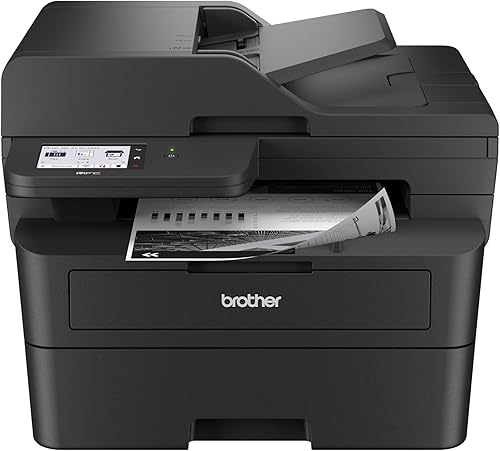
- Up to 36 ppm
- 50-page auto document feeder
- Single-pass duplex scanning
- 700-page starter toner cartridge
The standard MFC-L2900DW shares the core print, scan and connection features of the XL version. It comes with a 700-page starter toner cartridge rather than the XL bundle's two cartridges.
Pros
- Same stated 36 ppm print speed
- Single-pass duplex scanning with a 50-page feeder
- Dual-band wireless, Ethernet and USB connectivity
- 3.5-inch touchscreen
Cons
- Starter cartridge has a lower stated yield than the XL bundle
- Black-and-white printing only
The standard package may fit occasional or moderate printing when a 700-page starter cartridge is enough to get started. If you print larger volumes, the XL bundle's additional toner can reduce how soon you need to replace the cartridge.
Both remain monochrome printers. Think about how often you print, whether documents need color, and whether you scan two-sided originals before deciding which bundle makes sense.
For a direct feature comparison with a similar model, see Brother MFC-L2820DW vs MFC-L2900DW.
What should you know about printing and connectivity?
The MFC-L2900DW prints black-and-white pages at up to 36 ppm and supports automatic duplex printing. Its 250-sheet paper tray can reduce the frequency of refills for regular office jobs.
You can connect over dual-band wireless, Ethernet or USB 2.0. Brother Mobile Connect supports mobile printing and scanning, while the touchscreen offers direct access to cloud services including Google Drive, Dropbox and OneNote.
A wired Ethernet connection can suit a shared office printer, while wireless may be more convenient for flexible placement. For guidance on the wider trade-offs, read what are the advantages of a laser printer? and what are the disadvantages of a laser printer?.
Is the MFC-L2900DW the right Brother all-in-one?
The MFC-L2900DW is a strong fit when you want a monochrome machine with duplex scanning, copying, faxing and several connection options. Its compact footprint and touchscreen also make it easier to place on a desk than a larger office machine, though you should still measure available space.
Choose the XL bundle if the additional in-box toner matters for your print volume. Choose the standard bundle if the 700-page starter cartridge better matches your expected use, or compare more options in our guide to the best Brother laser printer all-in-one models.
Pick the MFC-L2900DW for frequent two-sided scanning and black-and-white office work. If color printing is a regular need, choose a color all-in-one instead.
For a color Brother laser printer, see the HL-L3280CDW review.
Frequently asked questions
Does the Brother MFC-L2900DW scan both sides automatically?
Yes. The MFC-L2900DW has a 50-page automatic document feeder that supports single-pass duplex scanning, so it can scan both sides of a sheet during one pass.
This is useful for multi-page double-sided documents; check the scan settings and destination before starting a large job.
What extra toner comes with the Brother MFC-L2900DW XL?
The XL bundle includes TN830 and TN830XL toner, with up to 4,200 pages of toner yield in the box. Brother describes that as six times more in-box toner than the standard MFC-L2900DW, which comes with a 700-page starter black toner cartridge.
Can the MFC-L2900DW print in color?
No. The MFC-L2900DW is a monochrome laser printer for black-and-white documents.
Its scan specifications include separate black and color rates, but that does not mean it can print color; choose a color printer if your documents need color output.
How does the MFC-L2900DW connect to devices?
It supports dual-band wireless on 2.4GHz and 5GHz, Ethernet, and USB 2.0, plus mobile printing and scanning through Brother Mobile Connect. Its 3.5-inch touchscreen can also access popular cloud apps such as Google Drive, Dropbox and OneNote.


