Brother MFC-L2820DW Review: Worth It? (October 2026)
The Brother MFC-L2820DW is a compact monochrome laser all-in-one for small offices that need to print, copy, scan and fax. This Brother wireless MFC-L2820DW review covers its connections, setup, everyday use and how to choose between the standard and XL models.
On this page (10 sections)
- Brother MFC-L2820DW Review
- What does the Brother MFC-L2820DW do?
- Is the Brother MFC-L2820DW right for your kind of printing?
- How should you set up the Brother MFC-L2820DW?
- Are its copying, scanning and fax features useful?
- Which connections and controls suit your office?
- Should you buy the standard MFC-L2820DW or the XL?
- How can you avoid common printing mistakes?
- How does it compare with other Brother printers?
- Who should buy the Brother wireless MFC-L2820DW?
Brother MFC-L2820DW Review
The Brother wireless MFC-L2820DW is a compact monochrome laser all-in-one for small offices that need printing, copying, scanning and faxing. This Brother wireless MFC-L2820DW review explains who should buy it, how to set it up, and when the XL model makes more sense.
Its main limit is clear: output is black and white only. Choose it for text documents, forms and reports, then decide whether the standard model's toner supply fits your workload or the XL's larger supply is a better match.
What does the Brother MFC-L2820DW do?
The Brother MFC-L2820DW combines black-and-white printing with copying, scanning and faxing in one device. It measures 15.7 in deep, 16.1 in wide and 12.5 in high, so measure the desk and leave space to reach the paper tray and feeder.
Brother MFC-L2820DW Wireless Compact Monochrome All-in-One Laser: Best for small offices

- Black-and-white printing, copying, scanning and faxing
- Automatic duplex printing
- 50-page auto document feeder
- Dual-band wireless, Ethernet and USB
A compact four-function monochrome printer for offices handling regular document jobs. Automatic duplex printing and a 50-page feeder reduce manual work on two-sided and multi-page tasks.
Pros
- Prints, copies, scans and faxes
- Automatic duplex printing
- 50-page auto document feeder
- Wireless, Ethernet and USB connections
Cons
- Prints in black and white only
- Fax adds little for offices that never use it
A 50-page automatic document feeder handles stacks for multi-page copy, scan and fax jobs. Automatic duplex printing can print suitable documents on both sides, while a 2.7 in touchscreen gives you direct access to the printer's controls.
The printer offers dual-band wireless, Ethernet and USB. That range helps it fit different office layouts, from a shared wireless workspace to a wired network or a direct connection to one computer.
Who should consider the Brother wireless MFC-L2820DW?
This Brother monochrome laser printer suits an office where most pages are text, forms or other black-and-white documents. It makes sense when you also need scanning, copying or faxing and want those jobs handled in one place.
Skip it if you regularly print color charts, photos or marketing materials. A color model is a better fit for those jobs, while a simpler printer may suit you if you only need to print and never use the other functions.
For a plain-language explanation of this printer type, see what a monochrome laser printer is. If you're weighing laser printing against other options for home work, our guide to the advantages of a laser printer can help.
Is the Brother MFC-L2820DW right for your kind of printing?
The MFC-L2820DW is a good match when clear black text and office functions matter more than color. Think about the pages you actually print, not only the printer's listed functions.
Its print speed is described as up to 36 pages per minute, while the specifications give 34 pages per minute for black-and-white output. Real job time varies with the file, settings, connection and time needed to handle the first page, so use speed as a guide for document work rather than a promise for every job.
Automatic duplex printing is useful for reports, drafts and other documents that read well on two sides. For single-sided forms or pages that need a blank reverse, choose one-sided output in the print settings.
Don't count scanning or copying as a substitute for color output. Read the answer to whether the MFC-L2820DW is a color printer if you need to compare its limits with a color model.
How should you set up the Brother MFC-L2820DW?
Set up the printer by choosing its location and connection first, then adding it to the computers or phones that will send jobs. A clear setup order can prevent the common mistake of installing on one device before deciding how the rest of the office will connect.
Start by measuring the desk and checking access to the paper tray, touchscreen and feeder. Place the printer near a power outlet and, if you plan to use Ethernet or fax, within reach of the relevant cable connections.
Choose dual-band wireless for flexible shared access, Ethernet for a wired office network, or USB for a direct connection to one computer. Connect the printer and your devices using the instructions on its touchscreen and in Brother's setup materials.
The Brother Mobile Connect app can print, scan and manage the printer from a mobile device. Add cloud services such as Google Drive, Dropbox, Evernote or OneNote from the touchscreen if those are part of your document workflow.
Before your first longer job, confirm the paper size and one-sided or duplex setting on the sending device. Also check that the correct printer is selected, especially if your computer has more than one printer saved.
Are its copying, scanning and fax features useful?
The extra functions help when paper documents are part of your everyday office work. The feeder can take a multi-page stack for a copy, scan or fax job, which avoids placing every sheet on the glass individually.
For scanning, decide where each file should go before starting: a connected computer, mobile device or supported cloud app. Use a short test scan to confirm that the destination and page orientation are right before processing a large stack.
Fax is valuable only if your office still sends or receives documents that way. If nobody uses fax, it should carry little weight in your decision, though printing, copying and scanning may still make the all-in-one useful.
Which connections and controls suit your office?
The MFC-L2820DW offers wireless, Ethernet and USB connections, so you can match it to the devices and network you already use. Wireless fits shared access, Ethernet suits a wired network, and USB is a direct link to one computer.
The touchscreen provides access to printer functions and supported cloud apps. Brother's Mobile Connect app is another way to print, scan and manage the printer from a phone or tablet.
A common setup mistake is connecting the printer to the wrong wireless network or trying to send jobs from a device that is not connected to the same office setup. If wireless access is unreliable, check the printer's connection and the device's network before changing print settings.
Should you buy the standard MFC-L2820DW or the XL?
Choose the MFC-L2820DW XL if a larger toner supply in the box matters to your workload. Its included toner is rated for up to 4,200 pages; the standard model is the more straightforward choice if you don't need that larger initial supply.
Brother MFC-L2820DW XL Wireless Compact Monochrome All-in-One: Best for frequent printing
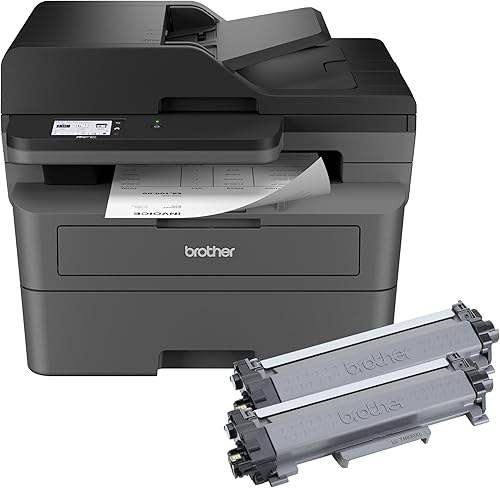
- Black-and-white printing, copying, scanning and faxing
- Up to 4,200 pages of included toner
- Automatic duplex printing
- 50-page auto document feeder
The XL shares the core office functions and compact dimensions of the MFC-L2820DW, with up to 4,200 pages of toner included. It suits buyers who want a larger initial toner supply.
Pros
- Includes toner for up to 4,200 pages
- Prints, copies, scans and faxes
- Automatic duplex printing
- Wireless, Ethernet and USB connections
Cons
- Still limited to black-and-white output
- Its main difference is the larger in-box toner supply
Both versions offer the same core print, copy, scan and fax functions, automatic duplex printing, a 50-page feeder and the same connection choices. Their listed dimensions are also the same, so the decision centers on the included toner supply.
A larger supply can reduce how soon you need to replace toner, especially if your office prints often. Compare the MFC-L2820DW and MFC-L2820DW XL in light of your expected print volume and toner preferences.
If you're comparing nearby Brother models, see Brother MFC-L2807DW vs MFC-L2820DW before deciding. Focus on the functions and connection options you'll use, rather than assuming similar model names mean identical features.
For a direct comparison, see DCP-L2640DW vs MFC-L2820DW.
How can you avoid common printing mistakes?
Use the right output mode for each job and confirm it before sending several pages. Choosing color by mistake wastes a step on a monochrome printer, while duplex settings can be wrong for forms that need a blank reverse.
For multi-page originals, place the stack in the feeder and check that the pages are oriented as the touchscreen or app directs. Confirm the scan destination before a large job so you don't have to repeat the process.
Keep paper loaded neatly and use the size and type your job calls for. If a print job doesn't start, check the selected printer, connection and paper supply before resending it, which can prevent duplicate copies when the first job was only delayed.
The touchscreen and app can help manage supplies and track toner use. Brother identifies TN830 and TN830XL as replacement toner options for these models; check the cartridge label and printer guidance before ordering.
How does it compare with other Brother printers?
The MFC-L2820DW is a monochrome four-function model, so compare alternatives by output type and the tasks you need. For another Brother option, see the Brother MFC-L2900DW review.
A color printer suits regular color work, while a print-only model may be enough if scanning, copying and faxing are unnecessary.
The Brother HL-L3280CDW review covers a color laser alternative. Check its functions against your needs because the MFC-L2820DW's combination of copy, scan and fax is part of its appeal.
For a wider comparison, see our guide to Brother all-in-one laser printers. You can also explore color all-in-one laser printers if you need color output alongside office functions.
Who should buy the Brother wireless MFC-L2820DW?
Buy the Brother wireless MFC-L2820DW if your office needs black-and-white printing plus copy, scan and fax in one compact machine. Its automatic duplex printing, feeder and multiple connection choices suit regular paperwork handled by more than one device.
Choose the standard model if its included toner supply fits your expected volume. Choose the XL if you print frequently and want up to 4,200 pages of toner included, or compare a color laser if monochrome output would leave important jobs unfinished.
For this Brother wireless MFC-L2820DW review, the decision is simple: match the printer's monochrome output and four functions to your real workload, then choose the toner supply that suits your volume. Browse Brother all-in-one laser printer options if you want to compare more models.
Frequently asked questions
Is the Brother MFC-L2820DW a color printer?
No. The Brother MFC-L2820DW prints in black and white only.
It can copy and scan, but those functions don't add color printing; if you regularly need color pages, compare a color laser printer such as the Brother HL-L3280CDW.
Can the Brother MFC-L2820DW scan multiple pages?
Yes. Its 50-page auto document feeder handles multi-page scan, copy and fax jobs.
Load a stack of originals in the feeder and choose the task on the touchscreen or in the app, following the prompts for the file destination or output.
Does the Brother MFC-L2820DW print on both sides?
Yes. Automatic duplex printing can print suitable documents on both sides without requiring you to turn each sheet by hand.
Choose one-sided output when a form or other page needs a blank reverse, and check the print preview before sending a long job.
What is the difference between the MFC-L2820DW and MFC-L2820DW XL?
The XL includes toner for up to 4,200 pages, while the standard model has a smaller in-box toner supply. Both provide black-and-white printing, copying, scanning and faxing, automatic duplex printing, a 50-page feeder, and wireless, Ethernet and USB connections.


