Brother HL-L3280CDW vs HL-L3295CDW: Which Should You Choose? (November 2026)
Choose the HL-L3280CDW for a straightforward color printer and the HL-L3295CDW for faster workflow controls, touchscreen access and NFC. Both support TN229 toner, but the HL-L3295CDW adds more office-focused features.
On this page (9 sections)
- Brother HL-L3280CDW vs HL-L3295CDW: which is better?
- Which Brother printer suits your workload?
- How do the printers compare for speed and paper handling?
- Which printer is easier to connect?
- Which toner should you choose?
- Which printer should use these toner options?
- Is the HL-L3295CDW worth choosing for a home office?
- What should you check before choosing?
- Brother HL-L3280CDW vs HL-L3295CDW: final choice
Choose the HL-L3280CDW for simpler color printing and the HL-L3295CDW for a busier office workflow. The Brother HL-L3280CDW vs HL-L3295CDW choice depends on whether you need advanced controls, automatic duplexing, mobile access and NFC.
The HL-L3295CDW is the more feature-focused option in this comparison. It offers speeds up to 31 pages per minute, a 2.7-inch color touchscreen, automatic duplex printing, wireless connectivity, Ethernet and NFC.
The toner choice is also important. Both compared printers work with the TN229XL cartridges described below, so your supply plan can stay similar even when the printer features differ.
 Best for lower-cost supply planning
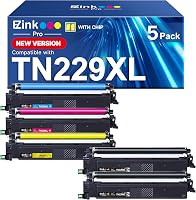
E-Z Ink Pro TN229XL TN229 Toner Cartridges
 Best for a ready-to-install 5-pack
Cool Toner TN229XL TN229 229XL Toner Cartridges Compatible
Brother HL-L3280CDW vs HL-L3295CDW: which is better?
The HL-L3295CDW is the stronger choice for office workflow features, while the HL-L3280CDW is the better fit for straightforward color documents. The right model depends on how often you print, how much setup control you want and which connections your office uses.
The HL-L3295CDW supports wireless printing, Ethernet, USB 2.0 and mobile devices. Its app, touch and voice control options give you several ways to send jobs.
Automatic duplex printing is useful when you regularly create double-sided documents. It can reduce manual page turning and make longer reports easier to manage.
The HL-L3280CDW may be the better match when you do not need a touchscreen, NFC or a broad set of office controls. A simpler setup can be easier to justify for a home office or a small desk.
For background information, read How Does an LED Printer Work? A Handy Guide before comparing laser-quality color printer designs.
Which Brother printer suits your workload?
Choose the HL-L3280CDW for routine documents and the HL-L3295CDW for frequent mixed office jobs. Think about the documents you print most often instead of choosing only by model number.
The HL-L3295CDW has a 250-sheet paper tray and a 30-sheet multipurpose tray. The multipurpose tray suits specialty paper such as labels and envelopes, while the main tray supports regular office paper.
Its stated print speed is up to 31 pages per minute for both color and black-and-white printing. That speed can help when several users send documents during a busy work period.
A home user who prints occasional forms may not need every control. If your jobs are mostly short documents, a straightforward color printer can be easier to live with.
When the HL-L3280CDW makes more sense
The HL-L3280CDW suits buyers who want a color document printer without paying attention to office access controls or touchscreen workflow. It is also a sensible starting point when the main concern is keeping compatible toner available.
Before choosing, check is the Brother HL-L3280CDW a laser printer if you are comparing it with inkjet models. The answer affects how you think about toner storage, page volume and routine maintenance.
When the HL-L3295CDW makes more sense
The HL-L3295CDW suits small offices, shared workspaces and home offices that need more ways to send print jobs. Wireless, Ethernet, mobile-device support and the 2.7-inch touchscreen give it a broader workflow than a basic color printer.
NFC and Secure Function Lock are useful when an office needs more control over who can access jobs. Those features matter less for a single person printing from one nearby computer.
The printer also supports cloud-based apps through its touchscreen, including Google Drive, Dropbox and Evernote. That can help when documents begin on a phone, tablet or cloud account instead of a single desktop.
For a closer look at this model, read the Brother HL-L3295CDW Review.
How do the printers compare for speed and paper handling?
The HL-L3295CDW is the clear choice when its 31-ppm speed and tray capacity match your workload. The available data here gives that speed and paper information for the HL-L3295CDW, not for the HL-L3280CDW.
A 250-sheet tray means fewer refills during a normal office day. The 30-sheet multipurpose tray also lets you handle specialty media without replacing the main paper supply each time.
Automatic duplex printing is another practical advantage. You can create double-sided pages without manually turning each sheet, which is useful for reports, handouts and longer documents.
Do not assume a higher stated speed always means a faster finished task. Connection method, document length, color coverage and the time needed to prepare a job can affect the full workflow.
Which printer is easier to connect?
The HL-L3295CDW offers the stronger connection range for mixed-device offices. It supports wireless, Ethernet, USB 2.0, smartphones, tablets and computers.
Wireless printing helps when several people use the printer from different desks. Ethernet can suit a shared office network, while USB 2.0 gives you a direct connection option.
Mobile compatibility matters if you often print from a phone or tablet. The touchscreen also supports cloud-based app access, so some jobs can start without moving files to a desktop computer.
For another model comparison in this family, see Brother HL-L3280CDW vs HL-L3220CDW. It can help you decide whether the HL-L3280CDW fits your needs before moving up to the HL-L3295CDW.
Which toner should you choose?
Choose a compatible TN229XL 5-pack when you want black and color replacements together for either printer. The 2 toner options here have the same stated page-yield pattern, but their product descriptions differ in how they describe the chip and package.
The E-Z Ink Pro set states a yield of up to 3,000 pages for black and up to 2,300 pages for each color at 5% coverage. It also includes a user guide and high-precision chips for toner-level display.
This set makes sense if you want a full color replacement set with a clearly stated compatibility list. It works with the HL-L3280CDW and HL-L3295CDW, along with other Brother models named in its product details.
The Cool Toner set contains 2 black, 1 cyan, 1 yellow and 1 magenta cartridge. It also states 3,000 pages for black and 2,300 pages for each color at 5% coverage.
The main practical difference is presentation. Cool Toner describes its chips as already installed, while E-Z Ink Pro describes high-precision chips that display toner levels.
Both options are compatible cartridge sets rather than Brother-branded toner.
Page yield depends on coverage. A page with heavy color or large dark areas uses more toner than a page with light text, so treat the stated figures as a comparison point rather than a promise for every document.
Which printer should use these toner options?
Both toner sets fit the listed HL-L3280CDW and HL-L3295CDW compatibility range. Check the model name on your printer before ordering and keep black and color cartridges organized so replacements are easy to identify.
The Brother HL-L3295CDW supports TN229 standard-yield, TN229XL high-yield and TN229XXL super-high-yield cartridges. The 2 compatible products covered here are TN229XL sets.
When replacing toner, remove the old cartridge from the drum unit and insert the replacement into the same slot. Follow the printer's on-screen prompts and the cartridge instructions if the printer does not recognize the replacement immediately.
Keep spare cartridges sealed until needed. Store them in a clean, dry place and avoid shaking or opening a cartridge before installation.
Is the HL-L3295CDW worth choosing for a home office?
The HL-L3295CDW is a good home-office choice when you use duplex printing, mobile access or shared connections. It may be more printer than you need if you mainly print a few basic pages from one computer.
Consider how many people will use it and how often documents change hands.
A single user printing forms or short letters may not need every control on offer.
A household or small business with several devices may benefit from the wider connection range.
Its 2.7-inch touchscreen makes common controls easier to reach on the printer itself.
You can check job details and start some tasks without returning to a desk computer.
Wireless and mobile compatibility can also reduce the need to move files between devices.
That helps when a document begins on a phone or tablet and needs a paper copy quickly.
Cloud based app access through the touchscreen can support the same habit.
Automatic duplex printing is useful for longer reports and double sided handouts.
It saves repeated manual handling and keeps pages in sequence with less interruption.
The printer measures 15.7 x 17.8 x 10.8 inches and weighs 36.8 pounds.
Measure your desk and delivery route before ordering, with room for paper loading and cable access.
Also leave space to open trays and reach the touchscreen comfortably during daily use.
A crowded shelf can make even a capable printer awkward to load and maintain.
For broader home-office guidance, read Why Choose a Laser Printer for a Home Office?.
What should you check before choosing?
Pick the printer that matches your daily workflow, then confirm the toner model and available space. A feature-rich printer is useful only when its controls and connections solve a real problem.
Use this short checklist:
- Choose the HL-L3280CDW if you want a simpler color document printer.
- Choose the HL-L3295CDW if you need automatic duplex printing and up to 31 ppm.
- Choose the HL-L3295CDW if you want wireless, Ethernet, USB 2.0, mobile and cloud-based printing options.
- Choose a TN229XL 5-pack if you want black and color replacements together.
- Compare the stated 5% coverage yields with your typical page coverage.
- Measure your workspace before choosing a printer that weighs 36.8 pounds.
If your HL-L3280CDW stops responding, see Why Is the Brother HL-L3280CDW Not Printing? for troubleshooting ideas.
Brother HL-L3280CDW vs HL-L3295CDW: final choice
Pick the HL-L3280CDW for simpler color printing, and pick the HL-L3295CDW for faster, more connected office work. The HL-L3295CDW is the better fit when its 31-ppm speed, automatic duplexing, touchscreen, mobile support and NFC will save time.
Start with the simplest version of your printing day.
If you mostly print routine color documents from one place, the simpler printer keeps the task clear.
You can focus on paper supply, toner availability and whether the output suits your documents.
Extra controls add little value when they are rarely used.
They can still add setup choices that need to be understood before the first job runs smoothly.
Now picture a busier day with several people and devices.
Speed matters more when jobs queue up and waiting slows the work in progress.
Automatic duplex printing matters when reports and handouts are regularly double sided.
A touchscreen matters when users need to check or start jobs at the printer itself.
Mobile and cloud access matter when documents live on phones, tablets or cloud accounts.
NFC and access controls matter when an office wants to manage who can use the printer.
Ethernet matters when a shared network connection is more reliable than relying only on wireless.
Think about paper handling as part of that busy picture too.
The HL-L3295CDW has a 250-sheet tray for regular office paper.
It also has a 30-sheet multipurpose tray for specialty paper such as labels and envelopes.
That mix helps when a day includes both standard documents and less common media.
It reduces the need to swap paper types as often during mixed work.
Choose the E-Z Ink Pro set when its 5-pack format and chip details fit your supply plan.
That set includes 2 black cartridges, 1 cyan, 1 magenta and 1 yellow cartridge.
It states up to 3,000 pages for black and up to 2,300 pages for each color at 5% coverage.
Choose the Cool Toner set when you prefer a 5-pack with pre-installed chips.
That set also includes 2 black, 1 cyan, 1 yellow and 1 magenta cartridge.
It states the same yield pattern at 5% coverage.
Both sets are compatible cartridges rather than Brother branded toner.
Page coverage will change the real yield for your own documents.
Heavy color pages and large dark areas consume toner faster than light text pages.
Compare the stated figures with your typical pages before deciding how many packs to keep ready.
Our scores weigh stated specs, features and buyer feedback against the needs of this comparison.
They do not replace checking your exact printer model, connection needs and typical document volume before ordering.
Confirm that TN229XL cartridges fit your printer model before you buy.
Measure the space where the printer will live and plan for paper loading.
Then choose the printer whose daily workflow matches the way you already work.
Frequently asked questions
What is the main difference between the Brother HL-L3280CDW and HL-L3295CDW?
The HL-L3295CDW adds a 2.7-inch color touchscreen, NFC, automatic duplex printing, wireless and Ethernet connectivity, and speeds up to 31 pages per minute. Choose the HL-L3280CDW when you want a simpler color printer, and choose the HL-L3295CDW when office workflow features matter.
Are the Brother HL-L3280CDW and HL-L3295CDW toner cartridges the same?
The TN229XL cartridges listed here are compatible with both the HL-L3280CDW and HL-L3295CDW. The E-Z Ink Pro and Cool Toner sets include 2 black cartridges, 1 cyan, 1 magenta and 1 yellow cartridge, with stated yields based on 5% coverage.
Is the HL-L3295CDW better for a small office?
The HL-L3295CDW is better for a small office when you need automatic duplex printing, mobile access, a touchscreen, Ethernet or NFC. Its 250-sheet paper tray and 30-sheet multipurpose tray also suit mixed paperwork.
For occasional printing, those features may not justify choosing the more capable model.
Should I choose compatible TN229XL toner?
Choose compatible TN229XL toner when a 5-pack, stated page yield and pre-installed chips fit your supply plan. The 2 options here list 3,000 pages for black and 2,300 pages for each color at 5% coverage.
Confirm your printer model before installing any cartridge.