Brother HL-L3295CDW Review: Worth It? (November 2026)
The Brother HL-L3295CDW suits a shared office that needs color documents, automatic duplexing and several ways to print. Its 250-sheet main tray, 30-sheet multipurpose tray and NFC badge reader help with shared workflows, while its 36.8 lb weight calls for a stable spot.

On this page (8 sections)
- Brother HL-L3295CDW review: who is it for?
- What shared-office features does it offer?
- How well does it handle routine color documents?
- Is it a laser printer or an LED printer?
- Which toner should you choose?
- What should you know about paper handling and placement?
- What are the main trade-offs?
- Is the Brother HL-L3295CDW right for your office?
The Brother HL-L3295CDW suits a shared office that needs color printing, automatic duplexing and flexible connections. It prints up to 31 pages per minute, has a 250-sheet main tray and a 30-sheet multipurpose tray, and includes NFC features for shared workflows.
Its 2.7-inch touchscreen and support for mobile and cloud-based printing add convenience for teams. It is a print-focused machine, so choose another model if your office needs scanning or copying built in.
Brother HL-L3295CDW review: who is it for?
The Brother HL-L3295CDW is a strong fit for a small office sharing color document printing. Automatic duplexing, multiple connection choices and a separate multipurpose tray cover common needs such as handouts, proposals, labels and envelopes.
Brother HL-L3295CDW Wireless Compact Digital Color Printer: Best for shared color printing

- Up to 31 ppm
- Automatic duplex printing
- 250-sheet paper tray and 30-sheet multipurpose tray
- 2.7-inch color touchscreen
- Wireless, Ethernet, USB, mobile and NFC features
A color printer with automatic duplexing, multiple connection options and an NFC card reader for shared office workflows. Its paper capacity and touch display suit teams that print routine documents and occasional specialty media.
Pros
- Automatic duplex printing
- Wireless, Ethernet, USB and mobile connectivity
- NFC badge authentication and Secure Function Lock
- Separate multipurpose tray for specialty media
Cons
- 36.8 lb weight needs a stable placement spot
- Print-only model despite one spec field describing all-in-one functions
Its NFC card reader and Secure Function Lock can help an office manage access to the printer. These features may matter when multiple people share a device or print work that should be collected by an assigned user.
The printer weighs 36.8 lb, so plan a stable, accessible location before setup. Its compact dimensions are 17.8 in wide, 15.7 in deep and 10.8 in high, but leave room to open trays and handle paper.
When does the HL-L3295CDW make sense?
Choose it if your team prints color documents regularly and wants automatic two-sided printing. The 250-sheet tray handles routine paper, while the 30-sheet multipurpose tray provides a separate path for specialty media such as labels and envelopes.
Consider another printer if scanning, copying or faxing is part of the daily workflow. The HL-L3295CDW is a printer, and the product details describe printing features rather than a built-in scanner or copier.
What shared-office features does it offer?
The HL-L3295CDW supports wireless, Ethernet, USB and mobile printing, giving a team several ways to send jobs. The 2.7-inch color touchscreen displays job details and can access cloud-based apps including Google Drive, Dropbox and Evernote.
A wired Ethernet connection can suit a fixed office setup, while wireless and mobile options help people print from laptops, phones and tablets. Walk-up printing from a USB host is also described for jobs brought directly to the printer.
For shared use, NFC badge authentication and Secure Function Lock can support access management. Check that these controls fit your office’s user accounts and print-handling process before relying on them.
How well does it handle routine color documents?
The printer offers color output at speeds up to 31 pages per minute, according to Brother’s published specification. Actual job time can vary with the document, connection, settings and whether a job uses color or duplex printing.
Automatic duplexing is useful for meeting packs, internal drafts and longer documents. It can reduce paper use when two-sided pages suit the job, without making users manually flip each sheet.
The main tray holds 250 sheets, and the multipurpose tray holds 30. That combination lets you keep standard paper in the main tray while using the multipurpose tray for specialty stock.
Is it a laser printer or an LED printer?
The HL-L3295CDW is a digital color printer that uses toner and provides laser-quality output. Brother’s product details identify its display type as LED, so readers comparing print technologies can also review [How Does an LED Printer Work?
A Handy Guide](/how-does-an-led-printer-work/).
It shares a product family and toner options with the HL-L3280CDW. Read the Brother HL-L3280CDW Review for a closer look at that related model, or compare their differences in Brother HL-L3280CDW vs HL-L3295CDW.
The question of whether its sibling counts as a laser printer comes up often. Our guide to whether the Brother HL-L3280CDW is a laser printer explains the terminology around this printer family.
For a model comparison, see HL-L3280CDW vs HL-L3220CDW.
Which toner should you choose?
Choose toner based on your office’s print volume, color needs and preference for Brother Genuine or compatible supplies. The HL-L3295CDW supports TN229, TN229XL and TN229XXL toner options.
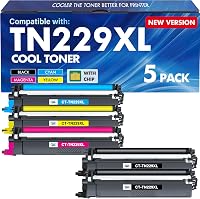
The compatible Cool Toner set includes two black cartridges and one each cyan, yellow and magenta. Its stated yield is 3,000 pages for black and 2,300 pages for each color cartridge at 5% coverage, so page design and coverage affect how long a set lasts.
Brother’s genuine TN229XXLBK black toner is rated for up to 4,500 pages. Brother says its Mobile Connect app can track genuine toner levels, and its cartridge collection program accepts used toner for recycling.
Color work also needs cyan, magenta and yellow toner. If your office prints mostly black text, a high-yield black cartridge may be a useful match; for regular color work, plan to keep all four colors available.
What should you know about paper handling and placement?
The printer’s 250-sheet main tray and 30-sheet multipurpose tray support different paper jobs without requiring you to replace the main stack each time. Brother also describes an optional 250-sheet lower tray, which can reduce how often a team refills paper.
Measure the intended shelf or table and check access to the paper trays, output area and power connection. At 36.8 lb, the printer is easier to place before it is connected and loaded.
For a second Brother option in a different class, see the Brother HL-L2480DW review. If your team needs a monochrome printer aimed at higher-volume printing, compare the Brother HL-L5210DW review.
What are the main trade-offs?
The HL-L3295CDW combines color printing, automatic duplexing, wireless features, Ethernet and NFC access controls. Those options are useful in a shared office, but they are more than a team needs if it prints only occasional black-and-white pages.
It is a printer rather than a scan-and-copy workstation. Offices that need those functions should compare an all-in-one model, such as the Brother DCP-L2640DW vs HL-L2480DW comparison.
Toner choice adds another decision. Brother Genuine toner gives you the manufacturer’s cartridge option, while the compatible five-pack offers a set with two black cartridges; consider your supply policy and preferred replacement approach.
Is the Brother HL-L3295CDW right for your office?
Pick the HL-L3295CDW if your shared office prints color documents, needs automatic duplexing and can use wireless, Ethernet or mobile connections. Its separate multipurpose tray and NFC features add flexibility for mixed office jobs and shared access.
Choose a simpler monochrome printer if color is rare, or an all-in-one if scanning and copying are required. For another toner-family comparison, read Brother DCP-L2540DW vs DCP-L2640DW before deciding which type of office workflow you need.
Frequently asked questions
Is the Brother HL-L3295CDW a laser printer?
The HL-L3295CDW is a digital color printer with laser-quality output and toner cartridges. It supports color printing, automatic duplexing and up to 31 pages per minute; its technology and cartridge family are closely related to the HL-L3280CDW.
Does the Brother HL-L3295CDW print double-sided?
Yes, the HL-L3295CDW has automatic duplex printing, so it can print on both sides without you turning each sheet over. Duplexing can reduce paper use for drafts, meeting notes and longer office documents, though you should check the print settings when a job needs single-sided pages.
Can several people connect to the Brother HL-L3295CDW?
The printer offers wireless and Ethernet connectivity, plus printing from mobile devices and USB. Brother also describes an integrated NFC card reader and Secure Function Lock for managing access, which may help an office apply shared-device controls.
What toner does the Brother HL-L3295CDW use?
The HL-L3295CDW is compatible with Brother TN229 standard, TN229XL high-yield and TN229XXL super high-yield toner options. The TN229XXLBK is a black cartridge rated for up to 4,500 pages, while color printing requires cyan, magenta and yellow toner as well.