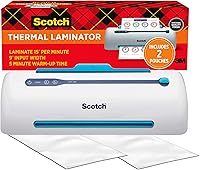
How to Check Whether Your Scotch Laminator Is Recalled
To check a Scotch laminator recall, find the exact model and serial details on your machine, then compare them with an official notice from Scotch or 3M. If your model matches, stop using it and follow the official instructions.
On this page (9 sections)
- How do I find the model number on my Scotch laminator?
- How do I check official Scotch laminator recall notices?
- What details make a recall apply to my machine?
- What should I do if my laminator is recalled?
- How do I tell what to do if my model is not recalled?
- How do warm-up and heat settings affect safe use?
- Which pouches should I check when I check a recall?
- When should I consider a different laminator after a recall check?
- How to check a Scotch laminator recall in five steps
To check a Scotch laminator recall, find the exact model and serial details on your machine, then compare them with an official notice from Scotch or 3M. If your model matches, stop using it and follow the official instructions.
A recall check takes only a few minutes when you have the right details. Start with the label on the machine, not with a general web search.
The model and serial numbers tell you whether a notice applies to your unit.
How do I find the model number on my Scotch laminator?
Look for a rating label on the bottom, back, or side of the machine. The model number is usually printed near the brand name, power details, and serial number.
Write down the full model, such as a TL series number, and any extra letters or digits. A small difference can matter, so copy it exactly as printed.
Take a photo if the print is faint.
Do not rely on the box, a receipt, or your memory of what you bought. The machine label is the source you need for a recall match.
If the label is missing or unreadable, contact Scotch support with any photos or purchase details you have.
Our guide to a laminator machine for paper explains the sizes and pouch types that most home machines use. That context helps you confirm that you are checking the right type of machine.
How do I check official Scotch laminator recall notices?
Search official Scotch or 3M sources by your exact model number. Use the model as printed on your label, including any TL prefix and numbers.
Start with the brand website, then check a federal product safety database for matching notices. Read the full notice, not just a headline, because it may list only certain serial ranges or manufacturing dates.
A headline may name a product line, while the details limit the affected units. That is why the serial range and date range matter.
Save or print the official notice before you take next steps.
If you own a model such as the scotch laminator tl1302, search that exact string first. Then search without the TL prefix in case the notice uses a shorter form.
Compare both results before you decide.
What details make a recall apply to my machine?
Model, serial range, and manufacture date together determine a match. A recall may cover only part of a product line, so a similar model name is not enough.
Check each detail in order. First confirm the brand and model family.
Then check the serial range. Then check any date codes or other limits listed in the notice.
If your serial number falls inside the stated range, treat the machine as affected. If it falls outside the range, your machine may not be covered, but keep the notice for reference.
Do not guess when numbers are hard to read.
Note the remedy in the notice as well. Some notices call for a repair, some for a replacement, and some for a refund or a stop-use instruction.
The remedy controls what you should do next.
What should I do if my laminator is recalled?
Stop using the machine, unplug it, and follow the official remedy. Do not try to modify, repair, or test a recalled heating or electrical product yourself.
Keep the machine, cord, and any included parts together until you finish the process. Taking a photo of the label and serial number can help during a support call.
Write down any case number or confirmation you receive.
Follow the notice step by step, including sending parts, registering for a replacement, or contacting the maker. If the notice says to return the product, use the stated method and keep any tracking details.
If the notice says not to use the product, move it to a place where no one will plug it in by mistake. That simple step prevents a second person from using it while you wait for instructions.
How do I tell what to do if my model is not recalled?
Keep using the machine only if your exact model and serial range are not listed. A recall for a different model does not require action on yours.
Still, check the label for normal wear, a damaged cord, or a loose housing. Stop use and seek help if you see damage, smell burning, or notice unusual heat.
Those signs need attention even without a recall.
Keep a short record of your model and serial number. That record makes any future check faster and helps if you need support or a manual later.
Store it with your purchase paperwork.
If you plan to keep using the machine, read the basic steps in how to use a Scotch laminator machine. That guide covers warm-up, pouch choice, and feeding, which helps you spot changes in normal behavior.
How do warm-up and heat settings affect safe use?
Use only the pouch thickness and warm-up steps your machine allows. Heat settings are tied to pouch type, so the wrong setting can lead to poor sealing or jams.
Most thermal machines have separate settings for thinner and thicker pouches. The pouch package states its thickness in mil, and the machine controls should match that range.
Let the machine finish warming up before you feed a pouch.
The Scotch PRO TL906 thermal laminator machine, for example, has two temperature settings for 3 mil and 5 mil pouches up to 9 in wide. It warms up in five to six minutes and laminates at 15 in per minute.
That example shows why labels matter. A machine that accepts both 3 mil and 5 mil pouches still needs the correct setting for each pouch.
A recall check should include that basic fit, because a notice may mention a specific accessory or pouch combination.
Which pouches should I check when I check a recall?
Check the pouch size, thickness, and brand against your machine manual. A recall may name a machine only, but pouch fit still affects safe daily use.
Thermal pouches come in sizes for letter, legal, and larger sheets. The pouch must fit the machine opening, and the thickness must match a heat setting.
A pouch that is too wide or too thick can jam or seal poorly.
The Scotch Thermal Laminating Pouches in this section are Legal Size, 11 x 17 inches, 25 pack, 3 mil. That size is larger than a standard letter sheet, so measure your document and machine opening before you buy.
These pouches are described for use with thermal laminators, with a clear and photo-safe finish for items that get frequent handling. The 3 mil thickness suits light protection rather than a stiff, rigid card.
If a recall notice names a pouch batch, do not use those pouches until you read the remedy. If the notice names only the machine, unused pouches may still be fine in a different machine that accepts the same size and thickness.
When should I consider a different laminator after a recall check?
Consider a replacement only after you confirm your machine is affected or damaged. A recall check may end with a repair, a replacement, or no action at all.
If your machine is not recalled, a new unit may still help if yours jams often, heats unevenly, or no longer fits your document sizes. Compare width, pouch thickness, warm-up time, and controls before you choose.
The Fellowes FEL5738201 is a home or home office laminator that works with 3 mil and 5 mil hot-lamination pouches, plus self-adhesive cold-lamination pouches. It accepts documents up to 9.5 in wide and heats up in four minutes.
Our roundup of the best Scotch laminator machine can help you compare Scotch models by width and pouch options. Use it after the recall check, not as a substitute for the official notice.
How to check a Scotch laminator recall in five steps
Find your model, search official notices, compare serial details, follow the remedy, and save the record. That order keeps you from acting on a partial match.
First, photograph the label and write down the model and serial number. Second, search Scotch or 3M sources for that exact model.
Third, compare the serial range and any date limits.
Fourth, if the notice matches, stop use and follow its remedy. If it does not match, keep the notice and continue normal care.
Fifth, save your notes with your manual and purchase paperwork.
For a TL902 specifically, our guide on Scotch TL902 thermal laminator how to use covers daily use after you confirm your unit is not affected. Read the recall notice first, then use the guide for normal operation.
Keep the process simple and exact. A careful model match protects you, saves time with support, and tells you whether any action is needed at all.
Frequently asked questions
How do I check if my Scotch laminator is recalled?
Find the model number on the label, then search the official Scotch or 3M recall notices for that exact model and any serial range. If you find a match, stop using the machine and follow the official remedy steps.
Keep the notice and your model details together for any support contact.
What should I do if my laminator is in a recall?
Unplug the machine, stop using it, and follow the official instructions for repair, replacement, or refund. Do not try to fix electrical or heating parts yourself.
Keep the machine, cord, and any included parts until the process is complete, and note any case number you receive.
Does a recall mean I need new pouches too?
Not always, because a recall may cover the machine, a cord, or a specific batch. Check the notice to see which parts are affected.
If only the machine is covered, your unused pouches may still be usable in a replacement machine that accepts the same size and thickness.
Where can I find official recall information for Scotch laminators?
Use the official Scotch or 3M website and search by model name, such as TL1302, TL906, or TL902. Federal recall databases are another source for safety notices.
Save the official page you used so you can follow its instructions exactly.